Condition met, Buy below certain price in the future bars

Viewing 3 posts - 1 through 3 (of 3 total)
  • Author
    Posts
  • #221700 quote
    mailtoharry19-forum
    Participant
    New

    Hi

    I am trying to code in PRT and when backtesting it is not giving the desired results, as it is NOT buying at the TargetPrice, seems I am not getting it right.

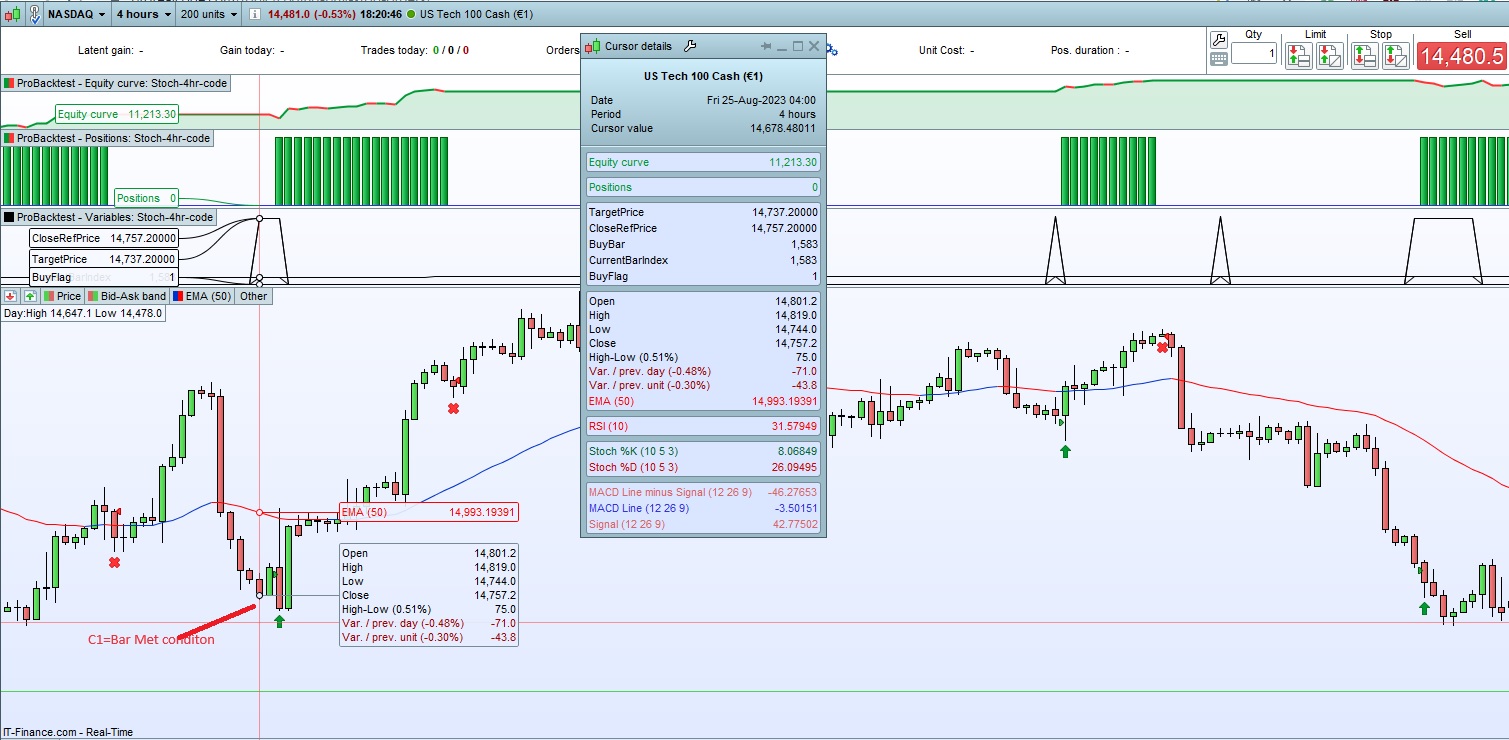
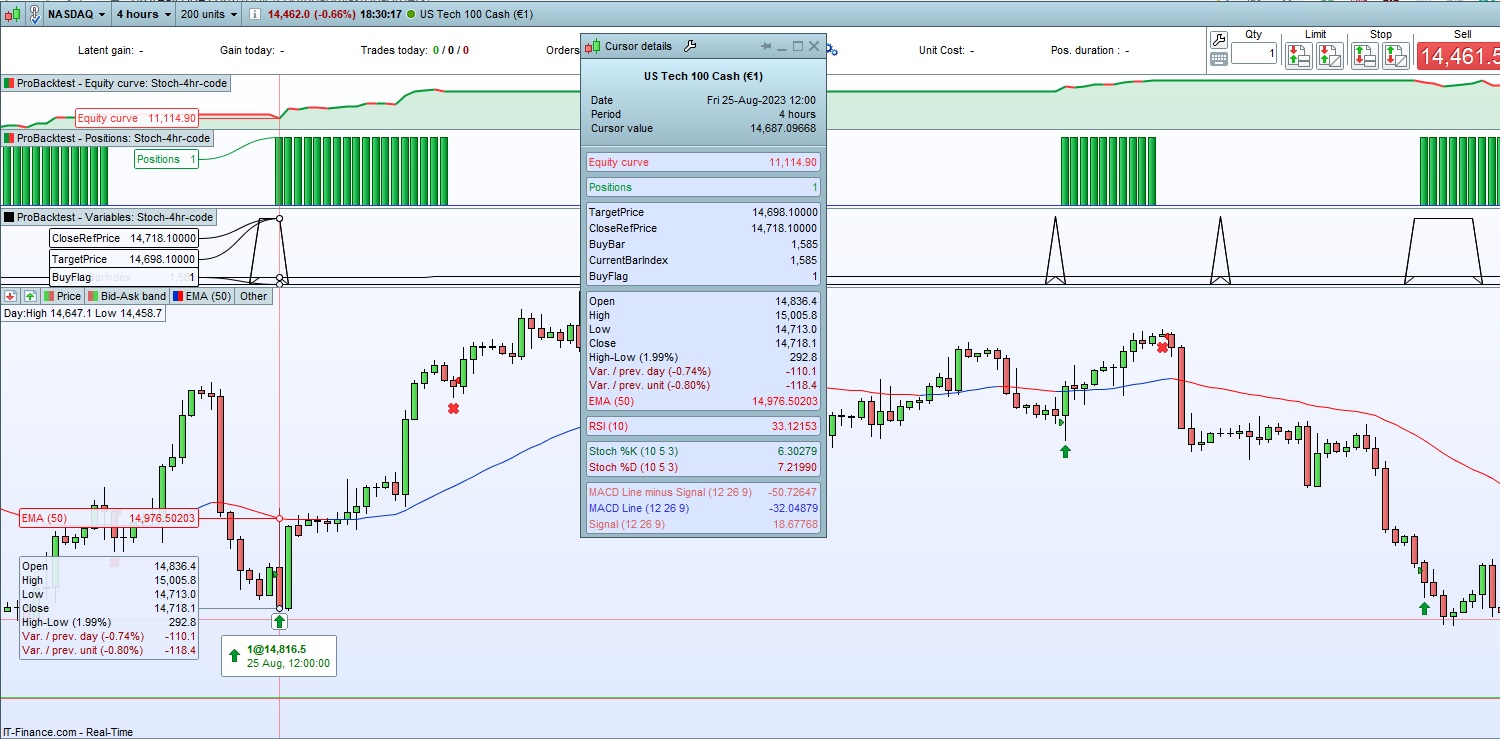
    Attached screenshot for reference, where the condition met at Bar 1583 with my TargetPrice to buy at 14737.2, but it is bought at Bar 1585 at a price 14816.5.

    My TargetPrice and CloseReferencePrice are also changing for each bar, and BuyBar and CurrentBar are also the same when the code runs for backtesting.

    Could please advise how this should be done i.e. Buying at the TargetPrice within the next 5 bars when the C1 condition is met,  with the below script:

    // Definition of code parameters
    DEFPARAM CumulateOrders = False // Cumulating positions deactivated
    TIMEFRAME(4 hours)
    
    // Variables to store the reference price and flag
    ReferencePrice = 0.0
    BuyFlag = 0
    TargetPrice = 0.0
    buybar = 0
    
    // Conditions to enter long positions
    indicator1 = Stochastic[10,5](close)
    c1 = (indicator1 <= 10)
    
    // Check if the indicator condition (c1) is met and set the reference price
    if c1 and BuyFlag=0 then //and IsLastBarUpdate=1 then
    ReferencePrice = close
    BuyFlag = 1
    buybar = barindex
    endif
    
    // Calculate the TargetPrice based on the reference price (outside the bar)
    if BuyFlag=1 then
    TargetPrice = ReferencePrice - (20*POINTSIZE)
    endif
    
    // Check if the close price is less than or equal to the TargetPrice
    if BuyFlag=1 and barindex-buybar<=5 then
    BUY 1 CONTRACT AT TargetPrice LIMIT
    endif
    
    // Conditions to exit long positions
    indicator2 = Average[3](Stochastic[10,5](close))
    c2 = (indicator2 >= 90)
    
    IF c2 THEN
    SELL AT MARKET
    ENDIF
    
    // Stops and targets
    //SET STOP pLOSS 20
    //SET TARGET pPROFIT 40
    graph TargetPrice as "TargetPrice"
    graph ReferencePrice as "CloseRefPrice"
    graph buybar as "BuyBar"
    graph barindex as "CurrentBarIndex"
    graph BuyFlag as "BuyFlag"

    Thanks

    Harry

    PRT-2023_09_27-01.jpg PRT-2023_09_27-01.jpg PRT-2023_09_27-02.jpg PRT-2023_09_27-02.jpg
    #221720 quote
    JS
    Participant
    Senior

    Hi Harry,

    It goes wrong by “resetting” the variables every time the code is executed…

    Use “Once” here and reset the variable “BuyFlag” when you are actually in a “Long” position…

     
    // Definition of code parameters
    DEFPARAM CumulateOrders = False // Cumulating positions deactivated
    TIMEFRAME(4 hours)
    
    // Variables to store the reference price and flag
    Once ReferencePrice = 0.0
    Once BuyFlag = 0
    Once TargetPrice = 0.0
    Once buybar = 0
    
    // Conditions to enter long positions
    indicator1 = Stochastic[10,5](close)
    c1 = (indicator1 <= 10)
    
    // Check if the indicator condition (c1) is met and set the reference price
    if c1 and BuyFlag=0 then //and IsLastBarUpdate=1 then
    ReferencePrice = close
    BuyFlag = 1
    buybar = barindex
    endif
    
    // Calculate the TargetPrice based on the reference price (outside the bar)
    if BuyFlag=1 then
    TargetPrice = ReferencePrice - (20*POINTSIZE)
    endif
    
    // Check if the close price is less than or equal to the TargetPrice
    if BuyFlag=1 and barindex-buybar<=5 then
    BUY 1 CONTRACT AT TargetPrice LIMIT
    endif
    
    // Conditions to exit long positions
    indicator2 = Average[3](Stochastic[10,5](close))
    c2 = (indicator2 >= 90)
    
    IF c2 THEN
    SELL AT MARKET
    BuyFlag=0
    ENDIF
    
    // Stops and targets
    //SET STOP pLOSS 20
    //SET TARGET pPROFIT 40
    graph TargetPrice as "TargetPrice"
    graph ReferencePrice as "CloseRefPrice"
    graph buybar as "BuyBar"
    graph barindex as "CurrentBarIndex"
    graph BuyFlag as "BuyFlag"
    Nicolas and mailtoharry19-forum thanked this post
    #221736 quote
    mailtoharry19-forum
    Participant
    New
    Hi JS Thanks for this insight, very much appreciated. I would have never got this right on my own without your help on this, it works now as expected.
    JS thanked this post
Viewing 3 posts - 1 through 3 (of 3 total)
  • You must be logged in to reply to this topic.

Condition met, Buy below certain price in the future bars


ProOrder: Automated Strategies & Backtesting

New Reply
Summary

This topic contains 2 replies,
has 2 voices, and was last updated by mailtoharry19-forum
2 years, 4 months ago.

Topic Details
Forum: ProOrder: Automated Strategies & Backtesting
Language: English
Started: 09/27/2023
Status: Active
Attachments: 2 files
Logo Logo
Loading...