Hi,
I’m hoping someone will be able to help.
How do I compare the highest high between the last 6 bars and last 30 bars in ProBuilder? I’ve tried the following syntax in my indicator without any success.
highest[6](high[1]) > highest[30](high[1])
Any help would be appreciated.
Thanks
Hi,
An easy way to do it would be:
hh1 = highest[6](high)
hh2 = highest[30](high)

test = hh1[1]>hh2[1]
By doing this you can compare offset of any of the hh1 and hh2 arrays value.
Thanks. I’ll give it a try.
Hi,
tried the suggestion but didn’t work, and still need help.
If I remove the code in bold it works, but without testing to see if it has made a higher high, in addition to a higher low. This is simply to test we are in an up trend using price action.
///////LONG POSITION
ma1=ExponentialAverage[20](close)
stochk=Stochastic[8,3](close)
c1=close crosses over ma1
c2=close>ma1
lh1=lowest[6](low)
lh2=lowest[40](low)
hh1=highest[6](high)
hh2=highest[40](high)
c3=lh1[1]>lh2[1]
c4=stochk>stochk[1]
c5=hh1[1]>hh2[1]
up=c1 and c2 and c3 and c4 and c5
Apologies for the formatting issue, that should be, if I remove lines 8,9, and 12 and change line 13 to exclude “and c5” it works without testing the last higher high against the previous higher high.
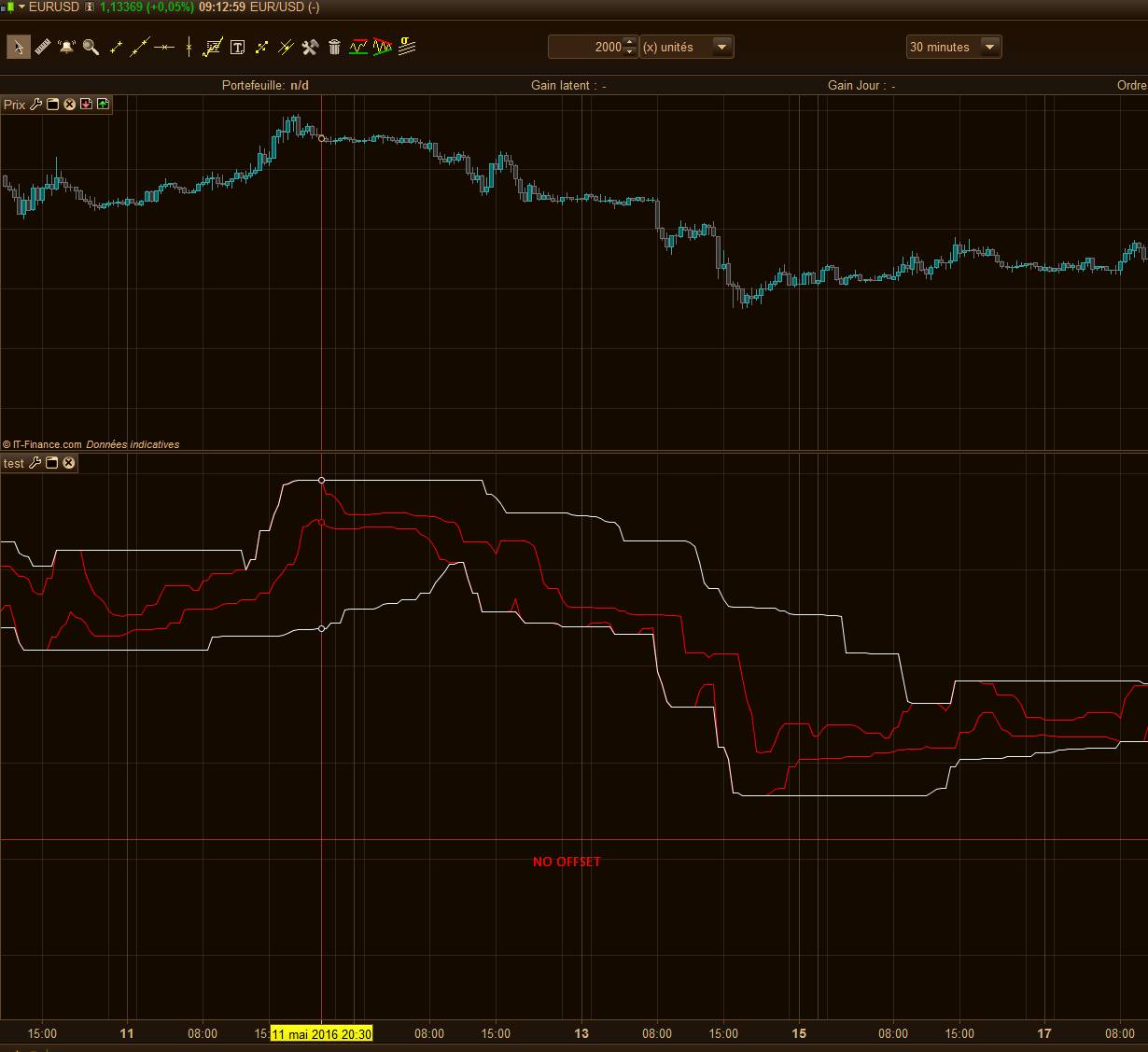
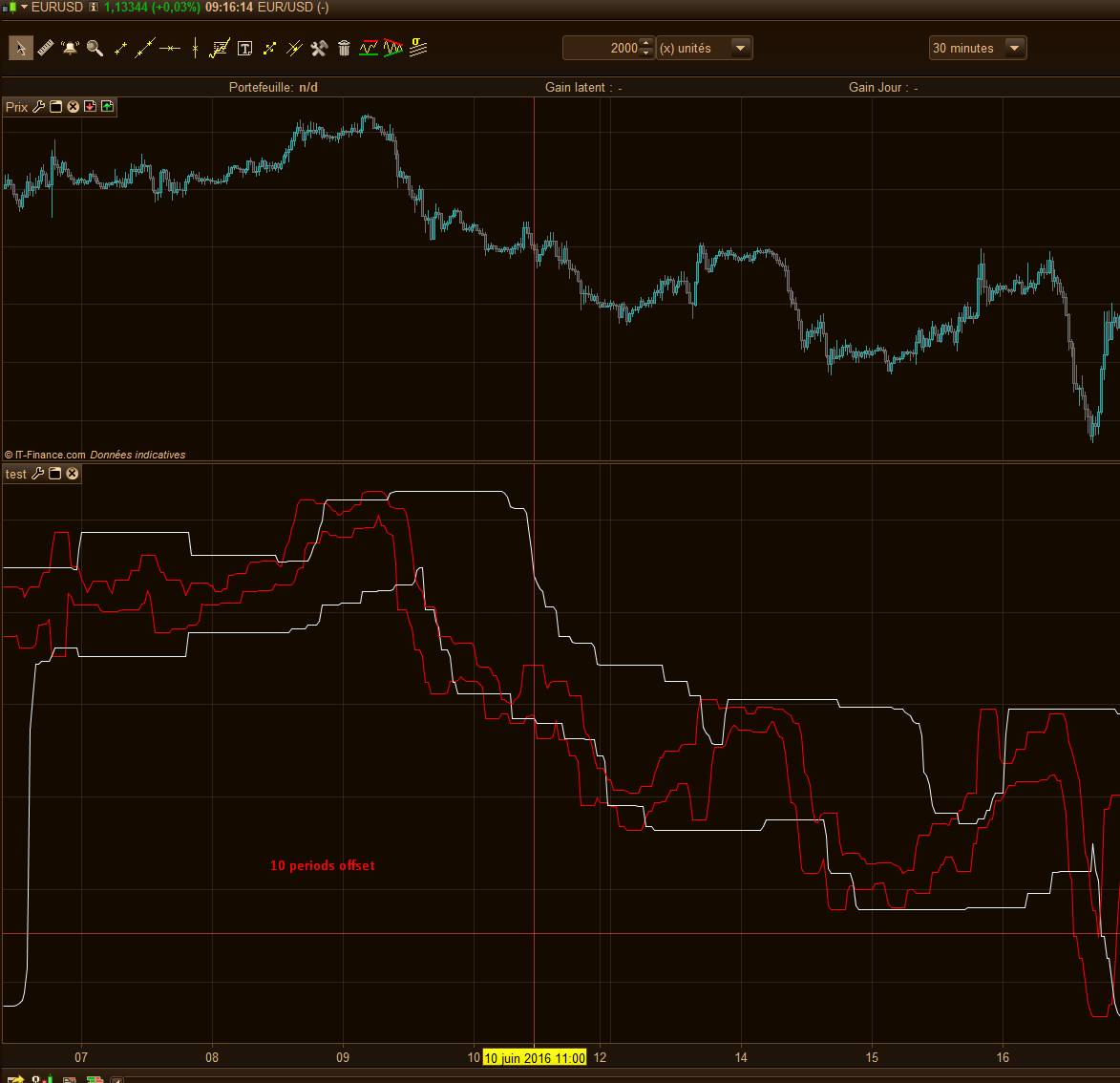
As you can see in the picture below, the 6 periods highest high/lowest low channel is always included into the 40 periods. So to test a breakout of the 40 periods channel, you should test if the 6 periods one is inferior or superior with a candlestick offset more longer:
c3=lh1[1]>lh2[10]
Sorry, if I put you on the wrong track in my previous reply.
Thanks again for your prompt reply.
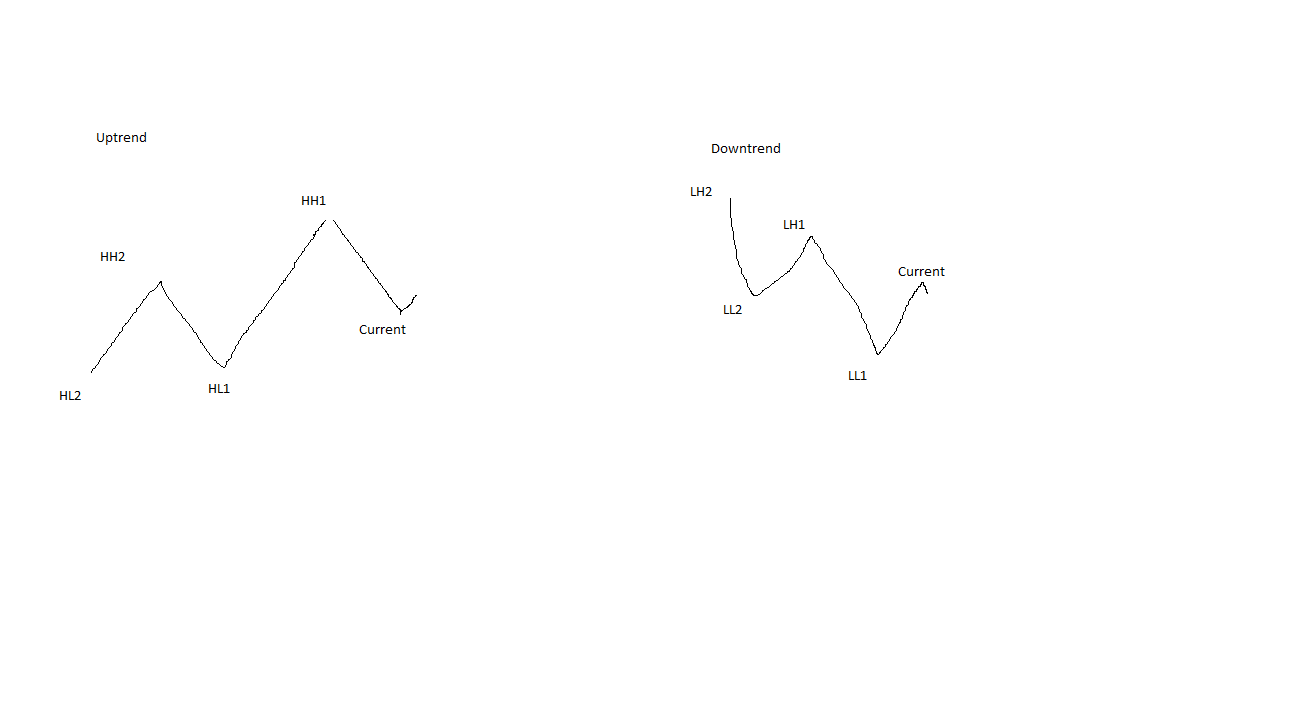
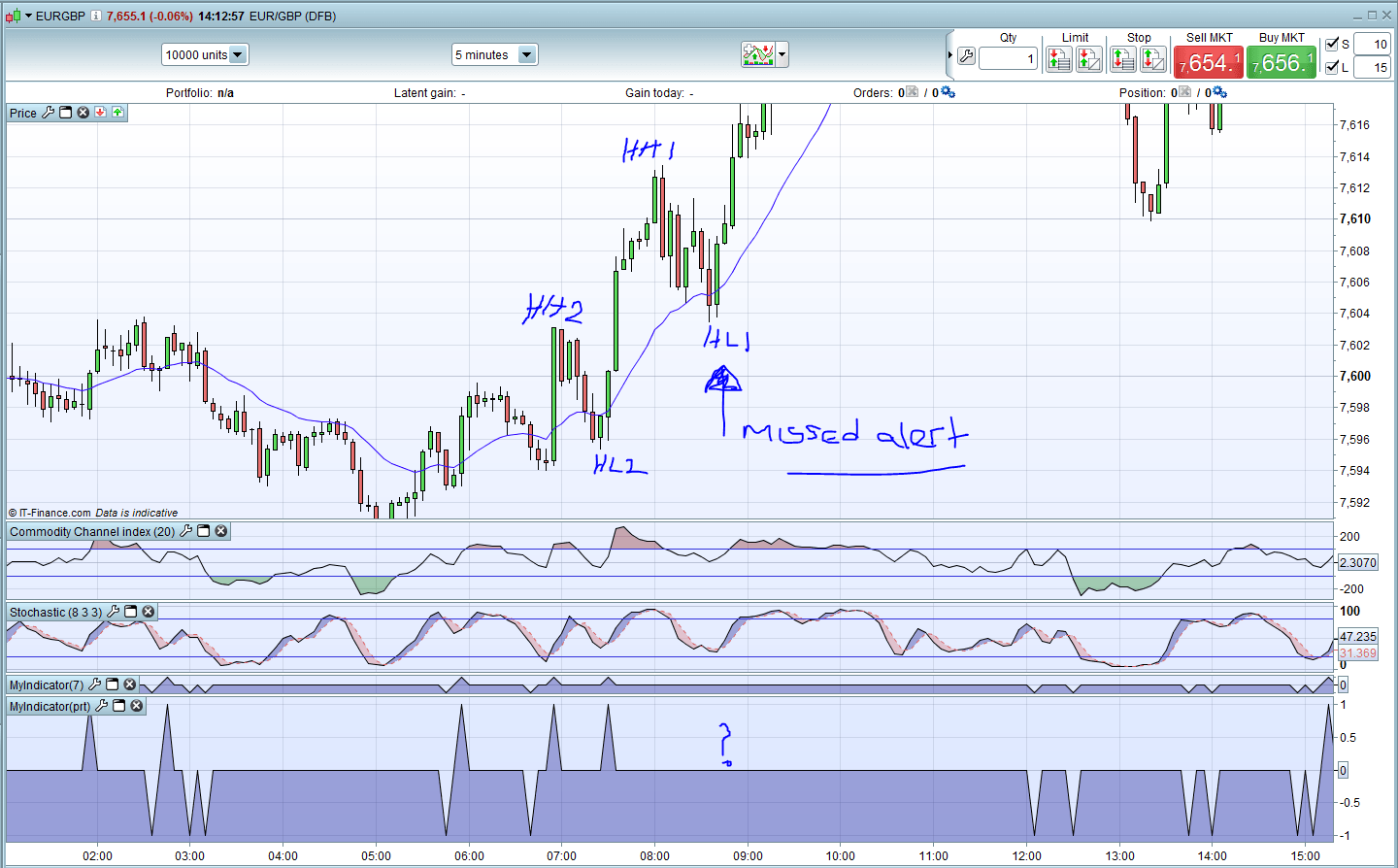
Please see the attached image for what I’m trying to achieve within the code as I think we may have our wires crossed.
Curent position is true if:
Uptrend
HH1>HH2 and
HL1>HL2
Downtrend
LH1<LH2 and
LL1<LL2
the following code is my attempt. Lines 12,13 and 16 have been REM’d out as it’s currently not working
res = 0
ma1=ExponentialAverage[20](close)
//stochd = Average[3](Stochastic[8,3](close))
stochk=Stochastic[8,3](close)
//rs=RSI[14]

///////LONG POITION
c1=close crosses over ma1
c2=close>ma1
lh1=lowest[6](low)
lh2=lowest[40](low)
//hh1=highest[12](high)
//hh2=highest[40](high)
c3=lh1[1]>lh2[1]
c4=stochk>stochk[1]
//c5=hh1[1]>=hh2
up=c1 and c2 and c3 and c4


//////SHORT POSITION
d1=close crosses under ma1
d2=close<ma1
hl1=highest[6](high)
hl2=highest[40](high)
d3=hl1[1]<hl2[1]
d4=stochk<stochk[1]
down=d1 and d2 and d3 and d4


if up then
res=1
elsif down then
res=-1
endif

return res as "x"
Hmm that’s working for me if you use my previous solution …. ->
res = 0
ma1=ExponentialAverage[20](close)
//stochd = Average[3](Stochastic[8,3](close))
stochk=Stochastic[8,3](close)
//rs=RSI[14]

///////LONG POITION
c1=close crosses over ma1
c2=close>ma1
lh1=lowest[6](low)
lh2=lowest[40](low)
c3=lh1[1]>lh2[10]
c4=stochk>stochk[1]

up=c1 and c2 and c3 and c4


//////SHORT POSITION
d1=close crosses under ma1
d2=close<ma1
hl1=highest[6](high)
hl2=highest[40](high)
d3=hl1[1]<hl2[10]
d4=stochk<stochk[1]

down=d1 and d2 and d3 and d4

if up then
 res=1
elsif down then
 res=-1
endif

return res as "x"
Oops I pasted the wrong version of the code.
Below is the code, which at the moment was testing the long position section. The offending lines have been rem’d out (lines 12,13 and 16). Also condition c5 is not currently tested as it doesn’t work as expected.
res = 0
ma1=ExponentialAverage[20](close)
//stochd = Average[3](Stochastic[8,3](close))
stochk=Stochastic[8,3](close)
//rs=RSI[14]

///////LONG POITION
c1=close crosses over ma1
c2=close>ma1
lh1=lowest[6](low)
lh2=lowest[40](low)
//hh1=highest[12](high)
//hh2=highest[40](high)
c3=lh1[1]>lh2[1]
c4=stochk>stochk[1]
//c5=hh1[1]>=hh2
up=c1 and c2 and c3 and c4


//////SHORT POSITION
d1=close crosses under ma1
d2=close<ma1
hl1=highest[6](high)
hl2=highest[40](high)
d3=hl1[1]<hl2[1]
d4=stochk<stochk[1]
down=d1 and d2 and d3 and d4


if up then
res=1
elsif down then
res=-1
endif

return res as "x"
Yes I tested your code but the result is still the same.
both indicators tests the last two lowest low but not the last two highest highs in and uptrend successfully, vice versa in a downtrend.
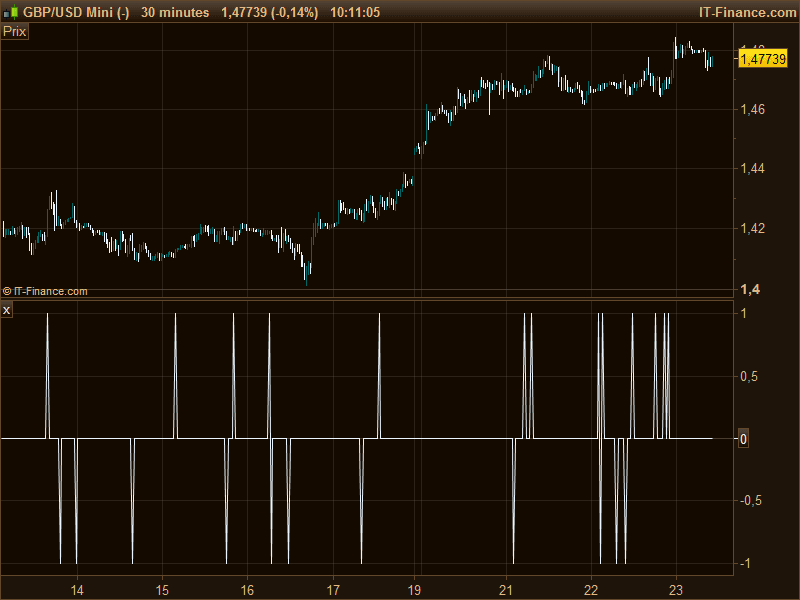
I have attached a screen capture showing your indicator as (prt) at the bottom and my indicator (7) just above. Both missed the corresponding alert highlighted on the chart.
I think it might be the way HH2 is being selected within the code. I guess ideally I need to somehow pick the highest high between 7 and 40. Is this possible?
Ok, but did you put 2 Donchian channels of 6 and 40 periods to verify if your setup is valid? One of the condition is not true, you have to test them individually, sorry it’s debugging time … 🙂
I’m not familiar with Donchian channels, as I have never used them. I’ll add them and see what results I get. This may take some time to debug 🙂
Donchian channels is exactly what you use in your code, it is a channel made of the highest high and lowest low over n periods :
//Donchian channel - 6 periods lookback

hh=highest[6](high)
ll=lowest[6](low)

RETURN hh,ll
Following some debugging it appears the problem lies in how highest[40](high) and lowest[40](low) are evaluated.
What I really need to express somehow is to excluding the first 6 bars i.e.
highest[7 to 40](high)
and also
lowest[7 to 40](low)
Any ideas how this can be achieved using the correct syntax?