Colouring price bars

Viewing 11 posts - 1 through 11 (of 11 total)
  • Author
    Posts
  • #11975 quote
    jaspalarora
    Participant
    Junior

    Can I please have help with colouring price bars as per my indicator below

    If I=1 then price bar should be coloured blue

    If i=0 then price bar should be coloured black

    If i=-1 the price bar should be coloured red.

    #11981 quote
    Nicolas
    Keymaster
    Master

    Changing colors of bars is only possible with version 10.3 and the new instruction DRAWCANDLE or DRAWBARCHART.

    What version or broker are you using right now?

    #12021 quote
    jaspalarora
    Participant
    Junior

    Thank you for the reply Nicholas.I am currently using the 10.2 on the IG brker platform.

    #12026 quote
    Nicolas
    Keymaster
    Master

    Ok, so it’s not possible to draw custom bars then. The only possibility would be to draw dots of different colors above or below the price or maybe coloured histogram in a custom indicator below the price chart. What’s your preference?

    #12027 quote
    jaspalarora
    Participant
    Junior

    Can you please then write me the code for both options.

    Many thanks.

    #12035 quote
    Nicolas
    Keymaster
    Master

    It would be much easier with your indicator code, for a direct implementation. So please provide it, thanks.

    #12036 quote
    jaspalarora
    Participant
    Junior

    A1=AVERAGE[X]

    A2=AVERAGE[X][1]

    B1=AVERAGE[Y]

    B2=AVERAGE[Y][1]

    IF A1>B1 AND A1>A2 AND B1>B2 THEN

    I=1

    ELSIF A1<B1 AND A1<A2 AND B1<B2 THEN

    I=-1

    ELSE

    I=0

    ENDIF

    RETURN I AS “INDICATOR”

    #12044 quote
    Nicolas
    Keymaster
    Master

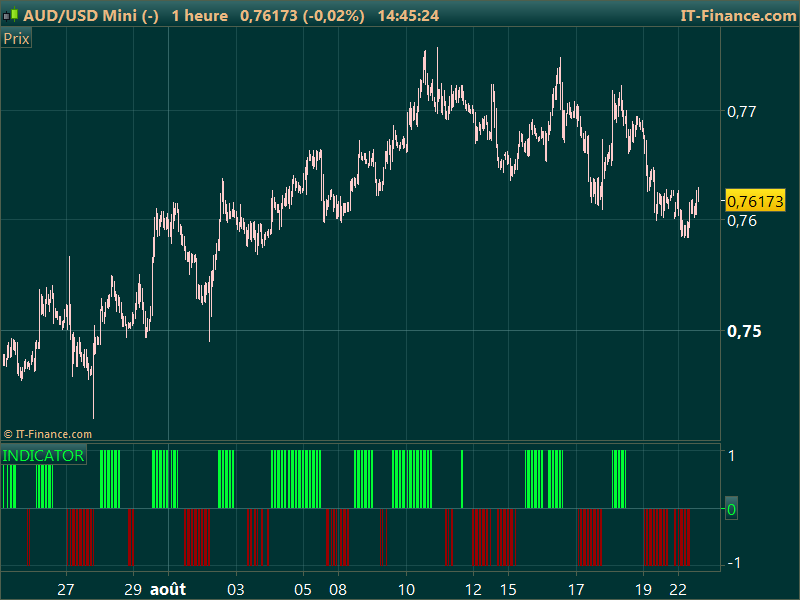
    Ok, so you already have everything needed to draw a cool histogram indicator to show your buy/sell signals :

    X = 10
    Y = 20
    
    A1=AVERAGE[X] 
    A2=AVERAGE[X][1] 
    B1=AVERAGE[Y] 
    B2=AVERAGE[Y][1] 
    IF A1>B1 AND A1>A2 AND B1>B2 THEN 
    I=1 
    ELSIF A1<B1 AND A1<A2 AND B1<B2 THEN 
    I=-1 
    ELSE 
    I=0 
    ENDIF 
    
    RETURN I coloured by I AS "INDICATOR"
    #12047 quote
    jaspalarora
    Participant
    Junior

    How about this being shown on the price bar above & below as dots as you mentioned.

    #12048 quote
    jaspalarora
    Participant
    Junior

    Sorry,also wanted it as

    I=1 coloured blue

    I=-1 coloured red

    I=0 coloured black

    #12049 quote
    Nicolas
    Keymaster
    Master

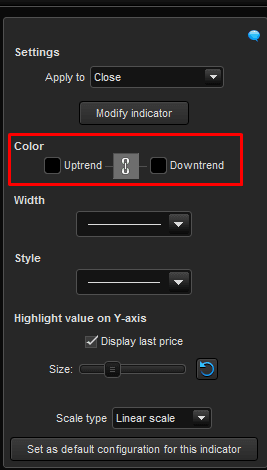
    You just have to change yourself the colours in the indicator parameters window (see screenshot attached).

Viewing 11 posts - 1 through 11 (of 11 total)
  • You must be logged in to reply to this topic.

Colouring price bars


ProBuilder: Indicators & Custom Tools

New Reply
Author
Summary

This topic contains 10 replies,
has 2 voices, and was last updated by Nicolas

9 years, 5 months ago.

Topic Details
Forum: ProBuilder: Indicators & Custom Tools
Language: English
Started: 08/20/2016
Status: Active
Attachments: No files
Logo Logo
Loading...