Color the Relative Volume Histogram

Viewing 6 posts - 1 through 6 (of 6 total)
  • Author
    Posts
  • #225168 quote
    Marcel van Vliet
    Participant
    Veteran

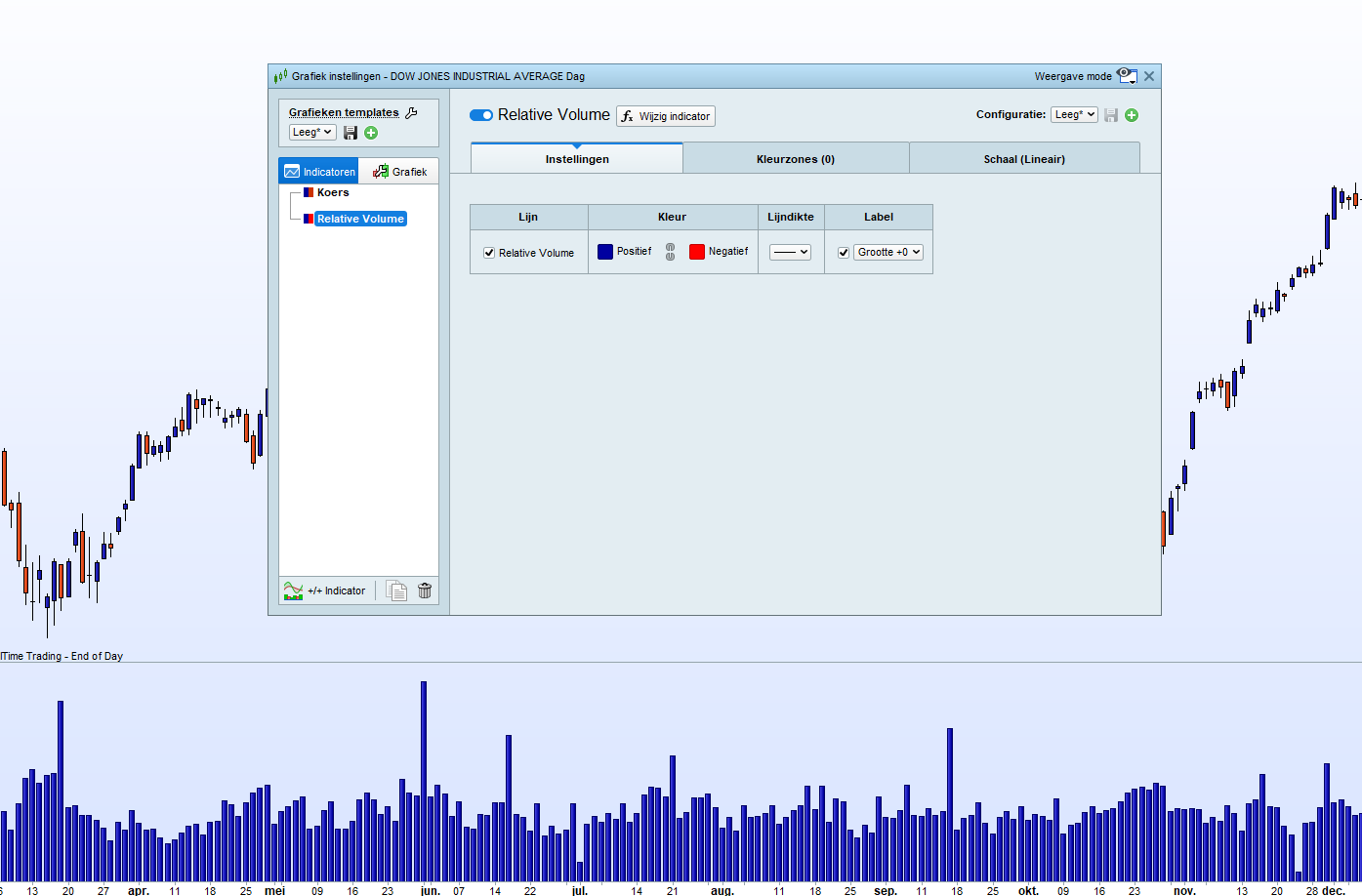
    Hi, Some how I cannot manage to color the histogram of the intraday Relative Volume indicator by Nicolas below, into blue for positive and red for negative (attached picture).

    Does anybody know which line must be added to the code for this?


    //Relative Volume indicator by Nicolas
    
    Period = 21 //X days averaging period
     
    intraindex = intradaybarindex
    $ivol[intraindex] = volume
     
    $gvol[barindex] = volume
    $gintraindex[barindex] = intraindex
     
    count = 0
    sum = 0
    for i = barindex downto 0 do
    if $gintraindex[i]=intraindex then //found same intraday bar
    sum=sum+$gvol[i]
    count=count+1
    endif
    if count=period then
    break
    endif
    next
     
    avg = sum/period
    rvol = $ivol[intraindex] / avg
     
    return rvol style(histogram)//$ivol[intraindex], avg coloured(0,0,0)
    #225178 quote
    JS
    Participant
    Senior

    Hi Marcel

    The values of the indicator are always greater than zero (no negative values) so you can only set the color of the positive values manually.

    Here is the code to color the histogram:

    //Relative Volume indicator by Nicolas
     
    Period = 21 //X days averaging period
     
    intraindex = intradaybarindex
    $ivol[intraindex] = volume
     
    $gvol[barindex] = volume
    $gintraindex[barindex] = intraindex
     
    count = 0
    sum = 0
    for i = barindex downto 0 do
    if $gintraindex[i]=intraindex then //found same intraday bar
    sum=sum+$gvol[i]
    count=count+1
    endif
    if count=period then
    break
    endif
    next
     
    avg = sum/period
    rvol = $ivol[intraindex] / avg
    
    If rvol>rvol[1] then 
    R=0
    G=255
    B=0
    ElsIf rvol<rvol[1] then
    R=255
    G=0
    B=0
    EndIf
     
     
    return rvol style(histogram)Coloured(R,G,B)//$ivol[intraindex], avg coloured(0,0,0)
    
    Marcel van Vliet thanked this post
    #225182 quote
    JS
    Participant
    Senior
    into blue for positive and red for negative 🙂
    //Relative Volume indicator by Nicolas
     
    Period = 21 //X days averaging period
     
    intraindex = intradaybarindex
    $ivol[intraindex] = volume
     
    $gvol[barindex] = volume
    $gintraindex[barindex] = intraindex
     
    count = 0
    sum = 0
    for i = barindex downto 0 do
    if $gintraindex[i]=intraindex then //found same intraday bar
    sum=sum+$gvol[i]
    count=count+1
    endif
    if count=period then
    break
    endif
    next
     
    avg = sum/period
    rvol = $ivol[intraindex] / avg
    
    If rvol>rvol[1] then
    R=0
    G=0
    B=255
    ElsIf rvol<rvol[1] then
    R=255
    G=0
    B=0
    EndIf
     
     
    return rvol style(histogram)Coloured(R,G,B)//$ivol[intraindex], avg coloured(0,0,0)
    
    Marcel van Vliet thanked this post
    #225241 quote
    Marcel van Vliet
    Participant
    Veteran
    Thanks JS, I have adjusted your idea for the code slightly to my original idea, so that the colors now correspond to the colors of the candles. This works a bit easier for me because I have built a screener that selects American stocks with RVol >2.
    //Relative Volume indicator by Nicolas
     
    Period = 21 //X days averaging period
     
    intraindex = intradaybarindex
    $ivol[intraindex] = volume
     
    $gvol[barindex] = volume
    $gintraindex[barindex] = intraindex
     
    count = 0
    sum = 0
    for i = barindex downto 0 do
    if $gintraindex[i]=intraindex then //found same intraday bar
    sum=sum+$gvol[i]
    count=count+1
    endif
    if count=period then
    break
    endif
    next
     
    avg = sum/period
    rvol = $ivol[intraindex] / avg
    
    If open>close then
    //If rvol>rvol[1] then
    R=204
    G=51
    B=0
    ElsIf open<close then
    //ElsIf rvol<rvol[1] then
    R=0
    G=51
    B=153
    
    EndIf
     
     
    return rvol style(histogram)Coloured(R,G,B)//$ivol[intraindex], avg coloured(0,0,0)
    JS thanked this post
    #225276 quote
    Marcel van Vliet
    Participant
    Veteran
    Hi, Here’s the next hurdle. It appears that the horizontal line (image) is not held by the indicator as an added indicator or loose line. This means that every time I open the graph the line has disappeared. Does anyone know how I can add a solid horizontal line (at 1.5) to the indicator?
    //Relative Volume indicator by Nicolas
     
    Period = 21 //X days averaging period
     
    intraindex = intradaybarindex
    $ivol[intraindex] = volume
     
    $gvol[barindex] = volume
    $gintraindex[barindex] = intraindex
     
    count = 0
    sum = 0
    for i = barindex downto 0 do
    if $gintraindex[i]=intraindex then //found same intraday bar
    sum=sum+$gvol[i]
    count=count+1
    endif
    if count=period then
    break
    endif
    next
     
    avg = sum/period
    rvol = $ivol[intraindex] / avg
    
    If open>close then
    //If rvol>rvol[1] then
    R=204
    G=51
    B=0
    ElsIf open<close then
    //ElsIf rvol<rvol[1] then
    R=0
    G=51
    B=153
    
    EndIf
     
     
    return rvol style(histogram)Coloured(R,G,B)//$ivol[intraindex], avg coloured(0,0,0)
    
    #225290 quote
    JS
    Participant
    Senior

    Hi Marcel,

    If you only want a permanent horizontal line in the indicator, you can add the following line in your code (before “Return”):

    DrawHLine(1.5) Coloured(“Red”)

    Marcel van Vliet thanked this post
Viewing 6 posts - 1 through 6 (of 6 total)
  • You must be logged in to reply to this topic.

Color the Relative Volume Histogram


ProBuilder: Indicators & Custom Tools

New Reply
Author
Summary

This topic contains 5 replies,
has 2 voices, and was last updated by JS

2 years, 1 month ago.

Topic Details
Forum: ProBuilder: Indicators & Custom Tools
Language: English
Started: 12/13/2023
Status: Active
Attachments: 4 files
Logo Logo
Loading...