Good Morning,
Can anyone help please with a piece of code.
I have various parameters in some moving averages code and I would like to add a parameter which allows me to select which days, or all days, to run back test/trade on? I have very basic coding knowledge so a parameter with option of 0 or 1 to select or not would be ideal.
can anyone help with that piece of code please ?
thanks in advance
Do you want to run the backtest (i.e. trading set to on) on all or selected days, or do you want to have your averages either calculated normally or on selected days?
thanks for coming back.
the averages are currently set for all week and that’s fine as triggers for buy and sell can only occur during a single days activity (EMA crosses) so that’s fine as is.
during my back testing i noticed that some days of the week performed far better than others so i want to be able to select certain days only for further back testing before implementation.
long winded answer, apologies, so this parameter im asking for is a way to select either one day, multiple days or all days for execution.
ideally something like all days of the week listed and i can put a 1 or 0 to indicate execute on that day if the strategy produces a trade – or something similar
hope that makes a bit more sense.
thanks in advance
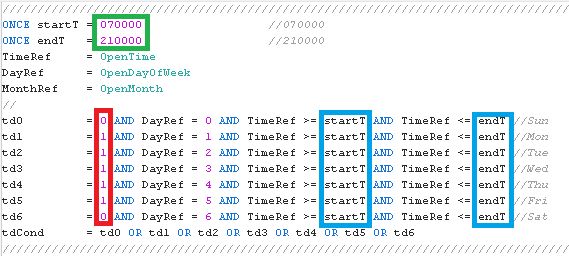
This snippet allows you to select each day (0=disabled, 1=enabled as from the RED rectangle in the attached pic). The GREEN rectangle highlights the general trading times. The CYAN rectangle shows the areas that you can change at your convenience; leaving the default variables startT and endT the general times (as said earlier) will be used, but you can change them at will, for instance you can set the Tuesday line as “td2 = 1 AND DayRef = 2 AND TimeRef >= 150000 AND TimeRef <= endT“, or “td2 = 1 AND DayRef = 2 AND TimeRef >= 110000 AND TimeRef <= 140000“:
////////////////////////////////////////////////////////////////////////////////////////////////////////////
ONCE startT = 070000                  //from 070000
ONCE endT   = 210000                  //to   210000
TimeRef     = OpenTime
DayRef      = OpenDayOfWeek
//
td0         = 0 AND DayRef = 0 AND TimeRef >= startT AND TimeRef <= endT //Sun
td1         = 1 AND DayRef = 1 AND TimeRef >= startT AND TimeRef <= endT //Mon
td2         = 1 AND DayRef = 2 AND TimeRef >= startT AND TimeRef <= endT //Tue
td3         = 1 AND DayRef = 3 AND TimeRef >= startT AND TimeRef <= endT //Wed
td4         = 1 AND DayRef = 4 AND TimeRef >= startT AND TimeRef <= endT //Thu
td5         = 1 AND DayRef = 5 AND TimeRef >= startT AND TimeRef <= endT //Fri
td6         = 0 AND DayRef = 6 AND TimeRef >= startT AND TimeRef <= endT //Sat
tdCond      = td0 OR td1 OR td2 OR td3 OR td4 OR td5 OR td6
////////////////////////////////////////////////////////////////////////////////////////////////////////////
then use the variable tdCond as a boolean variable (0, 1) to be added to your entry conditions to set when trading is enabled or disabled.
Setting the general times from 000000 to 240000 will grant trading is enabled 24 hours.
td stands for Time and Day, as you can select both trading days and trading times.
many thanks for coming back so quickly, and for the code – much appreciated.
will test and let you know.
thanks again
thanks again for the code, works perfectly.
however, could I please ask for one addition if you have time. the code allows you to select times to open a trade but I would like to add some code, for each individual day that forces a trade to close. example, if I’m trading a European index I want the trade to close at 4.30pm. or alternatively, i may only want to trade in the morning and close all trades on that day at 1pm for example.
hope that makes sense
thanks in advance
I modified my code to support only a CLOSING time, which can be different each day, if you need it:
////////////////////////////////////////////////////////////////////////////////////////////////////////////
ONCE ClosingTime = 170000                  //180000
TimeRef          = OpenTime
DayRef           = OpenDayOfWeek
//
tc0              = 0 AND DayRef = 0 AND TimeRef = ClosingTime //Sun
tc1              = 1 AND DayRef = 1 AND TimeRef = ClosingTime //Mon
tc2              = 1 AND DayRef = 2 AND TimeRef = ClosingTime //Tue
tc3              = 1 AND DayRef = 3 AND TimeRef = ClosingTime //Wed
tc4              = 1 AND DayRef = 4 AND TimeRef = ClosingTime //Thu
tc5              = 1 AND DayRef = 5 AND TimeRef = ClosingTime //Fri
tc6              = 0 AND DayRef = 6 AND TimeRef = ClosingTime //Sat
tcCond           = tc0 OR tc1 OR tc2 OR tc3 OR tc4 OR tc5 OR tc6
////////////////////////////////////////////////////////////////////////////////////////////////////////////
use tcCond as a condition (or as an additional condition to others of yours, if any) to close a trade.
I havent tested it.
many thanks for the code – much appreciated
will test in next few days and let you know
thanks again
hi Roberto,
unfortunately the code does not work as intended.
as an fyi – i currently use DefParam for flat before and flat after which works well for trading hours for the whole strategy but the idea is that i have all 5 days in one piece of code with potentially different open times and closing times and also slightly different inputs for about 7/8 parameters that i use to trigger a trade.
the day code you sent has worked perfectly to isolate a day – thank you. i have back-tested each individual day and therefore have slightly different inputs for the parameters for each day so i just need at some point to combine all 5 individual days into 1 long piece of code. i currently have them as 5 different pieces of code.
are you aware of a relatively simplistic way to combine? ie, mondays code at the top with its individual parameters and then move down to Tuesday etc – assuming the key is how you separate the code and move onto the next day when appropriate?
hope that makes sense and apologies to keep coming back – but appreciate your help
regards
I thinkit’s not possible, but I am not sure I did understand exactly what you need.
If you post an example of how you are managing this case, I might try to arrange something different.
Apologies Roberto if I’m not being clear as I appreciate you trying to help.
so I have a moving averages strategy that utilises various parameters and I have realised during back-testing that to get the best out of the strategy I need to have different numbers (such as stop loss, profit targets etc) for each day and that significantly enhances returns. you kindly shared the code for me to test individual days and I now have 5 pieces of code/strategies – 1 for each day.
however, ideally, I want to combine all 5 together to have 1 strategy but utilising different parameters for each day. the issue I have is that I don’t have code to make this happen.
the logic for the EMA’s once the day is confirmed does not change and that code works. so I need some code that says on a Monday look at Mondays parameters, and on Tuesday look at Tuesdays parameters etc
does that make sense?
regards
You can use arrays to accomplish that:
// Creation and Initialization of 7 elements (1 per day, Saturday and Sunday included)
// for each array needed (in my example I'll use only othree
// arrays, one for the Stop Loss, one for the Take Profit and one for the mnumber of lots).
// Each Element of the arrays will be referenced using OpenDayOfWeek, wich ranges from 0 to 6,
// even though 0 is used only for timeframe greater than 1 hour on Sundays OR for assets traded
// on the weekend
IF BarIndex = 0 THEN
   $mySL[0]   = 50  //Sun.- Stop Loss   ARRAY
   $mySL[1]   = 30  //Mon.- Stop Loss   ARRAY
   $mySL[2]   = 50  //Tue.- Stop Loss   ARRAY
   $mySL[3]   = 45  //Wed.- Stop Loss   ARRAY
   $mySL[4]   = 30  //Thu.- Stop Loss   ARRAY
   $mySL[5]   = 60  //Fri.- Stop Loss   ARRAY
   $mySL[6]   = 80  //Sat.- Stop Loss   ARRAY
   //
   $myTP[0]   = 100 //Sun.- Take Profit ARRAY
   $myTP[1]   = 60  //Mon.- Take Profit ARRAY
   $myTP[2]   = 100 //Tue.- Take Profit ARRAY
   $myTP[3]   = 90  //Wed.- Take Profit ARRAY
   $myTP[4]   = 60  //Thu.- Take Profit ARRAY
   $myTP[5]   = 120 //Fri.- Take Profit ARRAY
   $myTP[6]   = 160 //Sat.- Take Profit ARRAY
   //
   $myLOTS[0] = 1   //Sun.- Lot Size    ARRAY
   $myLOTS[1] = 1   //Mon.- Lot Size    ARRAY
   $myLOTS[2] = 1   //Tue.- Lot Size    ARRAY
   $myLOTS[3] = 1   //Wed.- Lot Size    ARRAY
   $myLOTS[4] = 1   //Thu.- Lot Size    ARRAY
   $myLOTS[5] = 1   //Fri.- Lot Size    ARRAY
   $myLOTS[6] = 1   //Sat.- Lot Size    ARRAY
ENDIF
// LONG Conditions
MyLongConditions = (close CROSSES OVER highest[20](high[1])) AND Not OnMarket
// Entry
IF MyLongConditions THEN
   BUY $myLOTS[OpenDayOfWeek] Contract at Market
   SET STOP   pLOSS   $mySL[OpenDayOfWeek] * PipSize
   SET TARGET pPROFIT $myTP[OpenDayOfWeek] * PipSize
ENDIF
Hi Roberto,
that’s amazing – thank you so much for your help. my coding skills are very very basic so i will need some time to work with this and confirm it works or not.
but thanks again – much appreciated.
hello,
I use the following way, both in backtest and then in live, to select the better days and hours of the week:
- at the beginning I write: DD = (dayofweek=1 or dayofweek=2 or dayofweek=3 or dayofweek=4 or dayofweek=5)
- in the buy/sell conditions I add: and DD and (hour=>H1 and hour<=H2)
- as variables I write H1 and H2
- then I run the backtest. Once I’ve decided all variables, then I run the backtest by filtering the day (in this rxample below only day 1) and do the same for the other days DD = (dayofweek=1) // or dayofweek=2 or dayofweek=3 or dayofweek=4 or dayofweek=5)
- it’s a simple way to filter hours first and then days.
- I consider only the days from Mondat to Friday, avoiding the weekend