Coding a Momentum Indicator

Viewing 5 posts - 1 through 5 (of 5 total)
  • Author
    Posts
  • #93133 quote
    Pippa Carron
    Participant
    New

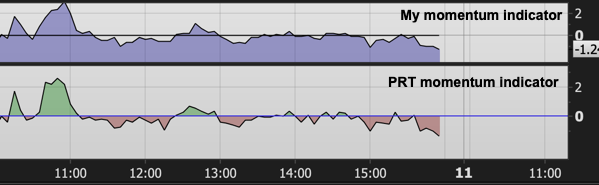
    I have created a simple program for a 4-bar momentum indicator but want it to look like the PRT momentum indicator (i.e. having it oscillate on either side of zero line with different colours). Can anyone tell me what I need to add into the program to achieve this?  Thanks. My coding so far is this:

    Variable1 = 0
    MyOpen = Open[4]
    MyClose = Close[0]
    Result = ((MyClose-MyOpen)/MyOpen)*100
    Return Result, Variable1
    PRT.png PRT.png
    #93137 quote
    Vonasi
    Moderator
    Master

    Welcome to the forums.

    There are a few basic rules that you should try to follow when posting in the forums. You broke a couple of them with your first post.

    1. Post in the correct forum section. I have moved your topic from the ‘General Discussion’ to the indicator related ‘ProBuilder’ forum.
    2. When posting code use the ‘Insert PRT Code’ button to make it more readable for others. I have tidied up your code.


    To answer your question try this:

    Variable1 = 0
    MyOpen = Open[4]
    MyClose = Close[0]
    Result = ((MyClose-MyOpen)/MyOpen)*100
    
    r = 128
    g = 0
    if result > 0 then
    r = 0
    g = 128
    endif
    
    Return Result coloured(r,g,0) style(line,1) as "Result", Variable1 as "0"
    Pippa Carron thanked this post
    #93242 quote
    Pippa Carron
    Participant
    New

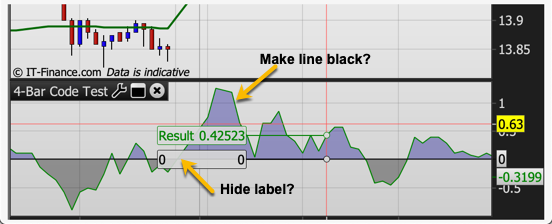
    Thank you so much for your coding help. Two things: (1) is there a way I can get the momentum line to be black; and (2) is there a way I can have the zero line label not show?

    Code-test.png Code-test.png
    #93248 quote
    Vonasi
    Moderator
    Master

    I may be a little confused by your request  now! I thought that you wanted the line to change colour from green to red but did you really mean that you wanted the infill colour to change? If so then this can sort of be achieved by hard coding but it is far easier and gives a much better results if you just add a colour zone via the indicator settings and then save these settings as default for the indicator so that every time you apply the indicator it is the same. Your original code should produce a black line.

    If you remove the zero bits of code and add a separate ‘Horizontal Line’ indicator via the indicator settings then you might get rid of the “0” label – not certain so you need to test.

    Pippa Carron thanked this post
    #93301 quote
    Pippa Carron
    Participant
    New

    Thanks so much for your help. I had wanted colour to either side of the 1% line, but the line itself to be black (which I’ve now got). If the line is coloured, the numbers/words come up in the data box as coloured text which is much harder to read on the screen than black.

Viewing 5 posts - 1 through 5 (of 5 total)

  • You must be logged in to reply to this topic.

Coding a Momentum Indicator


ProBuilder: Indicators & Custom Tools

New Reply
Author
Summary

This topic contains 4 replies,
has 2 voices, and was last updated by Pippa Carron
6 years, 11 months ago.

Topic Details
Forum: ProBuilder: Indicators & Custom Tools
Language: English
Started: 03/08/2019
Status: Active
Attachments: 2 files
Logo Logo
Loading...