Code for basic Linnear Regression Line

Viewing 11 posts - 1 through 11 (of 11 total)

  • Author
    Posts
  • #47181 quote
    margincallcat
    Participant
    Average

    Hi!


    Does anyone have the basic default code for creating the Linnear Regression Line the way its drawn by default in PRT? Also if one knows the containing codes for the RAFF and Standard Error lines that are drawn by PRT Defaults.

    I have managed to get the second point x and y axis as it is the last bar of (n) periods linnear regression – but i dont know how to find the first x and y axis.

    I am aware of this indicator: https://www.prorealcode.com/prorealtime-indicators/triple-raff-channel-projection-on-price/ but it does not contain the specific code i am looking for and does not help with my idea.

    So if anyone knows the code for the linnear regression line it would be greatly appreciated!


    //Viktor

    #47196 quote
    Nicolas
    Keymaster
    Master

    You can find everything needed and a full example on how to draw a line from linear regression coordinates, in this indicator: https://www.prorealcode.com/prorealtime-indicators/regression-channel-sketcher/

    #47212 quote
    margincallcat
    Participant
    Average

    I have read that one but several times but still dont get it.

    Is

    y1 = 1.5*std[p](high)+z1

    the basics for finding coordinates? In this case high. Is it always 1.5 times the standard deviation of (n)?

    Also it does not explain calculation for Raff and Standard error.


    As you can guess i lack some mathematical skillz, but learn quick so im just trying to understand the logic.


    Thanks for your patience and understanding.

    #47222 quote
    margincallcat
    Participant
    Average

    I have now once again used the specific code you forwarded (but using (close) and only 1 line) – and it does not translate into the same result as just drawing a Linnear Regression Line over said period.

    Im really confused

    #47290 quote
    Nicolas
    Keymaster
    Master

    Another example:

    defparam drawonlastbaronly=true
    
    p=62
    
    z1 = linearregression[p]
    
    DRAWSEGMENT(barindex-p,z1[p],barindex,z1)
    
    
    RETURN

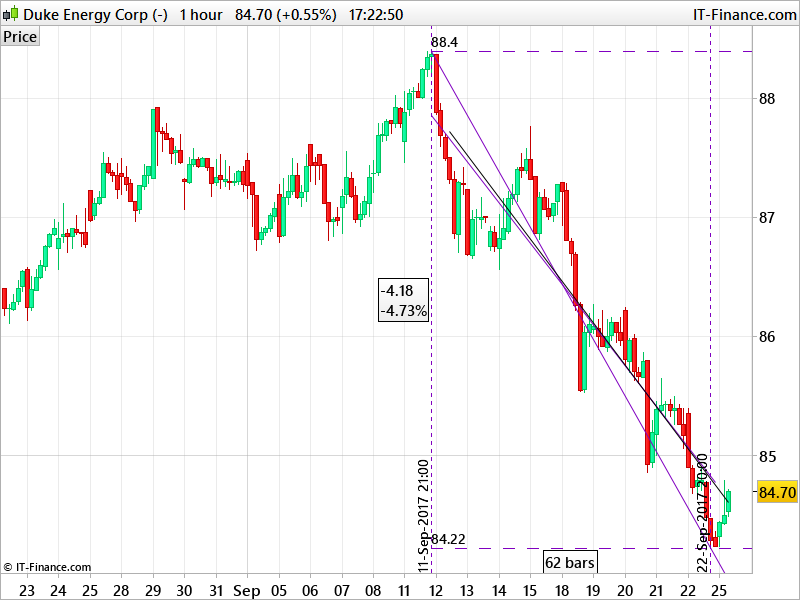
    In the attached screenshot, you have the automatic trendline plotted by the platform (violet one) and the one from the code (the black one). Because I took the Close for the linearregression indicator, there is a little difference with the two points I chose to draw the linear regression line, but that’s how it goes.

    #47296 quote
    margincallcat
    Participant
    Average

    Thank you for your answer!

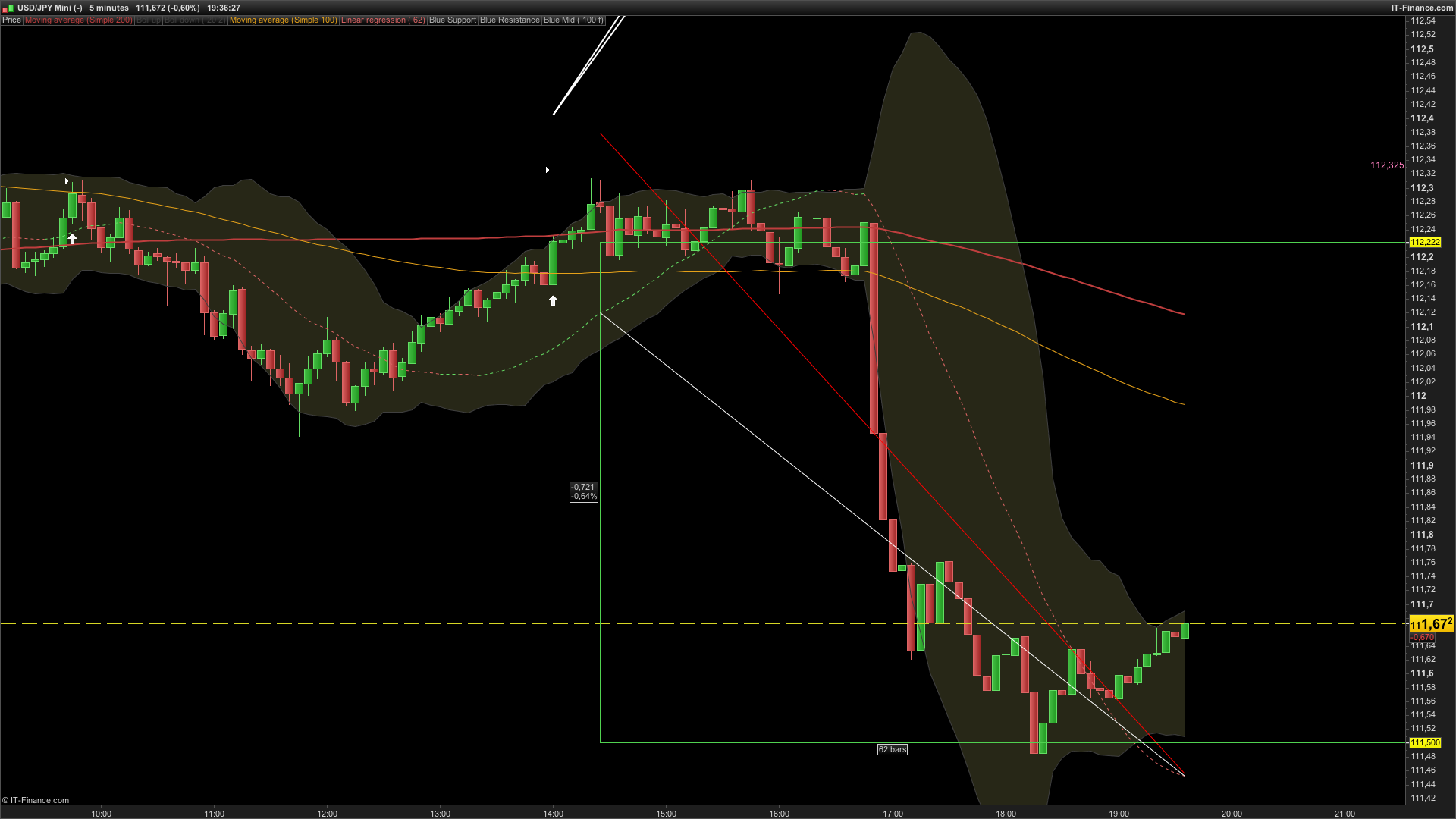
    However, it still does not translate to a correctly drawn linear regression line like the one drawn by default. Please see attached picture. Maybe i am doing something wrong?

    Red Line = Default Linear Regression Line, 62 bars

    White = Line from this code:

    defparam drawonlastbaronly=true
     
    p=62
     
    z1 = linearregression[p]
     
    DRAWSEGMENT(barindex-p,z1[p],barindex,z1)
     
     
    RETURN

    As you can see its way off. If i just want to make a line exactly like the one the program draws for me – what should i write?

    Would greatly appreciate a solution!


    Thanks!

    Viktor


    Edit: The X1 axis is correct but the Y1 (in this case z1[p]) give the wrong coordinate

    #47717 quote
    margincallcat
    Participant
    Average

    Is there no one that has the code to copy the linear regression line drawn by PRT?

    #49014 quote
    margincallcat
    Participant
    Average

    I am still looking for the answer to this. If anyone knows it would be appreciated.

    #59229 quote
    Nobody
    Participant
    Veteran

    BUMP would be fantastic to have access to the source code for PRT builtin indicators

    #59242 quote
    robertogozzi
    Moderator
    Master

    PRT software is proprietary much like Windows or MacOS and it is (and is likely not to ever be) open to the public.

    #59304 quote
    Nobody
    Participant
    Veteran

    I hardly want the software operating system , just the way an indicator coded . Such as linear regression  .  I dont think its a huge ask

    Bel thanked this post
Viewing 11 posts - 1 through 11 (of 11 total)
  • You must be logged in to reply to this topic.

Code for basic Linnear Regression Line


ProBuilder: Indicators & Custom Tools

New Reply
Author
Summary

This topic contains 10 replies,
has 4 voices, and was last updated by Nobody

8 years ago.

Topic Details
Forum: ProBuilder: Indicators & Custom Tools
Language: English
Started: 09/25/2017
Status: Active
Attachments: 2 files
Logo Logo
Loading...