Closing trade with candle.

Viewing 9 posts - 1 through 9 (of 9 total)

  • Author
    Posts
  • #212104 quote
    bearbull
    Participant
    Average

    Simple question really.

    Once I have a trade open – say manually…………………..is there a way to set the limit with a “candle close” over or across a specified line, level etc?………….as opposed to manually closing or setting a specified level when touched?

    Many thanks

    Mike

    #212832 quote
    RafaelN
    Moderator
    Senior

    Hi bearbull, if you have access to V12 with your account/broker you can link an order (Limit, Stop, Market,…) to an alert at the bottom of the alert window, which you can set up to trigger on a price level, or a line, or an indicator, etc.

    Would that suit your need?

    #212879 quote
    bearbull
    Participant
    Average

    Hi RafaelN

    I am using V11 and i see what you mean re associate a trade with a set alarm but all the options only allow crossings over a set level, >= but no option regarding an actual candle close across/over a set level.

    Thanks

    #212890 quote
    GraHal
    Participant
    Master

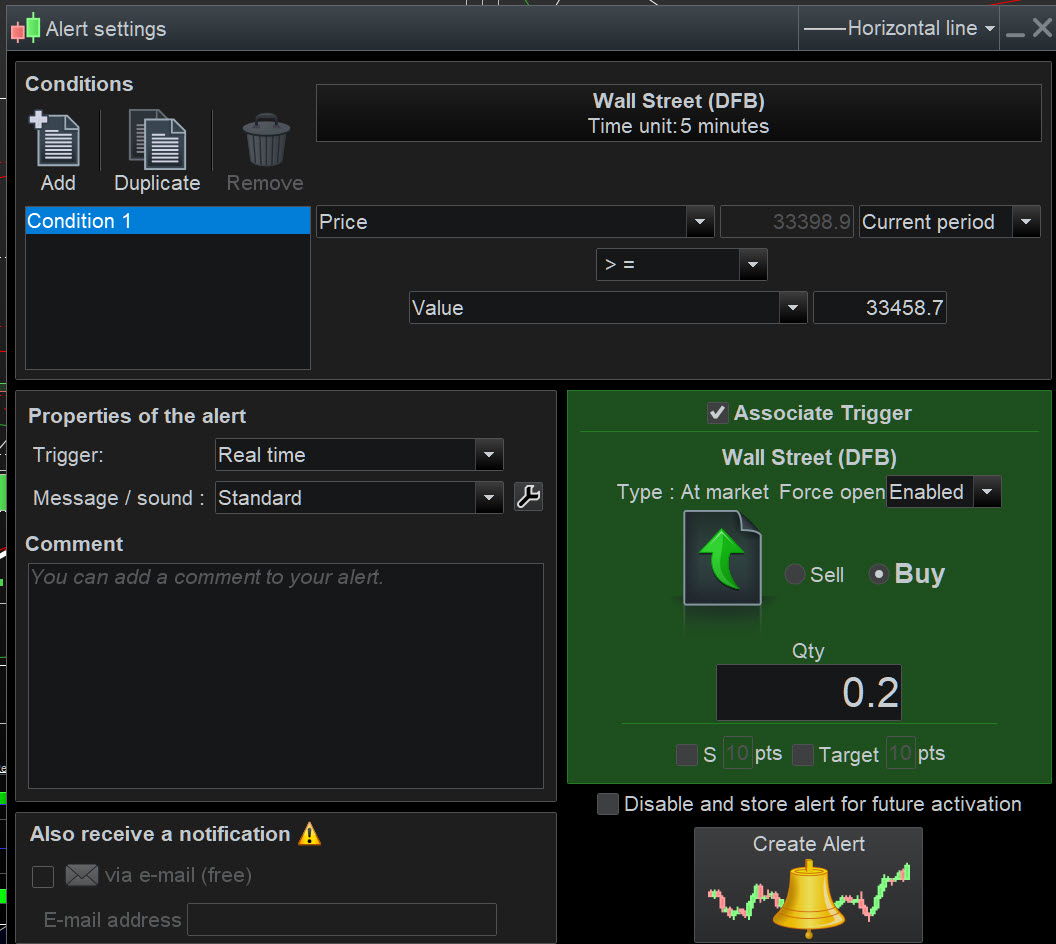
    So attached is not what you are after?

    It has to be the price >=  at the candle close / end of the current bar??

    If Price had crossed over during the bar then at the end of the bar price would be > whatever level you choose (provided price doesn’t cross back under before end of the bar … is that the Issue?)?

    I can’t get my head around exactly what you are needing? 🙂

    bearbull.jpg bearbull.jpg
    #212902 quote
    bearbull
    Participant
    Average

    “”It has to be the price >=  at the candle close / end of the current bar??””

    Hey GraHal, yes so the candle close has to be above the particular level.

    I understand the alarm will go off as soon as price action either touches the level or briefly pops its head beyond it.

    What I want is to be able to automatically set so that a candle will close above that particular level and not that the price action reaches/touches that level and then say the candle closes below it.

    Does the => mean a candle close above a set level or just means that the price action of that candle briefly touches or briefly goes above the level but but does not close above?

    Mike

    #212917 quote
    GraHal
    Participant
    Master

    You will need an Indicator that changes at each bar, I suggest barindex.

    Are you able to code an Indicator to do this, well here you are try this …

    C2 = barindex <> barindex[1]
    Return C2

    Now you can set an alert for 2 Conditions, C1 = Price > 10 and C2 and then set the Alert to close the trade.

    Anybody feel free to jump in and suggest an alternative way to achieve what bearbull wants. 

    #212918 quote
    GraHal
    Participant
    Master

    Above won’t work as C2 will always be True / 1 … my coffee hadn’t worked through!!! 🙂

    #212919 quote
    GraHal
    Participant
    Master

    Have you tried selecting Previous period for price on the Alert screen?

    1. So if price > 10 for previous period then that satisfies your condition??

    If previous period ends with price <= 10 then 1. above would not be True and so your position would not be closed.

    #212920 quote
    bearbull
    Participant
    Average

    Thanks for inputs…………………..Ill have a play around and see what results i get.

    thanks

Viewing 9 posts - 1 through 9 (of 9 total)

  • You must be logged in to reply to this topic.

Closing trade with candle.


Platform Support: Charts, Data & Broker Setup

New Reply
Author
author-avatar
bearbull @bearbull Participant
Summary

This topic contains 8 replies,
has 3 voices, and was last updated by bearbull

2 years, 10 months ago.

Topic Details
Forum: Platform Support: Charts, Data & Broker Setup
Language: English
Started: 03/25/2023
Status: Active
Attachments: 1 files
Logo Logo
Loading...