Changing colour of an indicator line.

Viewing 3 posts - 1 through 3 (of 3 total)

  • Author
    Posts
  • #18650 quote
    robert123
    Participant
    Master

    Hi Nicolas,

    Love the site.

    I am using 10.2

    I wondered if it is possible to:

    a, change the colour of an indicator line if certain conditions occur?

    b, I have set up that work in multiple time frames, is there any way to code one timeframe result into another timeframe?(I.E the result of a 1664 tick chart into a 39 tick chart)

    Many thanks,


    Bert

    #18659 quote
    Nicolas
    Keymaster
    Master

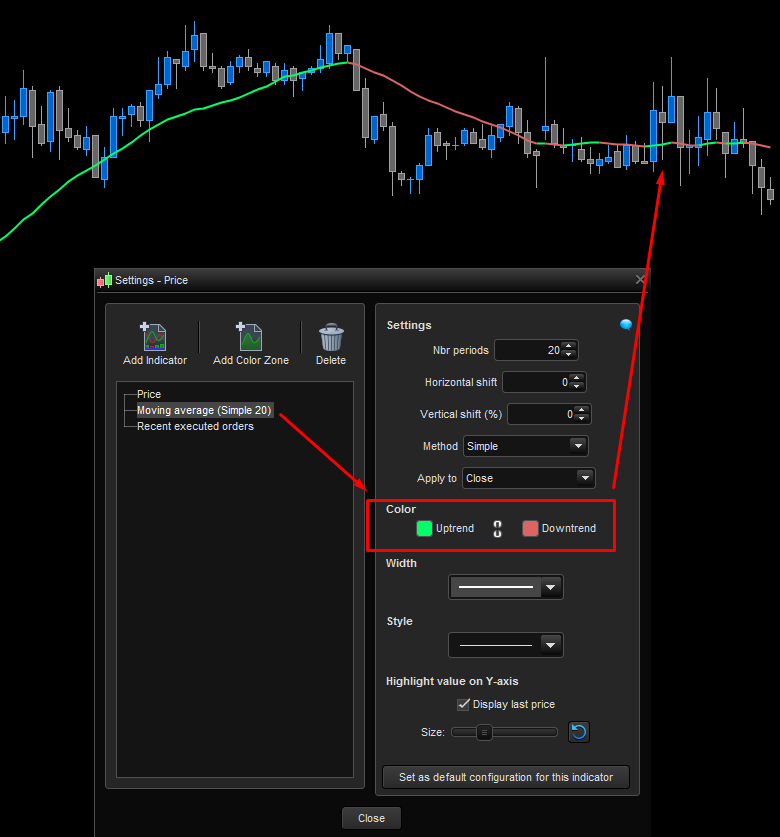
    To change the line colour, you can defined a new variable named “mycolor” (for example).

    Test if a bullish condition occurred, if true then set “mycolor” to 1 , if it’s a bearish condition set it to -1:

    if bullish then 
     mycolor = 1
    elsif bearish then 
     mycolor = -1
    endif

    Let’s say that the returned value of your indicator is called “myvalue”, then let’s write your return line like this:

    RETURN myvalue coloured by mycolor

    Then, just set the appropriate colours you’d like to bearish/bullish condition in the indicator’s parameters window (screenshot attached).

    That’s all! Let us know if everything’s doing well 🙂

    #18666 quote
    robert123
    Participant
    Master

    Thanks, I will give it a go.

    B

Viewing 3 posts - 1 through 3 (of 3 total)
  • You must be logged in to reply to this topic.

Changing colour of an indicator line.


ProBuilder: Indicators & Custom Tools

New Reply
Author
author-avatar
robert123 @robert123 Participant
Summary

This topic contains 2 replies,
has 2 voices, and was last updated by robert123
9 years, 1 month ago.

Topic Details
Forum: ProBuilder: Indicators & Custom Tools
Language: English
Started: 12/16/2016
Status: Active
Attachments: No files
Logo Logo
Loading...