Change Colour depending on price.

Viewing 10 posts - 1 through 10 (of 10 total)
  • Author
    Posts
  • #81298 quote
    Lind3berg
    Participant
    Junior

    Hello everyone! Im quite new in this with programing so I would be really thankful for some help. 🙂

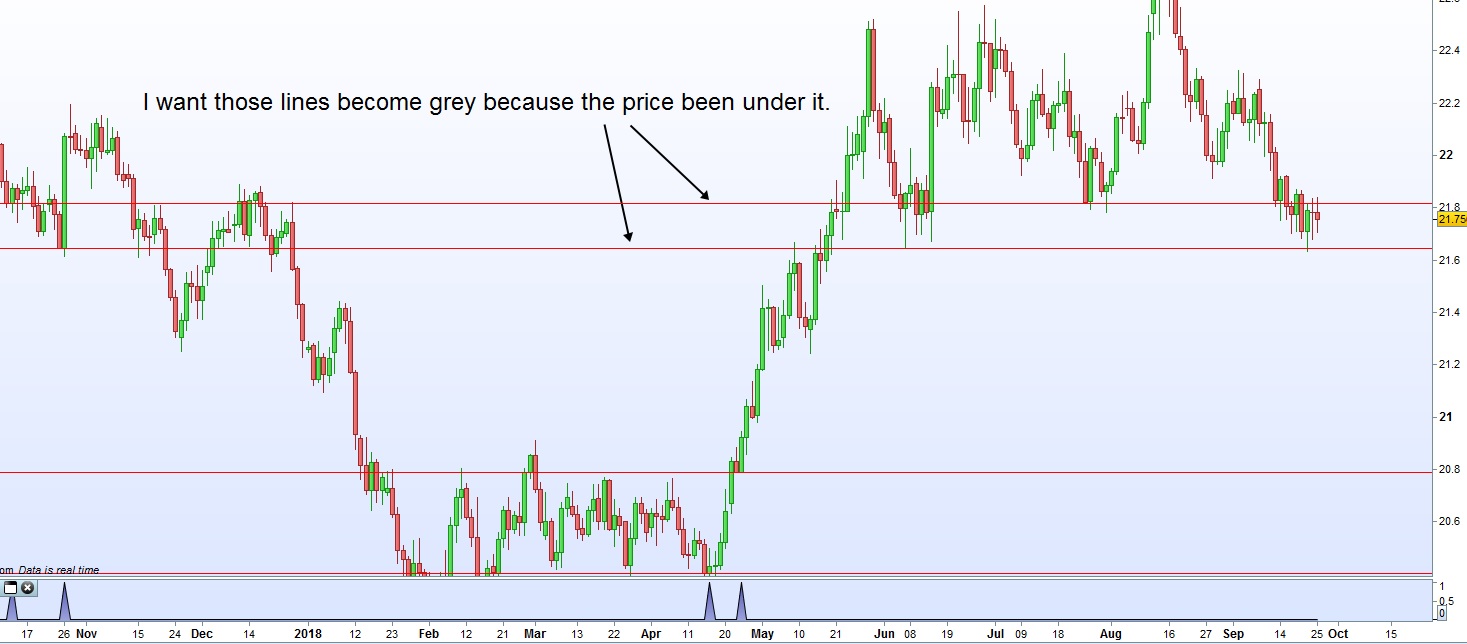
    I’ve done one indicator that draw red lines if two bars Open and Close are in the same level. And now to the problem. I only want the lines to be red if price since line was drawn haven’t been under the line. If the price been under. I want them to be grey.

    Thanks and also a big thumb up for the great videos about programming!

    #81401 quote
    Nicolas
    Keymaster
    Master

    Well, that’s not so easy. It is not possible to change the color of an object already plotted. But we could try to plot new lines over it with a new color and it should overlap the previous ones. Another problem is the lack of data array, so it is not possible to store dynamically how many lines had been drawn and at what levels.

    How many lines from the past would have their colors changed? Could you post your code in its actual state?

    Lind3berg thanked this post
    #81453 quote
    Lind3berg
    Participant
    Junior

    Thank you so much for your reply Nicolas!

    Ok, i see… I think 5 lines should be enough. Plot a new line over the old one sound like a good option!

    Here is the code, I forgot to put in in last time. 😊

    Maybe it’s a better idea to only plot the ones that´s never been over the price and do another indicator for the ones that’s been?


    //Write line if two bar are in the same level.
    DEFPARAM CALCULATEONLASTBARS =50
    
    
    GreenBar = Close>Open                                            //Its a green bar.
    RedBar = Open>Close                                                //Its a red bar.
    SameLevelGreen = Open[0]=Close[1]                   //Current bar is on the same level as the one before.
    
    If GreenBar and SamelevelGreen and RedBar[1] then   // If its a green bar in the samle level as before.                                                         and the one before is a red bar...
    DRAWHLINE(open)COLOURED(255,0,0)                       //Then draw a red line.
    Signal = 1
    else
    Signal = 0
    endif
    
    Return Signal
    #81460 quote
    Vonasi
    Moderator
    Master

    Lind3berg – please use the ‘Insert PRT Code’ button when posting code in your future replies as it makes it far more readable for others. I have tidied up your post for you. 🙂

    Lind3berg thanked this post
    #81464 quote
    Lind3berg
    Participant
    Junior

    Oh sorry. I missed that one. I will do it next time. 🙂 Thank you!

    #81851 quote
    Lind3berg
    Participant
    Junior

    Is there someone of you smart guys who have an idea to solve this? Or just a way to only show the spots that are over todays Close.?

    #81899 quote
    Nicolas
    Keymaster
    Master

    Could you try the below code? I’m struggling to find examples to test it works correctly..

    defparam drawonlastbaronly=true 
    
    lookback = 1000 //bars lookback to find setup
    GreenBar = Close>Open //Its a green bar.
    RedBar = Open>Close //Its a red bar.
    SameLevelGreen = Open[0]=Close[1] //Current bar is on the same level as the one before.
    setup = GreenBar and SamelevelGreen and RedBar[1]
    
    for i = lookback downto 1 do 
    r=255
    g=0
    b=0
    if setup[i] then 
    level = open[i]
    ll = lowest[max(1,barindex-barindex[i])](low)
    if(ll<level) then
    r=169
    g=169
    b=169
    endif
    drawhline(level)coloured(r,g,b)
    endif
    next
    
    return
    Lind3berg thanked this post
    #81943 quote
    Lind3berg
    Participant
    Junior

    It works amazing @Nicolas! 😀 Exactly what i wanted! Thank you so much, I dont know how many hours ive been trying to solve his on my own.

    Is there a way to only show the ones the price not been to? I can Think it will be a problem for all history. But if its like the 3 lines that was made closest to today?

    #81944 quote
    Nicolas
    Keymaster
    Master

    Is there a way to only show the ones the price not been to? I can Think it will be a problem for all history. But if its like the 3 lines that was made closest to today?

    That’s possible. BTW, you can already adapt the history it looks at with the “lookback” variable in the code, I made it as 1000 bars by default.

    #81964 quote
    Lind3berg
    Participant
    Junior

    That sounds good, now i will start scratch my own head again. 😉

    Yes, i changed it to 100 and also changed the lines to segments to make it easier to see where they appered.

    Thanks a lot for your help, it means a lot! With this programming I Think ive  found a new interest in my Life. 🙂

Viewing 10 posts - 1 through 10 (of 10 total)

  • You must be logged in to reply to this topic.

Change Colour depending on price.


ProBuilder: Indicators & Custom Tools

New Reply
Author
author-avatar
Lind3berg @lind3berg Participant
Summary

This topic contains 9 replies,
has 3 voices, and was last updated by Lind3berg
7 years, 4 months ago.

Topic Details
Forum: ProBuilder: Indicators & Custom Tools
Language: English
Started: 09/25/2018
Status: Active
Attachments: 1 files
Logo Logo
Loading...