


Change background color with signals based on Stochastic and RSI

Viewing 3 posts - 1 through 3 (of 3 total)

  • Author
    Posts
  • #119160 quote
    Crillezz
    Participant
    Veteran

    Hello!

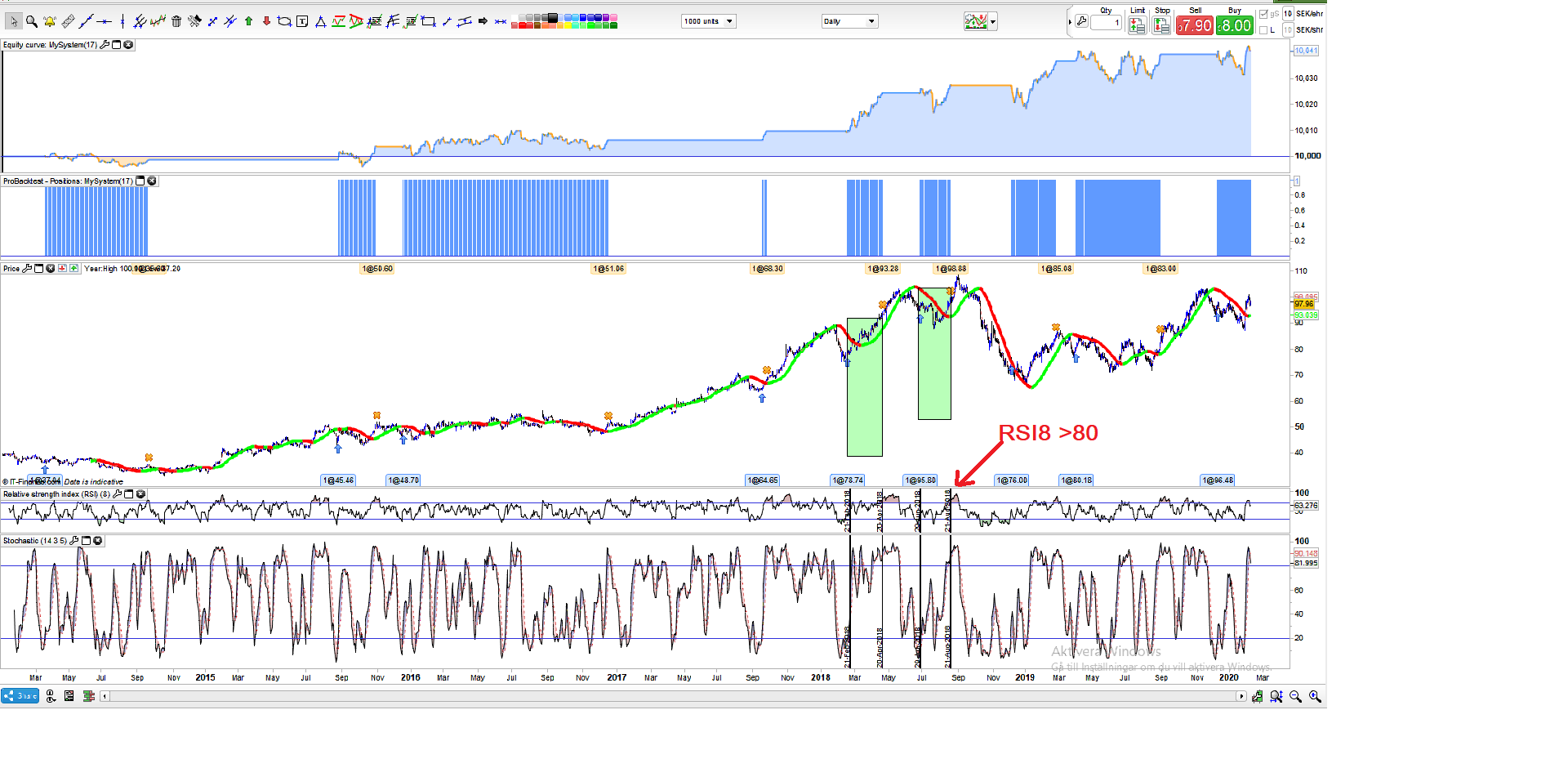
    I need help here with an indicator that changes the background to green when Stochastic% K crosses over Stochastic% D below 20 and RSI8 is rising.

    Then it should show green until the RSI8 is over 80. And then it will switch to white again (original color) on daily timeframe.

    I intend to use the signal for intraday trading in the same direction.

    I also want a screener of the same signal until the RSI8 reaches 80

    Here is an example

    / Christian

    hfghfghgfghfghf.png hfghfghgfghfghf.png
    #119184 quote
    fifi743
    Participant
    Master

    you can use a histogram style indicator

    Crillezz thanked this post
    EXEMPLE-HISTOGRAM.itf
    #119186 quote
    Nicolas
    Keymaster
    Master

    I think that I have understood what you need, please try the code below:

    sto=Stochastic[14,3](close)
    sig=average[5](sto)
    irsi = rsi[8](close)
    
    if sto crosses over sig and sto<20 and irsi>irsi[1] then 
    start=barindex
    endif 
    
    if barindex>start and start>0 and irsi<=80 then 
    backgroundcolor(0,200,0,100)
    endif
    
    if irsi crosses over 80 and start<>0 then 
    start=0
    endif
    
    return

    The background change color on the signal of the stochastic below the level 20, background go green until the RSI8 reach the 80 level.

    Crillezz thanked this post
Viewing 3 posts - 1 through 3 (of 3 total)
  • You must be logged in to reply to this topic.

Change background color with signals based on Stochastic and RSI


ProBuilder: Indicators & Custom Tools

New Reply
Author
author-avatar
Crillezz @crillezz Participant
Summary

This topic contains 2 replies,
has 3 voices, and was last updated by Nicolas

6 years ago.

Topic Details
Forum: ProBuilder: Indicators & Custom Tools
Language: English
Started: 02/10/2020
Status: Active
Attachments: 2 files
Logo Logo
Loading...

