


strategia di base con indicatore CCI

Viewing 3 posts - 1 through 3 (of 3 total)
  • Author
    Posts
  • #83648 quote
    enricot
    Participant
    Junior

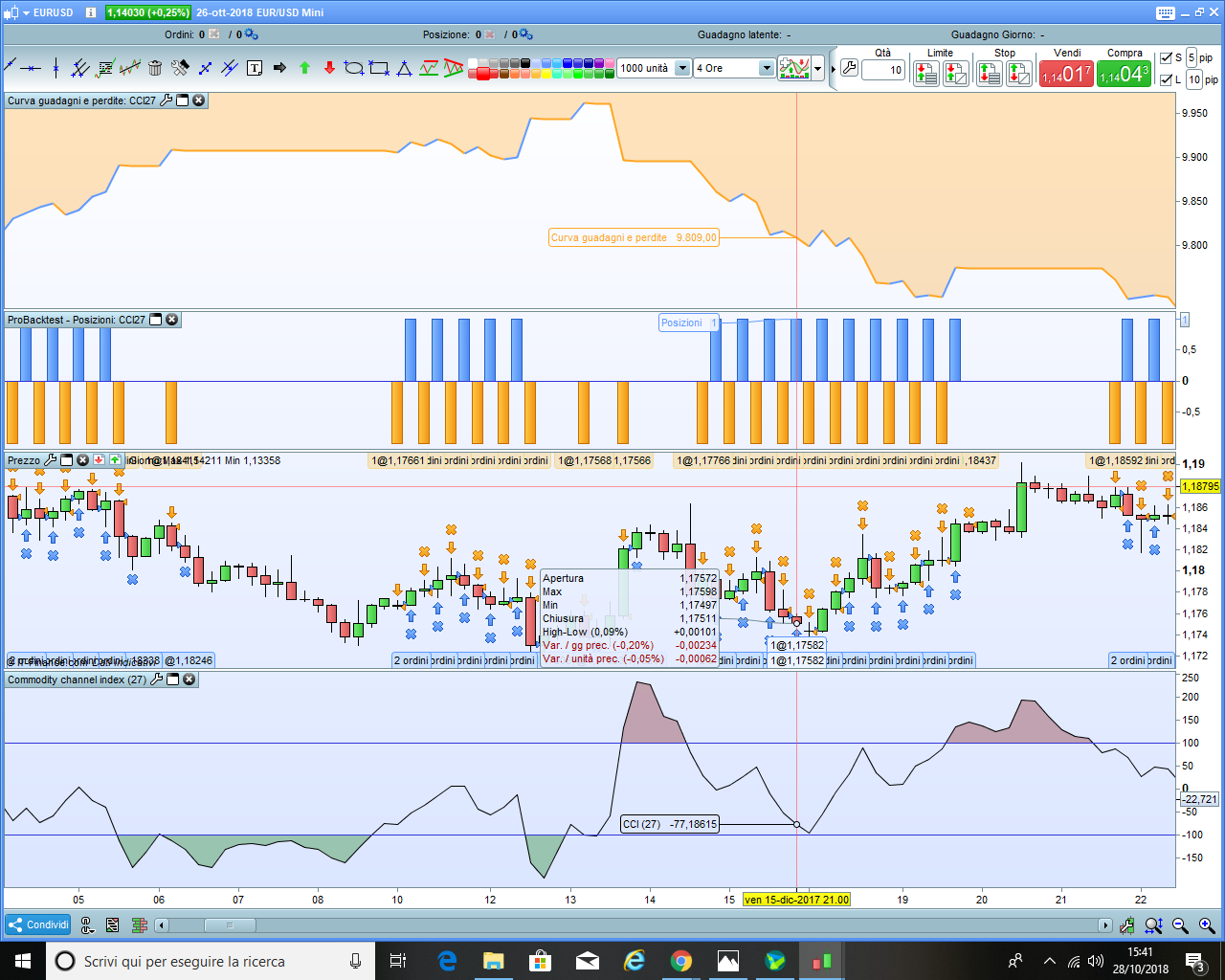
    buon giorno vorrei fare un programma molto semplice eppure nn capisco dove sbaglio.Entrare long quando la linea del grafico CCI risale sopra il -100 e chiudere quando passa sopra il 100,e l’opposto per posizioni short.Il problema è che mi apre tante operazioni anche nel mezzo tra -100 e 100.Ok questo è il codice e sotto metto una foto.grazie

    // Definizione dei parametri del codice
    DEFPARAM CumulateOrders = False // Posizioni cumulate disattivate
    
    // Condizioni per entrare su posizioni long
    indicator1 = CCI[27]
    c1 = (indicator1 > -100)
    
    IF c1 THEN
    BUY 1 CONTRACT AT MARKET
    ENDIF
    
    // Condizioni per uscire da posizioni long
    indicator2 = CCI[27]
    c2 = (indicator2 > 100)
    
    IF c2 THEN
    SELL AT MARKET
    ENDIF
    
    // Condizioni per entrare su posizioni short
    indicator3 = CCI[27]
    c3 = (indicator3 < 100)
    
    IF c3 THEN
    SELLSHORT 1 CONTRACT AT MARKET
    ENDIF
    
    // Condizioni per uscire da posizioni short
    indicator4 = CCI[27]
    c4 = (indicator4 < -100)
    
    IF c4 THEN
    EXITSHORT AT MARKET
    ENDIF
    
    Screenshot-27.png Screenshot-27.png
    #83654 quote
    robertogozzi
    Moderator
    Master

    Perché alla riga 6 e 14 indichi >, sostituiscilo con CROSSES OVER.

    Alle righe 22 e 30 fai lo stesso ma con CROSSES UNDER.

    #83656 quote
    enricot
    Participant
    Junior

    ok grazie di nuovo

Viewing 3 posts - 1 through 3 (of 3 total)
  • You must be logged in to reply to this topic.

strategia di base con indicatore CCI


ProOrder: Trading Automatico & Backtesting

New Reply
Author
author-avatar
enricot @enricot Participant
Summary

This topic contains 2 replies,
has 2 voices, and was last updated by enricot
7 years, 4 months ago.

Topic Details
Forum: ProOrder: Trading Automatico & Backtesting
Language: Italian
Started: 10/28/2018
Status: Active
Attachments: 1 files
Logo Logo
Loading...
