Can't See Name of AutoSystem

Viewing 6 posts - 1 through 6 (of 6 total)
  • Author
    Posts
  • #72636 quote
    GraHal
    Participant
    Master

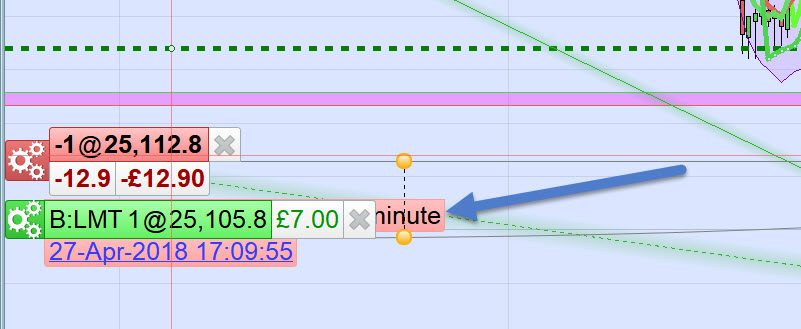
    See attached – I can’t see the System name?

    If I can’t see the System name then what is the point of having that function??

    If PRT make System name to the right of Order details then all would be good???

    Orders-2.jpg Orders-2.jpg
    #72641 quote
    Vonasi
    Moderator
    Master

    + 1 from me.

    This has been highlighted many times (well at least twice – by you and me!) and it would be absolutely fantastic if it could be fixed. You can stretch the chart scale out and eventually you might be able to read the label but what a faff when just changing the graphic location to the right would so easily fix it once and for all.

    #72651 quote
    GraHal
    Participant
    Master

    I’ve suggested the fix to PRT 3 or 4 times (over the last 18 months or so), the fix is so simple I cannot believe that PRT would not jump on it, sort it and keep us happy??

    Or tell us why the fix is a massive job and so is No 102 on a list of over 1,000!?

    This is why I decided to open this Topic (again), this Forum has to got to be the easiest medium for PRT to advise users of progress / lack of??

    I know … think I’ll put it on the PRT website Forum also!! Now there’s a plan!!! 🙂 🙂

    #72663 quote
    Carine
    Moderator
    Average

    Hello,

    I have transferred your email to our product management team for future consideration.
    We regularly add features to ProRealTime based on ideas suggested by our users.

    You can see the new features added in the latest version of ProRealTime here:

    https://www.prorealtime.com/en/new-features-ProRealTime-v10-3

    Regards,

    Carine

    GraHal thanked this post
    #72668 quote
    GraHal
    Participant
    Master

    Thank you @Carine.

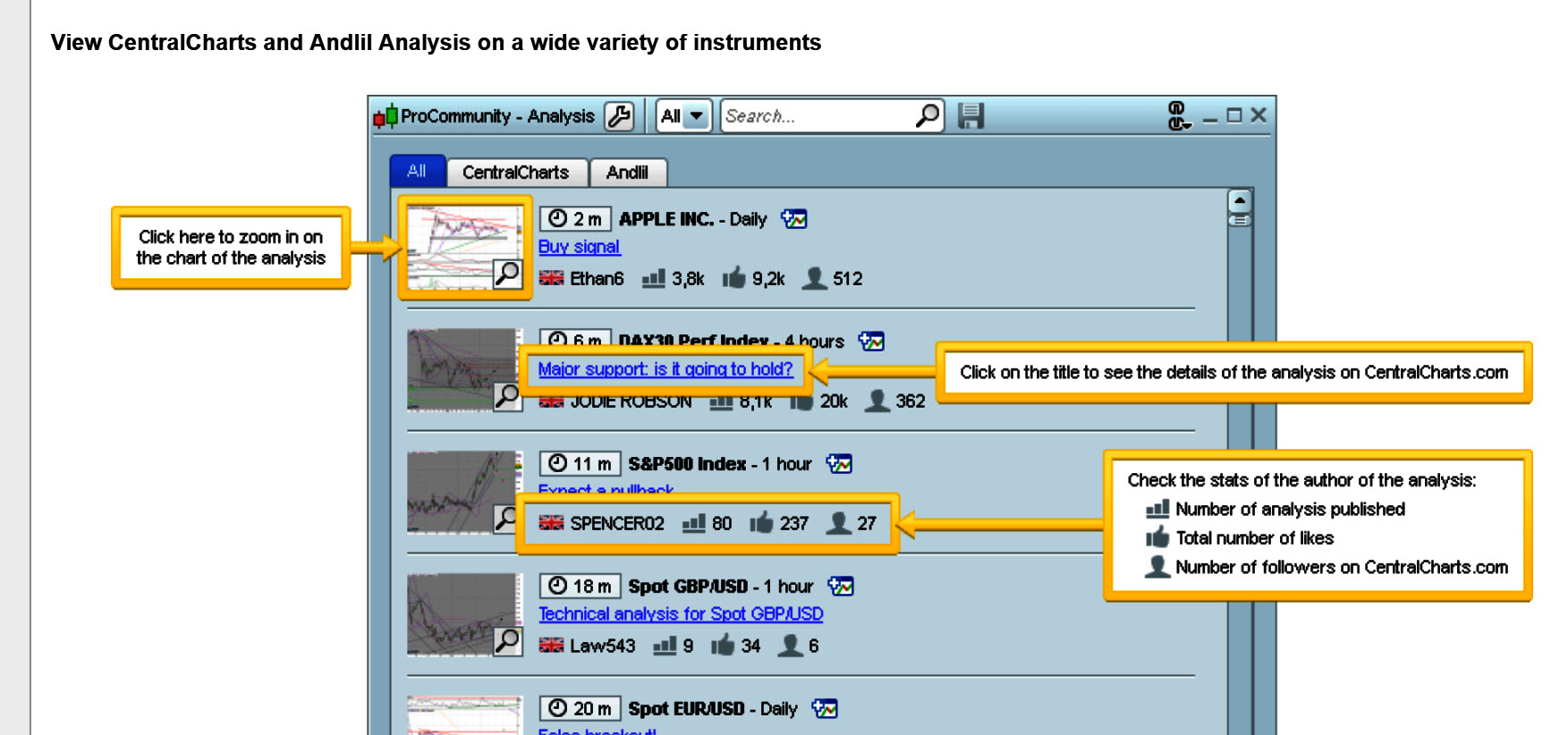
    Attached Pro Community Analysis is a new feature on me that shows on your 10.3 link above, however I can’t see it anywhere on my Platform.

    Is it only available on PRT sponsored Premium Platform??

    10.3.jpg 10.3.jpg
    #72858 quote
    Carine
    Moderator
    Average

    Hello,

    It’s a new feature that was recently added to ProRealTime software.

    This feature allows to receive market analysis on instruments of your choice and publish your own analysis directly via the ProRealTime platform.

    Since the IG market data (CFD) is not the same as the market data on ProRealTime Software and CentralCharts (exchange data), we currently cannot add this feature to the ProRealTime IG version.
    (ex: trading hours are often different between an underlying quoting at the exchange and its CFD version)

    Our teams are working on a possible solution.

    Regards,

    Carine

    GraHal thanked this post
Viewing 6 posts - 1 through 6 (of 6 total)

  • You must be logged in to reply to this topic.

Can't See Name of AutoSystem


Platform Support: Charts, Data & Broker Setup

New Reply
Author
Summary

This topic contains 5 replies,
has 3 voices, and was last updated by Carine

7 years, 8 months ago.

Topic Details
Forum: Platform Support: Charts, Data & Broker Setup
Language: English
Started: 06/08/2018
Status: Active
Attachments: 2 files
Logo Logo
Loading...