Hi guys !
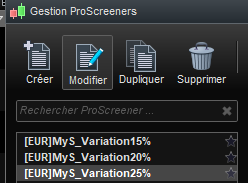
Is it normal that when I click on “modify” to modify any of my screeners, no window pops-up ?
I am having this problem since 24h, Am I the only one ?
Thank you.
I guess you have tried closing the PRT Platform and opening again then trying to modify your screener?
My modify screener button is working fine … I just tried it!
Yeah, I did and I even reboot my computer after lol.
Just tried again and still have the same problem, something weird is going on. I will call the support tomorrow.
Have your Screener filenames always been the same?
Or did you change filenames just before the modify Screener stopped working?
I’m thinking that the square brackets and the ? might be causing your Issue??
EDIT / PS
No it’s not filenames … I just tried it! 🙂
Let us know when you have it sorted what it was?
I think it has to do with the beta version.
I just run the previous version and I can “normally” change and open my screens.
coming back to the beta version, still have the problem.
And no, it has nothing to do with the filenames, it was always like that.
Thanks.
coming back to the beta version, still have the problem.
beta v 11 you mean?
Other v 11 users should be able to say if they have the same Issue?
Yeah the v11.
The problem doesn’t occur in the complete version v10.3.
Any v 11 users got this same Issue (see OP) and / or can tell bewoke2 all is good on their Platform please?
Is the problem still present today? or since the last message?
I was unable to reproduce the issue in my beta version v11.
If it still does not work please send a technical report via the help menu of the platform.
The problem (just like magic) has disappeared.
I just opened PRT V11 now and I can modify my screens.
Probably just a glitch..