Hello Community,
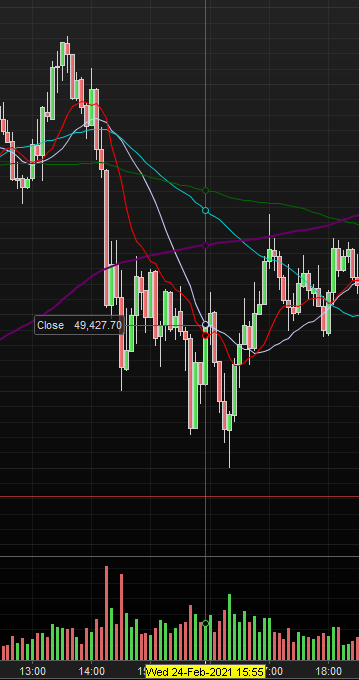
I don’t know if I messed up some options in my platform, but I can no longer see the different information when I set my cursor on a candle (highest, lowest, difference, close, open and the volume).
Could someone please tell me how to correct this.
Now, I only get this as shown in the attachment.
Thanks !
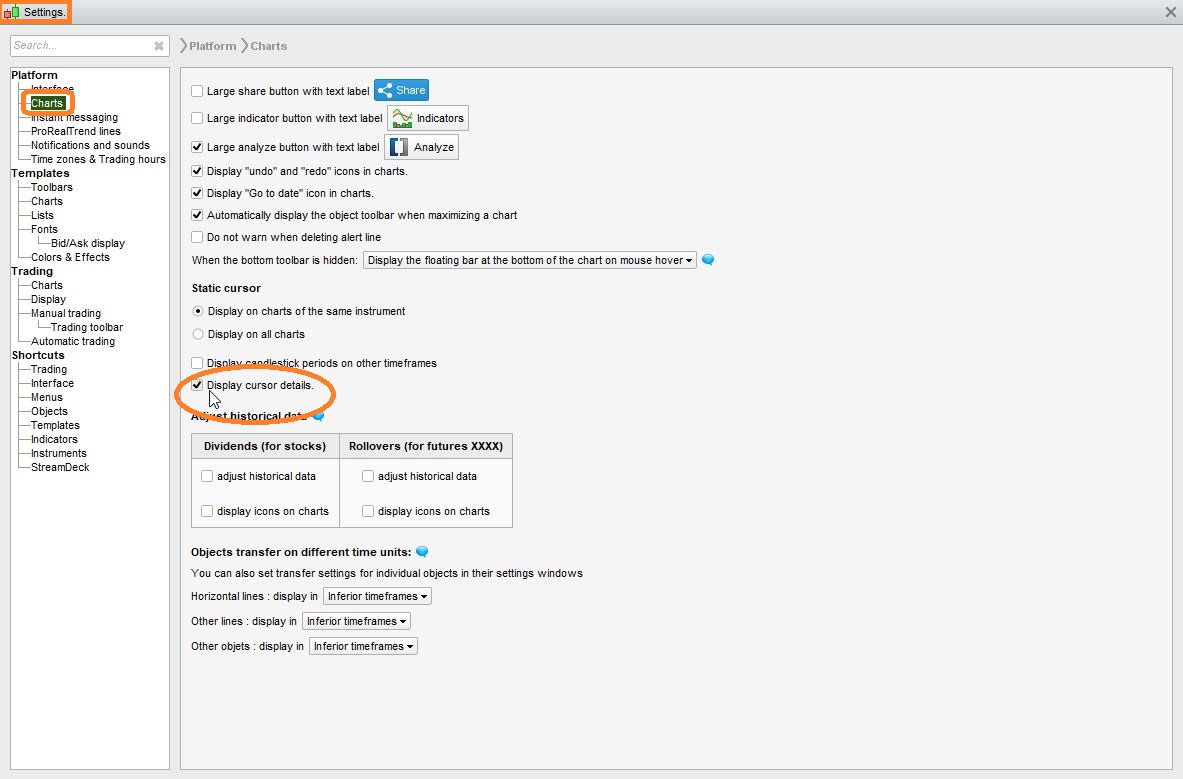
Go to SETTINGS and tick the circled option.
Topic moved from french forum “support plateforme” to english forum “platform support”, please make sure you select the appropriate forum based on language you choose to use regardless of your chosen user flag, please see all rules in yellow big box below thanks. Please find all 30 forums (6 for each 5 of 5 languages) there if needed: https://www.prorealcode.com/forums/
Hello,
As indicated above, you can display the cursor details when placing your cursor on a candle by ticking Display cursor details in Settings > Platform > Charts.
You may want to add and/or remove values (such as Open, High, Low, Close) in this cursor details. To do so:
- Click on Display > Cursor details to open the corresponding window
- Click on the configuration button at the top
- Tick the boxes corresponding to the values you want to include in the cursor details
- Click on Close
The changes will apply to the Cursor details in the dedicated window, but also to the Cursor details on your charts.
Sebastien