Cann’t you use a ttrailingstop and a stoploss together?

Viewing 7 posts - 1 through 7 (of 7 total)
  • Author
    Posts
  • #232815 quote
    DeathMetal
    Participant
    New

    Hello,

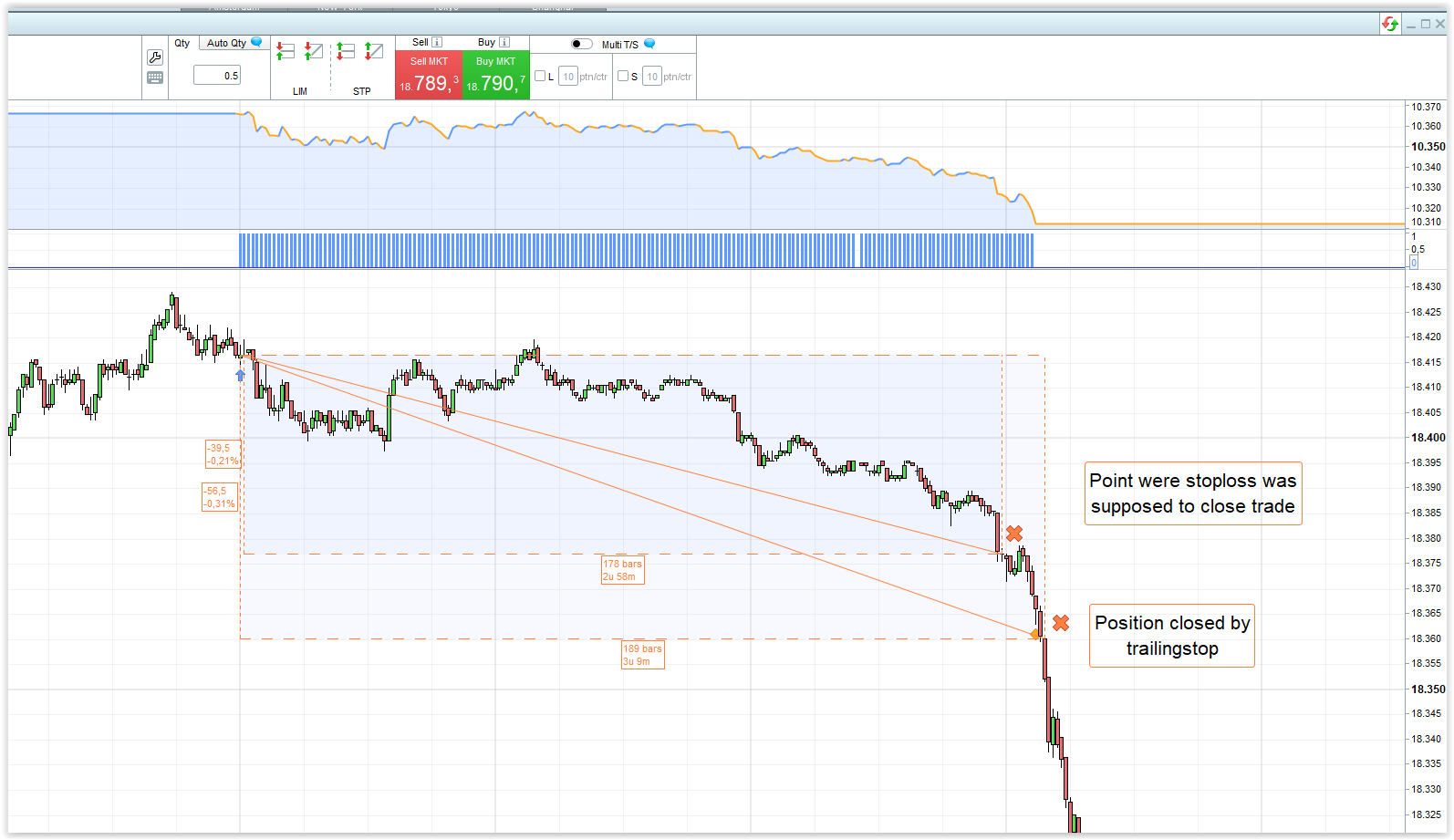
    I have noticed strange results after using a trailingstop and a stoploss together.

    See picture, the trade is closed by the trailingstop instead by the stoploss.

    System on DAX:

    SET TARGET pPROFIT 61
    SET STOP pLOSS 34
    SET STOP PTRAILING 55

    afbeelding_2024-05-20_135810313.png afbeelding_2024-05-20_135810313.png
    #232819 quote
    Iván González
    Moderator
    Master

    Could you share the code?

    #232828 quote
    DeathMetal
    Participant
    New

    Sorry, I don’t want to share the code, because I’ve put a lot of time and money into this to get as far as I have now.
    The code of the stop loss etc. is below the programming instructions.

    I have often encountered it in other systems I have created that one of the two does not work.

    #232839 quote
    GraHal
    Participant
    Master

    Yes the lower / last instruction re a stop loss cancels any previous instruction re a stop loss.

    pTrailing cancels / negates / renders ineffective pLoss as written below.

    SET TARGET pPROFIT 61
    SET STOP pLOSS 34
    SET STOP PTRAILING 55
    DeathMetal thanked this post
    #232887 quote
    robertogozzi
    Moderator
    Master

    Yes, is GraHal right. You can’t have two different kind of STOP LOSS, the last one always overrides any previous one.

    DeathMetal thanked this post
    #232894 quote
    DeathMetal
    Participant
    New

    This should do the trick….


     /////  trailingstop for long and short   /////////////////////
    //////////////////////////////////////////////////////////////
    
    
    /// Reset variables
    IF NOT ONMARKET  THEN
    LaagsteKoers=1000000
    HoogsteKoers=0
    ENDIF
    
    once UitstapOpTSL=15  // points to trail for long
    once UitstapOpTSS=20  // points to trail for short
    
    
    //////////////   LONG    /////////////////////////////
    If LongOnMarket AND HoogsteKoers=0 THEN
    OpeningsprijsL= close
    Hoogstekoers=openingsprijsL
    ENDIF 
    
    //  Determine highest high
    If LONGONMARKET THEN 
    DezeHigh= high
    If DezeHigh > HoogsteKoers then
    Hoogstekoers=DezeHigh
    ENDIF 
    ENDIF 
    
    
    //Sell trade if close< highest high- x points (UitstapOpTSL )
    IF (close < (Hoogstekoers - UitstapOpTSL)) and LONGONMARKET  then
    SELL AT MARKET
    ENDIF 


    /////////////////  SHORT          ////////////////////////////////////////////
    
    
    IF ShortOnMarket AND LaagsteKoers=1000000 THEN
    OpeningsprijsS= close
    Laagstekoers=openingsprijsS
    ENDIF 
    
    
    IF ShortOnMarket THEN
    DezeLow= low
    If DezeLow < laagsteKoers then
    LaagsteKoers=DezeLow
    endif
    ENDIF


    IF (close >  (Laagstekoers + UitstapOpTSS)) and SHORTONMARKET  then
    EXITSHORT AT MARKET
    endif
    
    
    SET TARGET pPROFIT 75
    SET STOP pLOSS 45
    
    
    ///  Exit by trailingstop is at market, only use this on small timeframes!!
    
    
    #232895 quote
    DeathMetal
    Participant
    New

    BTW, points for  trailingstops must be larger then your stoploss, this was only for test purposes.

Viewing 7 posts - 1 through 7 (of 7 total)

  • You must be logged in to reply to this topic.

Cann’t you use a ttrailingstop and a stoploss together?


ProOrder: Automated Strategies & Backtesting

New Reply
Author
author-avatar
DeathMetal @deathmetal Participant
Summary

This topic contains 6 replies,
has 4 voices, and was last updated by DeathMetal
1 year, 9 months ago.

Topic Details
Forum: ProOrder: Automated Strategies & Backtesting
Language: English
Started: 05/20/2024
Status: Active
Attachments: 1 files
Logo Logo
Loading...