Cannot access the programming environment

Viewing 3 posts - 1 through 3 (of 3 total)
  • Author
    Posts
  • #193183 quote
    Swanzy
    Participant
    New

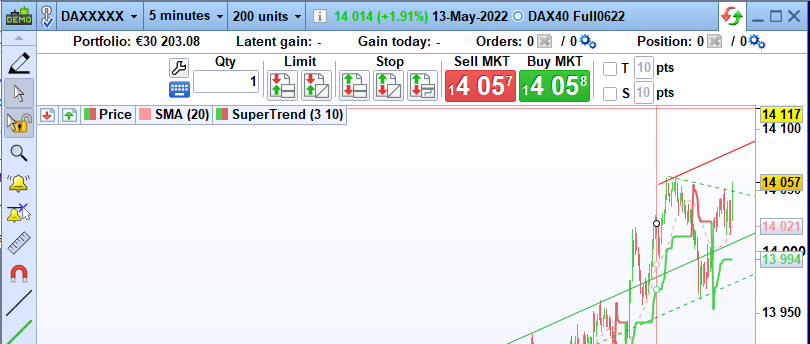
    I cannot access the programming environment. I’ve looked at the tutorial videos and the instructions pdf and basically my chart windows look nothing like the ones there. There is no “Indicator/Backtest” button  in the top right corner of the charts. There are big Buy Market and Sell Market buttons instead. I send an image of my chart if it’s any help. I’m sure that I must be missing something but cannot figure what, really. Any help would be really appreciated.

    Chart.png Chart.png
    #193185 quote
    JC_Bywan
    Moderator
    Master

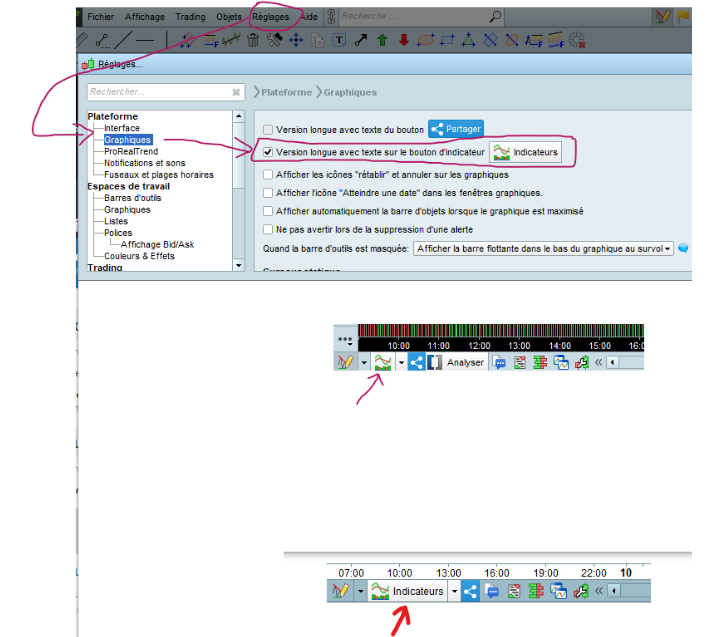
    Hi, you’ve probably seen v10.3 images if it shows at the top. In current version v11 the button indicators/backtests button has moved to bottom left, with an option setting to write “indicators” or not inside the button. I attach an image in 3 parts, first for setting location, second and third for both versions of button with or without text at bottom left (french menu, but same location as in platform with another language)

    Swanzy thanked this post
    v11-bouton-avec-ou-sans-texte-indicateurs.png v11-bouton-avec-ou-sans-texte-indicateurs.png
    #193188 quote
    Swanzy
    Participant
    New

    Thanks a lot, now I found it!. I had that setting selected, but even so the button was hidden in the lower toolbar. I had to click on some “>>” button to show the lower toolbar buttons. Thanks again 🙂

Viewing 3 posts - 1 through 3 (of 3 total)

  • You must be logged in to reply to this topic.

Cannot access the programming environment


Platform Support: Charts, Data & Broker Setup

New Reply
Author
author-avatar
Swanzy @swanzy Participant
Summary

This topic contains 2 replies,
has 2 voices, and was last updated by Swanzy

3 years, 9 months ago.

Topic Details
Forum: Platform Support: Charts, Data & Broker Setup
Language: English
Started: 05/14/2022
Status: Active
Attachments: 2 files
Logo Logo
Loading...