Candlestick open close and high low price

Viewing 6 posts - 1 through 6 (of 6 total)

  • Author
    Posts
  • #65901 quote
    seal
    Participant
    New

    Hi,

    I would like to see the candlestick’s open, close, high and low values when I hover over the candlestick. Is this possible?

    Thanks

    #65903 quote
    GraHal
    Participant
    Master

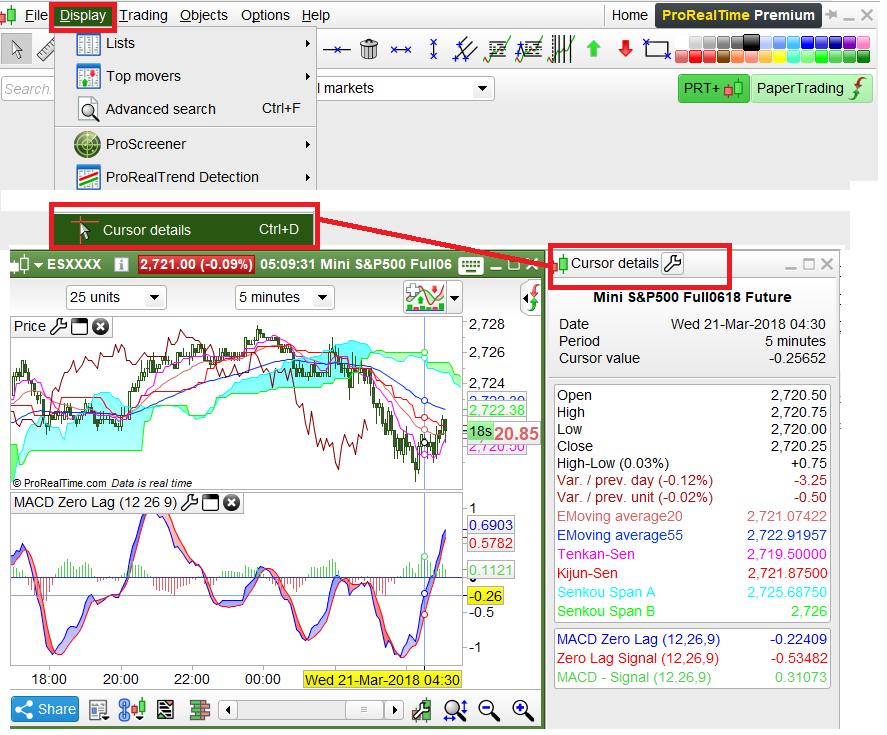
    hover over a white bit of the chart (where no bars etc)  then right click, Display, select Cursor details at bottom of the list.

    Then hover over a bar and you should see all the values?

    let us know how you get on?

    seal thanked this post
    #65911 quote
    seal
    Participant
    New

    Thanks that worked 🙂

    #65969 quote
    Ulrike
    Moderator
    Senior

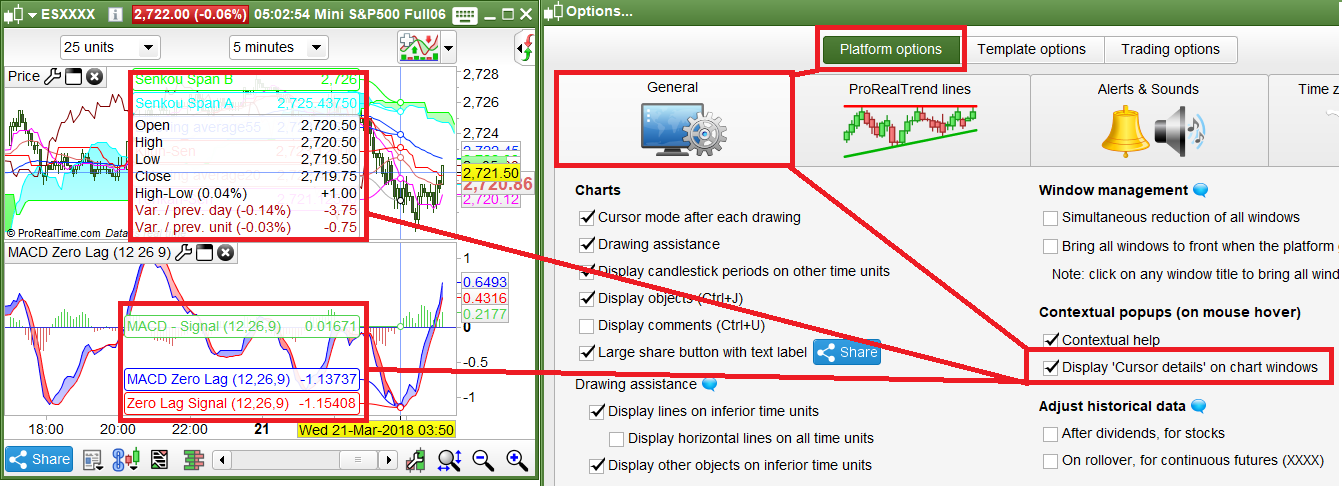
    Some additional information concerning the display of cursor information; please note that there are 2 ways to display cursor details on mouse hover.

    As GraHal already explained you can activate cursor details in a separate window via a right mouse click on the chart.

    You may also do this via the Display menu =>  (see image below).

    It is also possible to see the cursor details directly on the chart. If you wish to activate this option, please click on the drop-down menu “Options” => “Platform options” => “General” and check the box “Display ‘Cursor details’ on chart windows” .

    Cursor details in separate window

    [attachment file=65970]


    Cursor details directly on chart

    [attachment file=65971]

    cursor-detail-separate-window.png cursor-detail-separate-window.png Cursor-details-in-chart.png Cursor-details-in-chart.png
    #235029 quote
    Florian878
    Participant
    New

    Hi there,

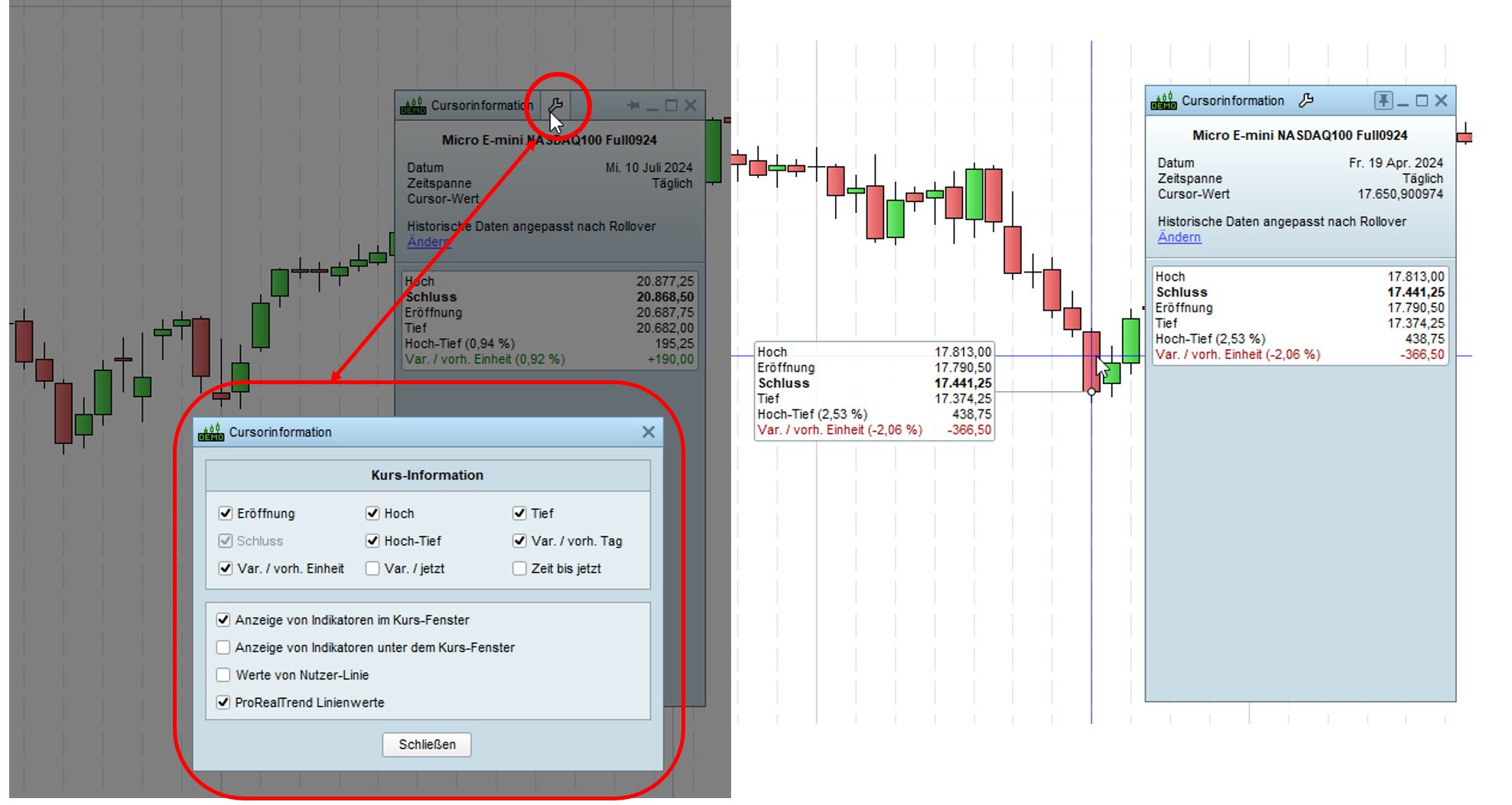
    I know, this topic has passed some days now. However I don’t understand why since the latest update of PRT (v12) in 2024 the price information shown on the cursor is swapped around for prices of open, high, low and close. And I even less understand why it is impossible to change it back to ‘normal’ as me being used to it the past years.

    Today it reads like: high, close, open, low. This drives me crazy – hoping, I’m not alone with it. Please feel free to comment if you feel the same way.

    The technical support told me it is not possible to sort the prices like open/high/low/close any more. But how was it then possible before? That simply does not make any sense.

    I attached a screenshot for my current readings.
    My platforms language is set to German, but basically it reads:

    Hoch = high
    Schluss = close
    Eröffnung = open
    Tief = low

    If there is any kind of work around to change it back, please let me know.
    If there is any chance of opening a support ticket, also please let me know.

    Thank you.

    best regards,

    Florian

    Cursor-Information.jpg Cursor-Information.jpg
    #235036 quote
    druby
    Participant
    New

    I haven’t noticed if there has been a changed or not.

    My v12 shows from top to bottom in the cursor info,

    H.O.C.L   if all the same value

    H,O,C,L   if bear candle

    H,C,O,L   if bull candle.

    Seems to follow logic, top to bottom, for both bull and bear candles, treats all same value version as bear version.

    GraHal and Iván González thanked this post
Viewing 6 posts - 1 through 6 (of 6 total)

  • You must be logged in to reply to this topic.

Candlestick open close and high low price


Platform Support: Charts, Data & Broker Setup

New Reply
Author
author-avatar
seal @seal Participant
Summary

This topic contains 5 replies,
has 2 voices, and was last updated by druby

1 year, 7 months ago.

Topic Details
Forum: Platform Support: Charts, Data & Broker Setup
Language: English
Started: 03/20/2018
Status: Active
Attachments: 3 files
Logo Logo
Loading...