Candlestick calculation doesn’t seem to work

Viewing 10 posts - 1 through 10 (of 10 total)
  • Author
    Posts
  • #233507 quote
    ATCOtrader
    Participant
    New

    Hi,

    This is my first post here! I’m trying to backtest an idea where I calculate and measure the different parts of the candlesticks. I want to calculate the lower wick and if it is bigger than the higher wick it’s an entry signal. However it doesent seem to be working, it gives random results. This is the code:

    body=close-open
    
    if body>0 then
    bodytop=close
    bodybottom=open
    else
    bodytop=open
    bodybottom=close
    endif
    
    shadowtop=high-bodytop
    shadowbottom=bodybottom-low
    
    Hammer= Shadowbottom > Shadowtop
    Exit= (BarIndex - TradeIndex) = 1
    
    IF  Hammer THEN
    BUY 1 CONTRACTS AT MARKET
    ENDIF
    
    If LongOnMarket THEN
    SELL AT MARKET
    ENDIF

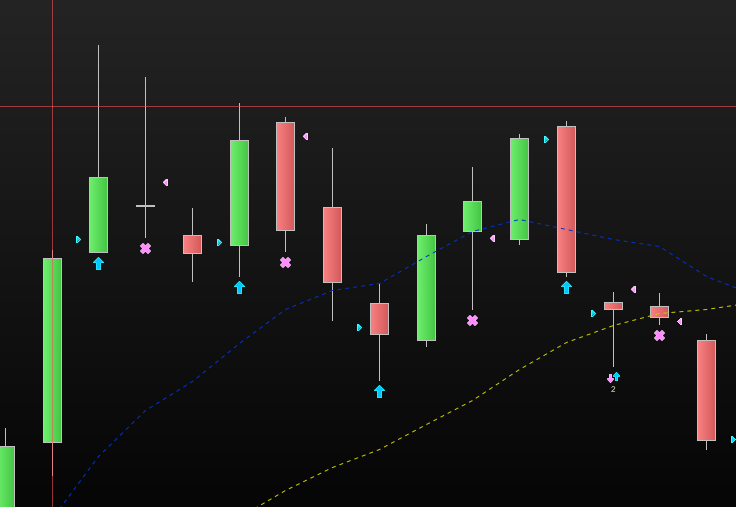
    I have created an indicator with the same calculation of the wick and this seem to be working fine, see attached picture. You can also see in the attached picture that entries is not according to my expected behaviour. What am I missing?

    Best regards

    Skarmbild-2024-06-05-090228.png Skarmbild-2024-06-05-090228.png
    #233521 quote
    Iván González
    Moderator
    Master

    Hi. The problem with your code comes when you have two or more bars “hammer” type.
    When a hammer bar appears the system buy 1 contract in the next bar open and sells after 1 bar.
    If you have 2 consecutive hammer bars the second one doesn’t exits for the system.
    In order to avoid it we can change the code like this:

    IF Hammer and not onmarket THEN
    BUY 1 CONTRACT AT MARKET
    ENDIF
    if onmarket then
    if hammer then
    buy 1 contract AT MARKET
    sell 1 contract at market
    else
    sell at market
    ENDIF
    endif

    if there are 3 consecutive candles with hammer type you should be on market 3 bars.

    druby and ATCOtrader thanked this post
    #233522 quote
    druby
    Participant
    New

    Is the Timeframe your displaying in image, the same as the running backtest code , image suggests no.

    What was your expected behaviour for the result.

    ATCOtrader thanked this post
    #233524 quote
    ATCOtrader
    Participant
    New

    Thank you very much for your replies!

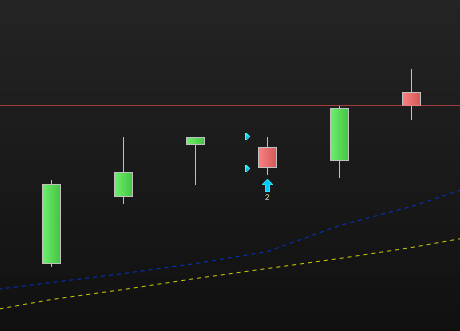
    It still doesn’t seem to work though. The picture is the same timeframe as the backtest.

    What I want to achieve is to have a backtest that buys when the wick under the body is x times as big as the wick above the body. I have updated my code with the input from above and also added the criteria that the wick under the body should be 3 times bigger than the one above in order for it to be easier to spot if it works or not.

    body=close-open
    
    if body>0 then
    bodytop=close
    bodybottom=open
    else
    bodytop=open
    bodybottom=close
    endif
    
    shadowtop=high-bodytop
    shadowbottom=bodybottom-low
    
    Hammer= Shadowbottom > 3 * Shadowtop
    Exit= (BarIndex - TradeIndex) = 1
    
    IF Hammer and not onmarket THEN
    BUY 1 CONTRACT AT MARKET
    ENDIF
    if onmarket then
    if hammer   then
    buy 1 contract AT MARKET
    sell 1 contract at market
    else
    sell at market
    ENDIF
    endif
    
    Skarmbild-2024-06-05-114431.png Skarmbild-2024-06-05-114431.png
    #233527 quote
    druby
    Participant
    New

    Try this,

    Comment out lines 15, 22 and 23  by placing // at the beginning of these lines

    15. Exiting after 1 bar seems to go against staying in.

    22,23 If in market, buying and then selling same qty is the same as staying in market at current qty.

    25. Then only sell if in market and closing bar is not a hammer.

    The logic appears to be ,

    If not on market, Buy at Market  on a Hammer,

    If on market sell Market  on  NOT hammer

    ATCOtrader thanked this post
    #233538 quote
    ATCOtrader
    Participant
    New

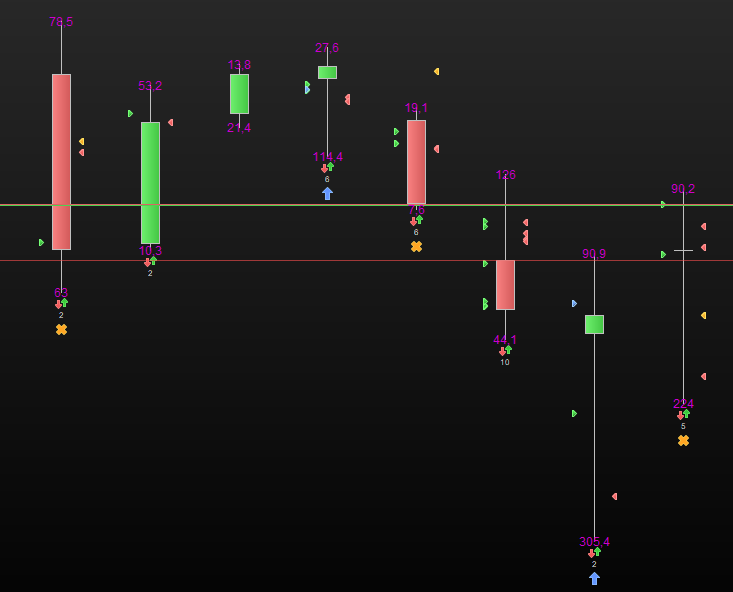
    Thank you, I have tried this but with no luck. There seems to something else that is off… I have made the code even more basic to prove the point -> buy all times condition is met. Result is that the system is buying at correct points mostly but sometimes it’s off. Sometimes it indicates two orders same day but with different execution dates (see picture). There must be something that is not in sync?

    body=close-open
    
    if body>0 then
    bodytop=close
    bodybottom=open
    else
    bodytop=open
    bodybottom=close
    endif
    
    shadowtop=high-bodytop
    shadowbottom=bodybottom-low
    
    Hammer= Shadowbottom > 3 * Shadowtop
    
    IF Hammer THEN
    BUY 1 CONTRACT AT MARKET
    ENDIF
    Skarmbild-2024-06-05-145451.png Skarmbild-2024-06-05-145451.png
    #233548 quote
    JS
    Participant
    Senior

    Hi,

    What you show (two orders/day) probably only happens on Friday…?

    ATCOtrader thanked this post
    #233551 quote
    ATCOtrader
    Participant
    New
    Yes, that is correct – it’s on a friday. Why is it that way? It shows entry the date day after (saturday), that must be wrong?
    #233552 quote
    JS
    Participant
    Senior

    Hi,

    Is IG that is “out of sync”…

    IG has a very nasty “Sunday candle”…

    What happens is: buy on Friday and then again on Sunday and then again on Monday… And when the option “don’t show weekend dates” is enabled, then the Sunday order shifts to Friday, hence the two orders on one day…

    ATCOtrader thanked this post
    #233557 quote
    ATCOtrader
    Participant
    New
    Thank you very much for that insight, explaines a whole lot for my strategies.. Thanks again!
    JS thanked this post
Viewing 10 posts - 1 through 10 (of 10 total)

  • You must be logged in to reply to this topic.

Candlestick calculation doesn’t seem to work


ProOrder: Automated Strategies & Backtesting

New Reply
Author
author-avatar
ATCOtrader @atcotrader Participant
Summary

This topic contains 9 replies,
has 4 voices, and was last updated by ATCOtrader
1 year, 8 months ago.

Topic Details
Forum: ProOrder: Automated Strategies & Backtesting
Language: English
Started: 06/05/2024
Status: Active
Attachments: 3 files
Logo Logo
Loading...