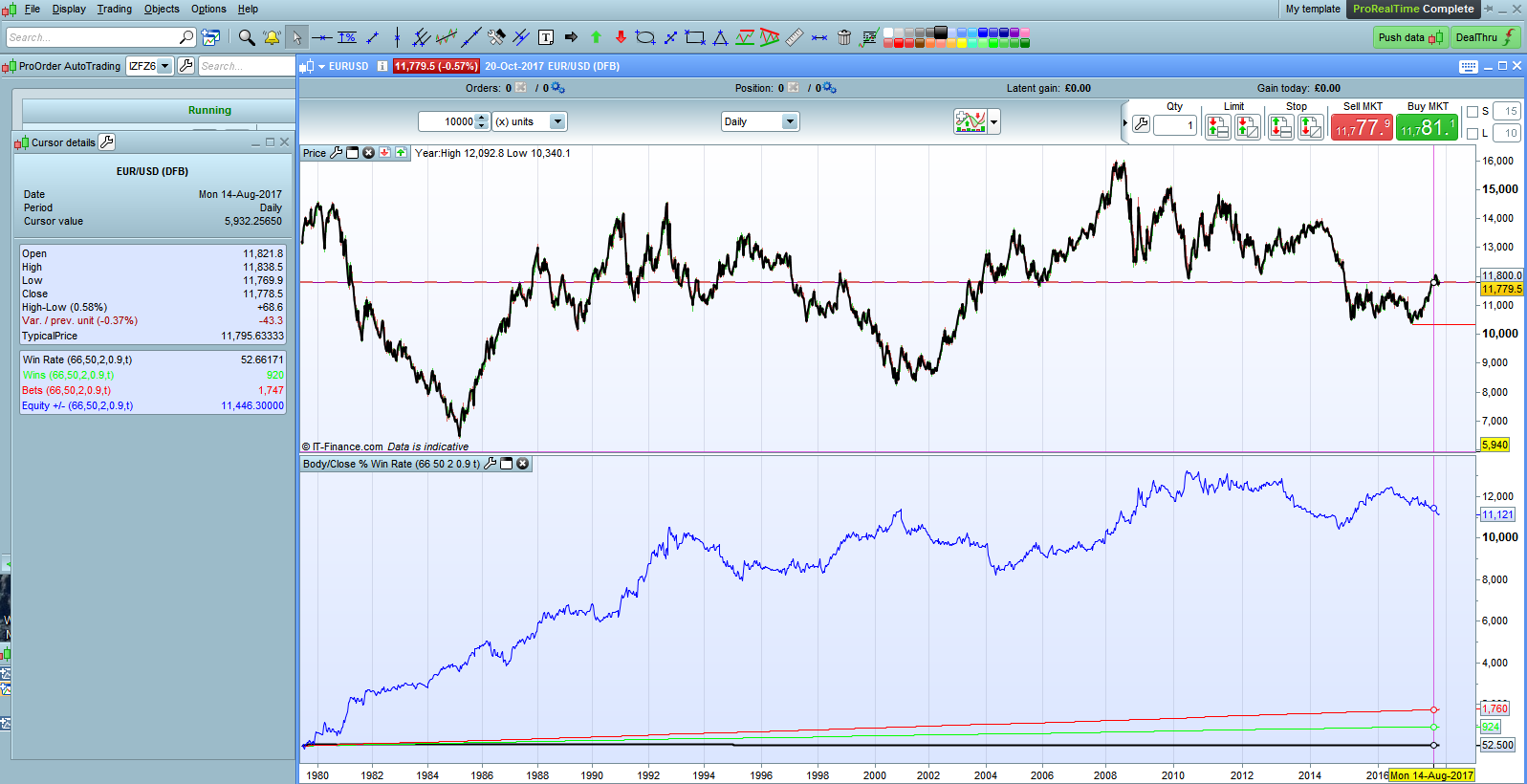
I thought I posted this but it disappeared! So apologies if it now appears twice.
In my search for the elusive ‘edge’ I wanted to analyse what effect the size of candlestick body compared to its range has on the probability of the next candle closing in the same direction. I also wanted to see what effect the close position within the range had. So I wrote a little code to do this. I then added a filter of ATR rising which seemed to give a little edge if set to a very short period. This ATR filter can be turned on or off.
I added an equity curve based on closing each position at the close of the next candle just to see what the result was. Interestingly most markets seemed to stop being profitable from this simple entry and exit criteria somewhere around the 90’s.
Although this is technically an analysis tool rather than an indicator I wrote it as an indicator rather than a strategy so I’ve posted it here. Any comments will be appreciated – especially if you spot something wrong as I wrote it after a couple of glasses of wine!
From a few quick tests on daily markets it seems that an edge of 2 to 4% can be gained over the 50/50 chance of random entry by considering the close position and body size – especially if the ATR filter is added.
//
//CandleStick Analysis Tool
//
//CloseLevel = Close price as % of Range
//BodyLevel = Total body size as % of Range
//ATRPeriod = Period to be used for ATR Rising filter
//Spread = Spread for market being analysed
//ATROn = Tick to apply ATRRising filter within analyse
//
//CandleStick Analysis Tool can be used to analyse the effect that candlestick bodysize and close position within range has on the next candle closing in the same direction. An AverageTrue Range filter can also be applied to analyse the benefits or disadvantage of this. The Equity +/- is calculated on close of position after one candle. Spread is deducted from each position.

//Average True Range Calculation
ATR = AveragetrueRange[ATRPeriod]
ATRRising = ATR[1] < ATR

//Body % Calculation
BodyPerc = ((ABS(close[1] - open[1]))/(High[1]-Low[1]))*100

//Close % Calculation
IF close[1] > Open[1] THEN
ClosePerc = ((Close[1] - Low[1])/(High[1] - Low[1]))*100
ENDIF

IF close[1] < Open[1] THEN
ClosePerc = ((High[1] - Close[1])/(High[1] - Low[1]))*100
ENDIF

//Analysis including ATR Filter
IF ATROn THEN
//Up Candle followed by Up Candle
IF BodyPerc > BodyLevel and close[1] > open[1] and close > close[1] and ClosePerc > CloseLevel and ATRRising THEN
Win = Win + 1
Count = Count + 1
Amount = Amount + ((Close - close[1])-Spread)
ENDIF

//Up Candle followed by Down Candle
IF BodyPerc > BodyLevel and close[1] > open[1] and close < close[1] and ClosePerc > CloseLevel and ATRRising THEN
Count = Count + 1
Amount = Amount - ((Close[1] - close)+Spread)
ENDIF

//Down Candle followed by Down Candle
IF BodyPerc > BodyLevel and close[1] < open[1] and close < close[1] and ClosePerc > CloseLevel and ATRRising THEN
Win = Win + 1
Count = Count + 1
Amount = Amount + ((Close[1] - close)-Spread)
ENDIF

//Down Candle followed by Up Candle
IF BodyPerc > BodyLevel and close[1] < open[1] and close > close[1] and ClosePerc > CloseLevel and ATRRising THEN
Count = Count + 1
Amount = Amount - ((Close - close[1])+Spread)
ENDIF

//Analysis without ATR Filter
ELSE
//Up Candle followed by Up Candle
IF BodyPerc > BodyLevel and close[1] > open[1] and close > close[1] and ClosePerc > CloseLevel THEN
Win = Win + 1
Count = Count + 1
Amount = Amount + ((Close - close[1])-Spread)
ENDIF

//Up Candle followed by Down Candle
IF BodyPerc > BodyLevel and close[1] > open[1] and close < close[1] and ClosePerc > CloseLevel THEN
Count = Count + 1
Amount = Amount - ((Close[1] - close)+Spread)
ENDIF

//Down Candle followed by Down Candle
IF BodyPerc > BodyLevel and close[1] < open[1] and close < close[1] and ClosePerc > CloseLevel THEN
Win = Win + 1
Count = Count + 1
Amount = Amount + ((Close[1] - close)-Spread)
ENDIF

//Down Candle followed by Up Candle
IF BodyPerc > BodyLevel and close[1] < open[1] and close > close[1] and ClosePerc > CloseLevel THEN
Count = Count + 1
Amount = Amount - ((Close - close[1])+Spread)
ENDIF
ENDIF

//Win Rate as %
WinRate = (Win/Count) * 100

Return WinRate coloured (0,0,0) Style(Line,2) as "Win Rate", Win coloured (0,255,0) Style(Line,1) as "Wins", Count coloured (255,0,0) Style(Line,1) as "Bets", Amount coloured (0,0,255) Style(Line,1) as "Equity +/-"
Forgot to add the ITF file so here it is.
Thanks Vonasi, very interesting concept. Did you try something with optimisation of the few variables with ProBacktest? You should consider it seriously.
 Bard
BardParticipant
Master
Interesting concept @Vonasi, thanks for the code. Is there anyway to change the length of hold period (for the equity curve calculation), it’s hard coded?
I’m wondering what would happen if the hold period was lengthened from one bar, sometimes a strong candle intimates bigger impending moves?
I’d forgotten this one!
It was really just coded as an analysis tool and not a strategy. It could be re-coded for longer hold periods by just changing the candle analysed to be close[n] instead of close[1] and by adjusting the profit /loss calculations to cover the longer period.
I’m a little too busy with boat maintenance at the moment to do it myself but feel free to give it a go. The code is quite logical and unusually well commented compared to my recent work!