 tonb
tonbParticipant
Junior
i am looking for a candele screener under the following conditions
High -Low max 10.0 points
There you go:
SCREENER[range <= 10.0 * pipsize](Range as "Range")
tonbParticipant
Junior
Thanks for the comment, unfortunately the code does not work in pro Builder and you receive an error message.
It can’t work in ProBuilder, it’s a screener to be used in ProScreener.
ProBuilder only deals with indicators.
This is the above code for ProBuilder:
RETURN (range <= 10.0 * pipsize)
tonbijl – Your topic title has been edited. Please try to follow the forum rules with any future topics.
- Give your topic a meaningful title. Describe your question or your subject in your title. Do not use meaningless titles such as ‘Coding Help Needed’.
tonbParticipant
Junior
Thanks for de code i’d like to add one more thing
Candel up high-close <=1 p
Candel down low-close <= 1 p
Can you add this to the code. thank you very much
There you go:
c1 = (range <= 10.0 * pipsize)
c2 = 0
IF close > open THEN
  c2 = (high - close) <= 1 * PipSize
ELSIF close < open THEN
  c2 = (close - low)  <= 1 * PipSize
ENDIF
Cond = c1 AND c2
SCREENER[Cond](Range as "Range")
tonbParticipant
Junior
Thanks for the comment, unfortunately the code does not work in pro Builder and you receive an error message.
tonbijl – You clearly want indicator help and not screener help so I have changed your title and moved your topic from the screener forum to the indicator forum.
Try to be a little clearer with what you actually need with any future posts to try to save confusion and wasted time.
c1 = (range <= 10.0 * pipsize)
c2 = 0
IF close > open THEN
c2 = (high - close) <= 1 * PipSize
ELSIF close < open THEN
c2 = (close - low) <= 1 * PipSize
ENDIF
Cond = c1 AND c2

return Cond
tonbParticipant
Junior
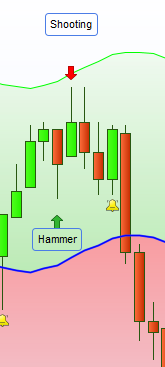
is it possible to add this formula to the indicator Above
shooting = (min(open,close)-low)/range<=.5 and (open-low)/range<=.5 and (close-low)/range<=.5
hammer = (high-max(open,close))/range<=.5 and (high-open)/range<=.5 and (high-close)/range<=.5

return -shooting,hammer
tonbijl – Once again I have had to tidy up your post. It was a HTML mess – are you cutting and pasting from a translation app? If so please stop doing it. If your post looks wrong then you have five minutes to edit it or delete it after clicking submit.
You also failed to use the ‘Insert PRT Button’ when posting code as requested in the forum rules. I tidied that up too.
On top of this you have posted two topics so far and managed to put both in the wrong forums
You have also failed to give both of your topics meaningful titles.
You are creating a lot of work for moderators having to tidy up your posts so please re-read and understand the few simple forum rules before posting again.
The forum rules are the things written under the text box and above the ‘submit’ button if you are struggling to find them.
tonbParticipant
Junior
Sorry for the inconvenience this is the complete code
shooting = (min(open,close)-low)/range<=.5 and (open-low)/range<=.5 and (close-low)/range<=.5
hammer = (high-max(open,close))/range<=.5 and (high-open)/range<=.5 and (high-close)/range<=.5

return -shooting,hammer
I hope it is possible to complete the code
Why are you posting it again!!! ? I already said that I tidied up your last post and inserted the code.
c1 = (range <= 10.0 * pipsize)
c2 = 0
IF close > open THEN
c2 = (high - close) <= 1 * PipSize
ELSIF close < open THEN
c2 = (close - low) <= 1 * PipSize
ENDIF

shooting = (min(open,close)-low)/range<=.5 and (open-low)/range<=.5 and (close-low)/range<=.5
hammer = (high-max(open,close))/range<=.5 and (high-open)/range<=.5 and (high-close)/range<=.5

Cond = c1 AND c2 and (shooting or hammer)

return Cond
tonbParticipant
Junior
I would like to adjust the indicator as in the atttached examle under the same conditions