Can multiple Lists be displayed at the same time?

Viewing 8 posts - 1 through 8 (of 8 total)

  • Author
    Posts
  • #196571 quote
    inverse
    Participant
    New


    Hello All,

    Are multiple lists doable? Been poking around and there’s not a vanilla option to do so (or one that I’ve found yet).

    To put it another way, can you display two lists side by side, or more for that matter?


    Many thanks in advance.

    INV

    #196575 quote
    PeterSt
    Participant
    Master

    An answer “as many as you like” would probably overdoing it, but still that would be an answer from me without trying really (that obvious it is).
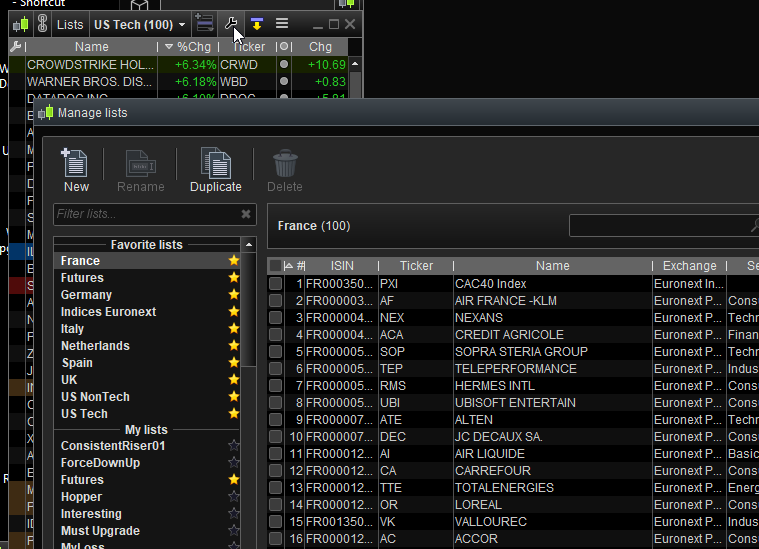
    See the wrench under the mouse pointer, below. Or from the main menu in the 2nd attachment.

    image_2022-07-02_025752170.png image_2022-07-02_025752170.png image_2022-07-02_030027473.png image_2022-07-02_030027473.png
    #196589 quote
    inverse
    Participant
    New

    Nothing here on the version I’m running through IG (11.1)

    I’ve poked about a few weeks back and thought it was a feature. One list at a time displayed.

    Are you displaying the Lists proper. Side by side, not just the single list or how many you have created – it’s not in your attached reply that I can see.


    Pull up a couple side by side, I’ll let you choose, any of the predefined will do … 🙂

    #196590 quote
    inverse
    Participant
    New

    See the wrench under the mouse pointer, below. Or from the main menu in the 2nd attachment.

    I can see what you have here as well on 11.1

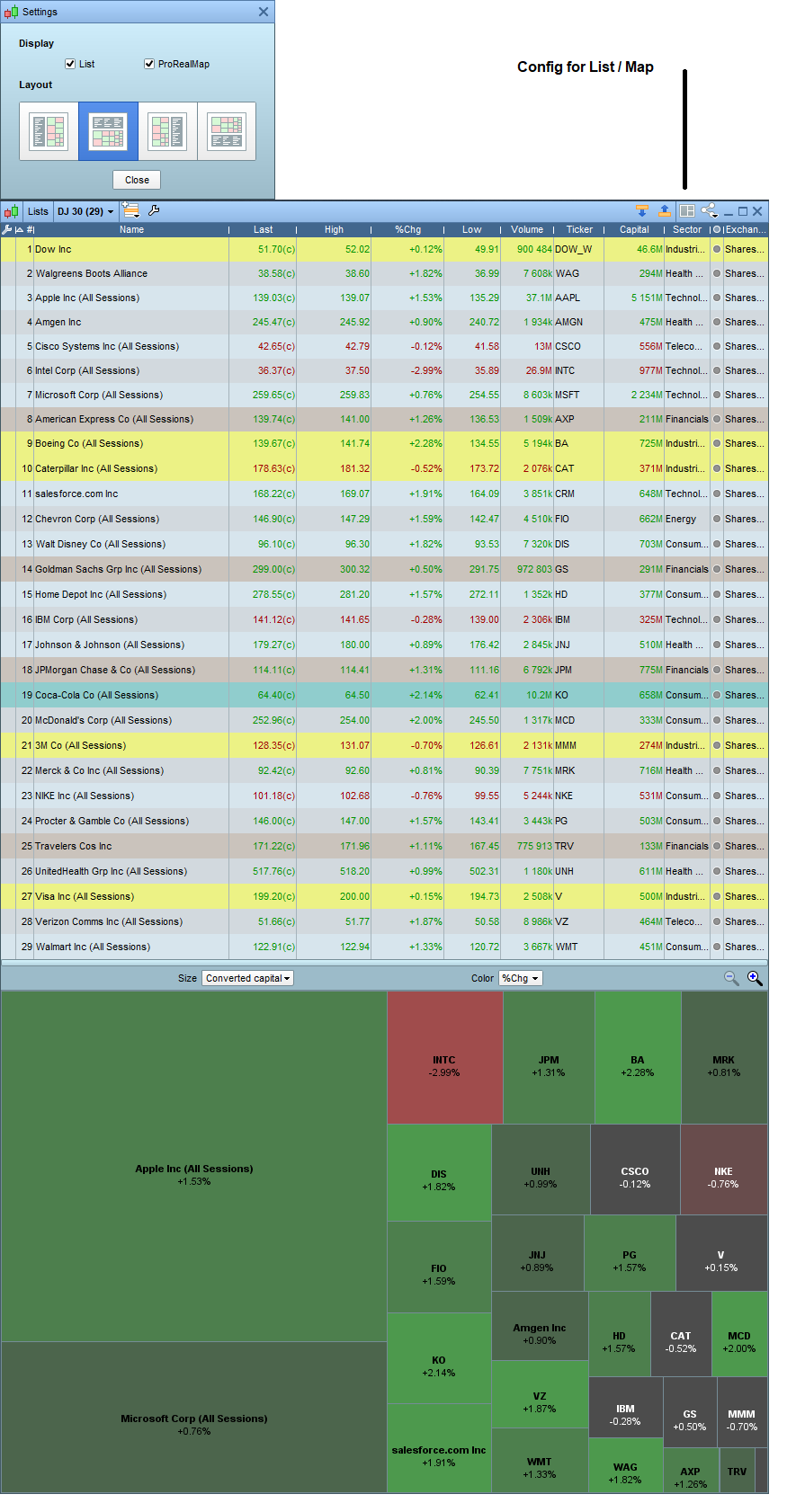
    What I was looking for was a way to display 2 Lists side by side. For example, as you have US Tech in the background, now drop another next to it, any complete list would be fine but have two side by side and then blowup a heatmap (prorealmap) below both.

    #196594 quote
    PeterSt
    Participant
    Master

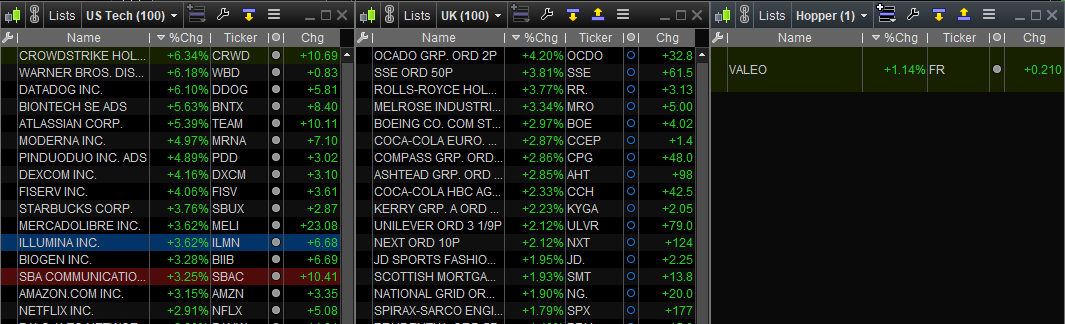
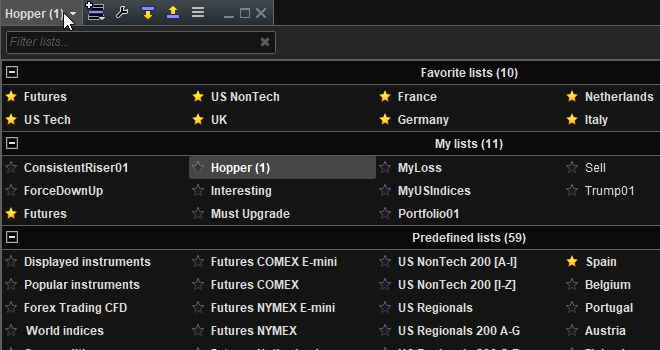
    I must investigate the ProRealMap (maybe I never heard of it 😉 ) but is below answering your other half of the question ? (possibly I just don’t understand what you are referring to)
    The third one is a List I made myself.

    As you can see I even have a Trump list. Just in case. Haha.


    PS: Can you show an example of “ProRealMap” ?

    image_2022-07-02_083203760.png image_2022-07-02_083203760.png image_2022-07-02_083334232.png image_2022-07-02_083334232.png
    #196600 quote
    inverse
    Participant
    New

    Yes you have and thankyou. What rev. are you running?

    Are you a standalone customer or is your PRT bundled with a broker?

    I don’t have the option to have another ‘List’ window only the one.

    Look, it could be operator error, too lol


    PS. Going a bit silly over it too, could have sworn I’d seen it before!

    heatmaps_prt.png heatmaps_prt.png
    #196603 quote
    inverse
    Participant
    New

    Hmm, further reading show’s it’s version dependent:

    Complete vs Premium

    PS. Do you have access to AUS market? From memory it wasn’t available in standalone flavor bitd.

    #196612 quote
    PeterSt
    Participant
    Master

    Complete vs Premium

    Indeed. I just checked and that is the reason; with Complete you can’t load another one.

Viewing 8 posts - 1 through 8 (of 8 total)
  • You must be logged in to reply to this topic.

Can multiple Lists be displayed at the same time?


Platform Support: Charts, Data & Broker Setup

New Reply
Author
author-avatar
inverse @inverse Participant
Summary

This topic contains 7 replies,
has 2 voices, and was last updated by PeterSt

3 years, 7 months ago.

Topic Details
Forum: Platform Support: Charts, Data & Broker Setup
Language: English
Started: 07/01/2022
Status: Active
Attachments: 5 files
Logo Logo
Loading...