Camarilla Indicator with High , Low , Close displayed

Viewing 4 posts - 1 through 4 (of 4 total)
  • Author
    Posts
  • #93109 quote
    topcla987
    Participant
    Junior

    Hi

    I am looking to create an indicator which allows someone to enter the Daily High, Low and Close for

    any instrument.

    From these figures it will draw those three lines on the chart along with calculating the Camarilla

    pivots which would also be displayed.  I have tried using the Camarilla indicator from this forum but cant amend  program the

    way I want it too.


    Any help would be greatly appreciated

    Mick

    #93112 quote
    robertogozzi
    Moderator
    Master

    Do you want those data to be entered with the indicator properties?

    #93116 quote
    topcla987
    Participant
    Junior

    Yes- the daily high, low and close would be the inputs


    Everything else is calculated from these and displayed as lines

    #93121 quote
    robertogozzi
    Moderator
    Master

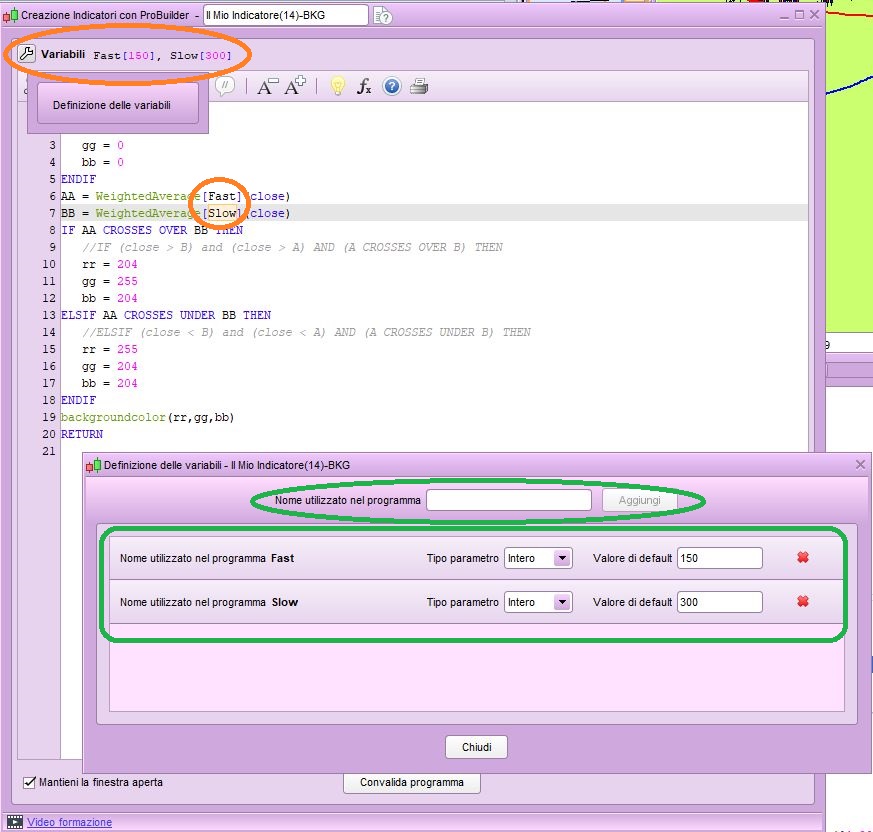
    You need to click the spanner on the upper left corner of your indicator, then add all variables needed, assigning them default values (in this case 0 or whatever you prefer).

    Then you can use those variables as any other variable.

    x-6.jpg x-6.jpg
Viewing 4 posts - 1 through 4 (of 4 total)
  • You must be logged in to reply to this topic.

Camarilla Indicator with High , Low , Close displayed


ProBuilder: Indicators & Custom Tools

New Reply
Author
author-avatar
topcla987 @topcla987 Participant
Summary

This topic contains 3 replies,
has 2 voices, and was last updated by robertogozzi
6 years, 11 months ago.

Topic Details
Forum: ProBuilder: Indicators & Custom Tools
Language: English
Started: 03/07/2019
Status: Active
Attachments: 1 files
Logo Logo
Loading...