Hi all,
I’am using a For loop to detecting a cross over, but how to include in the condition to get the first result only if the ema1 > ema2 from 0 to X ? I tried many soltuion but I still very bad and very old to find a solution 🙂
ema1 = Average[10,1]
ema2 = Average[20,1]
Offset = 10 * pipsize

// (。♥‿♥。) Block Start
FOR X = 0 to 100
   IF ema1 Crosses Over ema2 Then
      BarInd = Barindex[X]
      CouCou = 1
      Break
   ELSE
      CouCou = 0
ENDIF
NEXT
// Block End (。♥‿♥。)

IF CouCou Then
DRAWELLIPSE(BarInd-1,LOW[X]-Offset,BarInd+1,HIGH[X]+Offset)coloured(255,10,10)
ENDIF

Return ema1, ema2
tks in advance to any help, all idea is welcome
Try this as line 7:
IF ema1[X] Crosses Over ema2[X] Then
Try this as line 7:
|
|
IF ema1[X] Crosses Over ema2[X] Then
|
Hi Roberto and tks for your answers, I know your answer, because I made the code quikly yesterday ans so tyred, So your answer is very right, but I need also check all the condition like ema1[X] > ema2[X], I mean befaore finding the
IF ema1[X] Crosses Over ema2[X] Then
// I need also to check if the

IF ema1[X] > ema2[X] // from 0 to X
I found this solution I think from Nicola here, but I think it’s wrong, but It will help me to find my way
Can you explain exactly what are the two conditions to be detected and in which order?
that is an other code :
Lma= (Average[20](close))
Sma= (average[10](close))
Offset = 10 * pipsize
a= 0

// (。♥‿♥。) Block Start
IF Sma > Lma Then
For variable= 0 to 15 do
//a=a+1
IF (Sma[variable] > Lma[variable]) then
a=a+1
ENDIF
// a=a+(Sma[variable] > Lma[variable])

IF Sma[variable] Crosses Over Lma[variable] Then
BarIndCrosseOver = Barindex[variable]
Break
ENDIF
Next
ENDIF
// Block End (。♥‿♥。)

// (。♥‿♥。) Block Start
condition1= a=variable
// Block End (。♥‿♥。)

// (。♥‿♥。) Block Start
// Drawing
IF condition1 Then
BACKGROUNDCOLOR (0, 155, 10, 25)
ENDIF
IF condition1 AND NOT condition1[1] Then
DRAWELLIPSE(BarIndCrosseOver-1,LOW[variable]-Offset,BarIndCrosseOver+1,HIGH[variable]+Offset)coloured(255,10,10)
DRAWTEXT("V = #a#", BarIndCrosseOver, Low - Offset)
ENDIF
// Block End (。♥‿♥。)

Return Lma as "Long SMA", Sma as "Short SMA"
I want to check from 0 to 15 :
– Sma > Lma
– get the barindex of last Lma Crosses Over Sma
– and color with Green when my Lma > Sma
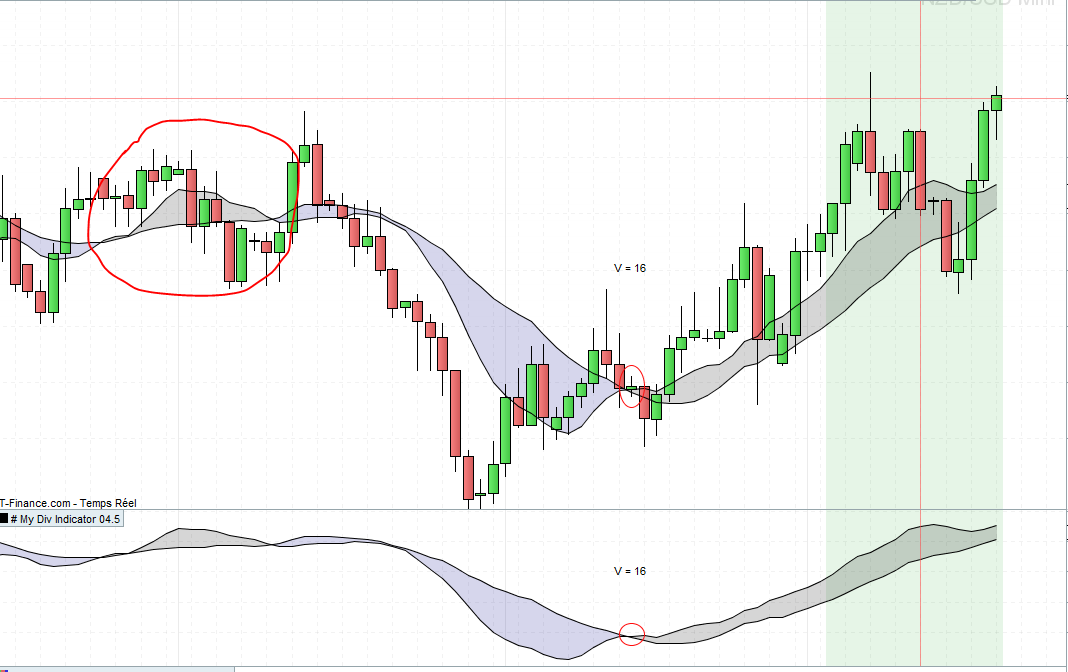
the Idea of coloring the backgrown it’s just to know when my condition is true, the idea is to use this condition like an On Off button, so if my condition is On I will do other think but if my condititon go from On to Off so I don’t do anythink,
I put a photo, in the red cercle I can’t detect my condition because my Varaiable value is 16, so I think I have to use a first Break to get the variable value and after do a continue and do an other break, I’m not sure about programming
tks in advance
It’s an inner feature of the iteration FOR…NEXT, the counter is first incremented, then the iteration ends when that number is greater than the one betweeen TO and DO. You can ALWAYS subtract 1, unless it is exited with BREAK, as in this case the iteration is exited BEFORE the the counter is incremented. To accomplish that you need to use a variable to be assigned 1 when the counter needs to be drecremented and 0 when it does not (not tested):
Lma= (Average[20](close))
Sma= (average[10](close))
Offset = 10 * pipsize
a= 0
DecValue = 1
// (。♥‿♥。) Block Start
IF Sma > Lma Then
For variable= 0 to 15 do
//a=a+1
IF (Sma[variable] > Lma[variable]) then
a=a+1
ENDIF
// a=a+(Sma[variable] > Lma[variable])

IF Sma[variable] Crosses Over Lma[variable] Then
BarIndCrosseOver = Barindex[variable]
DecValue = 0
Break
ENDIF
Next
ENDIF
// Block End (。♥‿♥。)

// (。♥‿♥。) Block Start
//condition1= a=variable  //this will assign condition1 a logical value (shoulf be always 1)
condition1= max(0,a-DecValue)
// Block End (。♥‿♥。)

// (。♥‿♥。) Block Start
// Drawing
IF condition1 Then
BACKGROUNDCOLOR (0, 155, 10, 25)
ENDIF
IF condition1 AND NOT condition1[1] Then
DRAWELLIPSE(BarIndCrosseOver-1,LOW[variable]-Offset,BarIndCrosseOver+1,HIGH[variable]+Offset)coloured(255,10,10)
DRAWTEXT("V = #a#", BarIndCrosseOver, Low - Offset)
ENDIF
// Block End (。♥‿♥。)

Return Lma as "Long SMA", Sma as "Short SMA"
tks you so much Roberto, I find an other way to resolve my other problem and I understand and don’t understand in the same time your solution because I’m too old :-), again tks you so much to your answers it’s seems working just a small problem with drawing many ellipse, I will try again to understand your idea and come back to this thread, again tks you