Bollinger Bands with Shift (offset)

Viewing 10 posts - 1 through 10 (of 10 total)

  • Author
    Posts
  • #104282 quote
    Jozo
    Participant
    Junior

    Hi Members, I am looking for Bollinger Bands with the shift (offset) feature. Any help will be much appreciated.

    Jozo

    #104285 quote
    robertogozzi
    Moderator
    Master

    What do you want to be shifted?

    #104287 quote
    Jozo
    Participant
    Junior

    Hi

    What I do need is the bollinger bands as follows Standard in brackets:

    Periods: (20)

    Shift/Offset days: ()

    Standard Deviation: (2.0)

    Then it offers me a chance to set it up as I wish with various day, sd and shift parameters.

    Thanks

    #104294 quote
    robertogozzi
    Moderator
    Master

    There you go:

    //BBVal= 20                                                //20   periods BB
    //BBdev= 2.0                                               //2.0  deviation BB
    BBval  = max(2,min(999,BBval))                             //2 - 999
    BBdev  = max(1.0,min(99.9,BBdev))                          //1.0 - 99.9
    BBavg  = average[BBval,1](close)                           //BB mean (middle line)  -  1=ema
    BollUp = BBavg + ((std[BBval](close)) * BBdev)             //BB Upper Band
    BollDn = BBavg - ((std[BBval](close)) * BBdev)             //BB Lower Band
    RETURN BBavg AS "Mean",BollUp AS "Top",BollDn AS "Bottom"
    //BBVal   = 20                                               //20   periods BB
    //BBdev   = 2.0                                              //2.0  deviation BB
    //ShiftNum= 0                                                //0    numbers of shifted periods
    BBval     = max(2,min(999,BBval))                            //2 - 999
    BBdev     = max(1.0,min(99.9,BBdev))                         //1.0 - 99.9
    ShiftNum  = max(0,min(99,ShiftNum))                          //0 - 99
    BBavg     = average[BBval,1](close[ShiftNum])               //BB mean (middle line)  -  1=ema
    BollUp    = BBavg + ((std[BBval](close[ShiftNum])) * BBdev) //BB Upper Band
    BollDn    = BBavg - ((std[BBval](close[ShiftNum])) * BBdev) //BB Lower Band
    RETURN BBavg AS "Mean",BollUp AS "Top",BollDn AS "Bottom"

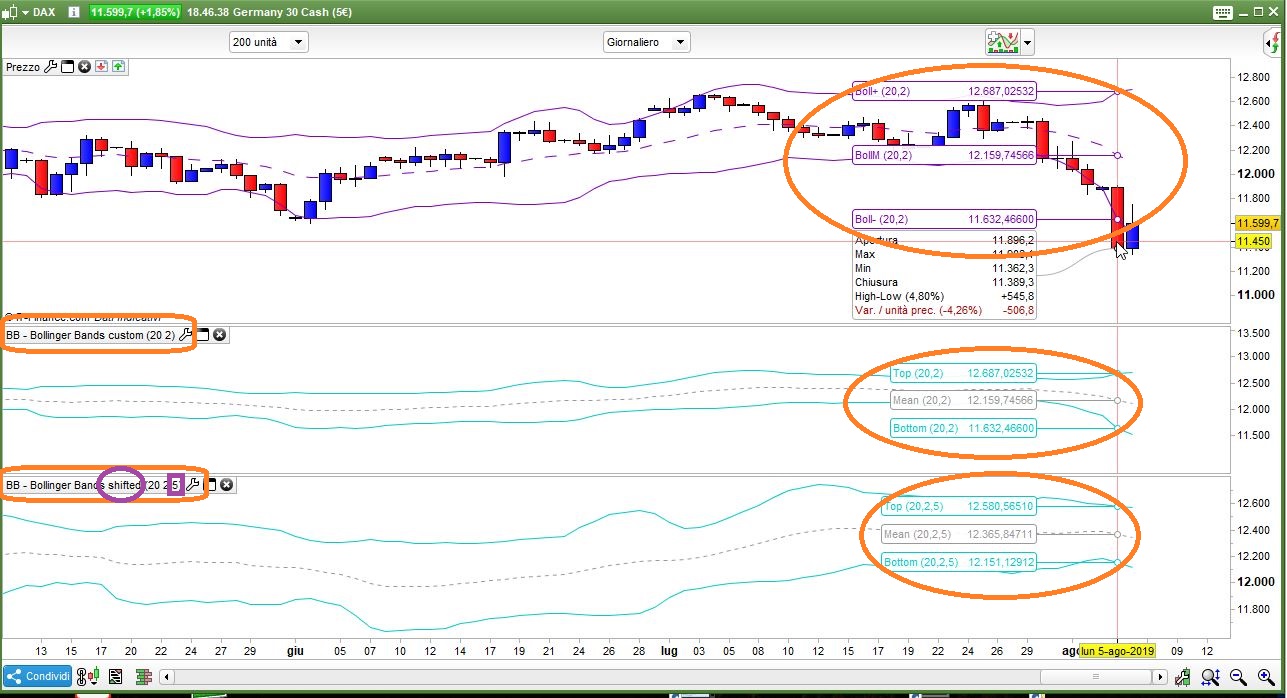
    you cam import attached ITF file(s).

    I hope that’s what you wanted (0=no shifting, 1=shift 1 period, ……).

    x-3.jpg x-3.jpg BB-Bollinger-Bands-custom.itf BB-Bollinger-Bands-shifted.itf
    #104305 quote
    Jozo
    Participant
    Junior

    Hi Robertogozzi,

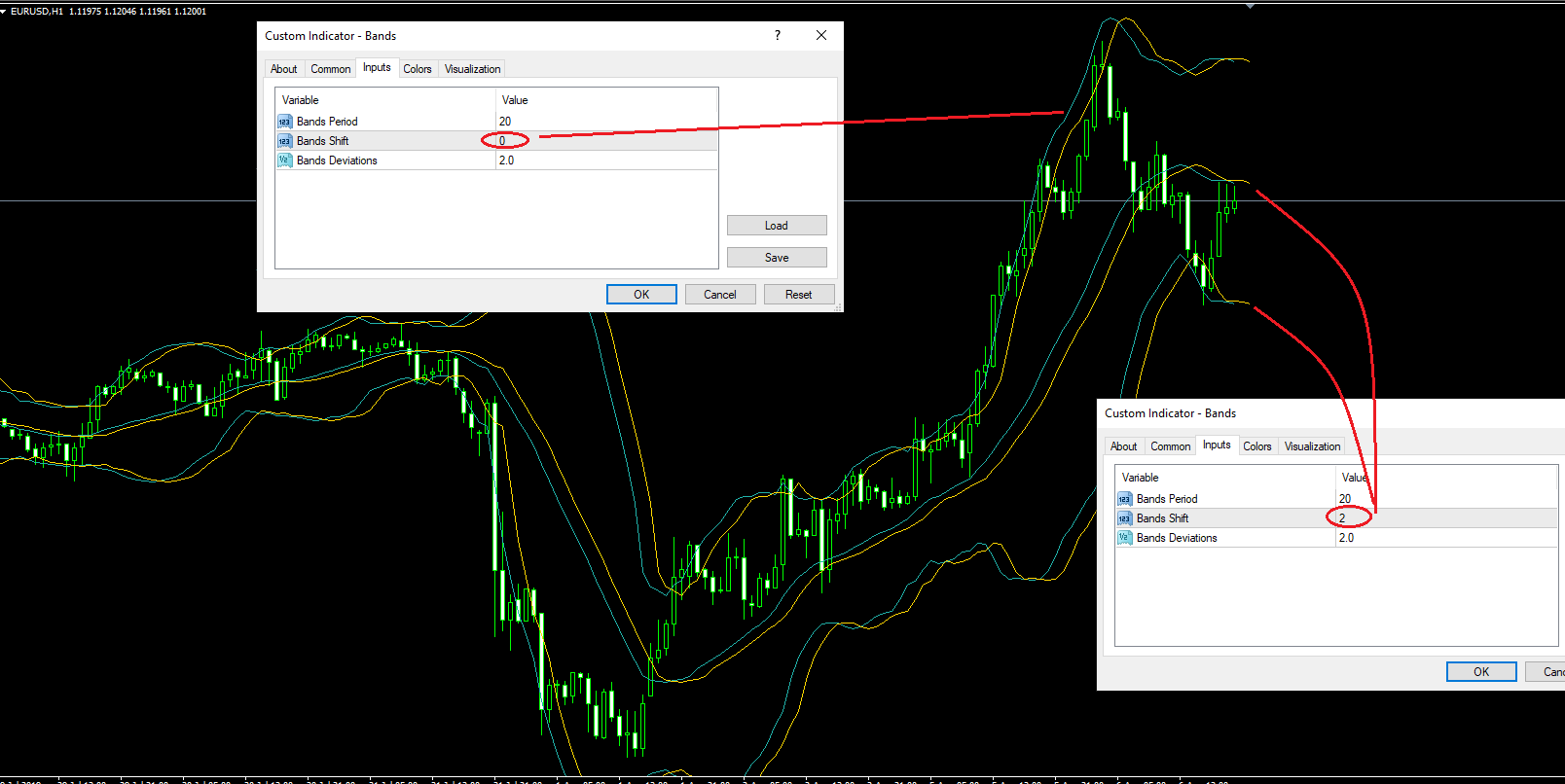
    Thank you very much for your assistance. Perhaps I did not explain myself well. What I mean by shift is to be able to move the bands forward (+ number) or backward (- number).  for example here is an example on MT4.

    The indicator you have provided is not doing that as shown.

    Thanks again.

    Bollinger-Bands-shifted-example.png Bollinger-Bands-shifted-example.png
    #104311 quote
    Jozo
    Participant
    Junior

    Oh, may be it is working well as required. Sorry, because I didn’t see the extension ahead of price,I thought it was not. But seems you have coded it not to show. Is that correct?

    #104319 quote
    Jozo
    Participant
    Junior

    I have now checked it with my MT4 comparison, it is working very well. Thank you so much. I am new to this platform.

    #132354 quote
    robertogozzi
    Moderator
    Master

    @Jozo

    Sorry for not replying to you. I missed it. Indeed only PRT can plot into the future (like Ichimoku), not us users!

    Actually v11.x allows to plot objects into the future, but not returned data.

    #148034 quote
    rimskys
    Participant
    New

    Thanks for the code. It shifts the indicator forward.

    How can we shift an indicator backwards (to the left) ?

    #148118 quote
    robertogozzi
    Moderator
    Master

    There you go:

    //BBVal   = 20                                               //20   periodi BB
    //BBdev   = 2.0                                              //2.0  deviazione BB
    //ShiftNum= 0                                                //0    numbers of shifted periods o the LEFT
    BBval     = max(2,min(999,BBval))                            //2 - 999
    BBdev     = max(1.0,min(99.9,BBdev))                         //1.0 - 99.9
    ShiftNum  = max(0,min(99,ShiftNum))                          //0 - 99
    IF BarIndex > (BBval + ShiftNum) THEN
       BBavg     = average[BBval,1](close)                          //BB mean (middle line)  -  1=ema
       BollUp    = BBavg + ((std[BBval](close)) * BBdev)            //BB Upper Band
       BollDn    = BBavg - ((std[BBval](close)) * BBdev)            //BB Lower Band
       BarNum    = BarIndex - ShiftNum
       DRAWSEGMENT(BarNum[1],BBavg[1] ,BarNum,BBavg)  coloured(255,0,0,255)
       DRAWSEGMENT(BarNum[1],BollUp[1],BarNum,BollUp) coloured(0,0,255,255)
       DRAWSEGMENT(BarNum[1],BollDn[1],BarNum,BollDn) coloured(0,0,255,255)
    ENDIF
    RETURN

    since no data are RETURNed (it plots lines with a graphical instruction), the cursor cannot show any info about these bands.

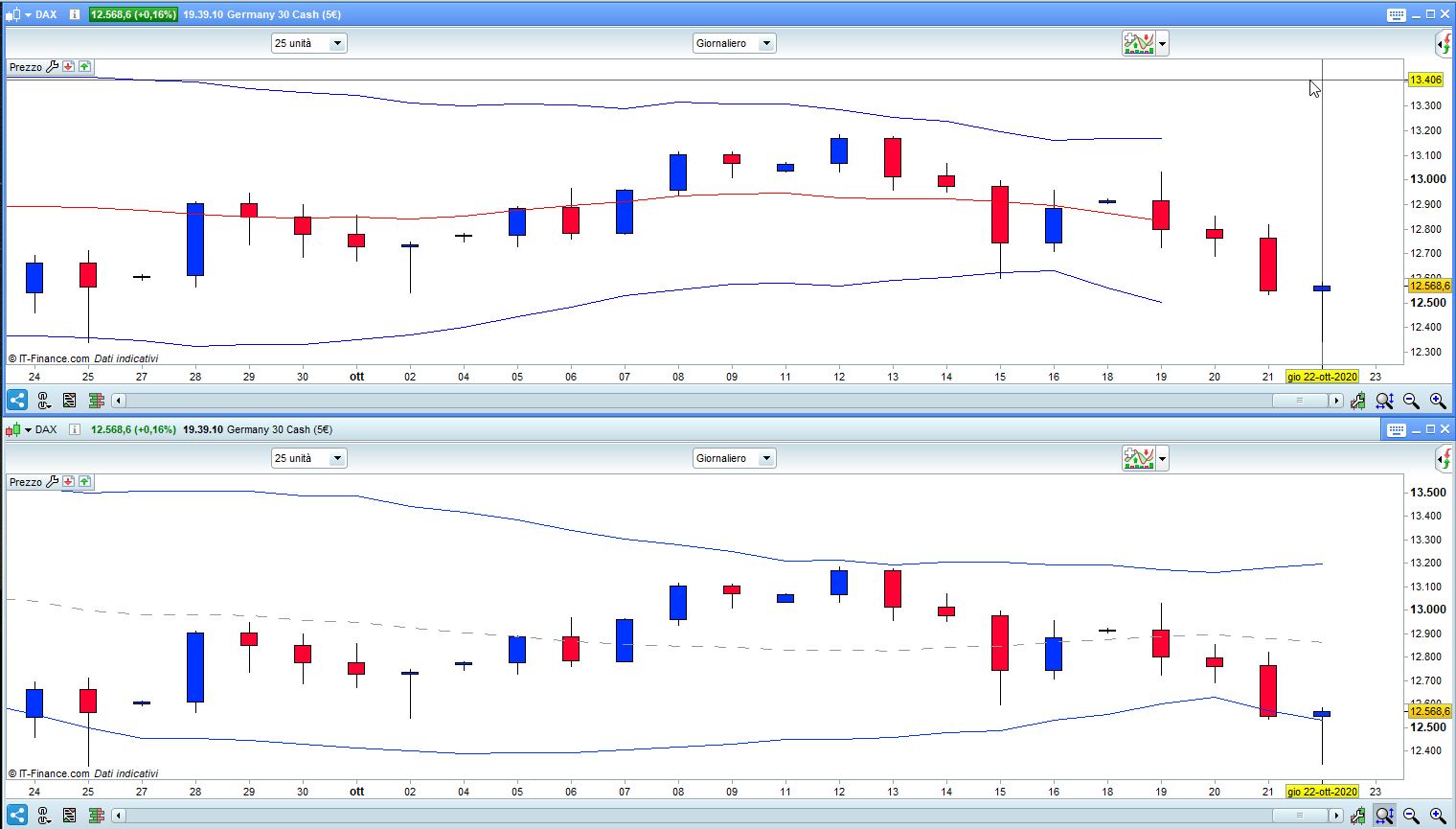
    In my screenshot the upper chart is shifted leftwards by 3 bars.

    x-7.jpg x-7.jpg BB-BollingerBands-shifted-LEFT.itf
Viewing 10 posts - 1 through 10 (of 10 total)
  • You must be logged in to reply to this topic.

Bollinger Bands with Shift (offset)


ProBuilder: Indicators & Custom Tools

New Reply
Author
author-avatar
Jozo @jozo Participant
Summary

This topic contains 9 replies,
has 3 voices, and was last updated by robertogozzi
5 years, 3 months ago.

Topic Details
Forum: ProBuilder: Indicators & Custom Tools
Language: English
Started: 08/06/2019
Status: Active
Attachments: 6 files
Logo Logo
Loading...