hi everyone,
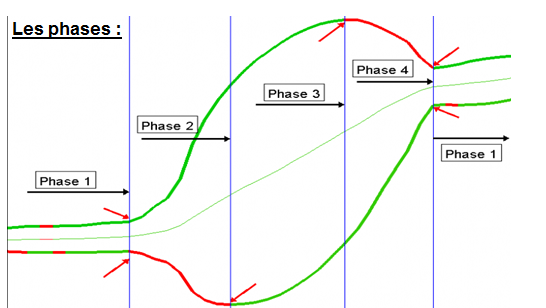
Do you know if there is a code here on the platform to detect the phases of the bollinger bands?
If it does not exist I would like to code it
Best Reguards,
ZeroCafeine
tks you Nicola, I saw it but I’m not sure it’s the same with different phase, tomorrow I will take my time to understand the code on the link you gave me and answer again, and tks again for quick answer
Phase 1 is one of those things which is easy with the eyes, but which needs coding criteria that may conclude differently for some cases… One way to not overcomplicate phase 1 coding is to consider bollinger bandwidth (variable bbw in code below) below a certain limit, chosen by user (variable bbwlimit in code below). Phases 2, 3, 4 are easy as soon as boll bandwidth is above your limit.
bbw=BollingerBandWidth[20](close)
bsup=BollingerUp[20](close)
binf=BollingerDown[20](close)

bbwlimit=0.003

if bbw<=bbwlimit then
phase=1
elsif bsup>bsup[1] and binf<binf[1] then
phase=2
elsif (bsup>bsup[1] and binf>binf[1]) or (bsup<bsup[1] and binf<binf[1]) then
phase=3
elsif bsup<bsup[1] and binf>binf[1] then
phase=4
else
phase=phase[1]
endif

return phase
I will to try to understand you code tomorrow, but can you tell me from where or why 0.003 ?
Just read the explanation from JC in the last post, it is well explained IMO.
There is no “universal” setting accross time units and instruments to detect phase 1, so we need a trigger, that’s the reason 🙂
Tks you Nico ☺️
I totally agree with you, and I know it’s not easy, but I study a lot for it, I will try to make something correct, about the ph1 I know it’s not easy to detect but using the volatility cycle and some other idea it will be possible to make something, for detecting the ph1 I will use the ph3 and 4 and volatility for maybe try to detect the ph1, I will come back on this thread when I will in my office this afternoon
I know this one available in the scripts library: https://www.prorealcode.com/prorealtime-indicators/multicolour-bollinger-bands-market-phases/
tks you Nicola, I saw the code and try to understand it, it’s just based on moving average to detect the phase and I think it’s not like that, but it’s a good idea and it will help me to restart to program, tks again
Phase 1 is one of those things which is easy with the eyes, but which needs coding criteria that may conclude differently for some cases… One way to not overcomplicate phase 1 coding is to consider bollinger bandwidth (variable bbw in code below) below a certain limit, chosen by user (variable bbwlimit in code below). Phases 2, 3, 4 are easy as soon as boll bandwidth is above your limit.
bbw=BollingerBandWidth[20](close)
bsup=BollingerUp[20](close)
binf=BollingerDown[20](close)
bbwlimit=0.003
if bbw<=bbwlimit then
phase=1
elsif bsup>bsup[1] and binf<binf[1] then
phase=2
elsif (bsup>bsup[1] and binf>binf[1]) or (bsup<bsup[1] and binf<binf[1]) then
phase=3
elsif bsup<bsup[1] and binf>binf[1] then
phase=4
else
phase=phase[1]
endif
return phase
1
2
3
4
5
6
7
8
9
10
11
12
13
14
15
16
17
18
19
bbw=BollingerBandWidth[20](close)
bsup=BollingerUp[20](close)
binf=BollingerDown[20](close)
bbwlimit=0.003
if bbw<=bbwlimit then
phase=1
elsif bsup>bsup[1] and binf<binf[1] then
phase=2
elsif (bsup>bsup[1] and binf>binf[1]) or (bsup<bsup[1] and binf<binf[1]) then
phase=3
elsif bsup<bsup[1] and binf>binf[1] then
phase=4
else
phase=phase[1]
endif
return phase
tks again, I understand why 0.003
some one can tell me how to do for my condition C1 and C2 is tru on a minimum of N bar ? I no want to use somethink like C1 = BBup > BBup[1] AND BBup[1] > BBup[2] AND …etc
// (。♥‿♥。) Block Start
BBup   = BollingerUp[nBB](close)
BBDown = BollingerDown[nBB](close)
max1 = BollingerUp[nBB]
min1 = BollingerDown[nBB]
// Block End (。♥‿♥。)

// (。♥‿♥。) Block Start
// Conditions : C1/C2
C1 = BBup > BBup[1] //AND BBup[1] > BBup[2] AND BBup[2] > BBup[3]
C2 = BBDown < BBDown[1] //AND BBDown[1] < BBDown[2] AND BBDown[2] < BBDown[3]
Signal = 0
// Block End (。♥‿♥。)

AllCondition = C1 AND C2

IF AllCondition Then
Signal = 1
DRAWCANDLE(max1, min1, max1, min1) Coloured (0, 255, 0, 42)
ELSE
Signal = 0
ENDIF

Return
I will try with some For boucle and come back when I have somethink
 JS
JSParticipant
Master
Hoi @ZeroCafeine
Alternatively, you could use the conditions for Phase 2 (expansion / increase in volatility):
Fase 2 => BBup > BBup[n] and BBDown < BBDown[n]
In collaboration with the slope of the average for determining the direction of the price .
Hoi @ZeroCafeine
Alternatively, you could use the conditions for Phase 2 (expansion / increase in volatility):
Fase 2 => BBup > BBup[n] and BBDown < BBDown[n]
In collaboration with the slope of the average for determining the direction of the price .
tks for your help, it’s a nice idea to use the slope of the average but for me I use it now just in the ph3, it’s can help, in ph2 is more complicated,
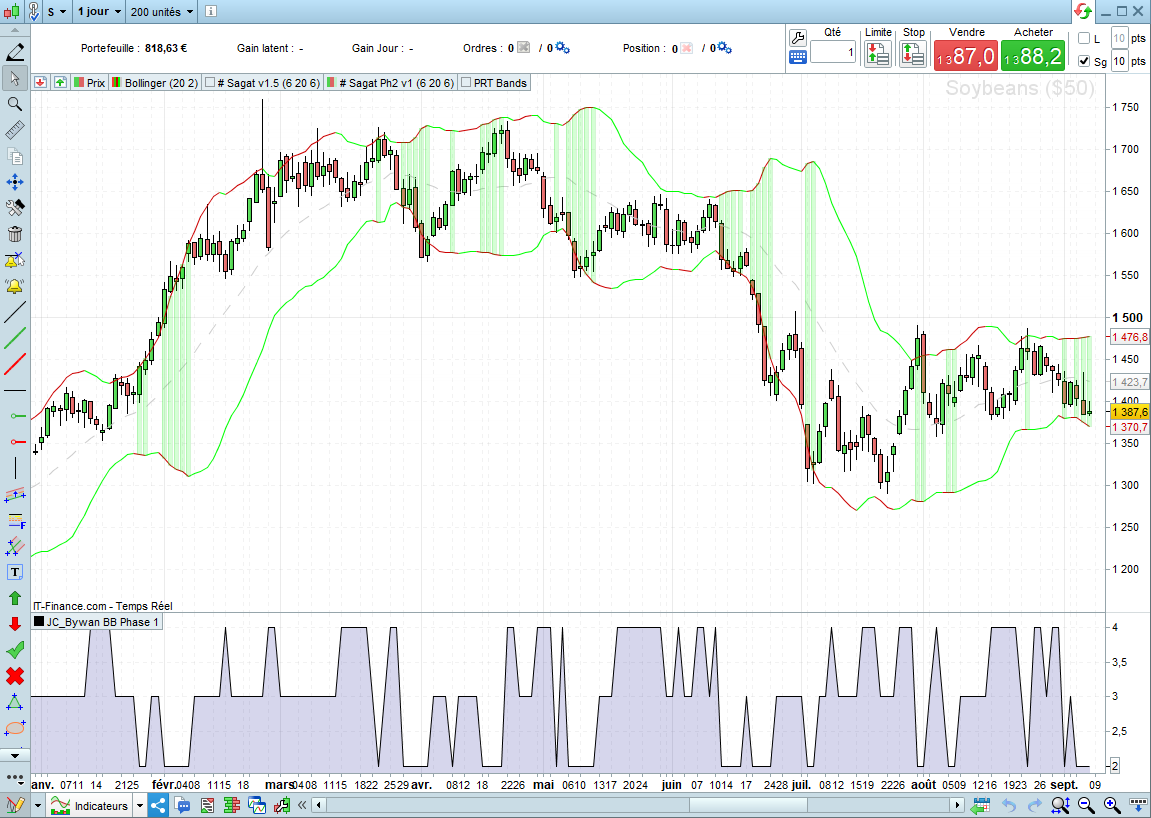
Now I got this result but it’s just based on the direrction of the BB, I have to work more for solve some small probleme before to go to more complicated
JSParticipant
Master
Hi
@ZeroCafeine
Looks very good, you can now clearly see the different phase…
You can still try what I suggested:
Instead of, for example:
BBup > BBup[1] and BBDown < BBDown[1]
BBup > BBup[n] and BBDown < BBDown[n]
Where you give n a certain value, for example 20
As a result, the phases will jump less quickly, and the graph will become “calmer”
hi every one,
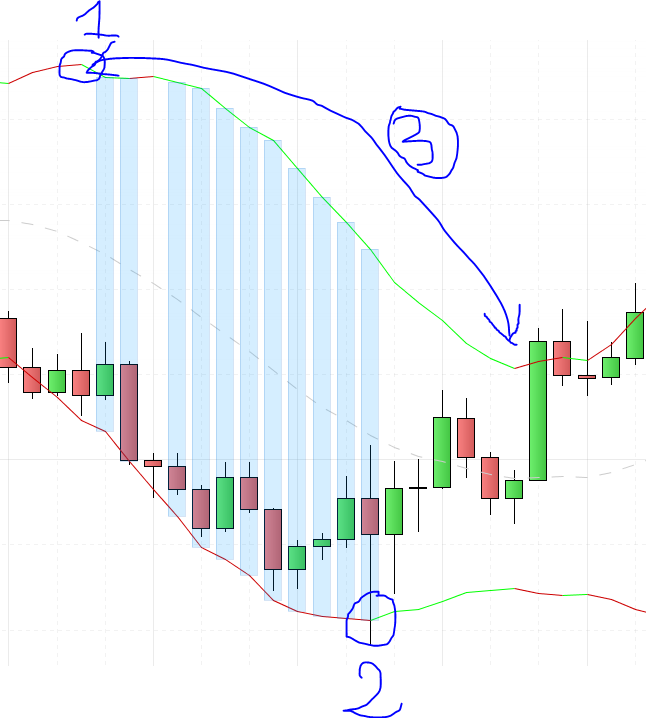
I need you help pls on the ph3, you can see my picture, the ph3 start in 1 and finish in 2, so condition is :
-1) First condition the upper band turns over (only the first time), we don’t need to check what happens afterwards on the upper band as long as the lower band is descending (in the whole part 3)
-2) Second condition, the lower band turns over, in our exemple in point 2 ( and we need only the first turn over)
tks in advance for any help or idea or link
that is my code for ph3
//(。♥‿♥。)================================================(。♥‿♥。)
//   Setup:   SAGAT Ph3
//   Code:    # Sagat Ph3 v
//   Version  1
//   Index:
//   TF:
//   Spread:
//   Date:    08/09/2022
//   Notes:   Detection de Phase 3 Bollinger
//
//   Attribus:
//          - BBup / BBDown
//          -
//          -
//  Conditions:
//          - C1/C2/C3 -> Ph3 Haussiere
//          - C4/C5/C6 -> Ph3 Baissiere
//(。♥‿♥。)================================================(。♥‿♥。)

// (。♥‿♥。) Block Start
// Block End (。♥‿♥。)

// (。♥‿♥。) Block Start
BBup   = BollingerUp[nBB](close)
BBDown = BollingerDown[nBB](close)
BBSMA = Average[nBB]

max1 = BollingerUp[nBB]
min1 = BollingerDown[nBB]
// Block End (。♥‿♥。)

// (。♥‿♥。) Block Start
// Conditions : C1/C2
C1 = BBup > BBup[1] //AND BBup[1] > BBup[2] AND BBup[2] > BBup[3]
C2 = BBDown > BBDown[1] //AND BBDown[1] < BBDown[2] AND BBDown[2] < BBDown[3]
C3 = BBSMA > BBSMA[1]

C4 = BBup < BBup[1] //AND BBup[1] > BBup[2] AND BBup[2] > BBup[3]
C5 = BBDown < BBDown[1] //AND BBDown[1] < BBDown[2] AND BBDown[2] < BBDown[3]
C6 = BBSMA < BBSMA[1]


Signal = 0
// Block End (。♥‿♥。)

AllConditions = C1 AND C2 AND C3 OR C4 AND C5 AND C6


IF AllConditions Then
Signal = 1
DRAWCANDLE(max1, min1, max1, min1) Coloured (0, 153, 255, 42)
ELSE
Signal = 0
ENDIF

Return
Best Reguards
@JS
tks for your answer, I saw it only now, maybe my second question can answer you, the problem with a code like BBup > BBup[n] and BBDown < BBDown[n] it’s not good for me, because I have to control each BB and not just the BB[0] with the BB[n], I have to know what happen with the BB1, BB2, …., BB[n]
hi every one,
I need you help pls on the ph3, you can see my picture, the ph3 start in 1 and finish in 2, so condition is :
-1) First condition the upper band turns over (only the first time), we don’t need to check what happens afterwards on the upper band as long as the lower band is descending (in the whole part 3)
-2) Second condition, the lower band turns over, in our exemple in point 2 ( and we need only the first turn over)
tks in advance for any help or idea or link
that is my code for ph3
//(。♥‿♥。)================================================(。♥‿♥。)
// Setup: SAGAT Ph3
// Code: # Sagat Ph3 v
// Version 1
// Index:
// TF:
// Spread:
// Date: 08/09/2022
// Notes: Detection de Phase 3 Bollinger
//
// Attribus:
// – BBup / BBDown
// –
// –
// Conditions:
// – C1/C2/C3 -> Ph3 Haussiere
// – C4/C5/C6 -> Ph3 Baissiere
//(。♥‿♥。)================================================(。♥‿♥。)
// (。♥‿♥。) Block Start
// Block End (。♥‿♥。)
// (。♥‿♥。) Block Start
BBup = BollingerUp[nBB](close)
BBDown = BollingerDown[nBB](close)
BBSMA = Average[nBB]
max1 = BollingerUp[nBB]
min1 = BollingerDown[nBB]
// Block End (。♥‿♥。)
// (。♥‿♥。) Block Start
// Conditions : C1/C2
C1 = BBup > BBup[1] //AND BBup[1] > BBup[2] AND BBup[2] > BBup[3]
C2 = BBDown > BBDown[1] //AND BBDown[1] < BBDown[2] AND BBDown[2] < BBDown[3]
C3 = BBSMA > BBSMA[1]
C4 = BBup < BBup[1] //AND BBup[1] > BBup[2] AND BBup[2] > BBup[3]
C5 = BBDown < BBDown[1] //AND BBDown[1] < BBDown[2] AND BBDown[2] < BBDown[3]
C6 = BBSMA < BBSMA[1]
Signal = 0
// Block End (。♥‿♥。)
AllConditions = C1 AND C2 AND C3 OR C4 AND C5 AND C6
IF AllConditions Then
Signal = 1
DRAWCANDLE(max1, min1, max1, min1) Coloured (0, 153, 255, 42)
ELSE
Signal = 0
ENDIF
Return
1
2
3
4
5
6
7
8
9
10
11
12
13
14
15
16
17
18
19
20
21
22
23
24
25
26
27
28
29
30
31
32
33
34
35
36
37
38
39
40
41
42
43
44
45
46
47
48
49
50
51
52
53
54
55
56
//(。♥‿♥。)================================================(。♥‿♥。)
// Setup: SAGAT Ph3
// Code: # Sagat Ph3 v
// Version 1
// Index:
// TF:
// Spread:
// Date: 08/09/2022
// Notes: Detection de Phase 3 Bollinger
//
// Attribus:
// – BBup / BBDown
// –
// –
// Conditions:
// – C1/C2/C3 -> Ph3 Haussiere
// – C4/C5/C6 -> Ph3 Baissiere
//(。♥‿♥。)================================================(。♥‿♥。)
// (。♥‿♥。) Block Start
// Block End (。♥‿♥。)
// (。♥‿♥。) Block Start
BBup = BollingerUp[nBB](close)
BBDown = BollingerDown[nBB](close)
BBSMA = Average[nBB]
max1 = BollingerUp[nBB]
min1 = BollingerDown[nBB]
// Block End (。♥‿♥。)
// (。♥‿♥。) Block Start
// Conditions : C1/C2
C1 = BBup > BBup[1] //AND BBup[1] > BBup[2] AND BBup[2] > BBup[3]
C2 = BBDown > BBDown[1] //AND BBDown[1] < BBDown[2] AND BBDown[2] < BBDown[3]
C3 = BBSMA > BBSMA[1]
C4 = BBup < BBup[1] //AND BBup[1] > BBup[2] AND BBup[2] > BBup[3]
C5 = BBDown < BBDown[1] //AND BBDown[1] < BBDown[2] AND BBDown[2] < BBDown[3]
C6 = BBSMA < BBSMA[1]
Signal = 0
// Block End (。♥‿♥。)
AllConditions = C1 AND C2 AND C3 OR C4 AND C5 AND C6
IF AllConditions Then
Signal = 1
DRAWCANDLE(max1, min1, max1, min1) Coloured (0, 153, 255, 42)
ELSE
Signal = 0
ENDIF
Return
Best Reguards
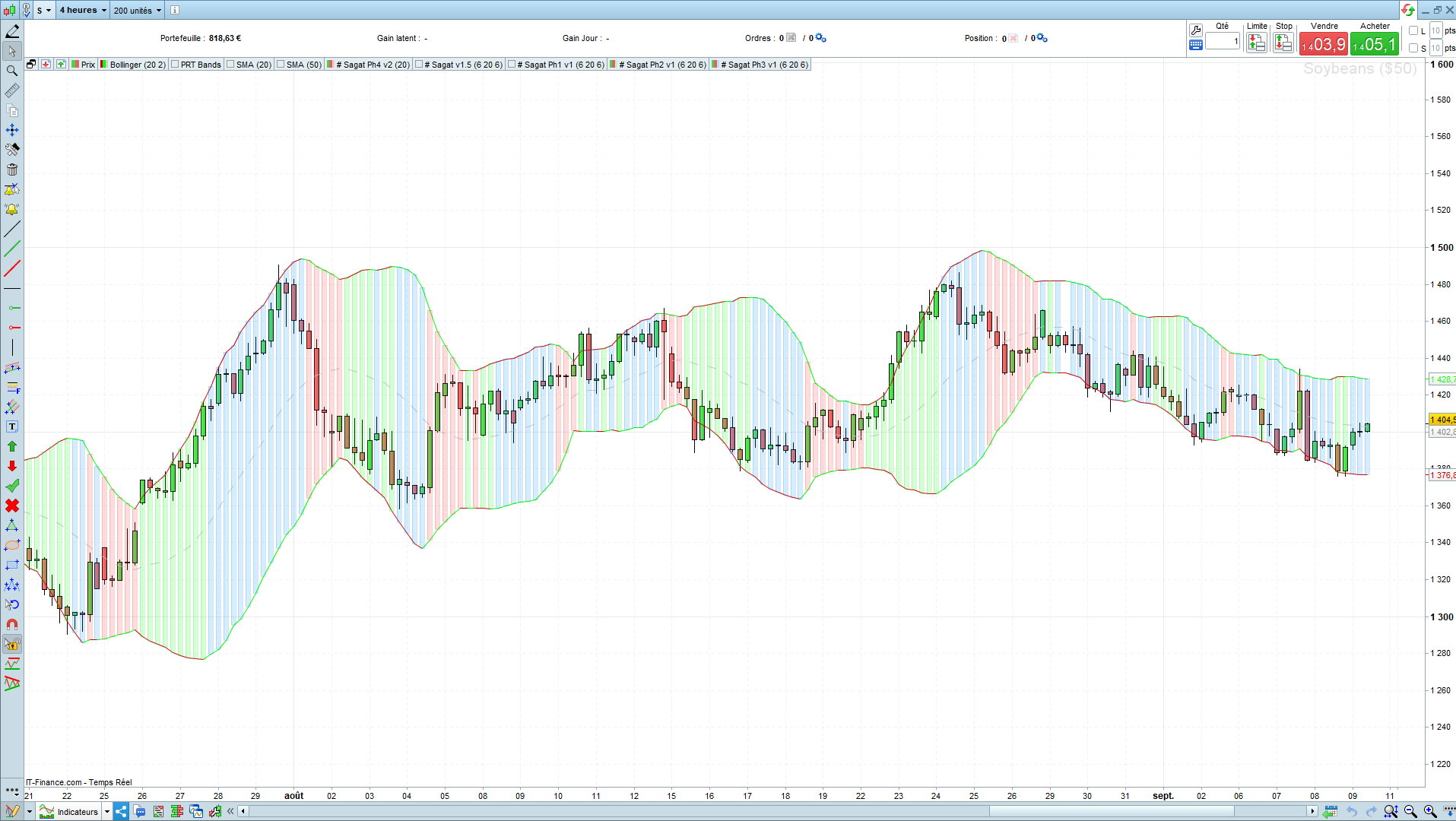
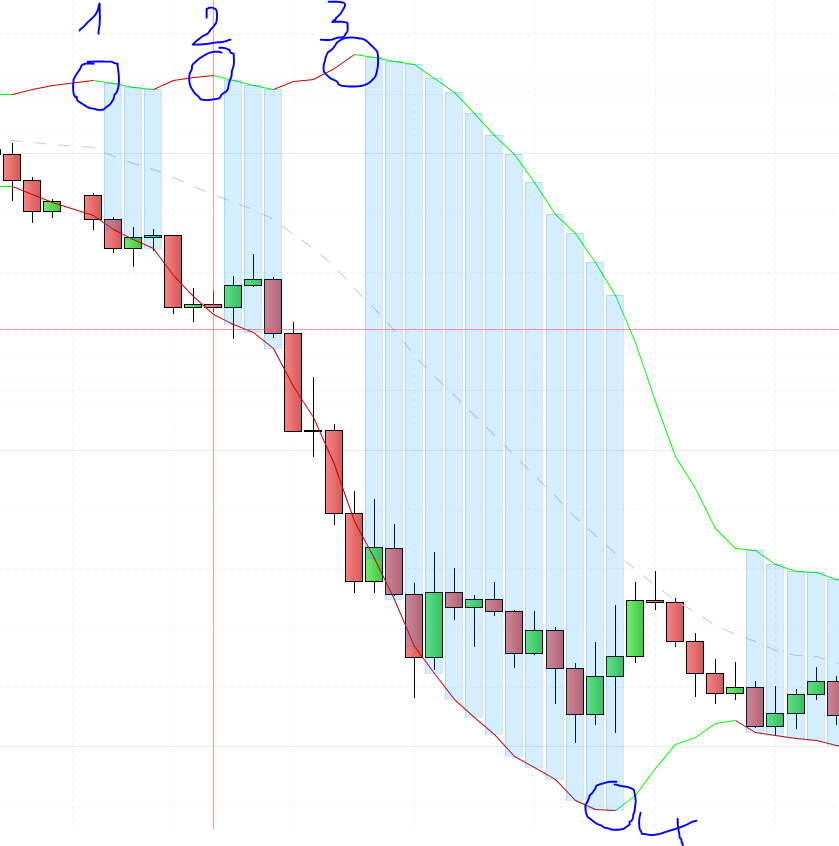
and other photo maybe can help, I want to detect only the 1 and 4, the point 2 and 3 it’s not important