







[beta-testing] multi timeframe support for automatic trading, ideas are welcome!

Viewing 15 posts - 271 through 285 (of 288 total)
  • Author
    Posts
  • #97737 quote
    robertogozzi
    Moderator
    Master

    For sure you can.

    You must use the lowest TF, say H1, as the main (default) TF that sets the pace.

    The only drawback is that you will have less data history available when backtesting, despite upcoming v11 will raise it from 200k to 1 million bars (but we don’t know when and whether IG will support it).

    #98074 quote
    Nicolas
    Keymaster
    Master

    mean that you can use code for a daily chart and shift which hour of the day you want as a close?

    Yes you can now do that.

    #101644 quote
    biglivetrade
    Participant
    New

    Hi, I am a new trader I usually trade in intraday please let me know if there are any strategy or tips I can follow.

    #101645 quote
    robertogozzi
    Moderator
    Master

    Hi, I am a new trader I usually trade in intraday please let me know if there are any strategy or tips I can follow.

    https://www.prorealcode.com/topic/francescos-hammernegated-strategy/#post-101616

    https://www.prorealcode.com/topic/swing-hi-lo-dax-weekly-mtf/

    https://www.prorealcode.com/topic/mid-daily-range-bo-dax-mtf/

    https://www.prorealcode.com/topic/cowabunga-on-dax-with-multiple-time-frames/

    https://www.prorealcode.com/topic/3-mas-pullback-dax-daily-on-mtf/#post-75518


    edit: @biglivetrade, I posted links to MTF strategies since you posted here, should you be interested in strategies other than using Multiple Time Frames, then let me know and I’ll move this post to the ProOrder support.

    Nicolas thanked this post
    #102989 quote
    Foxbat
    Participant
    New

    Hi All,

    I’m new to Multi Time Frames.

    I would like to setup a automated trading system with the below variables.

    Default Time Frame = 4 hours

    2nd Time Frame = 30 minutes.

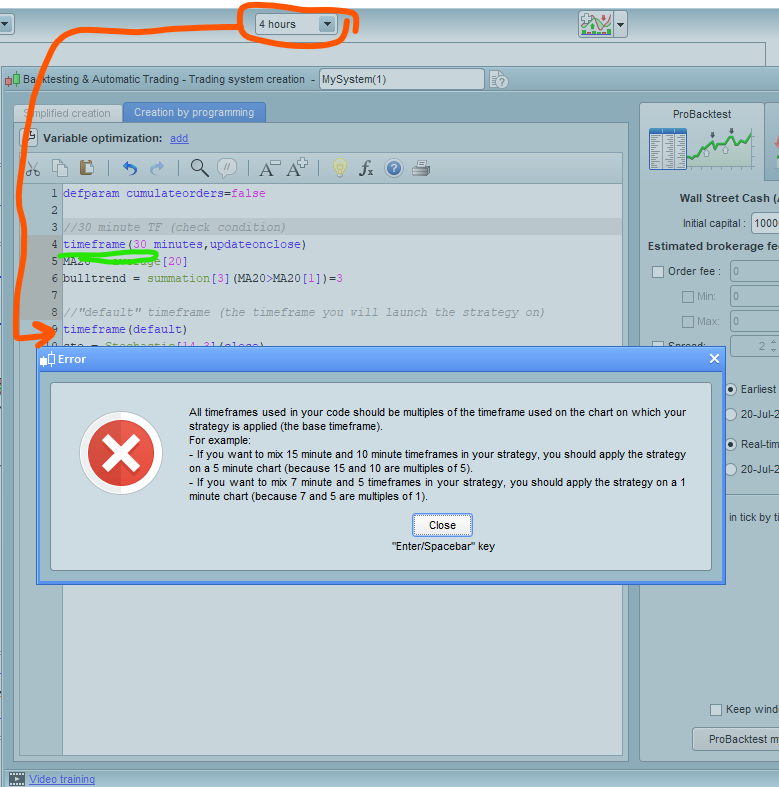
    I get an error see attached. What would be a work around to this Time Frame problem?


    ^In a nutshell, I’m trying to achieve the following.

    On a 4 hour chart when condition (X) is met on the 2nd time frame of 30 minutes – Buy order is created. I don’t want order to be created “Next Bar Open”.

    Any help would be greatly appreciated. Thanks in advance.


    Regards

    Shane

    #102993 quote
    robertogozzi
    Moderator
    Master

    It’s the other way round.

    You’ll have to set your lowest TF as default (the one on your chart), then use a 4H TF in your code. In your case you can use up to 6 TF’s (5 + default) in your code, but ALL of them are required to be multiple of the default (lowest) one.

    Your code won’t change much, but you’ll have some less data history for backtesting.

    Foxbat thanked this post
    #102997 quote
    Foxbat
    Participant
    New

    Thanks Roberto for the very quick reply – appreciated.

    I’m a little confused with the setup of MTF.

    Can you please help with the below:

    Example:
    The below strategy order is executed on “NEXT BAR OPEN” (I don’t want next bar open)

    The below is used on a 4hr chart.

    // Definition of code parameters
    DEFPARAM CumulateOrders = False // Cumulating positions deactivated
    
    // Conditions to enter long positions
    indicator1 = MACD[12,26,9](close)
    c1 = (indicator1 >= 5)
    
    IF c1 THEN
    BUY 10 CONTRACT AT MARKET
    ENDIF
    
    // Conditions to exit long positions
    indicator2 = MACD[12,26,9](close)
    c2 = (indicator2 <= -1)
    
    IF c2 THEN
    SELL AT MARKET
    ENDIF

    How do I code the strategy, so it’s executed in “Real Time”?

    I don’t want the MACD condition to be tested at CLOSE. I wan’t the MACD condition to be tested for example every 30 minutes. If MACD condition is TRUE an order is executed.

    Regards

    Shane

    #102998 quote
    robertogozzi
    Moderator
    Master

    >> For clarity of messages on ProRealCode’s forums, please use the “insert code PRT” button to separate the text of the code part! Thank you! <<

    #102999 quote
    robertogozzi
    Moderator
    Master

    ALL strategies are executed when a candle closes, just while the new one is about to open. Real time does not exist.

    You are allowed to use multiple time frames so that you can use a lower TF to “simulate” as much as possible real time. Strategies will still be executed when a candle closes, but, as they are on a lower TF it’s a bit closer to real time.

    You can code your strategy using MTF, with a 4h TF to evaluate conditions, then entering on the lower TF (say 1 minute):

    // Definition of code parameters
    DEFPARAM CumulateOrders = False // Cumulating positions deactivated
    TIMEFRAME(4 hour,default) 
    // Conditions to enter long positions
    indicator1 = MACD[12,26,9](close)
    c1 = (indicator1 >= 5)
    IF c1 THEN
       BUY 10 CONTRACT AT MARKET
    ENDIF
    // Conditions to exit long positions
    indicator2 = MACD[12,26,9](close)
    c2 = (indicator2 <= -1)
    IF c2 THEN
       SELL AT MARKET
    ENDIF
    TIMEFRAME(default)

    if you launch it from a 1-minute chart, you’ll be able to evaluate your conditions every single minute on your 4-hour TF and enter/exit accordingly.

    But your conditions will NOT be confirmed by the closure of a 4-hour candle, since you requested real time.

    If you want your conditions to be confirmed at closing time, then you need to replace line 3 with:

    TIMEFRAME(4 hour,updateonclose)

    but, in this case, using the MTF support is useless, unless you use the lowest TF to trail your SL or do something else.

    There are different consequences involved in using or NOT using the keyword UPDATEONCLOSE, mainly the fact that you can enter multiple times on the same conditions if your trade exits within a few candles thus entering when your conditions are no longer valid. You’d better study the available videos an the many code snippets on the forum, to go deeper into MTF.

    Foxbat and Nicolas thanked this post
    #108027 quote
    s00071609
    Participant
    Senior

    Can anyone help me with this basic info:

    What does it mean by Current Period, Previous Period and Periods Ago. I cannot find this info in manual. If there is a manual explaining this, please provide the link.

    First of all is it possible to create multi-time frame strategy with the code builder?

    What does the period mean, is it the previous time frame, can’t find this info in any manual?


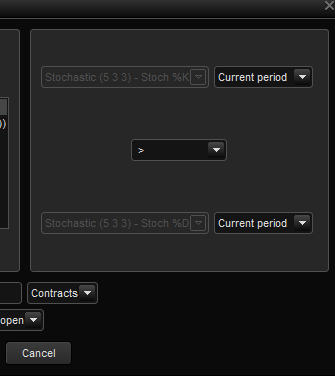
    If the main Timeframe is say 5 min, but I want to use an indicator eg. stochastic from 15 min, how do i create it? For example, place an order when 5 min stochastic crosses bullish, only when 15 min stochastic is bullish below 60.

    I am simply trying to create a very simple order placement code. Any help would be appreciated as I am totally new to pro real time.


    thanks

    #108042 quote
    Vonasi
    Moderator
    Master

    Current Period = this candle

    Previous Period = the candle prior to this candle

    Periods Ago = x candles ago.

    #108048 quote
    Nicolas
    Keymaster
    Master

    Assisted creation of strategies do not support multiple timeframes yet. You’ll have to code these MTF conditions by yourself! Please open a new specific topic for any coding question, thanks.

    #122535 quote
    Brianoshea
    Participant
    New

    Hi all


    Please help!

    I have basically no programming experience whatsoever. If possible, using the multi timeframe capability on PRT I’d like to add another timeframe condition to the current 15 minute strategy. (the current program is attached in a word doc ). This is the strategy: The DEMA moving average crosses the EMA moving average and is determined to be a long or short trade depending on whether the price is above or below the Wilders moving average.

    I would like the Wilders moving average (the Trend) to be taken from a 1 hour timeframe instead of the current 15 minute period. I’ve tried to follow the advice on this thread but unfortunately keep getting a syntax error and am unable to get this working. I’d really appreciate any coding help on this!!

    Thanks in advance

    #122540 quote
    Nicolas
    Keymaster
    Master

    Just declare the Wilder average into the 1-hour timeframe (line 5), create a condition with the Close in the default timeframe (line 8) and use this condition before launching a new order (the condition is true = BUY or not true = SELLSHORT).

    // Definition of code parameters
    DEFPARAM CumulateOrders = False // Cumulating positions deactivated
    
    timeframe(1 hour, updateonclose)
    wilder=WilderAverage[20](close)
    
    timeframe(default)
    wilderfilter = close>wilder
    
    // Conditions to enter long positions
    indicator1 = DEMA[28](close)
    indicator2 = ExponentialAverage[97](close)
    c1 = (indicator1 CROSSES OVER indicator2)
    indicator3 = average[325](close)
    c2 = (close > indicator3)
    
    IF c1 AND c2 and wilderfilter THEN
    BUY 2 CONTRACT AT MARKET
    ENDIF
    
    // Conditions to exit long positions
    indicator4 = DEMA[28](close)
    indicator5 = ExponentialAverage[97](close)
    c3 = (indicator4 CROSSES UNDER indicator5)
    
    IF c3 THEN
    SELL AT MARKET
    ENDIF
    
    // Conditions to enter short positions
    indicator6 = average[327](close)
    c4 = (close < indicator6)
    indicator7 = DEMA[28](close)
    indicator8 = ExponentialAverage[97](close)
    c5 = (indicator7 CROSSES UNDER indicator8)
    
    IF c4 AND c5 and not wilderfilter THEN
    SELLSHORT 2 CONTRACT AT MARKET
    ENDIF
    
    // Conditions to exit short positions
    indicator9 = DEMA[28](close)
    indicator10 = ExponentialAverage[97](close)
    c6 = (indicator9 CROSSES OVER indicator10)
    
    IF c6 THEN
    EXITSHORT AT MARKET
    ENDIF
    
    // Stops and targets
    SET STOP pTRAILING 235
    #122541 quote
    robertogozzi
    Moderator
    Master

    Please do not attach code files other than .TXT (or .PDF if .TXT is not available),  and .JPG or .PNG pics.

    Also .ITF (ProRealTime format) to be imported/exported are welcome (bu not in your first instance, since readers should have an idea of what your code is without much hassle).

    Thank you 🙂

    This is the code (inserted using the “Unsert PRT code” button), where is the WILDER average?

    // Definition of code parameters
    DEFPARAM CumulateOrders = False // Cumulating positions deactivated
    
    // Conditions to enter long positions
    timeframe(default)
    indicator1 = DEMA[28](close)
    indicator2 = ExponentialAverage[97](close)
    c1 = (indicator1 CROSSES OVER indicator2)
    indicator3 = average[325](close)
    c2 = (close > indicator3)
    
    IF c1 AND c2 THEN
    BUY 2 CONTRACT AT MARKET
    ENDIF
    
    // Conditions to exit long positions
    indicator4 = DEMA[28](close)
    indicator5 = ExponentialAverage[97](close)
    c3 = (indicator4 CROSSES UNDER indicator5)
    
    IF c3 THEN
    SELL AT MARKET
    ENDIF
    
    // Conditions to enter short positions
    indicator6 = average[327](close)
    c4 = (close < indicator6)
    indicator7 = DEMA[28](close)
    indicator8 = ExponentialAverage[97](close)
    c5 = (indicator7 CROSSES UNDER indicator8)
    
    IF c4 AND c5 THEN
    SELLSHORT 2 CONTRACT AT MARKET
    ENDIF
    
    // Conditions to exit short positions
    indicator9 = DEMA[28](close)
    indicator10 = ExponentialAverage[97](close)
    c6 = (indicator9 CROSSES OVER indicator10)
    
    IF c6 THEN
    EXITSHORT AT MARKET
    ENDIF
    
    // Stops and targets
    SET STOP pTRAILING 235
Viewing 15 posts - 271 through 285 (of 288 total)
  • You must be logged in to reply to this topic.

[beta-testing] multi timeframe support for automatic trading, ideas are welcome!


ProOrder: Automated Strategies & Backtesting

New Reply
Author
author-avatar
Nicolas @nicolas Keymaster
Summary

This topic contains 287 replies,
has 47 voices, and was last updated by Brianoshea

5 years, 10 months ago.

Topic Details
Forum: ProOrder: Automated Strategies & Backtesting
Language: English
Started: 03/19/2018
Status: Active
Attachments: 48 files
Logo Logo
Loading...
