[beta-testing] multi timeframe support for automatic trading, ideas are welcome!

Viewing 15 posts - 166 through 180 (of 288 total)
  • Author
    Posts
  • #78933 quote
    Gianluca
    Participant
    Master

    et

    No, i tried both, still different.

    If I am forced to use lower time frames to manage a trade on a higher timeframe, the result is totally different. So it means that something is not right.

    #78938 quote
    Vonasi
    Moderator
    Master

    I think it is because you are trying to buy and sell with those instructions in the 4 hour timeframe when with MTF you should be buying and selling in the default time frame. That is just a poorly educated guess though.

    #79030 quote
    LorenzoM
    Participant
    New

    Hello to everybody!
    I have two questions that I would like to clarify; maybe they have already been asked, but I cannot find them.

    In a multi timeframe scenario, something like that


    if ((not onmarket) and (onmarket[1]) then
    // do something if the strategy has just exited from the market
    endif

    [1] what does it refer to? to the default TF?

    And in something like

    timeframe (5 minutes, updateonclose)
    MA20 = average [20]
    bulltrend = summation [3] (MA20> MA20 [1]) = 3
    
    // "default" timeframe (the timeframe you will launch the strategy on)
    timeframe (default)
    ...
    
    if (MA20 <MA20[1]) then
    // do something if MA20 is decreasing
    endif

    [1] is referred to the value of MA20 in the TF bar 5 minutes before?

    Thanks,
    Lorenzo

    #79031 quote
    robertogozzi
    Moderator
    Master

    1) it does not involve TFs, it simply checks whether a trade has just been closed, though you usually use this for in the lowest TF.

    2) yes.

    LorenzoM thanked this post
    #79034 quote
    GraHal
    Participant
    Master
    #79100 quote
    Gianluca
    Participant
    Master

    I think it is because you are trying to buy and sell with those instructions in the 4 hour timeframe when with MTF you should be buying and selling in the default time frame. That is just a poorly educated guess though.

    i think that is the reason, but if is like this MTF is useless to use in Trailing stop code, and no so Revolutionary as said for the TF, in fact i think that one of the big problems of PRT is the use of the Trailing Stop function specially with Big TF, in fact if the funcion #trailingstop makes the results of the backtesting unreliable, a big improve should be using MultiFrame even for smaller periods even if the strategy is for a big periods.

    If the MTF remains like now, with the only possibility to use MTF starting for a small periods, thats will be not a big improve.

    And also, if i use a strategy originally made with the 4hr TF, starting from a lower TF but with the command Timeframe4hr, results should be the same, not differents.

    #79104 quote
    Nicolas
    Keymaster
    Master

    I think it is because you are trying to buy and sell with those instructions in the 4 hour timeframe when with MTF you should be buying and selling in the default time frame.

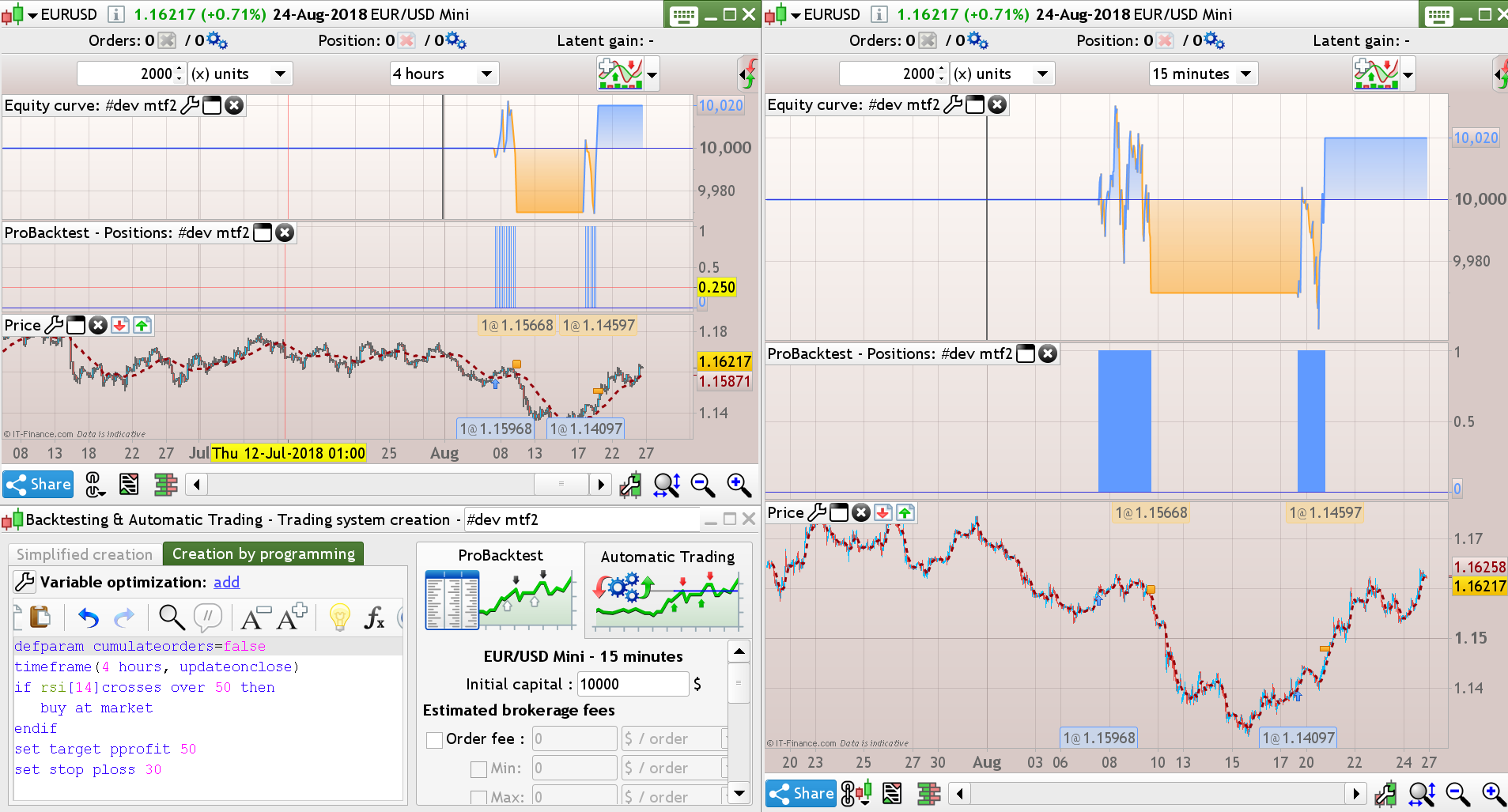
    That’s wrong. In this example, the strategy is buying on a 15-minute timeframe and the orders are managed in a lower TF: Partial closure of positions when price is retracing

    a big improve should be using MultiFrame even for smaller periods even if the strategy is for a big periods.

    That’s possible, why not using one of the trailing code functions available on the website, like the way I did in the article above?

    If the MTF remains like now, with the only possibility to use MTF starting for a small periods, thats will be not a big improve.

    That’s obvious that if you are using a lower timeframe to manage your orders, the ‘starting’ TF is the smallest one. But I deplore the fact that the history is limited to this one though..

    if i use a strategy originally made with the 4hr TF, starting from a lower TF but with the command Timeframe4hr, results should be the same, not differents.

    If the whole code of the strategy is embedded in the timeframe(4 hours, updateonclose), results should be the same (example attached below).

    #79109 quote
    robertogozzi
    Moderator
    Master

    When your strategy works as expected on a 4-h TF, with your trailing stop code embedded in the default TF, you can detect any benefit from MTF just:

    • Backtest it from a 4-hour TF using the max time interval allowed for 1-minute chart
    • Bscktest it from a 1-minute chart

    if this shows benefits, then keep your strategy MTF for the trailing code, otherwise do not!

    If you use MTF for your 4-hour strategy to run trailing stop code in a 30-minute TF you’ll never have benefits, because in 30 minutes prices can move so many pips, especially Dax and EurUsd.

    MTF should be used if:

    • you want to test indicators in more than one TF
    • you want to make your trailing stop code more responsive
    • you want both
    #79299 quote
    AlgoAlex
    Participant
    Master

    I’m trying a mtf  code in demo live, and I wanna share with you how I am unable to see errors in opening trades…

    This is the code:

    //-------------------------------------------------------------------------
    // Codice principale : RSIOMA MTF DAX 30M
    //-------------------------------------------------------------------------
    defparam preloadbars=10000
    defparam cumulateorders=true
    myRSIoMA, myLevelUp, myLevelDown, mymedlevel = CALL "PRC_RSIoMA extended"[14, 21, 1, 50, 80, 20](close)
    
    TIMEFRAME (Daily, updateonclose)
    //your daily conditions
    dlong=myRSIoMA>myRSIoMA[1]
    dshort=myRSIoMA<myRSIoMA[1]
    TIMEFRAME (4 hours, updateonclose)
    //your 4-hour conditions
    
    h4long=myRSIoMA>mymedlevel
    h4short=myRSIoMA<mymedlevel
    
    TIMEFRAME (1 hour, updateonclose)
    //your 1-hour conditions
    
    h1long=myRSIoMA>myLevelUp
    h1short=myRSIoMA<myLevelDown
    myST=Supertrend[3,10]
    TIMEFRAME (default)
    //your code to Enter/Exit trades
    //your stop loss code
    
    entrylong=myRSIoMA crosses over mylevelup
    entryshort=myRSIoMA crosses under myleveldown
    
    if dlong and h4long and h1long and entrylong then
    buy 1 contracts at market
    endif
    
    if dshort and h4short and h1short and entryshort then
    sellshort 1 contracts at market
    endif
    
    if longonmarket and close crosses under myST or myRSIOMA crosses under mylevelup then
    sell at market
    endif
    
    if shortonmarket and close crosses over myST or myRSIOMA crosses over myleveldown then
    exitshort at market
    endif
    ///breakeven
    startBreakeven = 50 //how much pips/points in gain to activate the breakeven function?
    PointsToKeep = 5 //how much pips/points to keep in profit above of below our entry price when the breakeven is activated (beware of spread)
     
     
    //reset the breakevenLevel when no trade are on market
    IF NOT ONMARKET THEN
    breakevenLevel=0
    ENDIF
     
    // --- BUY SIDE ---
    //test if the price have moved favourably of "startBreakeven" points already
    IF LONGONMARKET AND close-tradeprice(1)>=startBreakeven*pipsize THEN
    //calculate the breakevenLevel
    breakevenLevel = tradeprice(1)+PointsToKeep*pipsize
    ENDIF
     
    //place the new stop orders on market at breakevenLevel
    IF breakevenLevel>0 THEN
    SELL AT breakevenLevel STOP
    ENDIF
    // --- end of BUY SIDE ---
    
    //sell side
    IF SHORTONMARKET AND tradeprice(1)-close>startBreakeven*pipsize THEN
    //calculate the breakevenLevel
    breakevenLevel = tradeprice(1)-PointsToKeep*pipsize
    ENDIF
    //place the new stop orders on market at breakevenLevel
    IF breakevenLevel>0 THEN
    EXITSHORT AT breakevenLevel STOP
    ENDIF
    
    //stoploss for long position
    If longonmarket then
    //calculate the long stoploss (difference between the open price of the trade and the lowest low)
    Slong = Tradeprice-Lowest [15](low)
    Set stop loss Slong
    Endif
     
    //stoploss for short position
    if shortonmarket then
    //calculate the short order stoploss (difference between the open price of the trade and the highest high)
    Sshort = Highest [10](high) - Tradeprice
    Set stop loss Sshort
    Endif
    
    
    set target pprofit 100
    
    
    //-------------------------------------------------------------------------
    // Funzione : PRC_RSIoMA extended
    //-------------------------------------------------------------------------
    //PRC_RSIoMA extended | indicator
    //27.08.2018
    //Nicolas @ www.prorealcode.com
    //Sharing ProRealTime knowledge
    //converted from MT5 version
    
    // --- settings
    //RsiPeriod = 14 // Rsi period
    //PriceSmoothing  = 21 // Price smoothing (<= 1 for no smoothing)
    //PriceSmoothingM = 1 // Price smoothing method (MA mode)
    //MinMaxPeriod    = 50 // Floating levels period (<= 1 for fixed levels)
    //LevelUp         = 80.0 // Up level %
    //LevelDown       = 20.0 // Down level %
    // --- end of settings
    
    RsiPrice = customclose   // Price to use
    n=max(1,PriceSmoothing)
    ma=average[n,PriceSmoothingM](RsiPrice)
    rsioma=rsi[RsiPeriod](ma)
    
    //levels
    mmin = rsioma
    mmax = rsioma
    for k=1 to MinMaxPeriod-1 do
    mmin=min(rsioma[k],mmin)
    mmax=max(rsioma[k],mmax)
    next
    rrange = mmax-mmin
    levelupz = mmin+LevelUp * rrange/100
    leveldnz = mmin+LevelDown * rrange/100
    levelmi = mmin+0.5*rrange
    
    //colours
    r=192
    g=192
    b=192
    if rsioma>levelupz then
    r=50
    g=205
    b=50
    elsif rsioma<leveldnz then
    r=255
    g=165
    b=0
    endif
    
    slope=rsioma-rsioma[1]
    
    long=slope crosses over 0 and rsioma<levelupz
    
    short=slope crosses under 0 and rsioma>levelupz
    
    if long then
    drawarrowup(rsioma,low) coloured(0,255,0)
    endif
    
    if short then
    drawarrowdown(rsioma,high) coloured(255,0,0)
    endif
    
    return rsioma coloured(r,g,b) style(line,3) as "RSIoMA",levelupz coloured(50,205,50) style(dottedline,2) as "Level Up", leveldnz coloured(255,165,0) style(dottedline,2) as "Level Down", levelmi coloured(155,155,155) style(dottedline,2) as "mid level"
    

    And this is a screenshot from actual live trades:

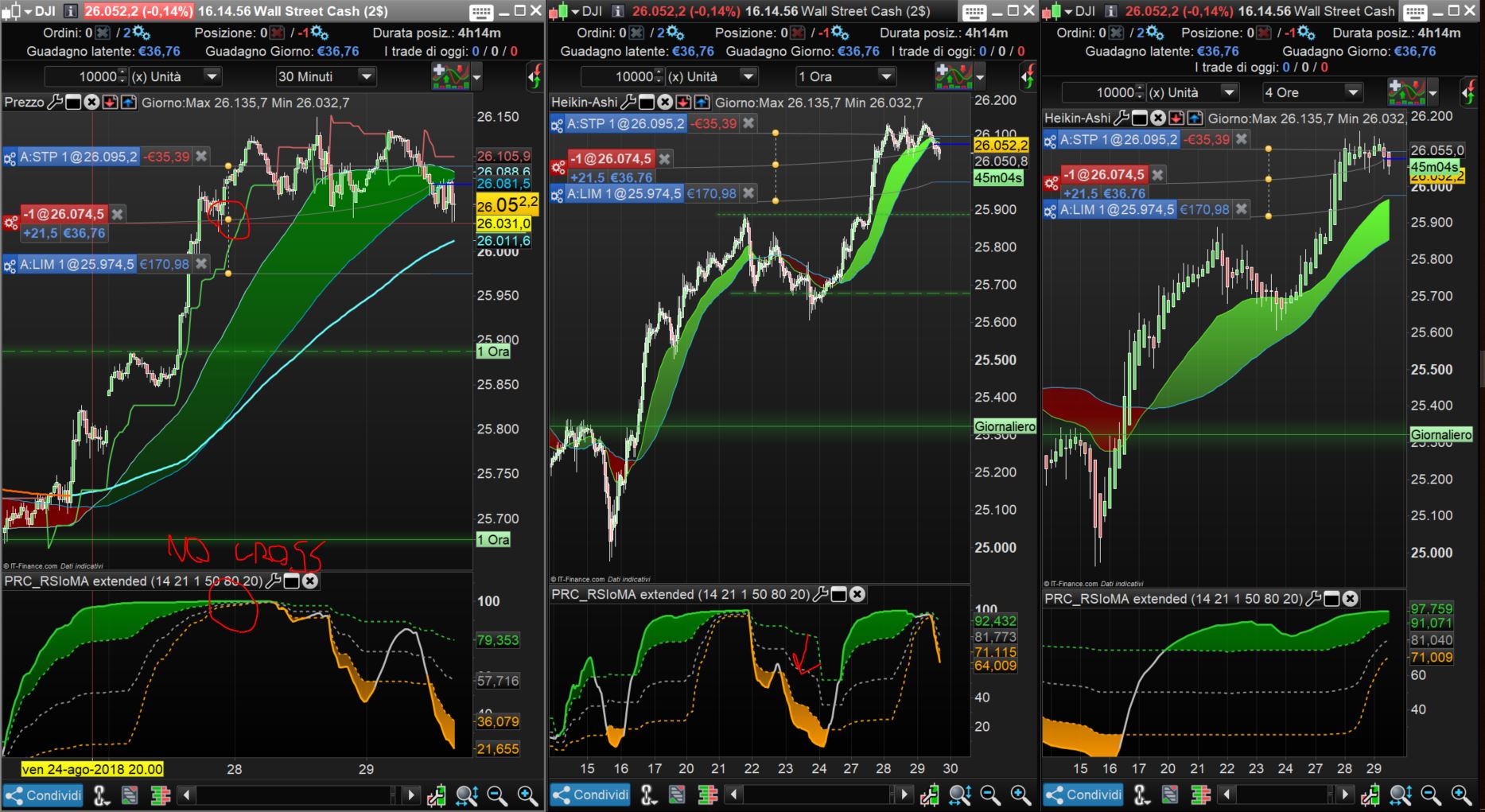
    [attachment file=”REPORT PER PRT.JPG”]

    As you can see, the need for having superior tfs above upperlevel (green zones) and crossing up of base tf (30m) are not respected.

    Why?

    #79301 quote
    robertogozzi
    Moderator
    Master

    Line 6 assigns values to variables based on PRC_RSIoMA extended called from the deafult (lower, I guess) TF.

    Lines 10-11, 15-16 and 21-22 reflect this behaviour, rather than referencing an indicator for their own TF. You should move line 6 to the beginning of each TF using different variable names:

    timeframe (daily,updateonclose)
    MyAvgD = close > average[20](close)
    
    timeframe (4 hours,updateonclose)
    MyAvgH4 = close > average[20](close)
    
    timeframe (1 hours,updateonclose)
    CrossingUP = average[5](close) CROSSES OVER average[20](close)
    
    timeframe (default)
    IF MyAvgD AND MyAvgH4 AND CrossingUP THEN
       BUY.....
    ENDIF
    Nicolas and Bel thanked this post
    #79302 quote
    Nicolas
    Keymaster
    Master

    Your indicator is declared and calculated in the ‘default’ timeframe and not in any other one. So, even if you are testing above/below levels in other TF, the code will always use the same indicator values.

    EDIT: Faster than me Roberto! and with a more precise answer! 😉

    robertogozzi thanked this post
    #79304 quote
    AlgoAlex
    Participant
    Master

    Ok,

    so I have to declare the Rsioma in each timeframes with different names.

    I will try and let you know.

    #79318 quote
    AlgoAlex
    Participant
    Master

    Now what?

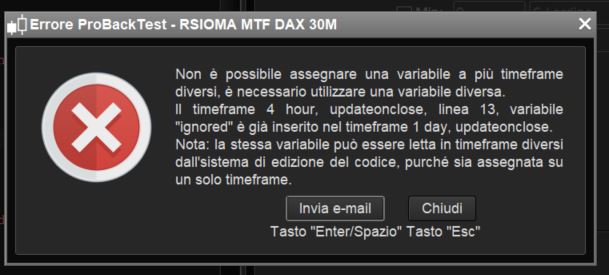
    It says I cannot use the same variables in different timeframes.

    So what should I do to exclude a variable from different tfs?

    I tried “ignored2” but it doesn’t work out.


    [attachment file=79319]

    #79324 quote
    robertogozzi
    Moderator
    Master

    You should use

    myRSIoMAD, myLevelUpD, myLevelDownD, mymedleveD = CALL "PRC_RSIoMA extended"[14, 21, 1, 50, 80, 20](close)

    for the DAILY TF and

    myRSIoMA1H, myLevelUp1H, myLevelDown1H, mymedlevel1H = CALL "PRC_RSIoMA extended"[14, 21, 1, 50, 80, 20](close)

    for the 1-hour TF.

    #79326 quote
    AlgoAlex
    Participant
    Master

    That was clear to me.

    My question is: how can I exclude “myLevelDownD” from daily and “mymedlevel1H ” from h1? If I use “ignore” for both it gives me error like my screenshot.

Viewing 15 posts - 166 through 180 (of 288 total)
  • You must be logged in to reply to this topic.

[beta-testing] multi timeframe support for automatic trading, ideas are welcome!


ProOrder: Automated Strategies & Backtesting

New Reply
Author
author-avatar
Nicolas @nicolas Keymaster
Summary

This topic contains 287 replies,
has 47 voices, and was last updated by Brianoshea
5 years, 10 months ago.

Topic Details
Forum: ProOrder: Automated Strategies & Backtesting
Language: English
Started: 03/19/2018
Status: Active
Attachments: 48 files
Logo Logo
Loading...