So if I want to know what my best performing Auto-System is for this week … how do I do that??
We have a Detailed Report for individual Systems, but we can’t select Days or This Week etc and we have a Detailed Report for all Systems where we can select Days or This Week etc, but we can’t select Systems!
Why don’t PRT combine both Detailed Reports into one Report … all options selectable by the User??
Please tell me I can easily see which was my best performing System for this week in version 11??
September has been a disappointing / losing month for me on my SB Account (but only Demo! 🙂 ) and yet on another account the results have been okay / good!
I desperately wanted to know which Systems have made / lost what?
The PRT Platform does not provide any means of analysis of Gain per Week / Month which results in a single TOTAL figure … unless you get your calculator out and add the Gain figure from the Orders List!?
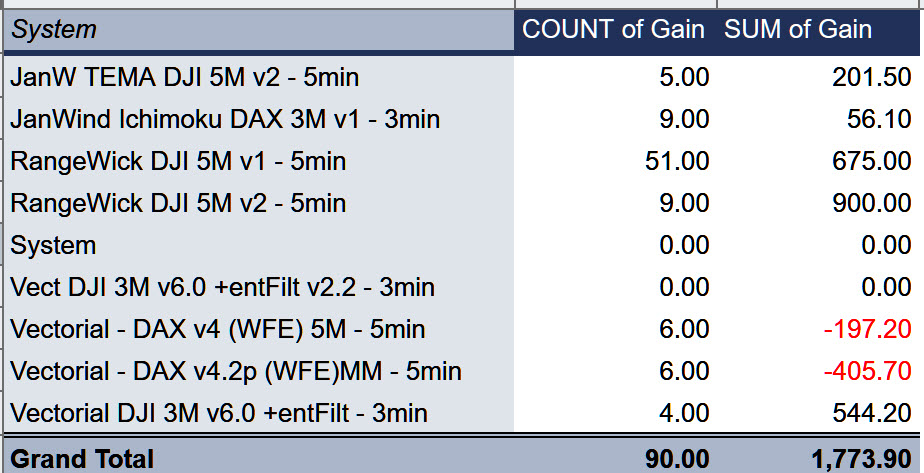
So I copy and pasted 1 month worth of data to a googlesheet and pivoted to show attached.
I’m pleased to say that the highest Gain Systems in September are 100% my own coding – RangeWick! 🙂
Even attached is not 100% accurate because the Orders List with 1 Month selected only shows Trades that were open AND closed in that 1 month period (or week or day etc). Trades already open when the month starts but closed in the following 1 month (selected) are not included (this is the (imo) illogical default setting on PRT)!
Also it’s not 1 calendar month as when we select 1 month we get the past 4 week period!! 🙁
PS
Please can somebody tell me that I can find my best performing System per Week / per Month on Version 11 without having to laboriously copy and past 100 lines at a time to a spreadsheet??