Bar Counter Display Current Day Only

Viewing 11 posts - 1 through 11 (of 11 total)

  • Author
    Posts
  • #220372 quote
    gadetrading
    Participant
    New

    Hello,

    Kindly asking for some help to tweak an indicator:
    Can someone make this bar counter display only on the current day? So it doesn’t display on any prior day than today.

    Thank you,
    Andreas

    Once Count = 0
     
    StartSession=22
    EndSession=221500
    
    If OpenTime >= StartSession and OpenTime <= EndSession then
    Count=Count+1
    xEven=Count/2 - Round(Count/2)
     
    
    If IntraDayBarIndex = 0 then
    
    Count = 1
    
    EndIf
    
    
    If Count > 0 and xEven=0 then
    DrawText( "#Count#", BarIndex,Low-1*pipsize,SansSerif) COLOURED (153, 153, 153, 255)
    EndIf
    
    If Time = EndSession then
    Count=0
    
    EndIf
    Endif
    Return
    #220377 quote
    fifi743
    Participant
    Master

    top of code

    defparam drawonlastbaronly=true
    #220380 quote
    gadetrading
    Participant
    New

    Appreciate the reply, but this only shows it for the last bar. I want it to show on the entire current day on any time frame. So the 5 min chart may currently have say 32 bars or 79 bars on the current day, and I want it to show only on these bars.

    #220381 quote
    fifi743
    Participant
    Master

    remove xeven

    #220382 quote
    gadetrading
    Participant
    New

    No, this is not what I am trying to change. I still only want it to display odd numbers. I simply want it to display what’s its already doing but only on the current day, whatever length the current day may already have.

    #220388 quote
    JC_Bywan
    Moderator
    Master

    Hello,

    defparam drawonlastbaronly=true
    
    Count=IntraDayBarIndex
    for i=0 to count
    If (Count[i] mod 2)<>0 then
    valcount=Count[i]
    DrawText( "#valcount#", BarIndex[i],Low[i]-1*pipsize,SansSerif) COLOURED (153, 153, 153, 255)
    EndIf
    next
    
    Return
    gadetrading thanked this post
    #220396 quote
    gadetrading
    Participant
    New

    @JC_Bywan
    Thank you sir. This only displays on the current day like requested.
    But this code counts the first bar as bar 0, is it possible to change this so the first bar of the day is bar 1?
    And I misspoke (sorry) in my last reply, I want it to display the even numbers only. Is this possible to fix?
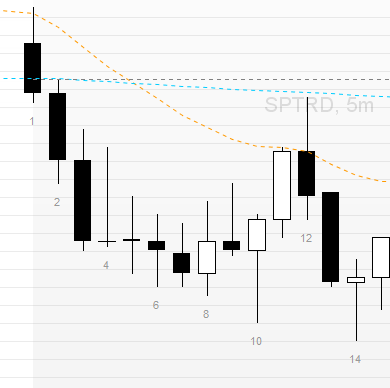
    I want it to display like in the screenshot:

    #220402 quote
    JC_Bywan
    Moderator
    Master

    This version should change to first bar count = 1, and display even numbers.

    Also included, a choice to select the most appropriate IF line, depending if the need is to display even numbers AND 1 as in screenshot, or only even numbers as in text. The unwanted IF line needs to be commented out thanks to // at beginning of line.

    defparam drawonlastbaronly=true
    
    Count=IntraDayBarIndex+1
    for i=0 to count-1
     If Count[i]=1 or (Count[i] mod 2)=0 then // use to display even bar numbers AND also bar=1 as in screenshot
     //If (Count[i] mod 2)=0 then // use instead of above IF line to display ONLY even bar numbers as asked in text, not bar=1
      valcount=Count[i]
      DrawText( "#valcount#", BarIndex[i],Low[i]-1*pipsize,SansSerif) COLOURED (153, 153, 153, 255)
     EndIf
    next
    
    Return
    #220413 quote
    gadetrading
    Participant
    New

    @JC_Bywan
    This functions well! However, it seems to attempt to load on all the data in the chart which takes a lot of time for it to complete.
    So switching between symbols now makes my CPU fan turn on. The original version (the one in my original post) did not do this even though it displayed bar numbers on a lot of data.
    Is this possible to fix?

    #220418 quote
    JC_Bywan
    Moderator
    Master

    If pc struggles, using islastbarupdate makes it possible to achieve same result with added bonus of skipping all unneeded earlier calculations to give CPU fan some rest when switching often:

    defparam drawonlastbaronly=true
    
    Count=IntraDayBarIndex+1
    if islastbarupdate then
     for i=0 to count-1
      If Count[i]=1 or (Count[i] mod 2)=0 then // use to display even bar numbers AND also bar=1 as in image
       //If (Count[i] mod 2)=0 then // use instead of above IF line to display ONLY even bar numbers as asked in text, not bar=1
       valcount=Count[i]
       DrawText( "#valcount#", BarIndex[i],Low[i]-1*pipsize,SansSerif) COLOURED (153, 153, 153, 255)
      EndIf
     next
    endif
    
    Return
    gadetrading thanked this post
    #220458 quote
    gadetrading
    Participant
    New

    Working great. You’re the best, thank you!

Viewing 11 posts - 1 through 11 (of 11 total)

  • You must be logged in to reply to this topic.

Bar Counter Display Current Day Only


ProBuilder: Indicators & Custom Tools

New Reply
Author
Summary

This topic contains 10 replies,
has 3 voices, and was last updated by gadetrading
2 years, 5 months ago.

Topic Details
Forum: ProBuilder: Indicators & Custom Tools
Language: English
Started: 09/05/2023
Status: Active
Attachments: 2 files
Logo Logo
Loading...