Backtesting – Automated Trading – Dashboard

Viewing 3 posts - 1 through 3 (of 3 total)

  • Author
    Posts
  • #246089 quote
    Ck
    Participant
    New

    Hello, I am performing backtesting in ProRealTime version 12.

    The system used to present a dashboard with statistics everytime i backtested a system. Now it does not.

    I would appreciate if someone guide me in the settings so that the dashboard is popped automatically everytime.


    Thanks !!!

    #246090 quote
    druby
    Participant
    New

    I think that the dashboard opens automatically by default, however if you close the dashboard window and then from then on and if the platform is later saved, then the dashboard saves the default as closed.

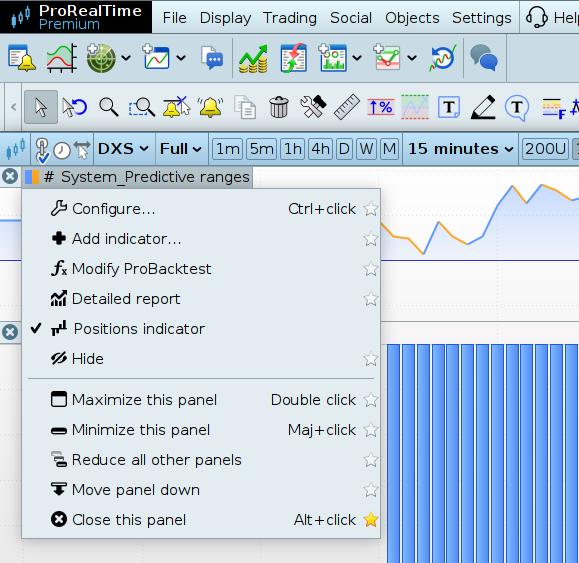
    To bring the dashboard back up, click on the charts equity name label of the strategy and enable dashboard, it also appears in the configure option window. (not sure if its left or right click)

    Additionally, if you close the optimisation results window, I think that will only re-appear if there is an valid optimisation being done, where it will re-open and show results.

    If all optimisation variables are set to fixed, and the optimiser is run, I think this won’t bring the results back up, only if optimisations are being calculated, the new results bring the window back up.

    Ck and Iván González thanked this post
    #246200 quote
    Iván González
    Moderator
    Master

    As Druby says (see attached screenshoot)

    2025-04-22_09-28.png 2025-04-22_09-28.png
Viewing 3 posts - 1 through 3 (of 3 total)

  • You must be logged in to reply to this topic.

Backtesting – Automated Trading – Dashboard


Platform Support: Charts, Data & Broker Setup

New Reply
Author
author-avatar
Ck @ck Participant
Summary

This topic contains 2 replies,
has 3 voices, and was last updated by Iván González

9 months, 4 weeks ago.

Topic Details
Forum: Platform Support: Charts, Data & Broker Setup
Language: English
Started: 04/19/2025
Status: Active
Attachments: 1 files
Logo Logo
Loading...