Hello all,
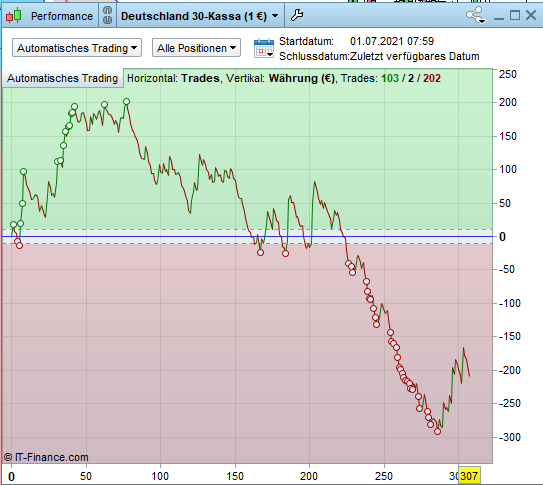
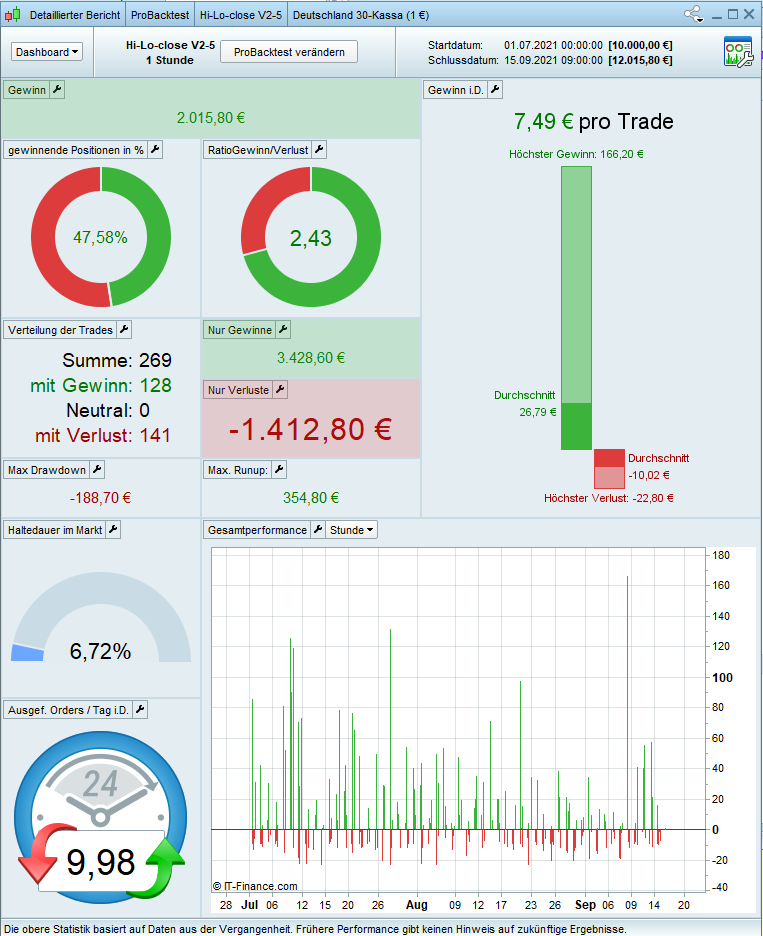
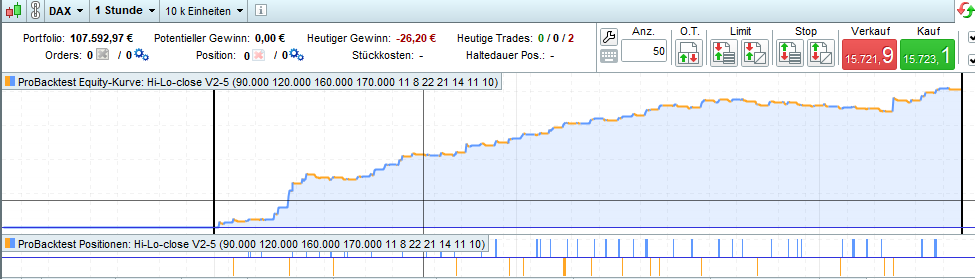
Here is a comparison of a backtest and the actual performance (DAX TF 1h)
Greetings
Suffi
I spent a few minutes tryng to get my head around what I am looking at / what the point is that you are making, but gave up as the two sets of charts / info are different formats?
Do I need more coffee? 🙂
Hello GraHal,
Here’s an explanation.
I have written a code that should work on Dax 1h.
Backtests over 10 years have shown that it is profitable.
I have the code since 01.07.2021 until today running, with the result there 307 trades with a total loss of about 200 € (picture: real).
Now I have created a backtest today, over the same period, from 01.07.2021 until today. Result. 269 trades, profit around 2,000 € (picture: backtest and backtest2).
I would like to say, that all that glitters is not gold.
Greetings
Suffi
Translated with http://www.DeepL.com/Translator (free version)
Backtest relies on the past… it can’t forsee the future.
Moreover, you may have use wrong TP and SL or TRAILING STOP.
You may also have tight TP and SL and haven’t ticked the tick-by-tick mode to work around the zero-bar issue (when both TP and SL are hit on the same bar, TP is assumed unless tick-by-tick is enabled).
Hello Roberto,
if I do a backtest today, of a system that has been running since 01.07.2021, should it reflect the result of real trading or not?
At least it should be similar.
It works with a trailing stop, that is between 10 and 25 points.
Tick by tick is activated spread = 1.6
Greets
Suffi
I agree … a Walk Backward backtest over the same period as a (previous) Live Forward Test … should be similar, within explainable / acceptable limits, a guess – 5% ish maybe ?
Is the Trailing Stop you used the inbuilt PRT … Set Stop pTrailing?
If Yes, there are known issues with above (beats me why the issues are not sorted or the TS code deleted? ).
Yes, it should, actually.
I think only PRT can work it out. You should press Ctrl+A and open a ticket for assistance.
Attached is a non-exhaustive list of the elements that can impact a live trading strategy and create differences with a demo account and/or backtests:
- Spread
- Slippage
- Orders rejections due to one of the above reason, but also because of the allowed distance from current price to put pending orders (known as “minimal distance”)
- Different trading hours (ProOrder code launched in a different time zone / custom hours, by the user)
- Coding problem: division by zero error, null or negative periods for indicators, ..
- Lack of responsiveness of IG demo servers (if IG is the broker), although this has improved considerably since last year.
- Make backtests without tick-by-tick option
- “set stop trailing” instruction that give IG the total control of your stoploss, can be moved differently between accounts due to points above
- Limited risk accounts and their rules
- Guaranteed stoploss rules and fees
- Starting a strategy at a different time (1 hour or even 1 minute later): depending on the code of the strategy, the results of some calculations could be different.
- Margin required on the trading account (no demo or backtest tests are made on this subject)
- Overnight and overweekend fees
- Automatic adjustement of stop orders checked or not when launching the ProOrder
- Minimal distance used in backtests for pending orders, not the same as in real trading, due to broker requirement
- Different contract size between backtests and live
Because backtests are only tested on history *with no connection to live market* , you may encounter differences with real live trading environment subject to spread enlargement, slippage, etc. If your stop hasn’t move, there must be information of an error into your orders rejected list you can consult with CTRL+O.
In any case, first step is to compare the backtest orders with the real orders, and why they triggered not at the same time/differently.
OK,
here is the code, have a look on it.
good morning, do not use Ptrailling.
use coded trailling
hi fifi743,
please explain why I should use ptrailing and what code would you recommend?
greetings
Suffi
What is the ptrailing value please?
Hi Nicolas,
in the code it the variable TP is equal to ptrailing value.
TP changes depending on the time.
IF Hour=09 THEN
TP=TP09
ELSIF Hour=10 THEN
TP=TP10
ELSIF Hour=11 THEN
TP=TP11
ELSIF Hour=12 THEN
TP=TP12
ELSIF Hour=16 THEN
TP=TP16
ELSIF Hour=17 THEN
TP=TP17
ELSE
TP=TP
ENDIF
greets
Suffi