Backtest shows wrong results

Viewing 14 posts - 16 through 29 (of 29 total)
  • Author
    Posts
  • #211413 quote
    Nicolas
    Keymaster
    Master

    Problem must be something related to the close quantity to close.

    Try to round it to the nearest value with 1 decimal only:

    CloseQuantity  = round(abs(CountOfPosition) - LeftQty, 1)
    ProRealP thanked this post
    #211415 quote
    ProRealP
    Participant
    Senior

    @Nicolas
    I’ll give that a go and let you know if it doesn’t work. Thank you!


    @phoentzs

    If it doesn’t work it must be a bug, or the like, so I’ll keep on trying until it works, or until we figure out why it doesn’t.

    #211416 quote
    PeterSt
    Participant
    Master

    Hi Pierre,

    Could you repost your code with the adjustments to the SL (regarding my not-so-really-nice-post but with the clear message) ?

    Then we all can “see” better. OK ?
    Thanks !

    #211420 quote
    ProRealP
    Participant
    Senior

    Here you go,

    //B/S
    
    If not onmarket and c5 then
    set stop loss 0
    buy positionsize contract at market
    slpricelong = close - sl
    endif
    
    If not onmarket and c6 then
    set stop loss 0
    sellshort positionsize contract at market
    slpriceShort = close + sl
    endif
    
    //SL
    
    if longonmarket and close < slpricelong then
    sell at sl stop
    endif
     
    if shortonmarket and close > slpriceshort then
    exitshort at sl stop
    endif
    
    TIMEFRAME(1hour)
    sl = PositionPrice + AverageTrueRange[14](close)*pipsize
    timeframe(default)
    #211423 quote
    PeterSt
    Participant
    Master

    Pierre, although we can’t see anything now of the partial close (which you can’t have tested either over this weekend – just saying), I think I can see that this “construction” now can’t work. Why ?

    TIMEFRAME(1hour)
    sl = PositionPrice + AverageTrueRange[14](close)*pipsize
    timeframe(default)

    Your entry will have been on a higher frequency TF. Say 5 minutes. Then the code runs into what I quoted above, and you are telling the system to register the sl the first next whole hour. Thus if the trade was entered at e.g. 15:10, then at 16:00 the sl is registered and only then for the next bar it will become active.

    But also :

    Because the Pending Stop commands are re-executed each 5 minutes (thus 5 minute TF assumed), it will give a price of 0n. Thus

    if longonmarket and close < slpricelong then
      sell at sl stop
    endif

    that will read as : Sell at 0 stop.

    That will never happen unless some larger Wars emerge.
    It will only start to work at the next whole hour and within in the next bar of 5 minutes to come.

    Also this

    if shortonmarket and close > slpriceshort then
      exitshort at sl stop
    endif

    which will be read as : exitshort at 0 stop

    will do unexpected things, as it will exit as a Market order because with the 0 you will be under the price (but should be above for a Short) and it will go out regardless. Thus, in the next 5 minute bar after the Trade was taken (a position emerged).

    … And so what you will observe is all over the place and maybe by some coincidence it works (like the trade taken at 15:55 because the next bar will fall on the 1H TF and things will work out the next 5m bar  after that).

    So you see, the again-not-so-nice-message is that PRT may contain some bugs or more, but you are the buggy one to begin with. :-).
    Try to get the hang of this all for 100% first before you start to work with increasing / decreasing positions.

    But … I saw no conflicting Stop commands any more, so good. Maybe try to work some more from top to bottom (the code is executed from top to bottom) so it doesn’t read upside down to others (me) and yourself. In what you showed now it looks harmless (at a glance) but when things get more complex it better be readable.

    Have fun now !

    #211424 quote
    ProRealP
    Participant
    Senior

    @PeterSt
    Haha, I’m the buggy one? Alright then^^.

    I don’t quite understand.

    if longonmarket and close < slpricelong then
      sell at sl stop
    endif

    Take this for example. Wouldn’t it just sell when close is smaller than the value of sl? I’m not setting a stop loss, so why wouldn’t it work like that?

    Also why would it read as “Sell at 0 stop.”? That doesn’t make any sense? Why will it give a price of 0n? I’m sure you’re right, but the way you write it, it sounds like it’s a rule without any explanation?

    Appreciate the help.

    #211425 quote
    PeterSt
    Participant
    Master

    Well, it is merely about how the Pending orders work. And may way of talking of course.

    If you sell a Long position for a price higher or equal 0 it will go out. So the pending stop you intended (read : the way a Stop order works) will never do what you expect it to do. You have an sl with a price in there (that is what you think) but the price is still zero, until the Hour expires.

    So it does not matter all that much how I write it – it is about your construction which can not work.

    Pseudo code :

    Price = 12000
    Sell at 11980 Stop

    That would work, when the price drops to 11980.

    What you virtually have is :

    Price is 12000
    Sell at 0 Stop

    And that will never happen (hopefully).
    And Yes, how Stop (and Limit) orders work, is by rules. Btw world wide – not only PRT or IG etc. Maybe Google those and you may run into a couple of more surprises. Try :

    stop order investopedia

    … only as an example. 🙂

    Edit :

    Why will it give a price of 0

    I explained that. Because that piece of code is executed only once per hour and you never fill the sl value until the whole hour. Now maybe better investigate TimeFrames in PRT.

    ProRealP thanked this post
    #211426 quote
    robertogozzi
    Moderator
    Master

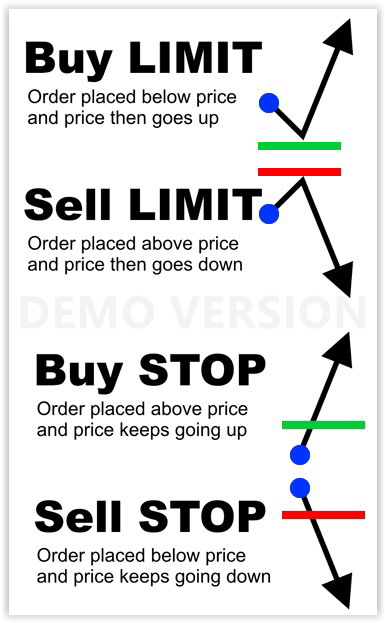
    The attached pic helps to tell STOP pending orders from LIMIT pending orders.

    ProRealP thanked this post
    Pending-STOP-LIMIT-Orders-Ordini-Pendenti.jpg Pending-STOP-LIMIT-Orders-Ordini-Pendenti.jpg
    #211432 quote
    robertogozzi
    Moderator
    Master

    If your PositionSize is not large enough to leave the minimum position size required by the broker, the entire position will be closed.

    Backtests with 1 open position reports several partial closing events where the left quantity is 0.75 and 0.5.

    If the broker request, say, a minimum 1 position open, then that position will be closed entirely. In this case try with 3 or more lots.

    #211894 quote
    ProRealP
    Participant
    Senior

    @Nicolas

    I tried your version, rounding it to the nearest value.

     CloseQuantity  = round(abs(CountOfPosition) - LeftQty, 1)

    It doesn’t work. Any other ideas?

    #211911 quote
    Nicolas
    Keymaster
    Master

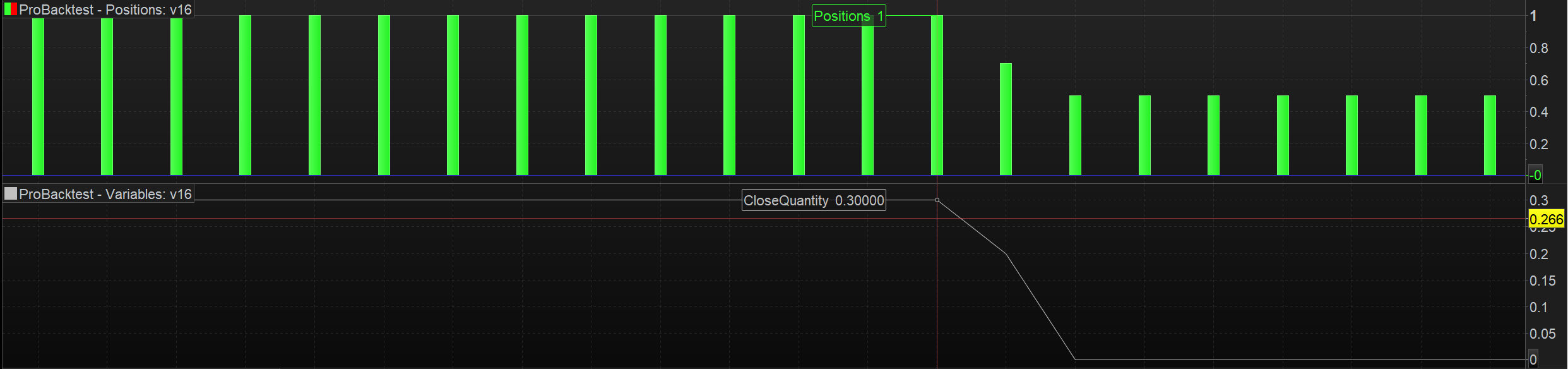
    Did you graph that variable to see what is the calculated quantity exactly?

    As per short position, you have to put a minus before the value:

    exitshort -CloseQuantity contract at market

    Because COUNTOFPOSITION returns a negative value for short orders, so — is equal to + in this case.

    #211923 quote
    PeterSt
    Participant
    Master

    As per short position, you have to put a minus before the value:

    exitshort -CloseQuantity contract at market

    exitshort -CloseQuantity contract at market


    Because COUNTOFPOSITION returns a negative value for short orders, so — is equal to + in this case.

    That was covered for already :

    CloseQuantity= round(abs(CountOfPosition) – LeftQty, 1)

    #211926 quote
    ProRealP
    Participant
    Senior

    @PeterSt
    Right? Should work like that.


    @Nicolas

    I’ve graphed the variable and it initially shows close quantity as 0.3, then 0.2 for a total of 0.5, that is, half a position of 1 contract. The system did eventually close half the position, but not till a couple of hours later than when it was supposed to, so I don’t reckon the position size is the problem? But not sure. Appreciate any input!

    Graph.png Graph.png
    #212098 quote
    ProRealP
    Participant
    Senior

    Anyone has any idea as to why there is a discrepency between backtest, and when a system is live in regards to the partial close?

    Would appreciate any input.

Viewing 14 posts - 16 through 29 (of 29 total)
  • You must be logged in to reply to this topic.

Backtest shows wrong results


ProOrder: Automated Strategies & Backtesting

New Reply
Author
author-avatar
ProRealP @prorealpierre Participant
Summary

This topic contains 28 replies,
has 7 voices, and was last updated by ProRealP
2 years, 11 months ago.

Topic Details
Forum: ProOrder: Automated Strategies & Backtesting
Language: English
Started: 03/10/2023
Status: Active
Attachments: 7 files
Logo Logo
Loading...