


Avoid return of a value when “0”

Viewing 8 posts - 1 through 8 (of 8 total)
  • Author
    Posts
  • #228285 quote
    liorp
    Participant
    New

    Hello
    I had a custom indicator that worked in the past –
    The idea was when the value of a variable was “0” the value was not to be returned. something like:
    if (close > open)
    v = close
    else
    v= 0
    return v AS “MY”

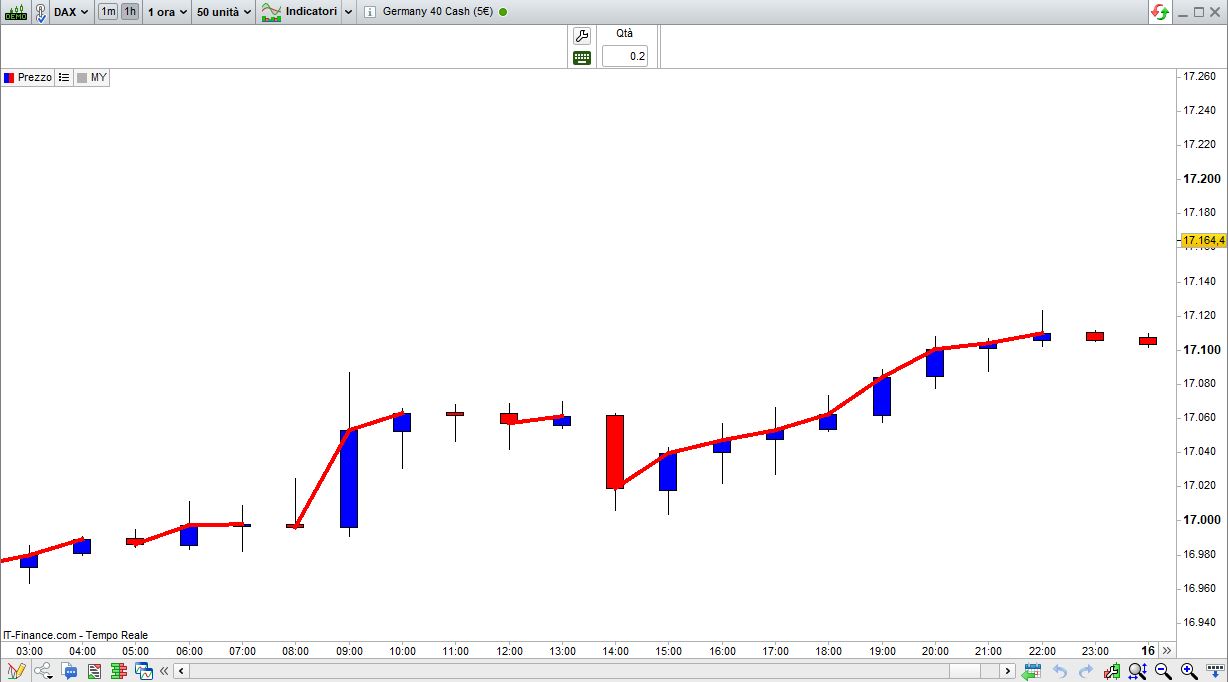
    this worked well , but now I see that the chart plots a transition from “0”
    Is there a way to still not distort the chart by values of “0” ?

    Thanks

    #228286 quote
    robertogozzi
    Moderator
    Master

    There you go:

    t = 0
    v = close
    if (close > open)then
       t = 255
    endif
    return v AS "MY" coloured(255,0,0,t) style(line,4)
    x-9.jpg x-9.jpg
    #228325 quote
    liorp
    Participant
    New

    Hi,
    Thanks a lot for you answer !
    it helped , but problem is still not resolved –
    The way that is is drawn now is you see a line connected between a candle that had “t=0” and  a candle with “t=255” .
    As you can see in your drawing a transition is plotted (marked in yellow) on the graph .
    is there a way to avoid drawing this transition and actually start the drawing from the candle that has “t=255” ?
    Thanks,
    Lior

    #228335 quote
    robertogozzi
    Moderator
    Master

    I can’t see any yellow line.

    #228341 quote
    liorp
    Participant
    New

    I am trying to attach a drawing, but  its not uploaded

    #228342 quote
    liorp
    Participant
    New

    if you look at the picture you sent out –
    there is a transition shown between the candle at 14:00 and the one at 15:00
    the candle at 14:00 has t=0 and the one at 15:00 has t=255, so I would expect the drawing to start for the candle at 15:00
    why is there a connecting line before the candle at 15:00  (the one joining the candle at 14:00 with the one at 15:00) and is there a way to avoid this ?
    Thanks

    #228346 quote
    JS
    Participant
    Senior

    It’s just a simple change in the formula…

    t = 0
    v = close
    if (close > open) and (Close[1]>Open[1]) and Close>Close[1] then
    t = 255
    endif
    return v AS "MY" coloured(255,0,0,t) style(line,4)
    
    robertogozzi thanked this post
    Scherm­afbeelding-2024-02-17-om-15.40.18.jpg Scherm­afbeelding-2024-02-17-om-15.40.18.jpg
    #228352 quote
    liorp
    Participant
    New

    Thanks a  lot !!

    JS thanked this post
Viewing 8 posts - 1 through 8 (of 8 total)
  • You must be logged in to reply to this topic.

Avoid return of a value when “0”


Platform Support: Charts, Data & Broker Setup

New Reply
Author
author-avatar
liorp @liorp Participant
Summary

This topic contains 7 replies,
has 3 voices, and was last updated by liorp

1 year, 12 months ago.

Topic Details
Forum: Platform Support: Charts, Data & Broker Setup
Language: English
Started: 02/16/2024
Status: Active
Attachments: 2 files
Logo Logo
Loading...

