Automatically marking profitable trades on the Chart

Viewing 5 posts - 1 through 5 (of 5 total)

  • Author
    Posts
  • #21814 quote
    Midlanddave
    Participant
    Veteran

    Hi everyone,

    Does anyone know how to display or highlight winning trades on the chart when we backtest a strategy? I know we can see the closed positions list which gives the % of winning or losing trades, but is there a way of marking those trades on the chart other than by doing so manually? The equity curve does help but it can be misleading when a trade goes into profit initially but then drops into a loss after.

    I’ve tried to make an indicator based on the equity curve and open positions, but alas my coding knowledge for indicators is virtually non-existant.

    Any ideas??


    Thanks!

    #21830 quote
    Big Hug
    Participant
    Average

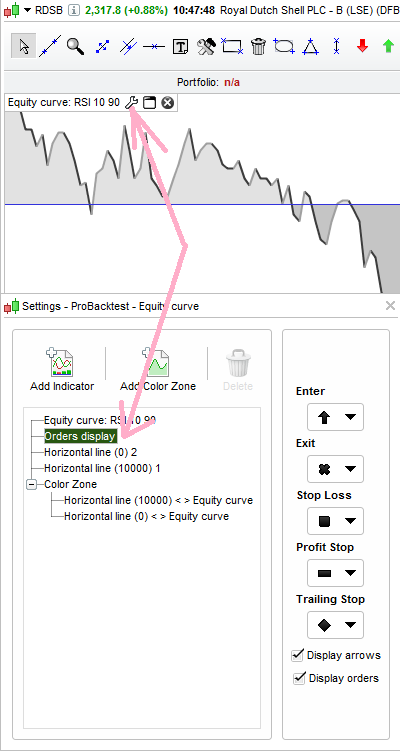
    Hi – You should get icons on the chart showing Stop Loss.

    Midlanddave thanked this post
    midland-dave.png midland-dave.png
    #21880 quote
    Midlanddave
    Participant
    Veteran

    Thanks that only seems to work if it hits a stop / limit rather than a particular profitable exit condition…..very curious!!

    #21959 quote
    GraHal
    Participant
    Master

    Hi Dave

    How about using the ‘GRAPH positionperf > 0.01’  then you would see gains of greater than 1% (or whatever you choose) marked up on the Chart.

    Cheers
    GraHal

    Midlanddave thanked this post
    #22023 quote
    Midlanddave
    Participant
    Veteran

    That’s an interesting idea!!!! I’ll have to look at that.

    Thanks GraHal 😀

Viewing 5 posts - 1 through 5 (of 5 total)
  • You must be logged in to reply to this topic.

Automatically marking profitable trades on the Chart


ProOrder: Automated Strategies & Backtesting

New Reply
Author
Summary

This topic contains 4 replies,
has 3 voices, and was last updated by Midlanddave
9 years, 1 month ago.

Topic Details
Forum: ProOrder: Automated Strategies & Backtesting
Language: English
Started: 01/20/2017
Status: Active
Attachments: No files
Logo Logo
Loading...