Hi!
I hope Iam in the right part of the forum, otherwise, excuse me.
Iam swingtrading stocks through IB / PRT, and Iam always using LoD as my stoploss. Is there any tool or addon/indicator that I can use that either connect my xxx amount of dollar risk with LoD, or showing the LoD in % away?
Best Regards
Christoffer
 JS
JSParticipant
Veteran
Hi,
It is possible to create an indicator for this:
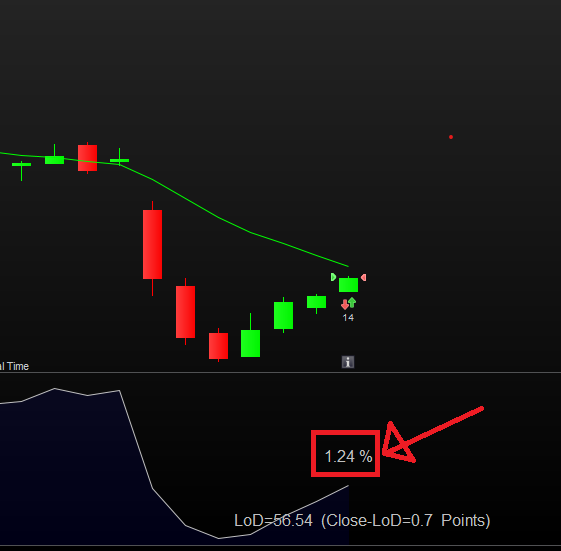
For example, you can display the “LoD” in the chart and show the number of points between the “Close” and the “LoD,” or display it as a percentage…
Maybe this is something for you…
DefParam DrawOnLastBarOnly=True
//RiskPerTrade
RiskPerTrade=1000

//LoD
LoD=DLow(0)

//CurrentPrice
CurrentPrice=Close

//Distance to LoD
DistanceToLoD=CurrentPrice-LoD

//Distance Percentage to LoD
DistancePerc=Round(DistanceToLoD/Lod*100,2)

DrawText("#DistancePerc#%",BarIndex,LoD+2,SansSerif,Standard,16)
DrawText("LoD=#LoD# (Close-LoD=#DistanceToLoD# Points)",-200,25,SansSerif,Standard,16)Anchor(BottomRight)

//Calculate PositionSize
PositionSize=RiskPerTrade/DistanceToLoD

Return LoD as "LoD"
Hi,
It is possible to create an indicator for this:
For example, you can display the “LoD” in the chart and show the number of points between the “Close” and the “LoD,” or display it as a percentage…
Maybe this is something for you…
DefParam DrawOnLastBarOnly=True
//RiskPerTrade
RiskPerTrade=1000
//LoD
LoD=DLow(0)
//CurrentPrice
CurrentPrice=Close
//Distance to LoD
DistanceToLoD=CurrentPrice-LoD
//Distance Percentage to LoD
DistancePerc=Round(DistanceToLoD/Lod*100,2)
DrawText(“#DistancePerc#%”,BarIndex,LoD+2,SansSerif,Standard,16)
DrawText(“LoD=#LoD# (Close-LoD=#DistanceToLoD# Points)”,-200,25,SansSerif,Standard,16)Anchor(BottomRight)
//Calculate PositionSize
PositionSize=RiskPerTrade/DistanceToLoD
Return LoD as “LoD”
1
2
3
4
5
6
7
8
9
10
11
12
13
14
15
16
17
18
19
20
21
22
23
DefParam DrawOnLastBarOnly=True
//RiskPerTrade
RiskPerTrade=1000
//LoD
LoD=DLow(0)
//CurrentPrice
CurrentPrice=Close
//Distance to LoD
DistanceToLoD=CurrentPrice–LoD
//Distance Percentage to LoD
DistancePerc=Round(DistanceToLoD/Lod*100,2)
DrawText(“#DistancePerc#%”,BarIndex,LoD+2,SansSerif,Standard,16)
DrawText(“LoD=#LoD# (Close-LoD=#DistanceToLoD# Points)”,–200,25,SansSerif,Standard,16)Anchor(BottomRight)
//Calculate PositionSize
PositionSize=RiskPerTrade/DistanceToLoD
Return LoD as “LoD”
This is prob the best possible without going too deep into it. I only need the % number from this, as text otherwise covers that when I have many small chart. How would the formula be in that case?
Many thanks for taking your time!
JSParticipant
Veteran
Can you give an example of what you mean exactly…
I didnt describe that good. Its mainly this number I would like to be shown all the time. as I have a fixed $ amount as stoploss and I always use LoD as my SL-level.
Best case would be to have auto-quantity with LoD. But I guess that is alot more tricky to get.
Best Regards
JSParticipant
Veteran
I have adjusted the indicator for the calculation of the “PositionSize”…
The “PositionSize” is based on “RiskPerTrade” which you have to set up/adjust in advance (currently $100)…
The distance between the “Close” and the “LoD” is basically the “StopLoss” distance multiplied by the “PointSize” and divided by the “PointValue”…
The theoretical position size: PositionSize = RiskPerTrade / StopLoss (distance)
It is of course the theoretical position size because you use the “Close” instead of the (still unknown) “TradePrice”…
DefParam DrawOnLastBarOnly=True
//RiskPerTrade
RiskPerTrade=100

//LoD
LoD=DLow(0)

//CurrentPrice
CurrentPrice=Close

//Distance to LoD
DistanceToLoD=(CurrentPrice-LoD)*PointSize/PointValue

//Distance Percentage to LoD
DistancePerc=Round(DistanceToLoD/Lod*100,2)

DrawText("#DistancePerc#%",BarIndex,0,SansSerif,Standard,16)
//DrawText("LoD=#LoD# (Close-LoD=#DistanceToLoD# Points)",-200,25,SansSerif,Standard,16)Anchor(BottomRight)


//Calculate PositionSize
PositionSize=RiskPerTrade/DistanceToLoD
DrawText("PositionSize=#PositionSize#",BarIndex,-0.2,SansSerif, Standard,16)
Return //LoD as "LoD"
Is it possible to create something that makes marketorders use LoD as SL, automatic? Using the chosen $ risk?
Also, how would this indicator code look with only the % number shown and nothing else?
Thanks for taking your time, apperciate it alot!
JSParticipant
Veteran
When we transform the indicator into a strategy, it is possible to generate market orders under certain conditions, using “LoD” as StopLoss…
You need to specify the conditions under which the market orders are generated (for example, when and under what conditions we go Long or Short)…
If you do not want to see certain output from the indicator, you can use two forward slashes for the relevant line.
For example, if you no longer want to see “PositionSize,” you can add two forward slashes before line 23…
//DrawText(“PositionSize=#PositionSize#”,BarIndex,-0.2,SansSerif, Standard,16)
Perfect!
Thanks for the help!