Automatic horizontal ray plotting

Viewing 15 posts - 1 through 15 (of 15 total)
  • Author
    Posts
  • #203224 quote
    Baguouse
    Participant
    New

    Hi Gentlemen,

    I use a powerful method to define support and resistance levels.

    I’d like to automatically plot horizontal rays in order to define them. I currently do it manually but it’s a hassle.

    First let’s define a breakout:

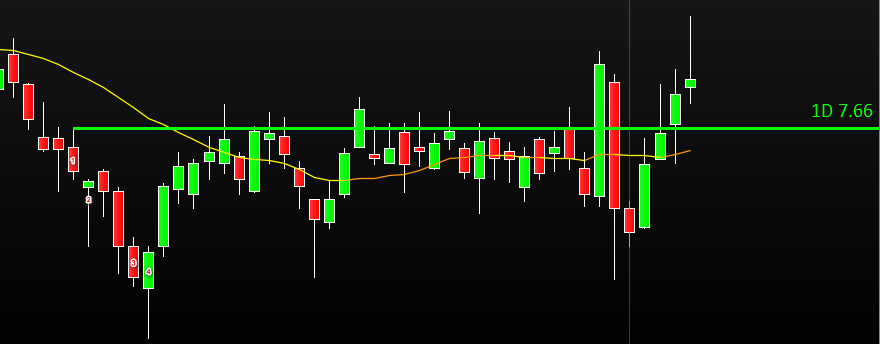
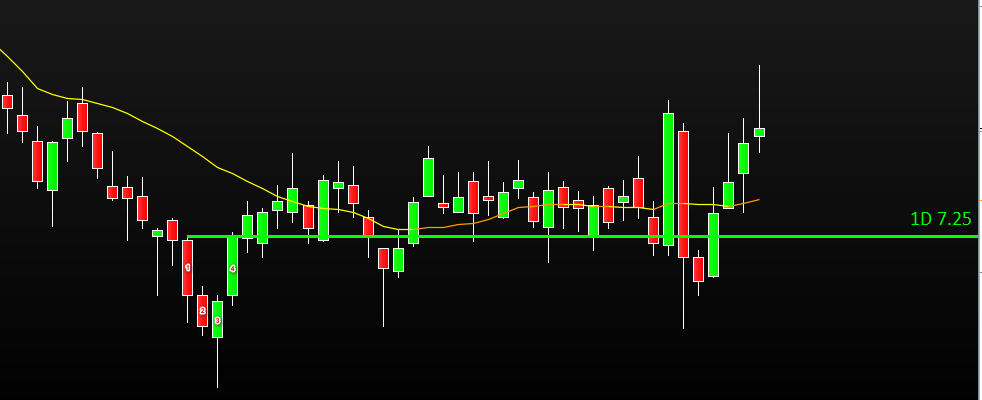
    Look at the ¨breakout¨ image.

    Candle 2 is completely below the high of candle 1 (high [candle2] < high[candle1])

    AND

    Candle 3 closed below the low of candle 2 (close [candle3] < low[candle2])

    AND

    Candle 4 makes a new low vs candle 3 (low [candle4] < low[candle3])


    There is breakout of the green ray there so this one isn’t valid and shouldn’t be drawn.


    Now let’s define a NO  breakout:

    Look at the ¨No breakout¨ image.

    Candle 2 is completely below the high of candle 1 (high [candle2] < high[candle1])

    AND

    Candle 3 didn’t close below the low of candle 2 (close [candle3] > low[candle2]) OR Candle 3 closed below the low of candle 2 (close [candle3] < low[candle2])

    AND

    Candle 4 didn’t make a new low vs candle 3 (low [candle4] > low[candle3])

    There is No breakout of the green ray there, so this one is valid, and that ray should be drawn. On top of that candle 4 closed above the ray (close [candle4] > high[candle1]) so it validates the line for good, meaning that if we breakout that ray to the downside, it should stay in place and a new dynamic ray should be created until validated.

    Basically, the green horizontal ray is showing the level that the bears couldn’t breakout.

    This works also on the upside, but highs have to be used instead of the low in the formula.

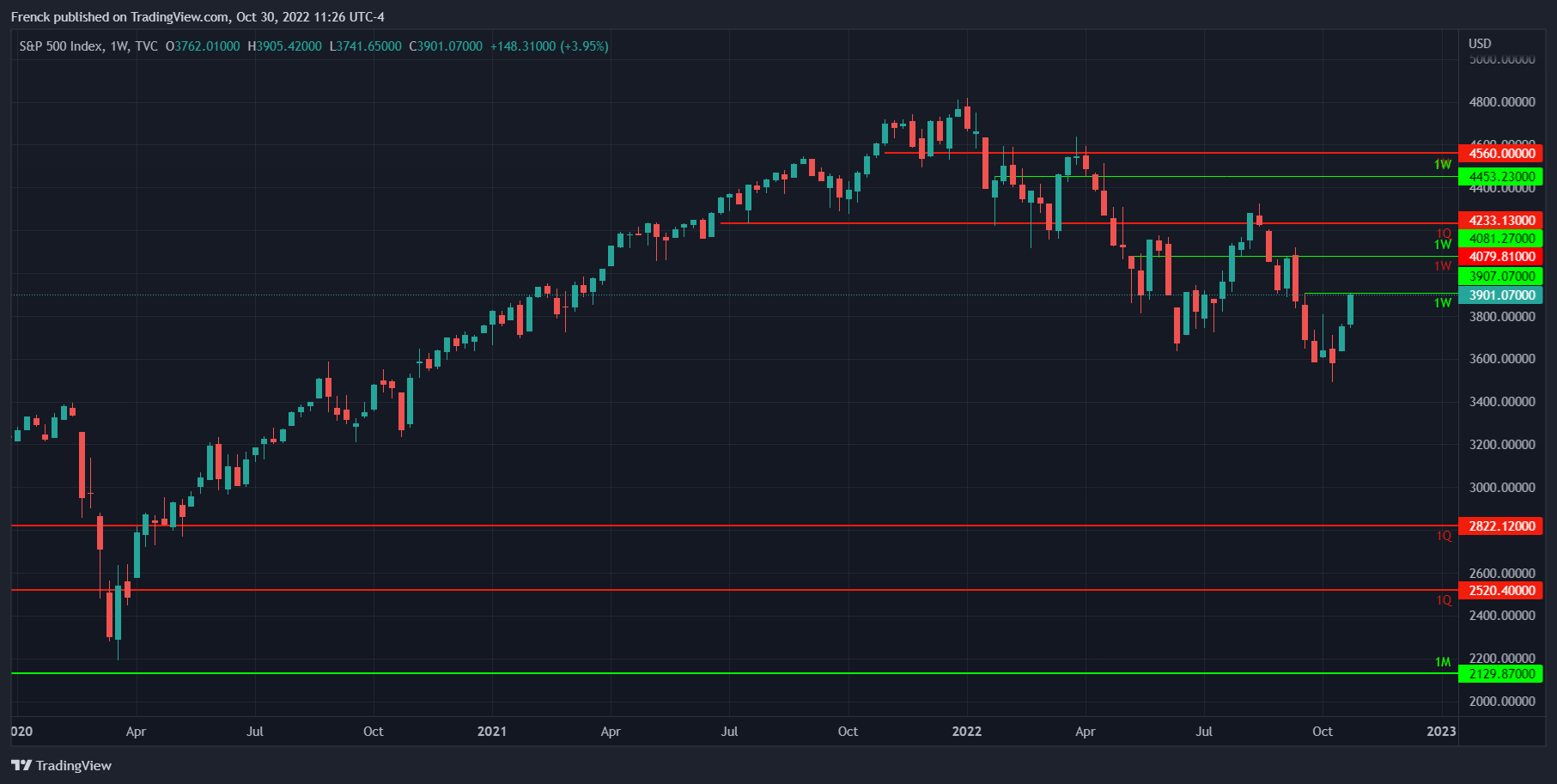
    I manually plot on daily, weekly, Monthly, quarterly and yearly.

    I’ve attached an example of what I manually plotted on SPX.

    Do you think it is possible to code such on chart indicator?

    If so, can anyone help?

    Thanks in advance.

    Cheers.

    Franck.

    #203227 quote
    Baguouse
    Participant
    New

    Adding the breakout image as it didn’t load apparently

    #203229 quote
    robertogozzi
    Moderator
    Master

    As to the BREAKOUT pic, the candle PRIOR to candle 3 closed below candle 2, why didn’t you label it?

    Baguouse thanked this post
    #203230 quote
    Baguouse
    Participant
    New

    Hi Roberto.

    Actually, it didn’t. The low of candle 2 is at 6.86 and the candle you mentioned closed also at 6.86 so it’s not a close below.

    Thanks for your attention. Much appreciated.

    Franck.

    #203241 quote
    Baguouse
    Participant
    New

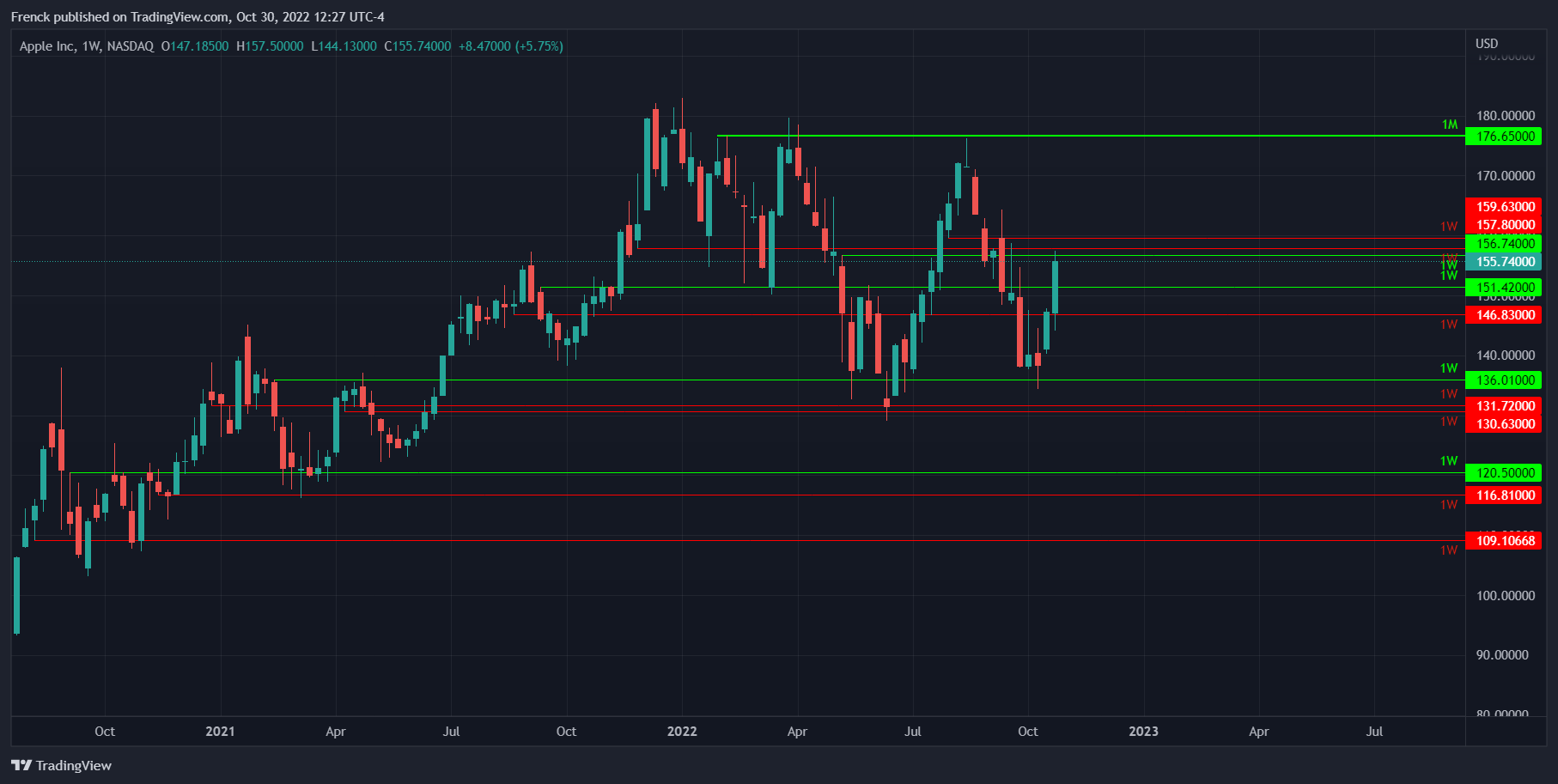
    Here’s an example of the lines plotted on AAPL

    #203251 quote
    robertogozzi
    Moderator
    Master

    Ok, still as to the BREAKOUT picture you wrote “Candle 2 is completely below the high of candle 1 (high [candle2] < high[candle1])” did you mean low?

    Anyway why did you start counting candles from candle 1? What are the conditions to name it 1?

    Then what are the conditions to name candle 2 as 2? etc… for all the other ones you mentioned?

    Pics can be useful, but a detailed description of conditions required is mandatory to understand what you mean.

    #203255 quote
    Baguouse
    Participant
    New

    Well, I labelled candle 1 as ¨1¨ because I am drawing the ray on the high of that candle when there is ¨no breakout¨. I named it also ¨1¨in the ¨breakout¨config as I wanted to show the difference between a breakout and a no breakout.

    Basically I am drawing the level for which: a complete candle is below it, AND there is a close below the low of that complete candle on one of the subsequent candles; and there this no subsequent lower low below that subsequent candle.

    I know it’s very hard to explain but I could show you a video call sharing my screen if not clear…

    Grazie.

    Franck.

    #203267 quote
    Baguouse
    Participant
    New

    Hi Roberto.

    For better understanding, I have uploaded a video here

    Please let me know once viewed/uploaded so that I can remove it from my google drive.

    Ciao.

    Franck.

    I

    #203268 quote
    Baguouse
    Participant
    New

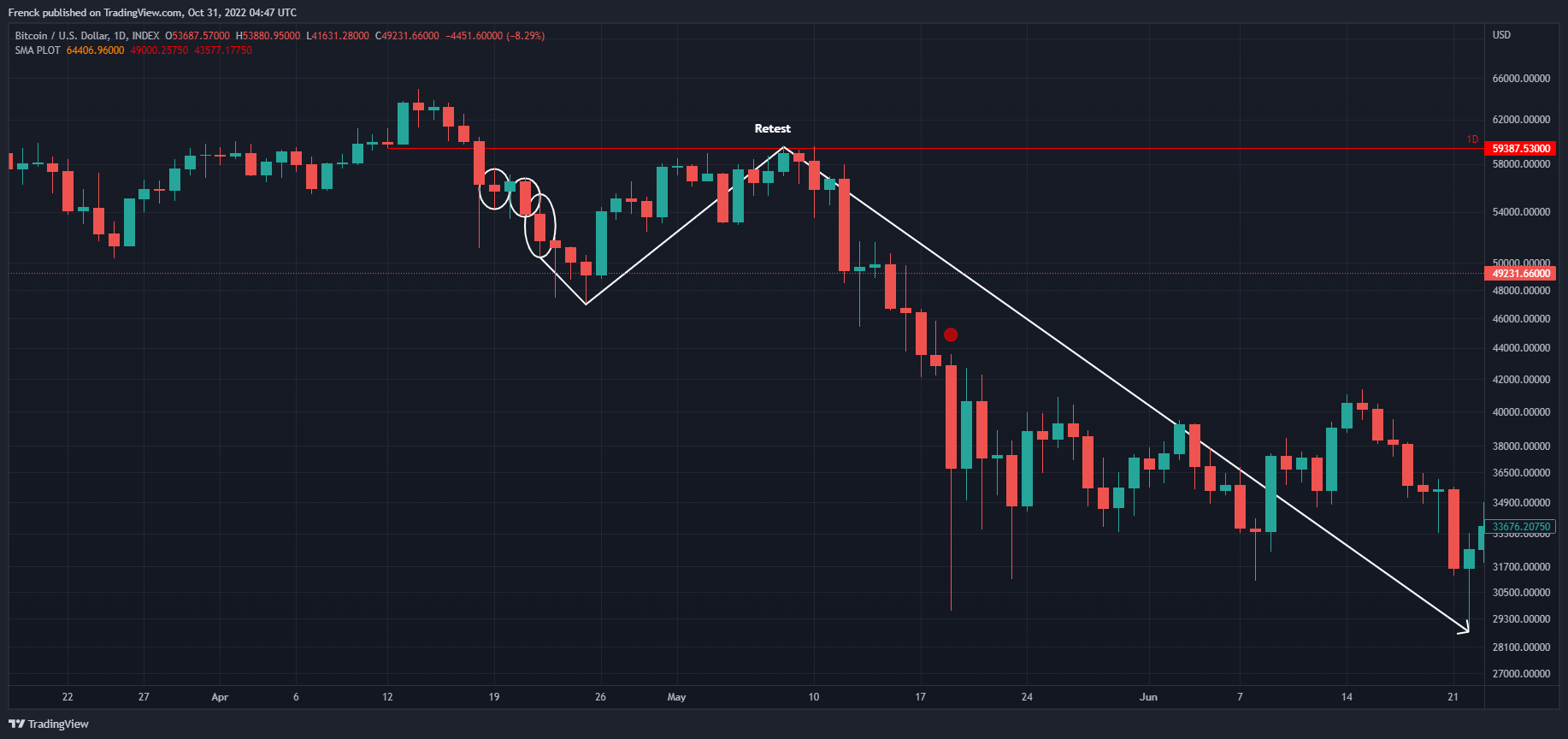
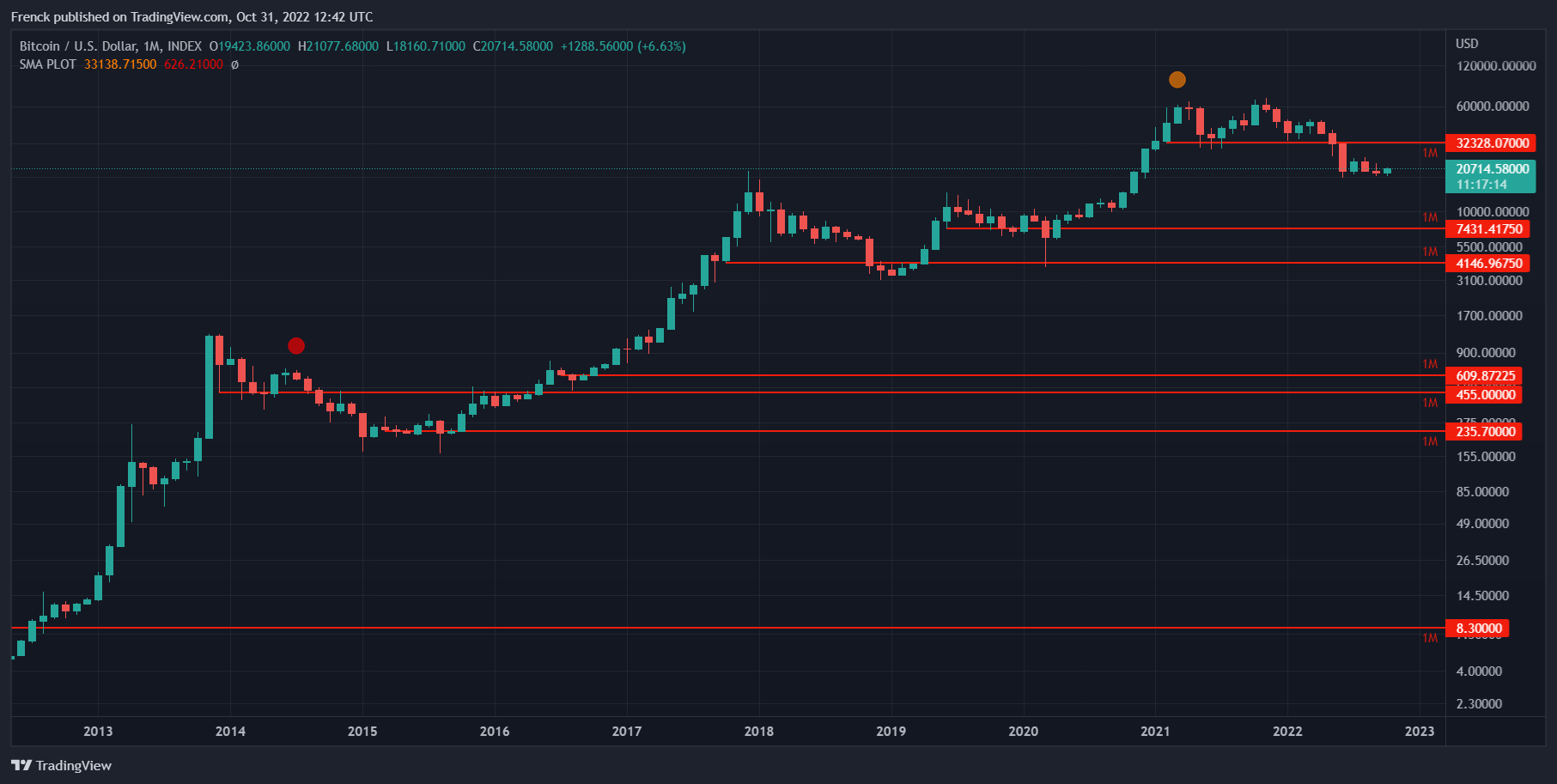
    Works on any instrument. Please check the BTC chart where you can see there was a sell signal on the 22nd of April 2021 with a subsequent retest of the resistance and a significant move downward (43% from the sell signal and 51% from the retest).

    This could be used to create screeners as well to detect either a breakout or a retest post breakout.

    Regards.


    Franck.

    #203285 quote
    Nicolas
    Keymaster
    Master

    Sorry but what you defined in your first post is only for green lines, right? Could you please share a single picture with only green lines in that case? Many thanks.

    #203304 quote
    Baguouse
    Participant
    New

    You mean for BTC?

    Have you watched the video I have shared. I think it will be very helpful for you to understand the process.

    Thanks.

    #203313 quote
    Baguouse
    Participant
    New

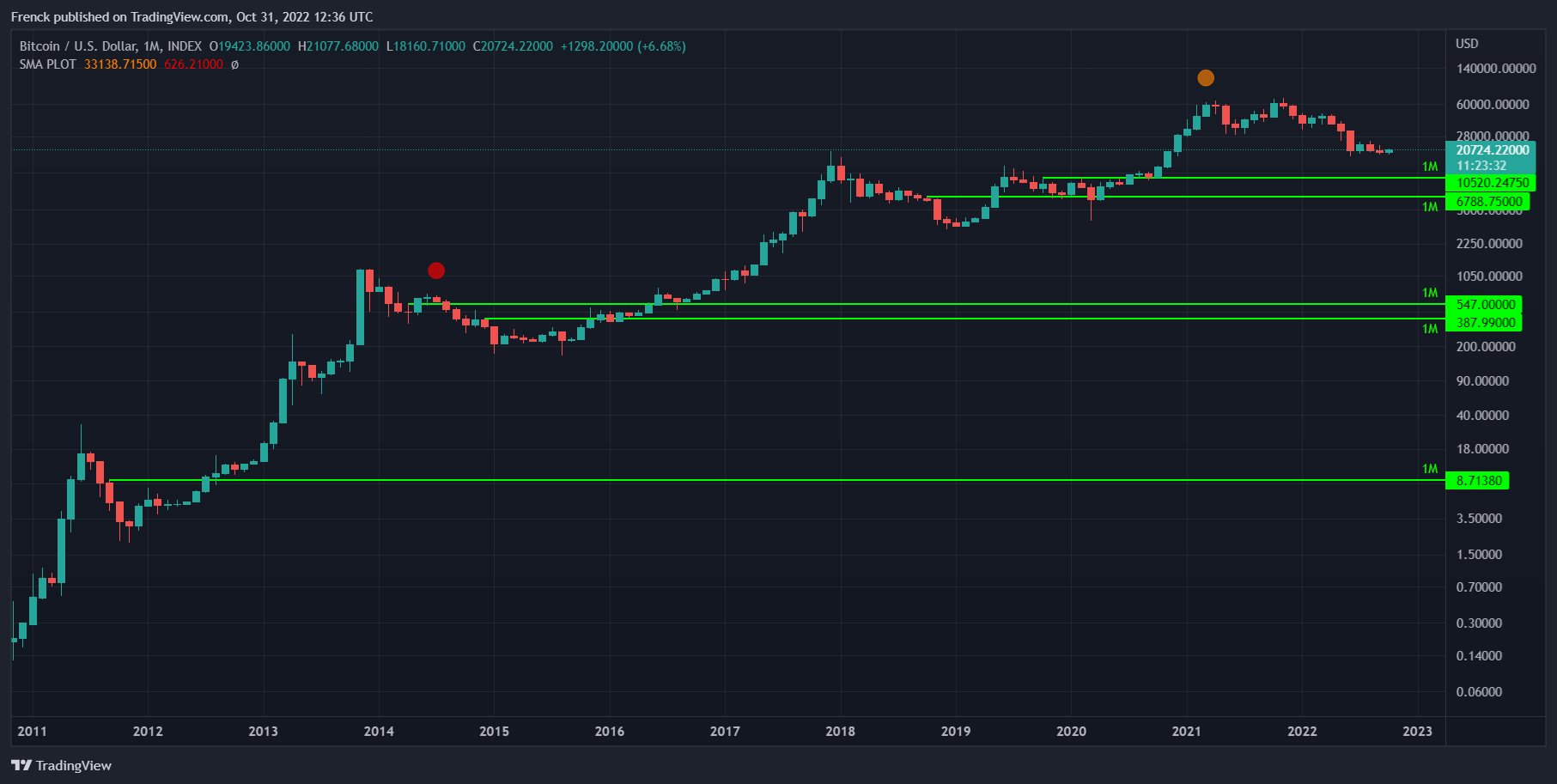
    I’ve attached a Monthly chart with only green lines and another with only red ones for the sake of clarity. On weekly or daily charts, it’d look too cluttered. But the principle is the same.

    The video is clearer though, I think.

    #203329 quote
    JS
    Participant
    Senior

    Hi @Baguouse

    I tried to convert the “NO BreakOut” into the usual notation where, for example, the last Close is noted as Close[0] and the previous one as Close[1] and so on:

    High[1]  <  High[0]

    And

    Close[2] > Low[1] or Close[2] < Low[1]

    And

    Low[3] > Low[2]

    Remark:

    Close[2] > Low[1] or Close[2] < Low[1]

    is always true… (so not really a condition)

    #203334 quote
    Baguouse
    Participant
    New
    Hi JS, Thanks for your support. Well, it’s not that simple because the candle that will close below the low of candle 2 isn’t necessarily candle 3. It can take several candles for this to happen. Have a look at the video below for better understanding. TSLA 228.52000 ▲ 2022-10-31 05-11-42.mp4 – Google Drive Cheers. Franck.
    #210243 quote
    Baguouse
    Participant
    New
    Maybe the below better explains. I want to automatically horizontal rays on chart. Here are the conditions: 1. The ray will be plotted and start on the low of Candle 1 2. Candle 2 is subsequent to Candle 1 is the first candle to have a low superior to Candle 1 low 3. Candles between Candle 1 and Candle 2 have a low inferior to Candle 1 low 4. Candles between Candle 1 and Candle 2 have a close superior to Candle 1 low 5. Candle 3 is subsequent to Candle 2 is the first candle to have a close superior to Candle 2 high 6. Candle 4 is subsequent to Candle 3 is the first candle to have a close inferior to Candle 1 low 7. The ray can be plotted only when Candle 4 happened
Viewing 15 posts - 1 through 15 (of 15 total)
  • You must be logged in to reply to this topic.

Automatic horizontal ray plotting


ProBuilder: Indicators & Custom Tools

New Reply
Author
author-avatar
Baguouse @baguouse Participant
Summary

This topic contains 14 replies,
has 4 voices, and was last updated by Baguouse

2 years, 11 months ago.

Topic Details
Forum: ProBuilder: Indicators & Custom Tools
Language: English
Started: 10/30/2022
Status: Active
Attachments: 7 files
Logo Logo
Loading...