Automatic Daily Pivot Caculator

Viewing 9 posts - 1 through 9 (of 9 total)

  • Author
    Posts
  • #60118 quote
    saif
    Participant
    Junior

    Hi All,

    Is it possible to have the horizontal lines to go right across the chart and not stop at the last traded bar, with the value indicated on the label ,where the line ends?

    Hope someone can help.

    Thanks in advance.

    #60134 quote
    Nicolas
    Keymaster
    Master

    Ok but only for the today’s pivots lines then?

    #60141 quote
    saif
    Participant
    Junior

    Yes Nicolas, I update them daily, but find the charts messy when the label sits on the last traded bar and also prefer to have the value indicated on the line along with the label at the right side of the chart..hope this makes sense.

    #60142 quote
    saif
    Participant
    Junior

    [attachment file=”UKX 1 hour.png”]
    This is how i”m used to when entering them manually..as you can see it takes a lot of time

    #60154 quote
    Nicolas
    Keymaster
    Master

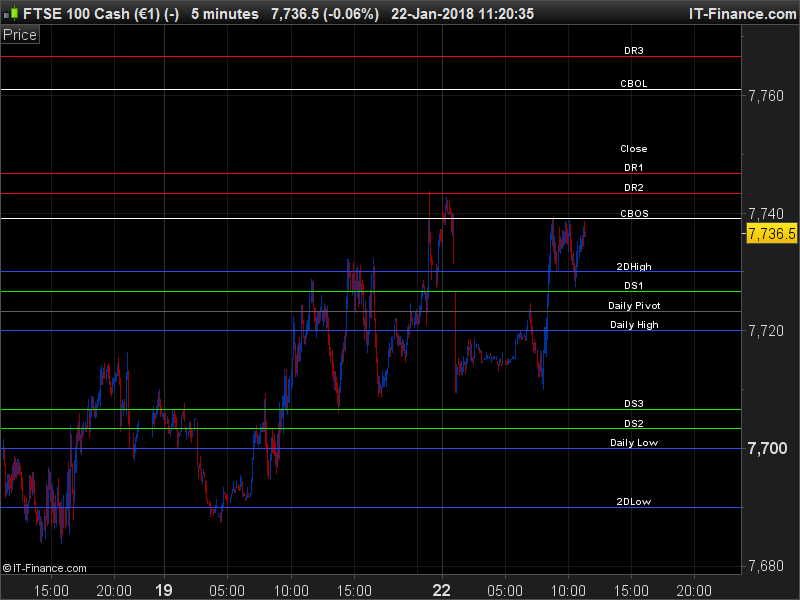
    I modified the indicator, it should looks how you want now ..

    defparam drawonlastbaronly = true
    
    MP = UNDEFINED
    CBOL = UNDEFINED
    CBOS = UNDEFINED
    //CSHT = UNDEFINED
    //CLNG = UNDEFINED
    MR3 = UNDEFINED
    MR2 = UNDEFINED
    MR1 = UNDEFINED
    MS1 = UNDEFINED
    MS2 = UNDEFINED
    MS3 = UNDEFINED
    MMLO = UNDEFINED
    MMHI = UNDEFINED
    MGAP = UNDEFINED
    MPDH = UNDEFINED
    MPDL = UNDEFINED
    
    SHOW = (TodayOnly and DATE[0] > Yesterday)
    
    IF SHOW or NOT TodayOnly THEN
    MP = ( (MClose + MHi + MLo )  / 3)
    CBOL = MClose +  ( ( (MHi  - MLo) * 1.1) / 2)
    CBOS = MClose - ( ( (MHi  - MLo ) * 1.1) / 2)
    MR3 = MHi + ( 2 * (MP - MLo) )
    MR2 = MP + (MHi - MLo)
    MR1 = (2 * MP) - MLo
    MS1 = (2 * MP) - MHi
    MS2 = MP - (MHi - MLo)
    MS3 = MLo - ( 2 * (MHi - MP) )
    MMLO = MLO
    MMHI = MHI
    MPDH = PDH
    MPDL = PDL
    MGAP = MCLOSE
    
    //vertical offsetto draw text correctly over horizontal lines
    Voffset = 1*pipsize
    
    //draw pivot points text
    DRAWTEXT("                                  Daily Pivot",barindex-2,MP+Voffset,SansSerif,Bold,10)
    DRAWTEXT("                                  CBOL",barindex-2,CBOL+Voffset,SansSerif,Bold,10)
    DRAWTEXT("                                  CBOS",barindex-2,CBOS+Voffset,SansSerif,Bold,10)
    DRAWTEXT("                                  DR3",barindex-2,MR3+Voffset,SansSerif,Bold,10)
    DRAWTEXT("                                  DR2",barindex-2,MR2+Voffset,SansSerif,Bold,10)
    DRAWTEXT("                                  DR1",barindex-2,MR1+Voffset,SansSerif,Bold,10)
    DRAWTEXT("                                  DS1",barindex-2,MS1+Voffset,SansSerif,Bold,10)
    DRAWTEXT("                                  DS2",barindex-2,MS2+Voffset,SansSerif,Bold,10)
    DRAWTEXT("                                  DS3",barindex-2,MS3+Voffset,SansSerif,Bold,10)
    DRAWTEXT("                                  Daily High",barindex-2,MMHI+Voffset,SansSerif,Bold,10)
    DRAWTEXT("                                  Daily Low",barindex-2,MMLO+Voffset,SansSerif,Bold,10)
    DRAWTEXT("                                  Close",barindex-2,MGAP+Voffset,SansSerif,Bold,10)
    DRAWTEXT("                                  2DHigh",barindex-2,MPDH+Voffset,SansSerif,Bold,10)
    DRAWTEXT("                                  2DLow",barindex-2,MPDL+Voffset,SansSerif,Bold,10)
    
    DRAWHLINE(MP)COLOURED(95,95,100)
    DRAWHLINE(CBOL)
    DRAWHLINE(cbos)
    drawhline(mr3)COLOURED (235,5,30)
    drawhline(mr2)COLOURED (235,5,30)
    drawhline(mr1)COLOURED (235,5,30)
    drawhline(ms3)COLOURED(30,235,5)
    drawhline(ms2)COLOURED(30,235,5)
    drawhline(ms1)COLOURED(30,235,5)
    drawhline(mmhi)COLOURED(45,75,240)
    drawhline(mmlo)COLOURED(45,75,240)
    drawhline(mpdh)COLOURED(45,75,240)
    drawhline(mpdl)COLOURED(45,75,240)
    
    ENDIF
    RETURN// MP COLOURED(95,95,100) as "Pivot", CBOL as "CBOL", CLNG COLOURED(30,235,5) as "CLNG", CSHT COLOURED(30,235,5) as "CSHT", CBOS as "CBOS", MR3 COLOURED (235,5,30) as "R3", MR2 COLOURED (235,5,30) as "R2", MR1 COLOURED (235,5,30) as "R1", MS1 COLOURED(30,235,5) as "S1", MS2 COLOURED(30,235,5) as "S2", MS3 COLOURED(30,235,5) as "S3", MGAP COLOURED(235,5,30) as "Close", MMHi COLOURED(45,75,240) as "Hi", MMLo COLOURED(45,75,240) as "Lo", MPDH COLOURED(45,75,240) as "PDH", MPDL COLOURED(45,75,240) as "PDL"
    
    // To set your own colours REM out above line and undo line below
    REM RETURN MP as "Pivot", CBOL as "CBOL", CLNG as "CLNG", CSHT as "CSHT", CBOS as "CBOS", MR3  as "R3", MR2 as "R2", MR1 as "R1", MS1 as "S1", MS2 as "S2", MS3 as "S3", MGAP as "Gap", MMHi as "Hi", MMLo as "Lo", MPDH as "PDH", MPDL as "PDL"
    

    I noticed that you update manually the variables to make the calculation the pivot points, it could be made automatically, could you tell me what are these manual values?

    saif thanked this post
    #60165 quote
    saif
    Participant
    Junior

    Thank you very much Nicolas. I used horizontal lines to enter the daily levels manually but I can now use this indicator to automatically populate the levels using EOD data.

    I modified using your inputs but still having the Texts( Labels) in the middle and not on the right, just before Y Axis. Is there also a way to display the value of each line as well.

    Please look in to this when time permits.

    I can’t thank you enough for helping me.

    Cheers mate.

    #60200 quote
    Nicolas
    Keymaster
    Master

    The only possibility to get the title on the right of the chart is by adding blank space before them, just like I did in the code I posted previously. But since the X axis is based on bars (time), and not pixels, the text could be far or near the candlesticks, depending on the timeframe or the zoom in/out you made.

    It’s possible to add values on each of the line, just add the variable name between 2 #, like in my example below:

    DRAWTEXT("                                  2DLow - #MPDL#",barindex-2,MPDL+Voffset,SansSerif,Bold,10)
    saif thanked this post
    #60321 quote
    saif
    Participant
    Junior

    Thank you very much Nicolas.

    #60793 quote
    saif
    Participant
    Junior

    Good Morning Nicolas,

    Sorry to bother you again. How can I get only 1 decimal point showing in the Values of the pivot points.

Viewing 9 posts - 1 through 9 (of 9 total)
  • You must be logged in to reply to this topic.

Automatic Daily Pivot Caculator


ProBuilder: Indicators & Custom Tools

New Reply
Author
author-avatar
saif @saifbuhari Participant
Summary

This topic contains 8 replies,
has 2 voices, and was last updated by saif
8 years ago.

Topic Details
Forum: ProBuilder: Indicators & Custom Tools
Language: English
Started: 01/22/2018
Status: Active
Attachments: 2 files
Logo Logo
Loading...