Hi Guys,
I’m new to coding in Prorealtime. I hope someone can help me with this.
- I have done some code for automated trading and backtested it.
- It works perfect in the backtest but when I execute this for autotrading on live, it does not work.
- But when I backtest the same code that wasn’t working on the live for those days in point 2 above, it works fine a couple of days later on backtesting.
- I suspect it may have been something to do with timezone? I don’t know.
- I’m in Australia so all my time zone are set to Australia/Sydney desktop time
- I’m trading US market indices
Any help would be great. Please see the code below.
What Am I doing wrong?
// Definition of code parameters
DEFPARAM CumulateOrders = False // Cumulating positions deactivated


// Prevents the system from creating new orders to enter the market or increase position size before the specified time
noEntryBeforeTime = 023000
timeEnterBefore = time >= noEntryBeforeTime

// Prevents the system from placing new orders to enter the market or increase position size after the specified time
noEntryAfterTime = 080000
timeEnterAfter = time < noEntryAfterTime

// Prevents the system from placing new orders on specified days of the week
daysForbiddenEntry = OpenDayOfWeek = 6 OR OpenDayOfWeek = 0


IF MyRules AND timeEnterBefore AND timeEnterAfter AND not daysForbiddenEntry THEN
BUY 10 CONTRACT AT MARKET
ENDIF

SET TARGET pPROFIT 100
SET STOP TRAILING 50
This is likely to have nothing to do with your issues, but as you used “p” with PROFIT you should use it with TRAILING as well.
What does “it does not work”?
What errors or wrong trades are reported?
What maximum size of trade have you set? If this is under the minimum size for the instrument that you are trying to trade then no trades will be opened.
Does the size you are trying to open meet the minimum size for that market?
10 CONTRACTS might be too much for your account? (free margin).
I’m not getting any errors. The code simple does not execute any trades in live.. although the code works fine in backtested for the same period.
I’m using it in NASDAQ indicies US Tech 100 ($1) market.
- The minimum size for this market is 0.5.
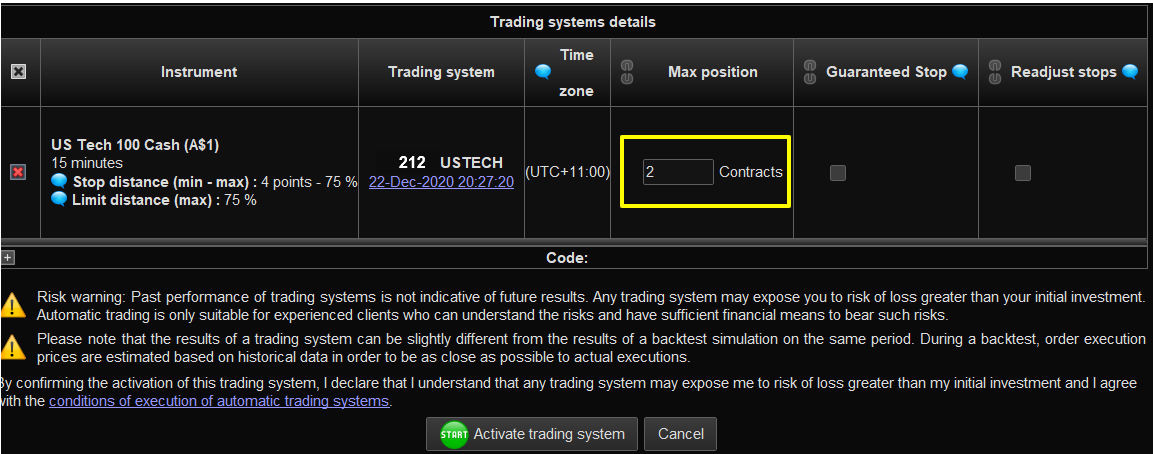
- Although the code says BUY 10 contract, I set a minimum contract to buy as 2 when you start the autotrading. Do I need to have the same quanty in the code and when you start ? (Please see the screenshot)
- I do have enough margin in the account to be able to execute 10 contracts.
I will try using the “p” with TRAINING.
What maximum size of trade have you set? If this is under the minimum size for the instrument that you are trying to trade then no trades will be opened.
Does the size you are trying to open meet the minimum size for that market?
Thank you for your reply. My code says 10 contract but I put 2 in maximum size.. ? Do I need to put 10 or more in the maximum size when I start the program?
The short answer is … Yes.
The Max Position box that you have to fill in before running a strategy live is quite simply a safety level that you set. It is useful if you have accumulating positions and want to set a limit to how many are allowed to be open at any one time. If your strategy only ever has one position open of a size of 0.5 then set it to 0.5.
The setting is there to stop out of control strategies from emptying your bank account.
The Max Position box that you have to fill in before running a strategy live is quite simply a safety level that you set. It is useful if you have accumulating positions and want to set a limit to how many are allowed to be open at any one time. If your strategy only ever has one position open of a size of 0.5 then set it to 0.5.
The setting is there to stop out of control strategies from emptying your bank account.
Thank you so much for your help.
Thanks to everyone for your input. Thank you.
I changed trading hours to reflect CET (Utc+1) and it just opened a trade with 10 contracts at 18:30 (Utc+1), entry price 12697.5.