ATR on chart indicator

Viewing 7 posts - 1 through 7 (of 7 total)

  • Author
    Posts
  • #126936 quote
    Fab666
    Participant
    New

    Hi

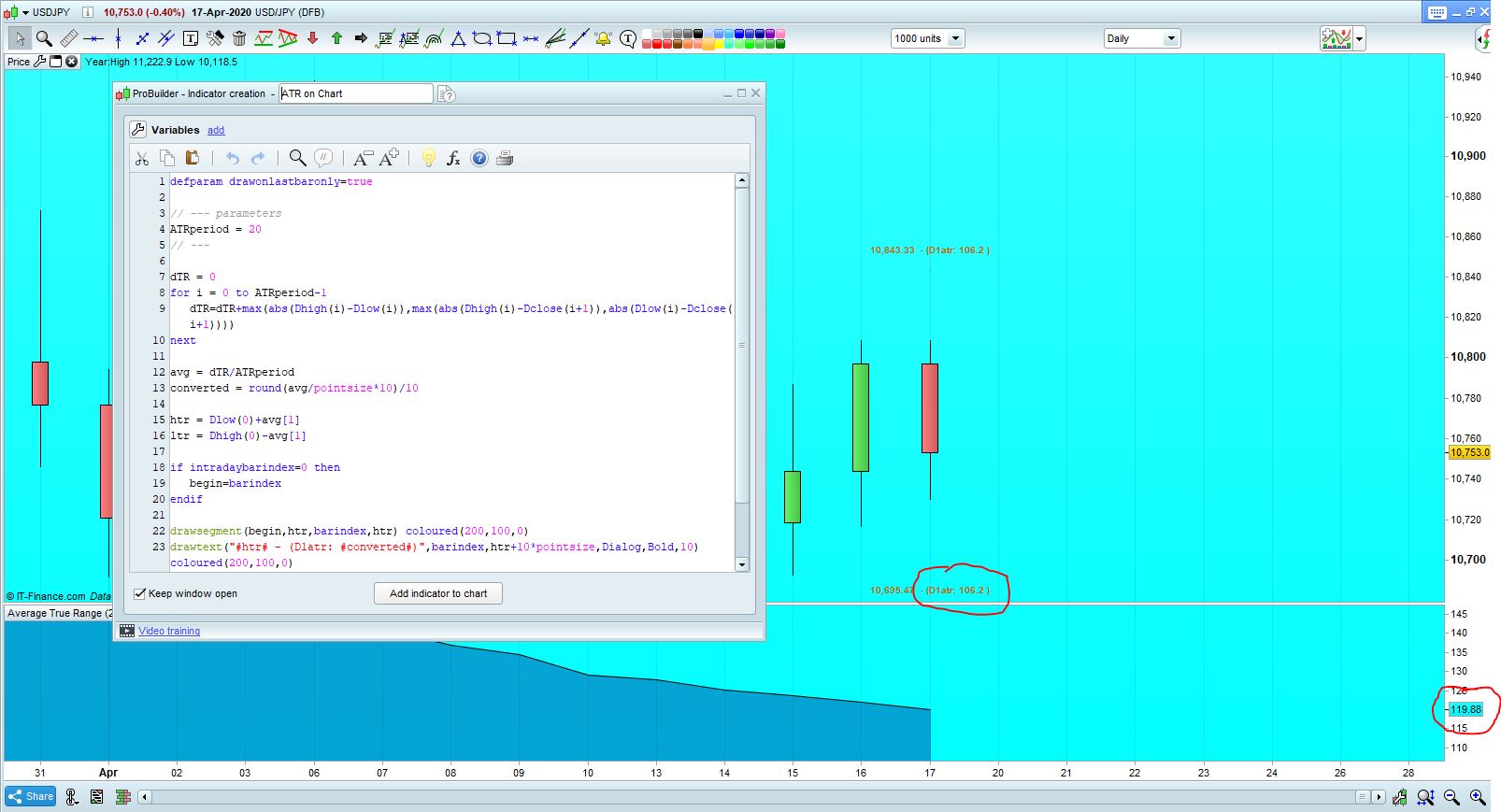
    Can anyone help with this code please, the ATR “on chart” indicator won’t match the PRT below chart indicator.. both set to 20 atr. What is wrong with the code?

    I’ve tried both including the weekend data and not including it,  and still way off. The below chart I can assume is accurate because its the PRT standard, can anyone help please?

    Picture attached shows the error between atr indicators.

    thanks

    defparam drawonlastbaronly=true
    
    // --- parameters
    ATRperiod = 20
    // ---
    
    dTR = 0
    for i = 0 to ATRperiod-1
    dTR=dTR+max(abs(Dhigh(i)-Dlow(i)),max(abs(Dhigh(i)-Dclose(i+1)),abs(Dlow(i)-Dclose(i+1))))
    next
    
    avg = dTR/ATRperiod
    converted = round(avg/pointsize*10)/10
    
    htr = Dlow(0)+avg[1]
    ltr = Dhigh(0)-avg[1]
    
    if intradaybarindex=0 then
    begin=barindex
    endif
    
    drawsegment(begin,htr,barindex,htr) coloured(200,100,0)
    drawtext("#htr# - (D1atr: #converted#)",barindex,htr+10*pointsize,Dialog,Bold,10) coloured(200,100,0)
    drawsegment(begin,ltr,barindex,ltr) coloured(200,100,0)
    drawtext("#ltr# - (D1atr: #converted#)",barindex,ltr-10*pointsize,Dialog,Bold,10) coloured(200,100,0)
    
    return
    
    atr-error.jpg atr-error.jpg
    #126939 quote
    Vonasi
    Moderator
    Master

    There are some simple rules that everyone using the forums is expected to follow. Your post has broken one or more of these rules.

    The forum rules are as follows. I have highlighted in bold the rule/rules that you have not followed:

    Post your topic in the correct forum.

    ProRealTime Platform Support          only platform related issues.
    ProOrder                                                only strategy topics.
    ProBuilder                                              only indicator topics.
    ProScreener                                           only screener topics
    General Discussion                               any other topics.
    Welcome New Members                      for new forum members to introduce themselves.

    Only post in the language of the forum that you are posting in. For example English only in the English speaking forums and French only in the French speaking forums.
    Always use the ‘Insert PRT Code’ button when putting code in your posts to make it easier for others to read.
    Do not double post. Ask your question only once and only in one forum. All double posts will be deleted anyway so posting the same question multiple times will just be wasting your own time and will not get you an answer any quicker. Double posting just creates confusion in the forums.
    Be careful when quoting others in your posts. Only use the quote option when you need to highlight a particular bit of text that you are referring to or to highlight that you are replying to a particular member if there are several involved in a conversation. Do not include large amounts of code in your quotes. Just highlight the text you want to quote and then click on ‘Quote’.
    Give your topic a meaningful title. Describe your question or your subject in your title. Do not use meaningless titles such as ‘Coding Help Needed’.
    Do not include personal information such as email addresses or telephone numbers in your posts. If you would like to contact another forum member directly outside of the forums then contact the forums administrator via ‘Contact Us’ and they will pass your details on to the member that you wish to contact.
    Always be polite and courteous to others.
    Have fun.

    I have edited your post where required. Please ensure that your future posts meet these few simple forum rules. 🙂

    Fab666 thanked this post
    #129317 quote
    Fab666
    Participant
    New

    So I found an alternative on prorealcode that displays an on chart ATR range above and below price, but it doesn’t discount the weekend data. Anyway to remove the weekend data without actually removing the weekend candles from view? thanks

    defparam drawonlastbaronly=true
     
    // --- parameters
    ATRperiod = 20
    // ---
     
    if intradaybarindex=0 then
    begin=barindex
    reset=0
    dTR = 0
    endif
     
    if reset=0 then
    for i = 1 to ATRperiod
    dTR=dTR+max(abs(Dhigh(i)-Dlow(i)),max(abs(Dhigh(i)-Dclose(i+1)),abs(Dlow(i)-Dclose(i+1))))
    next
    reset=1
    endif
     
    avg = dTR/ATRperiod
    converted = round(avg/pointsize*10)/10
     
    htr = Dopen(0)+avg[1]
    ltr = Dopen(0)-avg[1]
     
    drawsegment(begin,htr,barindex,htr) coloured(255,255,0)
    drawsegment(begin,htr+20*pointsize,barindex,htr+20*pointsize) coloured(255,0,0)
    drawtext("#htr# - (D1atr: #converted#)",barindex,htr+10*pointsize,Dialog,Bold,10) coloured(255,0,0)
    drawsegment(begin,ltr,barindex,ltr) coloured(255,255,0)
    drawsegment(begin,ltr-20*pointsize,barindex,ltr-20*pointsize) coloured(0,255,0)
    drawtext("#ltr# - (D1atr: #converted#)",barindex,ltr-10*pointsize,Dialog,Bold,10) coloured(255,0,0)
    drawsegment(begin,Dopen(0),barindex,Dopen(0)) coloured(255,250,250)
     
    return
    
    #140193 quote
    ViSi0nZ
    Participant
    Junior

    Bump

    #140195 quote
    robertogozzi
    Moderator
    Master

    Try this (not tested):

    defparam drawonlastbaronly=true
     // --- parameters
    ATRperiod = 20
    // ---
    DayOK = OpenDayOfWeek >= 1 and OpenDayOfWeek <= 5
     if intradaybarindex=0 and DayOK then
       begin=barindex
       reset=0
       dTR = 0
    endif
     if reset=0 then
       for i = 1 to ATRperiod
          dTR=dTR+max(abs(Dhigh(i)-Dlow(i)),max(abs(Dhigh(i)-Dclose(i+1)),abs(Dlow(i)-Dclose(i+1))))
       next
       reset=1
    endif
    If  DayOK Then
       avg = dTR/ATRperiod
       converted = round(avg/pointsize*10)/10
       htr = Dopen(0)+avg[1]
       ltr = Dopen(0)-avg[1]
     Endif
    drawsegment(begin,htr,barindex,htr) coloured(255,255,0)
    drawsegment(begin,htr+20*pointsize,barindex,htr+20*pointsize) coloured(255,0,0)
    drawtext("#htr# - (D1atr: #converted#)",barindex,htr+10*pointsize,Dialog,Bold,10) coloured(255,0,0)
    drawsegment(begin,ltr,barindex,ltr) coloured(255,255,0)
    drawsegment(begin,ltr-20*pointsize,barindex,ltr-20*pointsize) coloured(0,255,0)
    drawtext("#ltr# - (D1atr: #converted#)",barindex,ltr-10*pointsize,Dialog,Bold,10) coloured(255,0,0)
    drawsegment(begin,Dopen(0),barindex,Dopen(0)) coloured(255,250,250)
    return
    Fab666 thanked this post
    #141956 quote
    Fab666
    Participant
    New

    Hi

    I had a go with that code, thanks for trying.  It should match the PRT standard 20 average true range indicator once I remove the weekend data from the platform, but its still usually out by 10 pips or so. Unsure why it isn’t identical

    #142410 quote
    robertogozzi
    Moderator
    Master

    Removing weekend data from your chart won’t REMOVE data, just it won’t be visualized.

    Indicators keep running as usual, that’s why they differ and you need a custom indicator.

Viewing 7 posts - 1 through 7 (of 7 total)
  • You must be logged in to reply to this topic.

ATR on chart indicator


ProBuilder: Indicators & Custom Tools

New Reply
Author
author-avatar
Fab666 @fab666 Participant
Summary

This topic contains 6 replies,
has 4 voices, and was last updated by robertogozzi
5 years, 5 months ago.

Topic Details
Forum: ProBuilder: Indicators & Custom Tools
Language: English
Started: 04/19/2020
Status: Active
Attachments: 1 files
Logo Logo
Loading...