ATR-Envelope

Viewing 6 posts - 1 through 6 (of 6 total)

  • Author
    Posts
  • #135278 quote
    Zigo
    Participant
    Master

    I have attached a new indicater, wich I called Envelop-ATR , regrettably the name is changed in weightedaverage envelope ATR, I am not happy with that, because WMA in the code is not imported.

    I had in mind before I published this indicator, that the Average used in the code (Sinpel, Exp, WMA, Wilder, zero lag, end-point, Hull ….) should be a point of discussion.

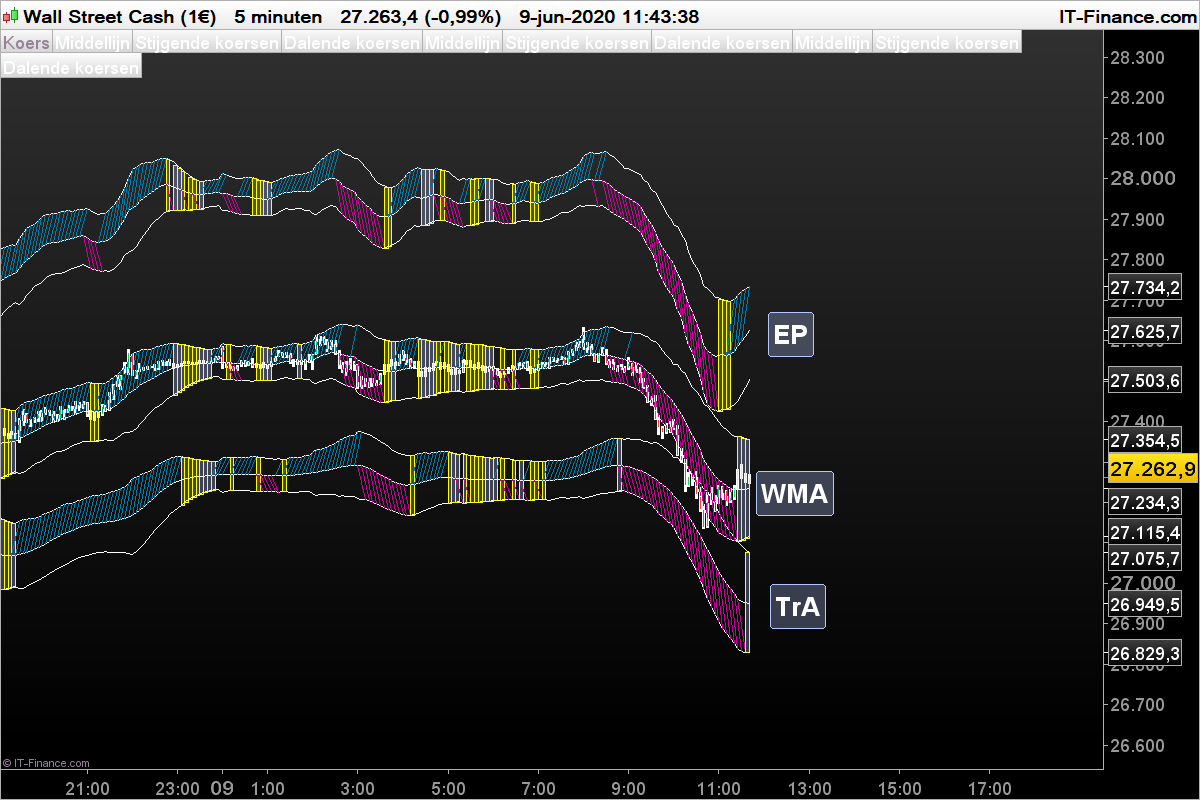
    Therefore I ask to change the name will simplified to “ATR-Envelope”. In the attachement its seen clearly that almost every other average do the work.

    In the attachement End-Point Average moving Up intentional

    e=endpointAverage[n](close)+0.015*close
    e1=endpointaverage[n](high)+2.618*AverageTrueRange[14](close)+0.015*close
    e2=endpointaverage[n](low)-2.618*AverageTrueRange[14](close)+0.015*close

    In, the attachement TriangularAverage moving down intentional

    e=triangularAverage[n](close)-0.01*close
    e1=triangularaverage[n](high)+2.618*AverageTrueRange[14](close)-0.01*close
    e2=triangularaverage[n](low)-2.618*AverageTrueRange[14](close)-0.01*close
    DOW-5-minutenMAs.png DOW-5-minutenMAs.png
    #135284 quote
    Nicolas
    Keymaster
    Master

    Hi Zigo, since the code you have posted used weighted average, it was obvious to me to named it “weighted average envelope”. Of course, you can change it to whatever centered average like you did in this topic 🙂

    Zigo thanked this post
    #135285 quote
    Zigo
    Participant
    Master
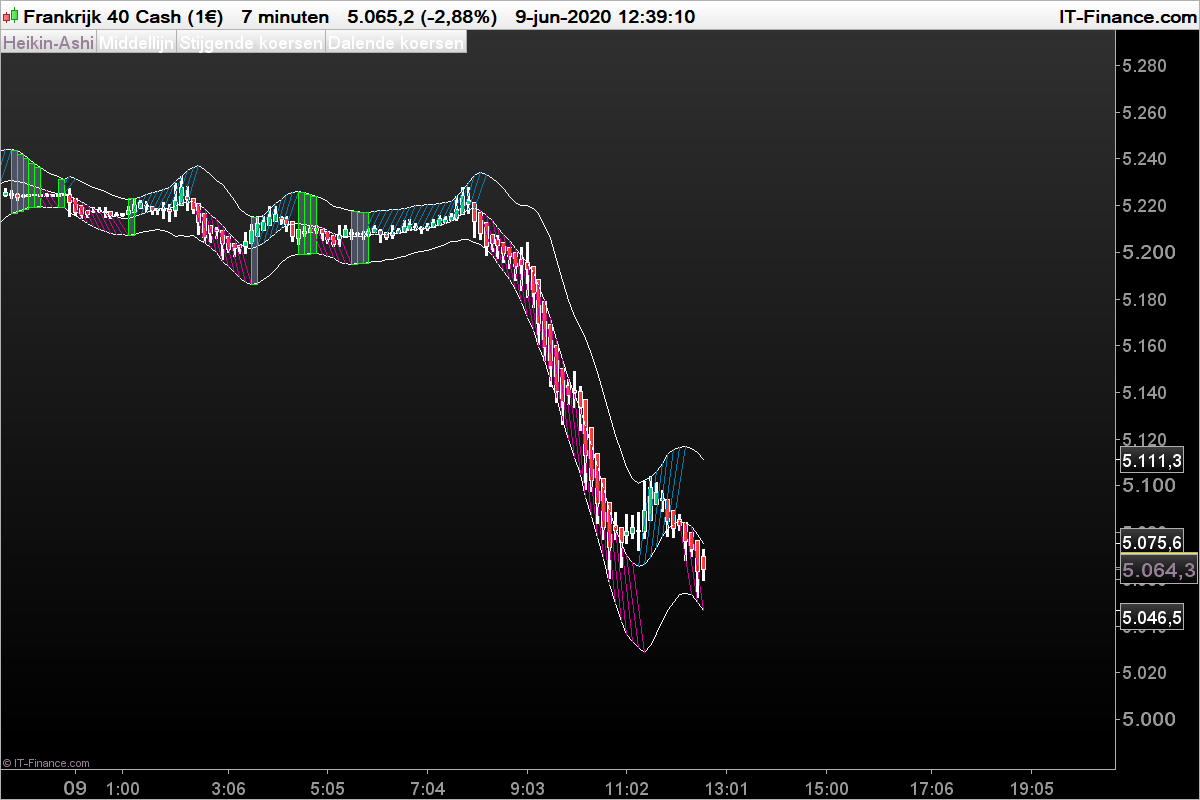
    //Berekening van het gemiddelde en zijn banden
    once n=21
    e= Weightedaverage[round(SQRT(n))]( 2*Weightedaverage[round(n/2)](close)-Weightedaverage[n](close))
    e1= Weightedaverage[round(SQRT(n))]( 2*Weightedaverage[round(n/2)](high)-Weightedaverage[n](high))+2.058*AverageTrueRange[14](close)
    e2= Weightedaverage[round(SQRT(n))]( 2*Weightedaverage[round(n/2)](low)-Weightedaverage[n](low))-2.058*AverageTrueRange[14](close)
    
    //Opwaartse koersen blauwe lijnen
    //Neerwaartse koersen rode lijnen
    //Gele rechthoeken zijwaartse koersen
    
    if e1>e1[2] then
    DRAWSEGMENT(barindex, e1, barindex[2], e[2])coloured(0,125,175,255)//Stijgende koersen
    elsif e2<e2[1] then
    DRAWSEGMENT(barindex, e2, barindex[2], e[2])coloured(204,0,155,255)//Dalende koersen
    else
    //We tekenen een rexhthoek als de koersen zijwaarts gaan
    DRAWRECTANGLE(barindex,e1, barindex[1], e2[1])coloured(0,255,0,255)//Zijwaartse koersen
    endif
    
    return e as"Middellijn", e1 as"Stijgende koersen", e2 as"Dalende koersen"
    PXI-7-minutenHull.png PXI-7-minutenHull.png
    #135294 quote
    Zigo
    Participant
    Master

    @Nicolas

    I want to change the name into “ATR-Envelope” instead of “WeightedAverage Envelope ATR”is that possible and how do I change it?

    #135296 quote
    Zigo
    Participant
    Master
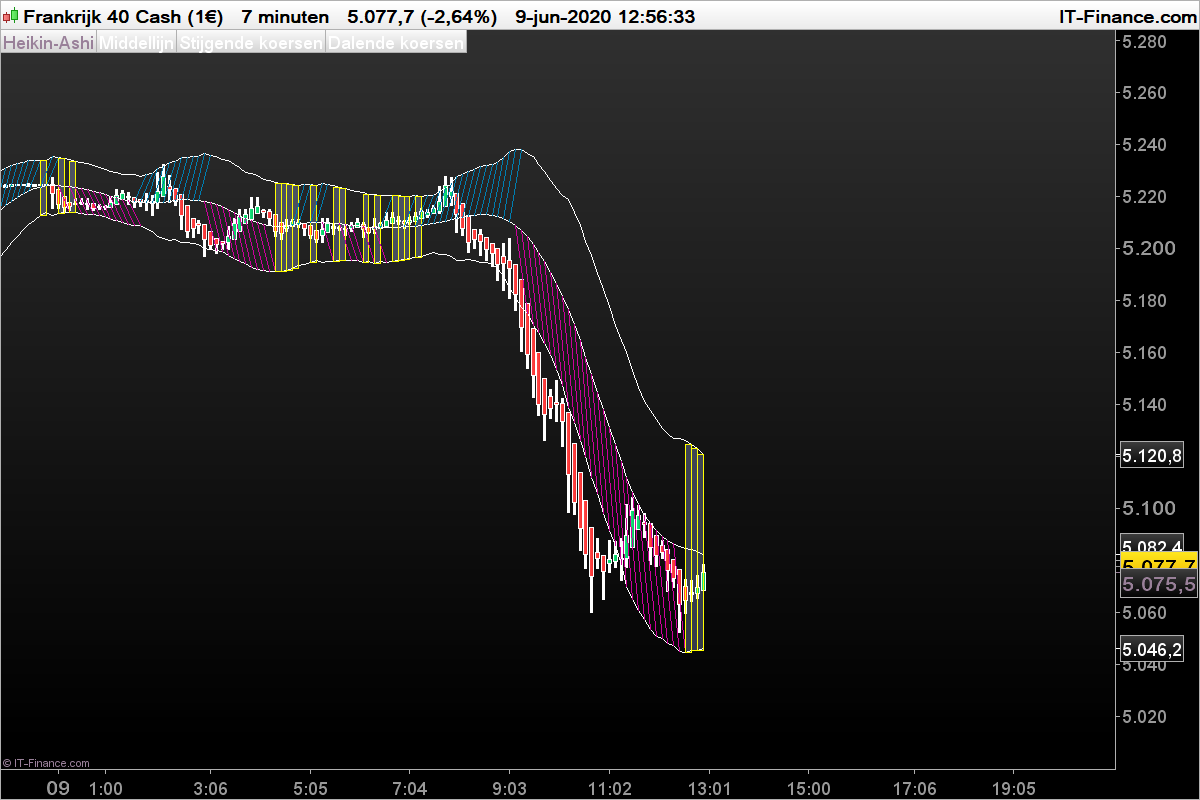
    //Berekening van het gemiddelde en zijn banden
    once n=21
    e=triangularAverage[n](close)
    e1=triangularaverage[n](high)+2.618*AverageTrueRange[14](close)
    e2=triangularaverage[n](low)-2.618*AverageTrueRange[14](close)
    
    //Opwaartse koersen blauwe lijnen
    //Neerwaartse koersen rode lijnen
    //Gele rechthoeken zijwaartse koersen
    
    if e1>=e1[2] then
    DRAWSEGMENT(barindex, e1, barindex[2], e[2])coloured(0,125,175,255)//Stijgende koersen
    elsif e2<=e2[1] then
    DRAWSEGMENT(barindex, e2, barindex[2], e[2])coloured(204,0,155,255)//Dalende koersen
    else
    //We tekenen een rexhthoek als de koersen zijwaarts gaan
    DRAWRECTANGLE(barindex,e1, barindex[1], e2[1])coloured(255,255,0,255)//Zijwaartse koersen
    endif
    
    return e as"Middellijn", e1 as"Stijgende koersen", e2 as"Dalende koersen"
    PXI-7-minutenTriAv.png PXI-7-minutenTriAv.png
    #135313 quote
    Nicolas
    Keymaster
    Master

    I changed the name of your post! 🙂

    Zigo thanked this post
Viewing 6 posts - 1 through 6 (of 6 total)
  • You must be logged in to reply to this topic.

ATR-Envelope


ProBuilder: Indicators & Custom Tools

New Reply
Author
author-avatar
Zigo @zigo Participant
Summary

This topic contains 5 replies,
has 2 voices, and was last updated by Nicolas

5 years, 8 months ago.

Topic Details
Forum: ProBuilder: Indicators & Custom Tools
Language: English
Started: 06/09/2020
Status: Active
Attachments: 3 files
Logo Logo
Loading...