Good morning PRT community,
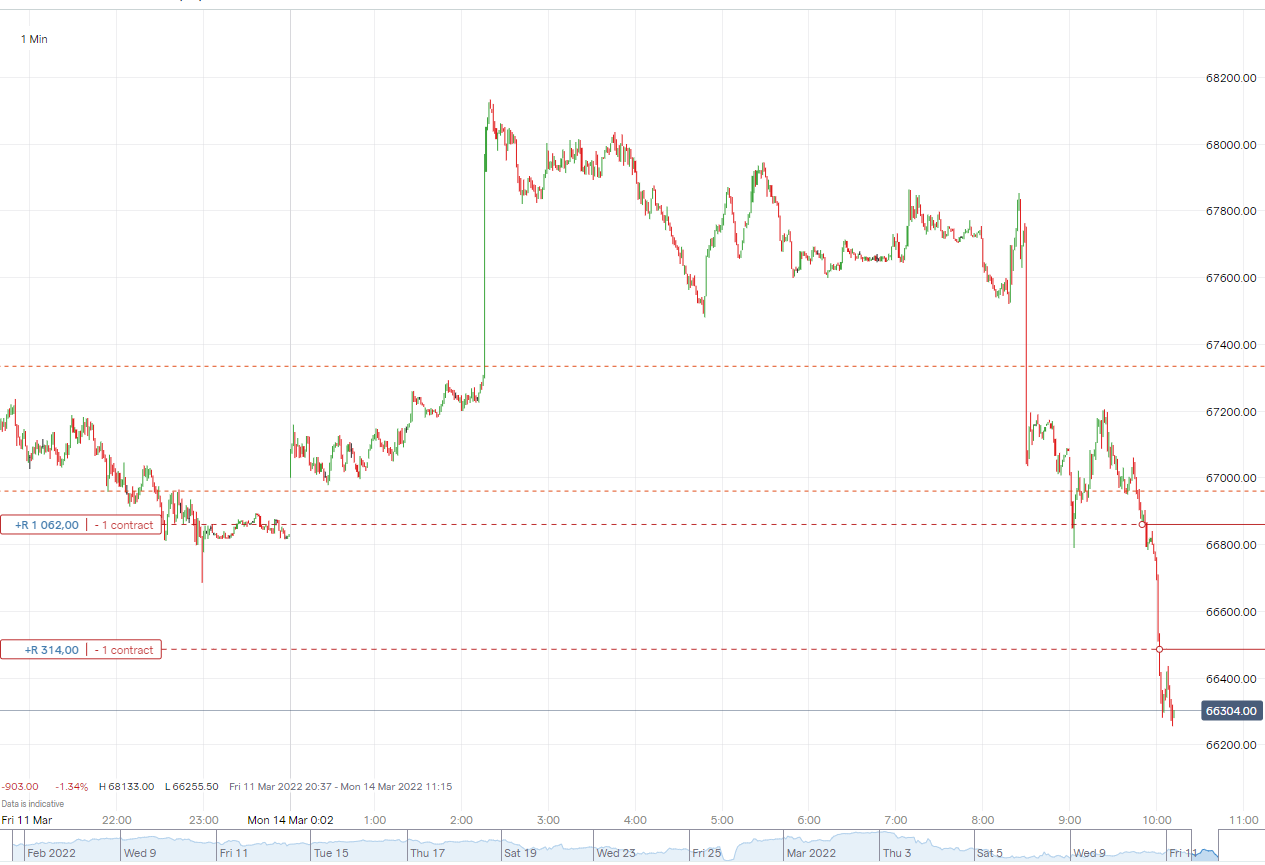
Could someone please provide me with some guidance as to why my code is failing to move my Stop losses?
It is a simple momentum code and the idea is after a initial trade has been opened, after a specified movement has been made, it should enter another trade in the same direction and adjust all previous Stop losses to the same price level as the latest trade.
I’m attaching a snap shot of what it is currently doing.
Any assistance would be greatly appreciated!
Kind regards,
Anton
DEFPARAM CumulateOrders = True

SSS = 220
GAP = 280

PositionSize = 1

// Conditions to enter new positions

IF NOT ONMARKET THEN
LONGRULE = (close[0] >= open[0])
SHORTRULE = (open[0] >=close[0])


IF LONGRULE THEN
BUY PositionSize CONTRACT AT MARKET
SSS2 = abs(close - Open[1]) + SSS*PipSize
SET STOP LOSS SSS2
ENDIF

IF SHORTRULE THEN
SELLSHORT PositionSize CONTRACT AT MARKET
SSS2 = abs(close - Open[1]) + SSS*PipSize
SET STOP LOSS SSS2
ENDIF

ENDIF

// Conditions to add addition positions and move Stop losses

ALR = (close[0] >= tradeprice(1)+(GAP*PipSize))

IF ALR THEN
BUY PositionSize CONTRACT AT MARKET
SSS2 = abs(close - Open[1]) + SSS*PipSize
SET STOP LOSS SSS2
ENDIF


ASR = (close[0] < tradeprice(1)-(GAP*PipSize))

IF ASR THEN
SELLSHORT PositionSize CONTRACT AT MARKET
SSS2 = abs(close - Open[1]) + SSS*PipSize
SET STOP LOSS SSS2
ENDIF
the stoploss calculation might be problematic, does it work with CumulateOrders = False ?
if yes, then try changing tradeprice to positionprice (for CumulateOrders True)
Thank you, I haven’t tested it out with <span class=”crayon-st”>CumulateOrders</span> <span class=”crayon-o”>=</span> False. I’ll give that try today. Funny thing is the code runs perfect in back testing but when linking it to a practice account, the Stop losses don’t adjust.
Essentially I just want every new trade to enter a stop loss of 220 points (while at the same time move all previous stop losses to the same level). I’ve made the Stop loss calculation complicated to try and do this but it doesn’t work either.
If I have for every new trade: <span class=”crayon-st”>SET STOP</span> <span class=”crayon-st”>LOSS</span> 220, it will make just that specific trade 220 points away. How do I have all other Stop losses move there too?
Could someone please provide me with some guidance as to why my code is failing to move my Stop losses?
Very literally put : StopLosses can’t be moved. You can set them once for any “being on market”. Might you have the idea to accumulate orders (add position) then I don’t think you can influence the StopLoss of that (seperately) either.
What you will be looking for is Exits (by whatever means) that have the number of contracts / lots /etc. in them. You will be able to “move” those as much as you want. They operate per bar. Thus with each new bar you can change (and MUST repeat) the “level” of them.
A StopLoss (or Target Profit for that matter) goes to the broker / exchange and stays put until the position is closed (which could be caused by the SL / TP itself).
PS: Generally, with respect, your code is too ambiguous to be able to work in the first place. You should explicitly ask for OnMarket and/or LongOnMarket/ShortOnMarket.
Have fun !
Thank you very much PeterSt!
After not finding any examples of code online to do this, I suspected as much that the initial Stop Loss might not be movable. I will change tactics and move to “Close positions IF etc” type code.
Thank you for the advice on the LongOnMarket/ShortOnMarket calls.
I just wish that PRT back testing could be more similar to MQL4/5 backtesting where you can back test and watch “LIVE” chart as trades enter/exit etc and speed up or slow down the back testing.
PRT is frustrating in that you code what you hope will happen, then basically have to link to a practice account for a few days to see if it will really do what you want. The backtesting for PRT also sometimes differs with real life. As an example, this code of mine only uses stop losses (which don’t move as they are supposed to) so there should be no way possible to close a trade in the money, However according to PRT back testing, it doesn’t just close some trades green but also shows some significant portfolio growth.. very frustrating.
Anyway, thank you very much for taking the time to help me out.
The SL actually moves, if you move it, but it is calculated from the average price (PositionPrice). To deal with it in a different way you need to use pending orders.
Try this one:
DEFPARAM CumulateOrders = True
SSS = 220
GAP = 280
PositionSize = 1
// Update SSS2 according to the actual price entered
Positions = abs(CountOfPosition)
IF Positions > Positions[1] THEN
   IF LongOnMarket THEN
      SSS2 = TradePrice - SSS*PipSize
   ELSIF ShortOnMarket THEN
      SSS2 = TradePrice + SSS*PipSize
   ENDIF
ENDIF
// Conditions to enter new positions
IF NOT ONMARKET THEN
   LONGRULE = (close[0] >= open[0])
   SHORTRULE = (open[0] >=close[0])
   IF LONGRULE THEN
      BUY PositionSize CONTRACT AT MARKET
      //SSS2 = abs(close - Open[1]) + SSS*PipSize
      SSS2 = close - SSS*PipSize                     //temporarily use CLOSE to set the nerw SL
      //SET STOP LOSS SSS2
   ENDIF
   IF SHORTRULE THEN
      SELLSHORT PositionSize CONTRACT AT MARKET
      //SSS2 = abs(close - Open[1]) + SSS*PipSize
      SSS2 = close + SSS*PipSize                     //temporarily use CLOSE to set the nerw SL
      //SET STOP LOSS SSS2
   ENDIF
ENDIF
// Conditions to add addition positions and move Stop losses
ALR = (close[0] >= tradeprice(1)+(GAP*PipSize))
IF ALR THEN
   BUY PositionSize CONTRACT AT MARKET
   //SSS2 = abs(close - Open[1]) + SSS*PipSize
   SSS2 = close - SSS*PipSize                     //temporarily use CLOSE to set the nerw SL
   //SET STOP LOSS SSS2
ENDIF
ASR = (close[0] < tradeprice(1)-(GAP*PipSize))
IF ASR THEN
   SELLSHORT PositionSize CONTRACT AT MARKET
   //SSS2 = abs(close - Open[1]) + SSS*PipSize
   SSS2 = close + SSS*PipSize                     //temporarily use CLOSE to set the nerw SL
   //SET STOP LOSS SSS2
ENDIF
IF LongOnMarket THEN
   SELL AT SSS2 STOP
ELSIF ShortOnMarket THEN
   EXITSHORT AT SSS2 STOP
ENDIF
//
graphonprice PositionPrice
graphonprice SSS2 coloured(255,0,0,255) as "SL"
Thank you very much Roberto! I appreciate your help immensely! I will link it up to my practice account to test it out over the next few days. This is exactly what I’ve been looking for! Thanks again!
Hello, I have the following query. I can’t move forward, can someone help me. I make a purchase (tradeprice) and then I want to calculate a stoploss from the tradeprice, here is the example:
at the date of purchase the price is: 76.76 and stoploss calculated at that date is 74.33. Then the price follows its movements, and the stoploss is modified until it rises to 75. And I want the stoploss calculated at the time of purchase (that is, 74.33), which is what I must modify..? (sorry for my level of English)
ATR20 = averagetruerange[20](close)
ptjeATR20b=ATR20*1.6/close
StopLoss1 = tradeprice*(1-ptjeATR20b[1])

IF LONGONMARKET THEN
IF newSL=0 AND close > (tradeprice+(1+trailingstart)) THEN
newSL = tradeprice(1)+(1+trailingstart)
ENDIF
endif
IF newSL>0 AND (close-newSL)>=trailingstep THEN
newSL = newSL+(1+trailingstep)
ENDIF
//IF newSL=0 AND close < (tradeprice+(1+trailingstart))then
//newSL = StopLoss1
//ENDIF
IF newSL>0 AND close < tradeprice then
newSL = StopLoss1
endif

if CC1 or CC2 Then
BUY CAPITAL CASH AT MARKET
endif
IF newSL>0 THEN
SELL AT newSL STOP
endif
If close < tradeprice then
SELL AT StopLoss1 STOP
endif
Try this one:
ATR20 = averagetruerange[20](close)
ptjeATR20b=ATR20*1.6/close
IF (OnMarket AND Not OnMarket[1]) OR (ShortoNmarket AND LongOnMarket[1]) OR (ShortoNmarket[1] AND LongOnMarket)  THEN
EntryPrice = TradePrice
StopLoss1  = EntryPrice*(1-ptjeATR20b[1])
 ENDIF
IF LONGONMARKET THEN
IF newSL=0 AND close > (EntryPrice+(1+trailingstart)) THEN
newSL = EntryPrice+(1+trailingstart)
ENDIF
endif
IF newSL>0 AND (close-newSL)>=trailingstep THEN
newSL = newSL+(1+trailingstep)
ENDIF
//IF newSL=0 AND close < (EntryPrice+(1+trailingstart))then
//newSL = StopLoss1
//ENDIF
IF newSL>0 AND close < EntryPrice then
newSL = StopLoss1
endif

if CC1 or CC2 Then
BUY CAPITAL CASH AT MARKET
endif
IF newSL>0 THEN
SELL AT newSL STOP
endif
If close < EntryPrice then
SELL AT StopLoss1 STOP
endif