



Array/Bubble sort in strategy doesn’t work, but works as an indicator

Viewing 15 posts - 16 through 30 (of 31 total)
  • Author
    Posts
  • #237343 quote
    robertogozzi
    Moderator
    Master

    @Finning

    I think it’s easier for me to code it differently, will you please post exactly what you want to achieve in your strategy?

    Finning thanked this post
    #237468 quote
    Finning
    Participant
    Veteran

    Hi Rob, yes, thank you, will do. Will get it all together and will post. Might be a day or so as I’m a bit busy, but will try and get done ASAP. Many thanks!

    #237815 quote
    Finning
    Participant
    Veteran

    Hi Rob,

    please find below.

    This code won’t work because of the stated problem, but it gives the idea of what it is I’m trying to achieve.

    It works as an indicator, just not with backtesting, because the backtest doesn’t like the summing of the array from what I can see.

    I’m trying to find which period Bollinger gives the most number of tradecandles, then trade that period.

    I would eventually like to make it so it interrogates a set number of candles in for a lookback (eg – 300), rather than finding the tradecandle period over all of the data.

    defparam cumulateorders = false
    
    
    //////////////////////////////////////////////////////////////////
    // Clearing the temp arrays so they give the correct answer every bar
    unset ($datemp)
    unset ($latemp)
    
    //////////////////////////////////////////////////////////////////
    // fill up the array with a sum count of tradecandles ($da[k]) and a corresponding Bollinger period ($la[k])
    
    for k = 1 to 40
    
    averageline = average[k](close)
    
    a = Average[k](Close)
    StdDeviation = STD[k](Close)
    Bsup = a + 2 * StdDeviation
    Binf = a - 2 * StdDeviation
     
    tradecandle = low>(a+((Bsup-a)*0.75))
     
    if tradecandle then
    
    newcount = 1
    else
    newcount=0
    
    endif
    
    once $da[k]=0
    
    $da[k] = newcount+$da[k]
    
    $la[k] = k
    
    next
    
    MaxElements = lastset($da)
    
    //////////////////////////////////////////////////////////////////
    // (Temp arrays to be created for use for Bubble sort, so original summation arrays are not damaged)
    
    for k = 1 to 40
    $datemp[k] = $da[k]
    $latemp[k] =$la[k]
    next
    
    //////////////////////////////////////////////////////////////////
    // (Bubble Sort of temp arrays)
    FOR i = 0 TO MaxElements -1
    FOR j = 0 TO MaxElements - i
    IF $datemp[j] > $datemp[j + 1] THEN
    // swap data
    temp   = $datemp[j]
    $datemp[j] = $datemp[j + 1]
    $datemp[j + 1] = temp
    // swap labels
    temp   = $latemp[j]
    $latemp[j] = $latemp[j + 1]
    $latemp[j + 1] = temp
    ENDIF
    NEXT
    NEXT
    
    //////////////////////////////////////////////////////////////////
    // remove duplicates in temp arrays by comparing the current element to the next one (creating 2 new arrays)
    NewMaxElements = 0
    FOR i = 0 TO MaxElements
    IF ($datemp[i] <> $datemp[i + 1]) OR (i = MaxElements) THEN
    $dx[NewMaxElements] = $datemp[i]          //save datum to new array, when different
    $lx[NewMaxElements] = $latemp[i]          //save label, too
    if (i = MaxElements) then
    break
    endif
    NewMaxElements      = NewMaxElements + 1
    ENDIF
    NEXT
    //////////////////////////////////////////////////////////////////
    // This is the value of the period that gives the max number of tradecandles from ALL of the data
    
    yyy = $lx[NewMaxElements]
    
    //////////////////////////////////////////////////////////////////
    //Using the found best value yyy that gives the most number of tradecandles for use in trading, re-calc the Bollinger variables to find tradecandle conditions.
    
    av = Average[yyy](Close)
    StdDeviation = STD[yyy](Close)
    Bup = av + 2 * StdDeviation
    Bdown = av - 2 * StdDeviation
     
    tradecandle2 = low>(av+((Bup-av)*0.75))
    
    //If there a tradecandle based on the right period yyy, and other conditions, then buy 
    If not longonmarket and tradecandle2 and av>av[1] and Bup>Bup[1] and Bdown>Bdown[1] then
    buy 1 contract at market
    endif
    
    //Just a simple stop for an exit
    if longonmarket then
    sell at av stop
    endif


    graph yyy as "newmaxelements"
    

    Thanks,

    Finning

    #237890 quote
    robertogozzi
    Moderator
    Master

    As to “It works as an indicator, just not with backtesting, because the backtest doesn’t like the summing of the array from what I can see.” I’d say it’s the other way round, as I stated in one of my posts, as indicators will sum up the same condition multiple times when using arrays, while the backtest only does that only once per candle (as it doesn’t run live)  at the closing of each bar, when the condition is tallied  if it has occurred.

    In any case, can you explain exactly what you want to tally?

    #237902 quote
    Finning
    Participant
    Veteran

    Hi Rob,

    For within set bounds of potential period [k] values, say 1 to 40, I want to find which period gives the most occurrences of the term tradecandle, if tradecandle is defined by the below:

    a = Average[k](Close)
    StdDeviation = STD[k](Close)
    Bsup = a + 2 * StdDeviation
    Binf = a - 2 * StdDeviation
     
    tradecandle = low>(a+((Bsup-a)*0.75))

    And I need to do this in a backtest/strategy/trading, that is my key problem. I already have this working as an indicator, as shown previously.

    Which period [k], from 1 to 40, gives the highest number (sum) of the term tradecandle, over a barindex/total lookback period, or a defined rolling lookback period, if that is possible.

    Many thanks

    #237972 quote
    druby
    Participant
    New

    Hi Finning…

    After looking at the Array/tick problem and following your attempt to dynamically optimise the period in the code, I thought, what does optimisation look like.

    I set about making an indicator to visualise the process and try to make the code work for indicator and back-test so some comparison could be achieved.

    Though you could hard code a load of variables, arrays do make it easier.

    The drawing tools for indicator are good, but are limited by the use of graph in back-test.

    Additionally Roberto’s comment above about back-test not being live, meaning the tick problem, isn’t a problem in back-test, writing a back-test specific code which won’t work as a indicator seams to rub me up the wrong way. What I see in a indicator,  I expect to see in a back test etc,  or else I want to know why so I can make a  judgment.

    Further, if you have an indicator, which match as a back-test version then you have a template to write a back-test specific version where you can compare results with.


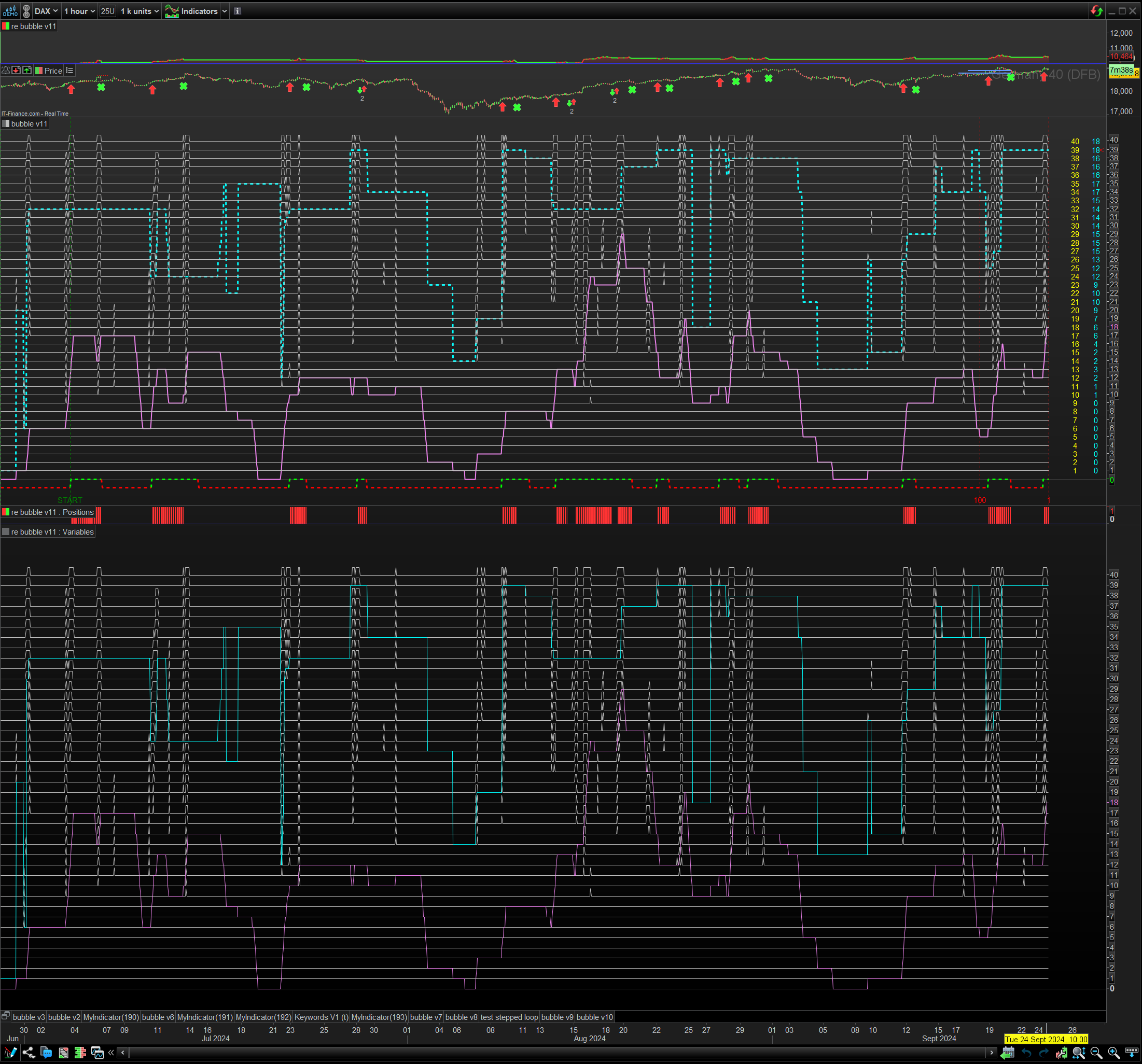
    Though the code is still a work-in-progress, the image shows both indicator (top)and back-test (bottom) versions, with a simulated entry/stop and the position frame in the middle.

    Looking at the indicator plot…

    The white lines show when the tradeCandle condition were true for each bar and sample period and are labelled with the yellow number list.

    The two red vertical lines, bookend the current lookback range ‘n’ and the blue numbers are the count of tradeCandle within it.

    The optimised period is denoted with an red arrow pointing to one of the ‘blue’ count numbers.

    The optimised period is the highest count with lowest period found in the range of sample periods over the lookback range.

    The blue dotted line is the historic path of the optimised period value and the pink was its count

    At the left edge are two green vertical lines, this represent the range of bars that first met the lookback distance, labelled START.

    The green and red line represent a simulated entry and stop, and the below, the position panel some what agree.

    Not yet sure where the difference comes from yet.

    Below that the back-test version, follows the same colour convention with graph etc.

    Both plots appear to show similar data. yeh!

    I did notice that if the there was not  enough bars in the chart and/ or pre-loaded-bars used, the plots could deviate early on in  the plot, but eventually aligned.

    To get some alignment with preload bars, it’s better to compare  an indicator plot with equivalent bars with the back-test plot, this needs a copy chart with more bars.


    In the code …

    ‘n’ is the lookback and ‘k’ s the upper period range.

    ‘kk’  alters the lower period of the range. I put this in so the range could be manually alter if the optimise period was at the top of the range.

    However I realised that if you did that, on the way up, if tradeCandles dramatically dropped, the the optimised value would be from the current settings

    and not from the bottom of original range. This part needs some work.

    anyway, see what you make of it.

    druby

    PeterSt thanked this post
    Screenshot-2024-09-24-145248.png Screenshot-2024-09-24-145248.png bubble-v11.itf re-bubble-v11.itf
    #238086 quote
    robertogozzi
    Moderator
    Master

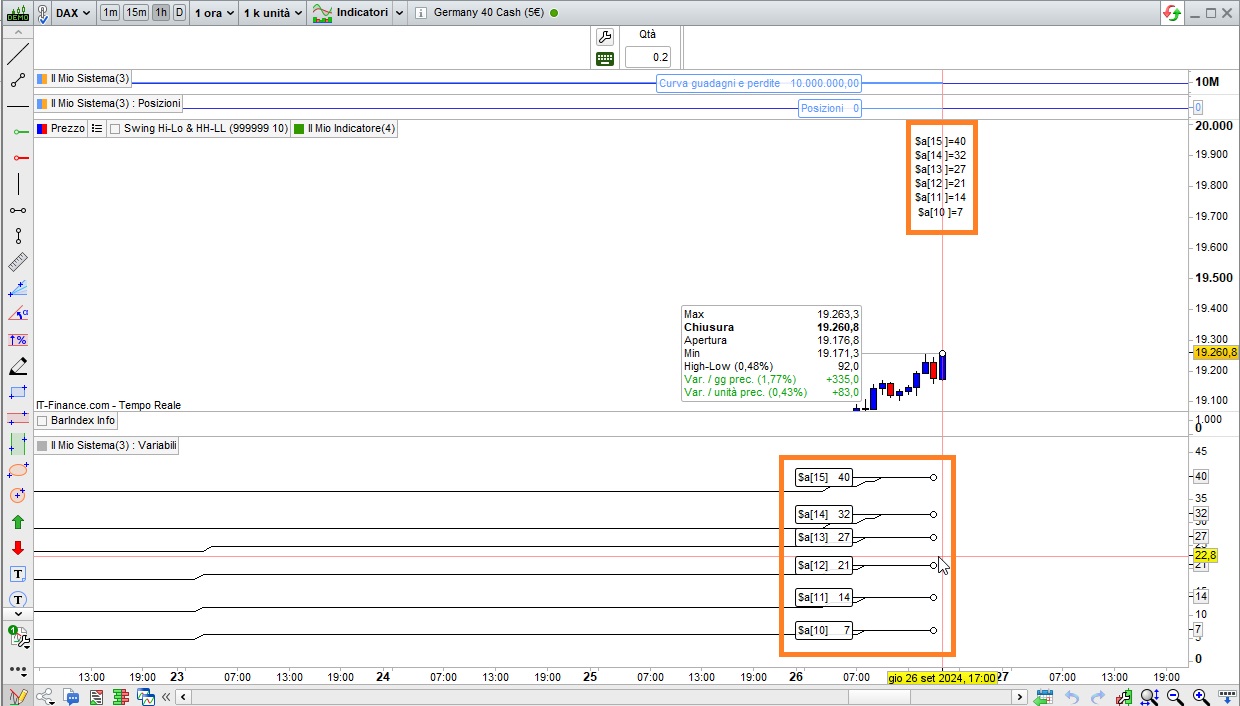
    This is the indicator:

    DEFPARAM DrawOnLastBarOnly = true
    // check 6 bars, from bar 10 to 15
    ONCE N1   = 10
    ONCE N2   = 15
    ONCE Diff = (N2 - N1) + 1
    //
    once x    = 0
    // iniztialize the array on the very first bar
    IF BarIndex = 0 THEN
       FOR j = N1 TO N2
          $a[j] = 0
       NEXT
    ENDIF
    // tally all due occurrences and store them in the array and print it
    FOR k = N1 TO N2
       Multi  = (k/1)
       Offset = highest[2](high) + ((range / 2) * Multi)
       a      = Average[k](Close)
       sDev   = STD[k](Close)
       Bsup   = a + 2 * sDev
       Binf   = a - 2 * sDev
       candle = low  > (a+((Bsup-a)*0.75))
       $a[k]  = $a[k] + candle
       y      = $a[k]
       DrawText("$a[#k#]=#y#",BarIndex,Offset)
    NEXT
    return

    this is the strategy to backtest:

    DEFPARAM PreLoadBars = 0
    ONCE N1   = 10
    ONCE N2   = 15
    ONCE Diff = (N2 - N1) + 1
    once x    = 0
    IF BarIndex = 0 THEN
       FOR j = N1 TO N2
          $a[j] = 0
       NEXT
    ENDIF
    FOR k = N1 TO N2
       Multi  = (k/1)
       Offset = highest[2](high) + ((range / 2) * Multi)
       a      = Average[k](Close)
       sDev   = STD[k](Close)
       Bsup   = a + 2 * sDev
       Binf   = a - 2 * sDev
       candle = low > (a+((Bsup-a)*0.75))
       $a[k]  = $a[k] + candle
       y      = $a[k]
    NEXT
    buy at -close limit  //at least one BUY instruction is required (evan doing nothing)
    graph $a[10]
    graph $a[11]
    graph $a[12]
    graph $a[13]
    graph $a[14]
    graph $a[15]

    both retain the same data.

    druby thanked this post
    x-10.jpg x-10.jpg
    #238138 quote
    druby
    Participant
    New

    Hello Roberto, thankyou for posting the code however there is an issue with the indicator version.

    When I tested the code, the values were indeed correct when the chart was built, but when ‘ticks’ started coming in, the count incremented on every tick the ‘candle’ condition was true.

    On line 23 the array elements appears on both sides of the ‘=’ sign, so the array elements are going to be updated on every tick and use the updated value from previous tick’ed result, till bar end.

    As far as I’m aware, this was the original issue, and the count was for, counting the bars, like in the back-test version, but the tick updates corrupted the count.


    From your earlier comment, regarding that the back-test does not run live, I take that to mean, it only uses the closed bar data and hence is always a bar behind.

    So, I suppose the simplest way to avoid the array tick update scenario and align with a back-test version is to only use fixed data from previous closed bar(s) that will not change.

    However, I have not tried that and somehow, I don’t think it will be that simple.


    From your back-test version… it count the total true ‘candle’ conditions,  for the sample range of periods N1 to N2, over the full range of bars.

    I have been following Finning’s posts and in edition to that, he was working towards finding the,  highest condition count, with the lower period value, over an ‘n’ range of bars.

    Effectively to dynamically find the optimised value of the ‘k’ periods in relation to the true condition count over ‘n’ bars.


    Regarding orders and ticks with respect to arrays, if lets say, indicators run live, and back-test do not, then what does the Automatic Trading system do or follow.

    Regards

    #238149 quote
    robertogozzi
    Moderator
    Master

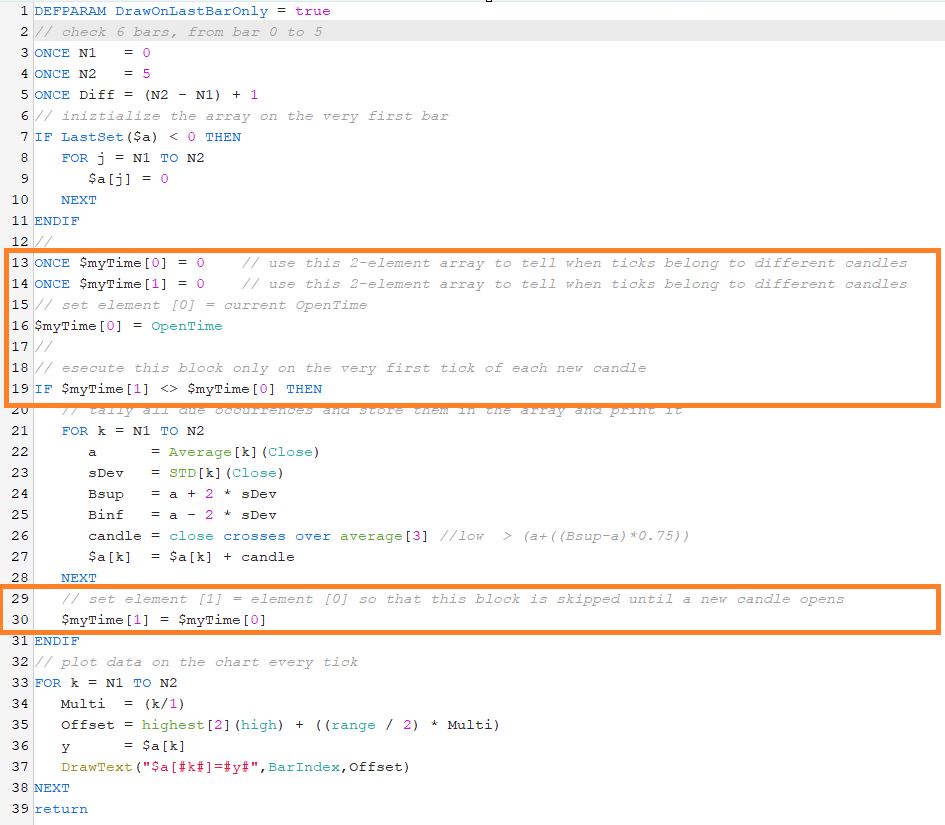
    Yes, you can skip the current bar, which is barely the same as the following code that only updates at the closing of each bar, ignoring incoming ticks after the first one.

    This version uses a 2-element array to tell ticks belonging to different candles (see also the attached pic):

    DEFPARAM DrawOnLastBarOnly = true
    // check 6 bars, from bar 0 to 5
    ONCE N1   = 0
    ONCE N2   = 5
    ONCE Diff = (N2 - N1) + 1
    // iniztialize the array on the very first bar
    IF LastSet($a) < 0 THEN
       FOR j = N1 TO N2
          $a[j] = 0
       NEXT
    ENDIF
    //
    ONCE $myTime[0] = 0    // use this 2-element array to tell when ticks belong to different candles
    ONCE $myTime[1] = 0    // use this 2-element array to tell when ticks belong to different candles
    // set element [0] = current OpenTime
    $myTime[0] = OpenTime
    //
    // esecute this block only on the very first tick of each new candle
    IF $myTime[1] <> $myTime[0] THEN
       // tally all due occurrences and store them in the array and print it
       FOR k = N1 TO N2
          a      = Average[k](Close)
          sDev   = STD[k](Close)
          Bsup   = a + 2 * sDev
          Binf   = a - 2 * sDev
          candle = close crosses over average[3] //low  > (a+((Bsup-a)*0.75))
          $a[k]  = $a[k] + candle
       NEXT
       // set element [1] = element [0] so that this block is skipped until a new candle opens
       $myTime[1] = $myTime[0]
    ENDIF
    // plot data on the chart every tick
    FOR k = N1 TO N2
       Multi  = (k/1)
       Offset = highest[2](high) + ((range / 2) * Multi)
       y      = $a[k]
       DrawText("$a[#k#]=#y#",BarIndex,Offset)
    NEXT
    return

    As I said above, It’s not much different than using a signal from the last closed candle, identified by index [1]. I just wanted to find a way not to let arrays be updated each tick in indicators

    druby and Finning thanked this post
    x-11.jpg x-11.jpg
    #238234 quote
    druby
    Participant
    New

    Hi Roberto, thanks for your reply.

    When I tested the code, the array counts were different to the working back-test version, if fact the values were all the same.
    After a while I realised that Line 26 had a different condition statement than originally coded. I expect the alien statement was part of a test. When reverted back to original, the counts resembled the back-test.

    The $mytime[ ] additional code appeared to do its job and isolate the code block from multiple ticks.
    However, after a while the counts started deviating from the back-test. I put this down mainly to the ‘Candle’ condition being captured at the first bar tick and not at bar end. Additionally, the values of Average, STD, Close and Low would theoretically be off with respects to values at the bar end.

    If the condition is true or false at first tick and this is mirrored at bar end, (0=0, 1=1), then not much harm done.
    However, its when there both different between first tick and bar end, (0=1, 1=0) that appears to cause the issue. This could results in the count being incremented when it shouldn’t and not incremented when it should, with respect to an end of bar value.

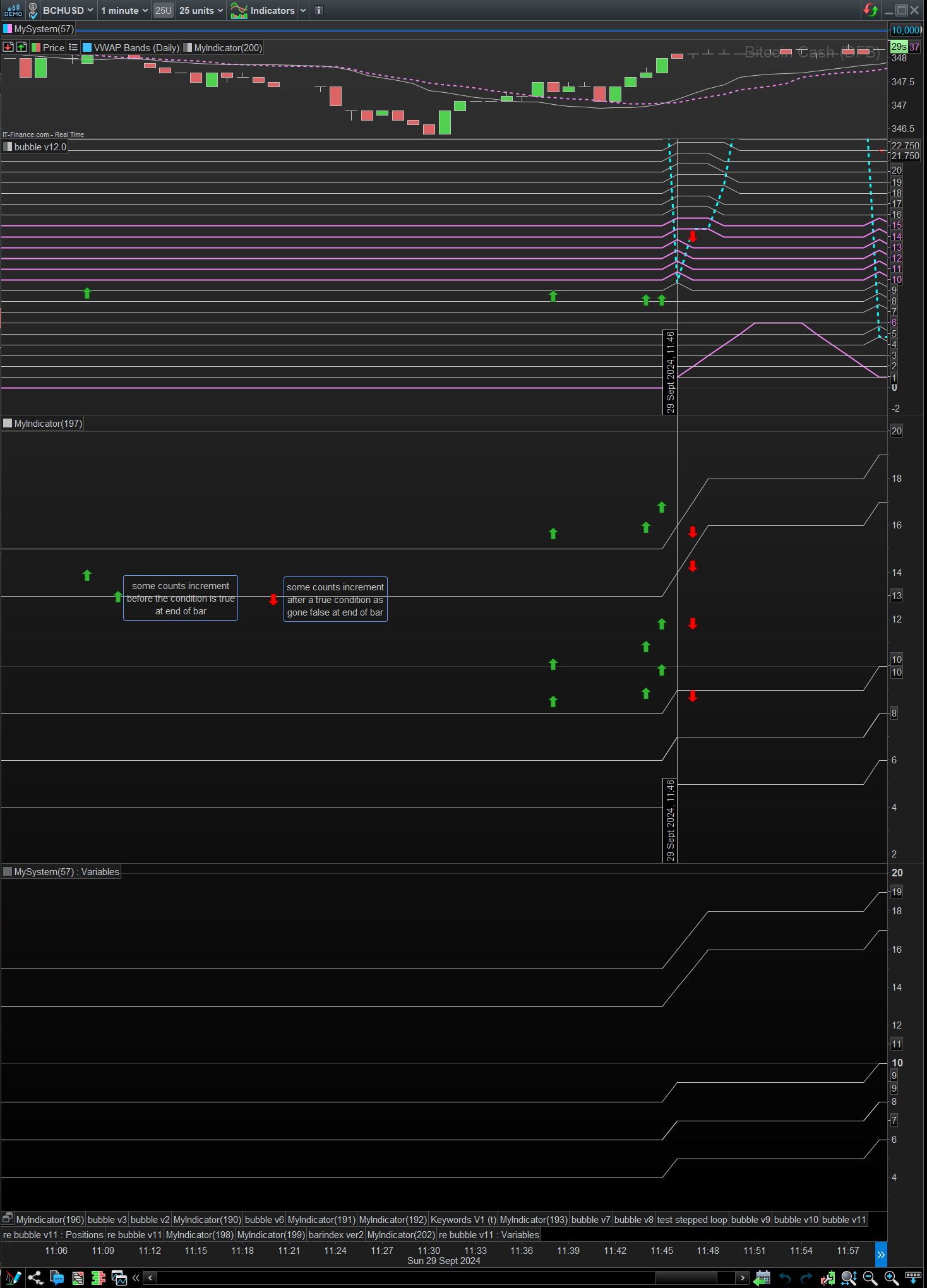
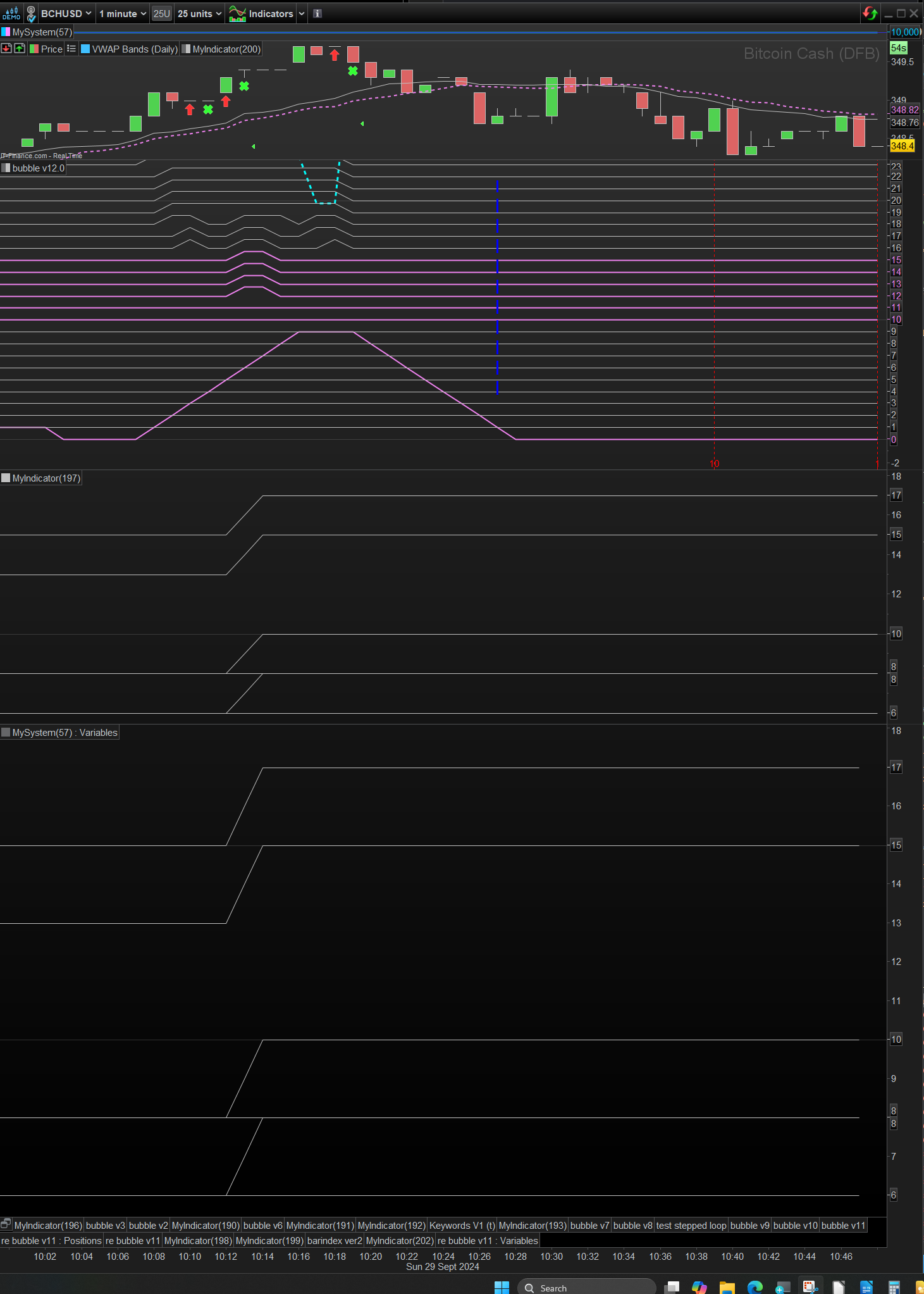
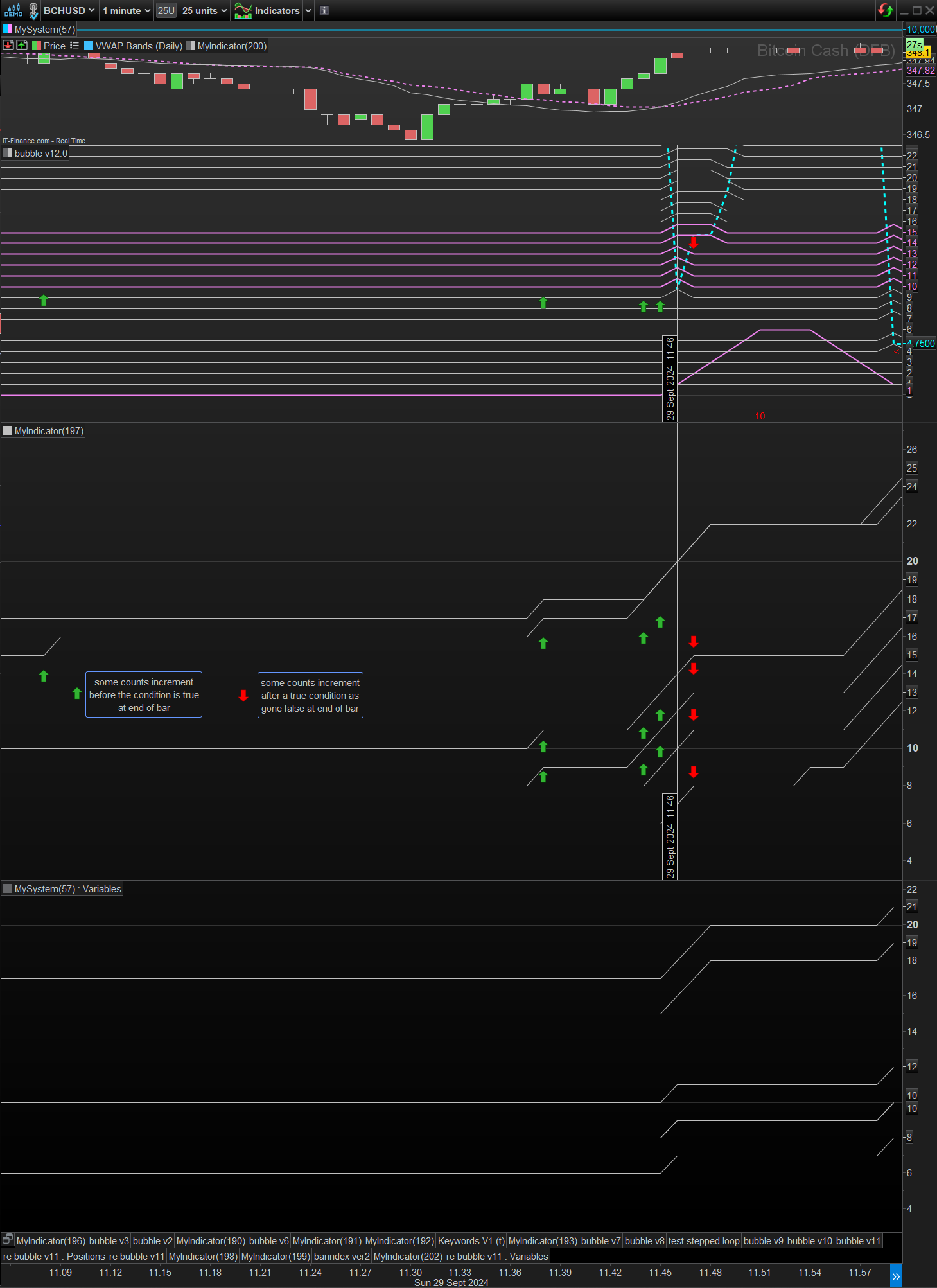
    In the images, Image1 shows results which fall within the chart build phase, and Image2 in the following live tick data. Image3 is the same area as image2, but after a re-build and when it falls in the chart build area.

    Bubble v12.0 represent the true/false condition relative to the period value in violet. The 6 horizontal lines period values match the y scale. The period+0.75 just represents when their true .
    MyIndicator(197) is the latest version of your indicator . Bottom up [10,11,13,12,14,15]
    MySystem(57) : Variables, is your original back-test version. Bottom up[10,11,13,12,14,15]

    Comparing the results of the indicator and back-test, in (Image2) I see addition increments in the count when they shouldn’t, see red and green arrows. These can seem to happen before and after the true condition. The green arrows represent when the bar condition is false and the first tick made it true. And the red arrows represent when the bar condition is false but the first tick made it true.

    Image1,  appears to represent correctly, probably due to the closed OHLC data used.
    Image2, the counts deviate, see y scale, between new indicator and back-test versions. This I think because of the first tick collection point as explained above.
    Image3, shows how the Image2 displays when it falls in the area of the build phase. The counts have changed and align, and aligned with the true conditions. Again, this due to the closed OHLC data used in the build.

    Over to you, I wonder what your next move is!
    Regards

    Finning thanked this post
    Screenshot-2024-09-29-121541.png Screenshot-2024-09-29-121541.png
    #238236 quote
    druby
    Participant
    New

    For some reason the, platform dumped Image 1 and 2 when posted or when using Edit function.

    Screenshot-2024-09-29-104814.png Screenshot-2024-09-29-104814.png
    #238238 quote
    druby
    Participant
    New
    #238244 quote
    robertogozzi
    Moderator
    Master

    druby However, after a while the counts started deviating from the back-test

    It is probably due to the fact that the backtest once it’s finished doesn’t update its data any longer, while the indicator still does!

    Finning thanked this post
    #238286 quote
    Finning
    Participant
    Veteran

    Hi all, sorry for my absence, something I need to get better at, despite my schedule.

    Roberto and DRuby, thanks for the great ideas.

    One question with all of this, could the above tick problem be bypassed if we were just looking at the last closed bar datas [1]?

    I think I mentioned the [1] idea before to avoid the tick data problem, and it would well and truly do what I need, if it makes things any easier?

    I am downloading and fully digesting the codes above now.

    Finning

    #238288 quote
    robertogozzi
    Moderator
    Master

    Yes, you can surely refer the prior closed bar, i.e. [1], which is almost the same as my last code to prevent arrays from repeatdly being updated each new incoming tick. Indeed I only allow array elements to be updated on the very first tick of each bar, which it’s almost the same as using the prior bar.

Viewing 15 posts - 16 through 30 (of 31 total)
  • You must be logged in to reply to this topic.

Array/Bubble sort in strategy doesn’t work, but works as an indicator


ProOrder: Automated Strategies & Backtesting

New Reply
Author
author-avatar
Finning @finning Participant
Summary

This topic contains 30 replies,
has 4 voices, and was last updated by druby

1 year, 5 months ago.

Topic Details
Forum: ProOrder: Automated Strategies & Backtesting
Language: English
Started: 08/25/2024
Status: Active
Attachments: 12 files
Logo Logo
Loading...
