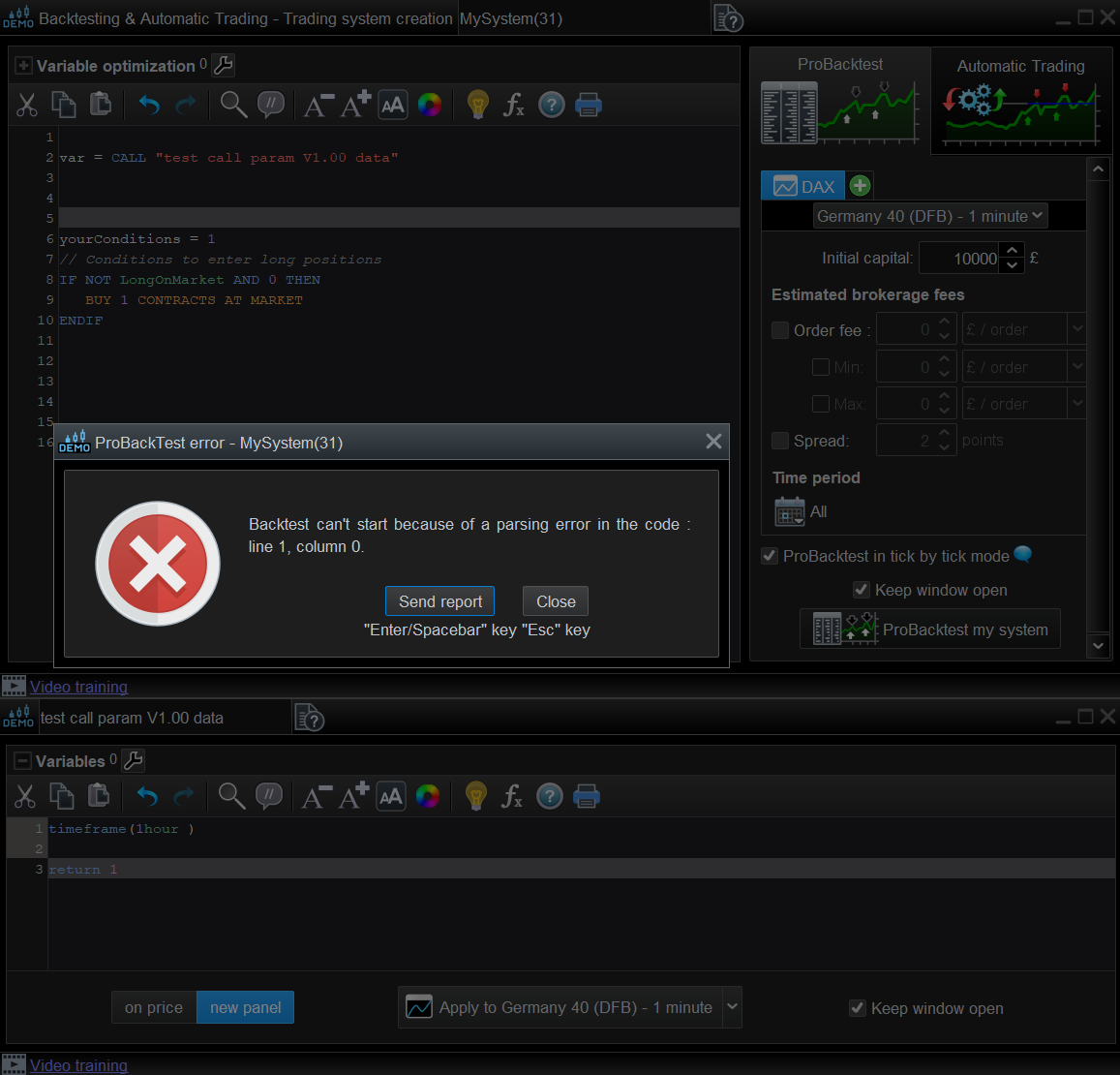
Again I think this is related to timeframe switching.
I cannot run a back test using the indicators I have developed. If I call my indicators it says “Back test cannot start because of a parsing error in the code line 4 column 0”, I assume this relates to line 4 in my indicator #T1, which is “timeframe(1 hour,updateonclose)”
Please advise, I specifically want to back test my strategy using multiple time frames.
T1=call “#T1″[1]
//Entanglment=call “#Entanglement”
signal=0
//sig=CALL “#T1”
// Conditions to enter long positions
IF signal >0 THEN
buy at market
ENDIF
if signal <0 THEN
sellshort at market
endif
When I get, line and column indication in error message, I take it to refer to main code.
If that line happens to be a ‘call’ instruction, then error may be in called file.
Its hard to say without all code and variables to run and test.
Yeah I need somebody in technical support to look at the code. It is a system bug for sure.
parsing error in the code line 4 column 0”
In addition to above, in the same eror message, do you also get words like … ‘begin and end in same entity’??
Nope just that message with a “Send report” dialogue, which I did, so it will go to my broker IG.com and then to ProRealtime.
I love the platform for manual trading, but for code… hmmm somewhat flaky frankly.
The best way to proceed, if you don’t want to share your code here in the forum, is send a thicket to PRT.
Have you tried to copy and paste you indicator inside the system code. In this way you will not use the call function. Sometimes it works.
pasting the indicator code into the back test script is a good idea, I will give that as try.
Sadly pasting the indicator in didn’t help, still the same error, but now line 4 is actually blank!
This is a very long shot but, try setting your timeframes to the same time units.
instead of 1 hour and 5 minutes etc, change to 60 minutes and 5 minutes.
One problem I looked into in the past, that helped.
ah ha, pasting might work, I’ll have to paste the whole hierarchy of indicators though, which is a pain but if works that will give a way forward at least
Pasting the entire code into the back test script worked! Thanks so much for your advice, it’s a but of a mess but at least I can work with it.
I noticed that, in your other post, you called ‘#HourlyBollinger’, and I wondered, why not call it ‘#Bollinger’ since you were calling it from an hourly timeframe in main file.
To me, that could infer that you used the ‘Timeframe’ instruction in a/the called file.
Doing a bit of testing, it appears that, when back testing, if you call a file with a’timeframe’ statement included in it , you get the ‘Parsing error’ message.
The line/column, does, point to the line in the called file, where the ‘Timeframe’ statement sits.
Image shows bare minimum to get error message up.
Solution appears, used generic, no timeframe specific called files and use timeframe in main.
Not checked every possible combination, but error appears repeatable.
It’s true that in principle I could set the timeframe outside of Hourly Bollinger, however I have other custom built indicators that require access to more than one time frame.
While waiting hopefully for the fix for the problem I have pasted all of my indicators into the back testing script, it’s not very elegant but it does at least work