Hello Guys!
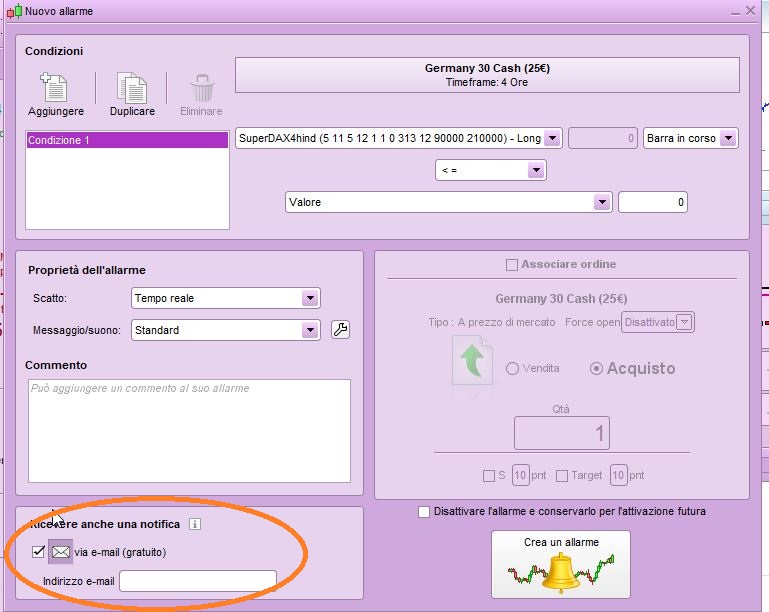
I just created a new indicator which I want to use in my alert for an opened position.
However, if I try to receive a notification (via mail) when the alert is set, I get the following message.
“It is not possible to an alert with offline notification based on the indicator XY (you may create a standard alert without offline notification if you wish to use it). ”
Any way I could outrun this?
Thanks guys!
Presumably you are setting the Alert via the PRT Platform Alert Tool?
The message is a long-winded way of saying that you need to keep your PC running else you will not get an email alert (nor any other type of alert).
Also you would need to close and reopen PRT / Your Platform every < 18 hours!
Thanks for your reply.
So it is not possible to use such indicators in the alerts.
And yes, alert from PRT interface.
Do you not get an Alert (when conditions are met) when your PC is running ?
Try it while you are looking at the screen … make the conditions be met and check for an email and / or the Alert sound and / or the popup on the screen??
Let us know how you get on?
So called offline-notifications (alerts by email or sms ) can only be set on
- a specific price;
- a specific time of the day;
- standard technical analysis indicators.
Alerts based on custom indicators are only available via platform alerts; hence the workstation must be open to receive these in real time via pop-up.
offline-notifications
Where / how do we set offline notifications (so Platform need not be running to receive alert) on the PRT Platf0rm please?
Thank you all for the replies.
So to answer my own question …
- Offline Alerts are emails / SMS.
- Online Alerts are a pop up.
Offline Alert does not mean you get an alert when the PRT Platform is offline / switched off … there is no way to receive an Alert when the PRT Platform is switched off.
No GraHal, as far as I could understand from Ulrike’s reply:
1-alerts on custom indicators can only be set to work online, as pop-up windows, IF your platform is open and active
2-alerts on standard, built-in, indicators can either be set as online alerts, just as it is for custom indicators OR as offline server-based alerts notified by email/sms, even if your platform is shut down.
as far as I could understand from Ulrike’s reply
Yes I read Ulrike’s reply the same as you … which is why I asked my question for clarification.
as offline server-based alerts notified by email/sms, even if your platform is shut down.
How do you set an offline server based alert anyway?? Does not need to be a detailed explanation, just point me to the setting in case I have forgotten!? 🙂
If it is using the normal ‘yellow bell’ then I guess PRT have made a change recently??
All Alerts set up using the yellow bell did not used to function if the PRT Platform was switched off??
It’s the same bell icon, you set it on your platform, then shut it down and wait.
I remember having tried once a few years ago.
YES it works … I’ve learnt something new today, thanks again Roberto!
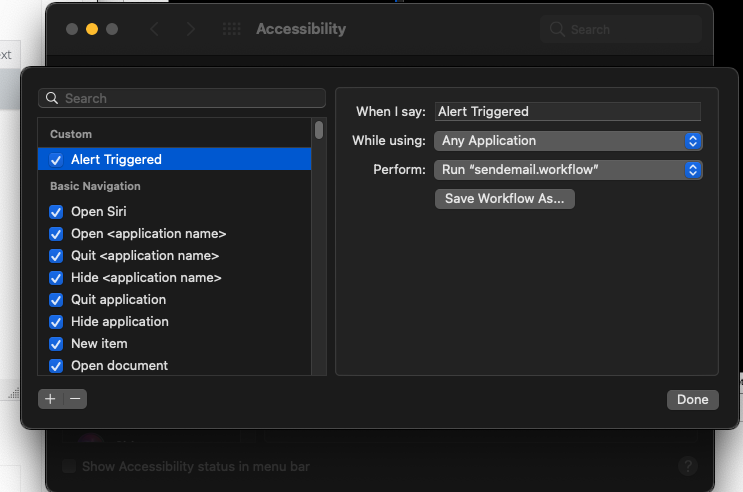
I’ve discovered a small ‘hack’ in terms of email notifications based on alerts from custom indicators. For all Mac users, you Enable Voice Control under System Preferences -> Accessibility, then create a custom command that listens to “Alert Triggered” which will then launch a very basic Automator workflow that sends an email to yourself. I’ve tested it and it is really responsive and works every time. It means you will need to have a computer on at all times at home which will trigger the alerts.
Just thought I’d share this workaround, not the most elegant solution, but it works!
@eckaw
can you help me wih a link or tutorial for how to create this commande “sendmail.workflow” pls ?
I’m looking to do the same but I’m stuck in the last step
Best Reguards
or somethink same for Windows 10 ?