aide pour changer l a

Viewing 3 posts - 1 through 3 (of 3 total)

  • Author
    Posts
  • #225132 quote
    geroniman
    Participant
    Junior

    Bonjour

    Voici un excellent indicateur de price action. Il faut ajouter les variables tigX tigX2 tigX3 tigX4 et tigX5 pour l efaire fonctionner.

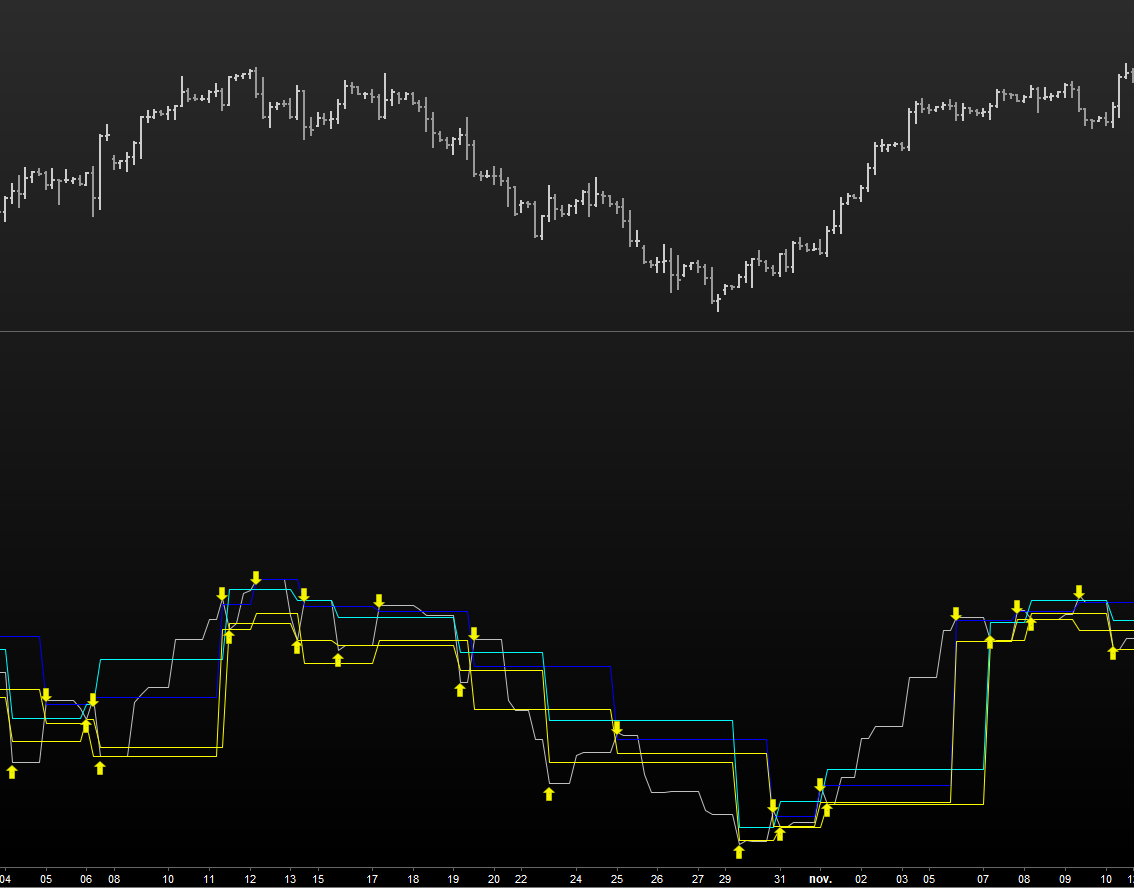
    Comment faire pour que les bougies signal changent de couleur ( par exemple de vert à blanc sur un LONG et de rouge à jaune sur un Short au lieu d’avoir des fleches sur le graphe.

    //
    defparam calculateonlastbars = 1000
    if Close>( max(max(high,high[1]),max(high[1],high[1]) ))[1] then
    D=Min(Min(low,low[1]),Min(low[1],low[1]))
    elsif close<(Min(Min(low,low[1]),Min(low[1],low[1])))[1] then
    D=Max(Max(high,high[1]),Max(high[1],high[1]))
    else
    D=D[1]
    endif
    //plot1 = 0
    //plot2 = 0

    rge = averagetruerange[10](close)

    if (close crosses over D) then
    //plot1 = 1
    DRAWARROWUP(barindex,low[1]-0.4*rge) coloured(250,250,0,250)
    DRAWTEXT(“B”,BarIndex,low[1]-0.3*rge,serif,bold, 1) coloured(0,5,5,255) //(H1/H4 = +7) (1 min = -1)

    levelDwn=low[0]
    hh=high

    //else
    //plot1 = 0
    endif
    if (close crosses under D) then
    DRAWARROWDOWN(barindex,high[1]+0.2*rge) coloured(250,250,0,250)
    DRAWTEXT(“.”,BarIndex,high[1]+0.2*rge,serif,bold, 1) coloured(250,250,250,255) //(H1/H4 = +7) (1 min = -1)
    //plot2=-1
    //else
    //plot2=0
    levelUP=high[0]
    ll=low
    endif

    return D,levelUp coloured(0,0,250) STYLE(LINE),levelDwn coloured(250,250,0) STYLE(LINE),hh coloured(0,250,250) STYLE(LINE),ll coloured(250,250,0) STYLE(LINE)

    #225160 quote
    Alai-n
    Participant
    Veteran

    Votre demande n’est pas très claire ! Lorsque j’applique le code, je vois ce qui apparait sur l’image jointe… Donc pas de bougies en vue !

    Concernant les variables tigX, elles n’apparaissent nulle part dans le code ?

    En gros je n’ai pas compris ce que vous voulez faire?!

    #225537 quote
    Jean FX
    Moderator
    New

    On a modifié les flèches par des changement de couleur de chandelier, c’est peut-être ce que vous souhaitez, indicateur à ajouter sur le graph de prix bien sur du coup :

    //
    defparam calculateonlastbars = 1000
    if Close>( max(max(high,high[1]),max(high[1],high[1]) ))[1] then
    D=Min(Min(low,low[1]),Min(low[1],low[1]))
    elsif close<(Min(Min(low,low[1]),Min(low[1],low[1])))[1] then
    D=Max(Max(high,high[1]),Max(high[1],high[1]))
    else
    D=D[1]
    endif
    //plot1 = 0
    //plot2 = 0
    
    rge = averagetruerange[10](close)
    
    if (close crosses over D) then
    //plot1 = 1
    DRAWCANDLE(open, high, low, close) coloured ("white")
    DRAWTEXT("B",BarIndex,low[1]-0.3*rge,serif,bold, 1) coloured(0,5,5,255) //(H1/H4 = +7) (1 min = -1)
    
    levelDwn=low[0]
    hh=high
    
    //else
    //plot1 = 0
    endif
    if (close crosses under D) then
    DRAWCANDLE(open, high, low, close) coloured ("yellow")
    DRAWTEXT(".",BarIndex,high[1]+0.2*rge,serif,bold, 1) coloured(250,250,250,255) //(H1/H4 = +7) (1 min = -1)
    //plot2=-1
    //else
    //plot2=0
    levelUP=high[0]
    ll=low
    endif
    
    return D,levelUp coloured(0,0,250) STYLE(LINE),levelDwn coloured(250,250,0) STYLE(LINE),hh coloured(0,250,250) STYLE(LINE),ll coloured(250,250,0) STYLE(LINE)
Viewing 3 posts - 1 through 3 (of 3 total)
  • You must be logged in to reply to this topic.

aide pour changer l a


ProBuilder : Indicateurs & Outils Personnalisés

New Reply
Author
author-avatar
geroniman @geroniman Participant
Summary

This topic contains 2 replies,
has 3 voices, and was last updated by Jean FX

2 years, 1 month ago.

Topic Details
Forum: ProBuilder : Indicateurs & Outils Personnalisés
Language: French
Started: 12/12/2023
Status: Active
Attachments: 1 files
Logo Logo
Loading...