Affichage indicateur UT Inf

Viewing 2 posts - 1 through 2 (of 2 total)
  • Author
    Posts
  • #247503 quote
    PRC_2021
    Participant
    Average

    Bonjour,


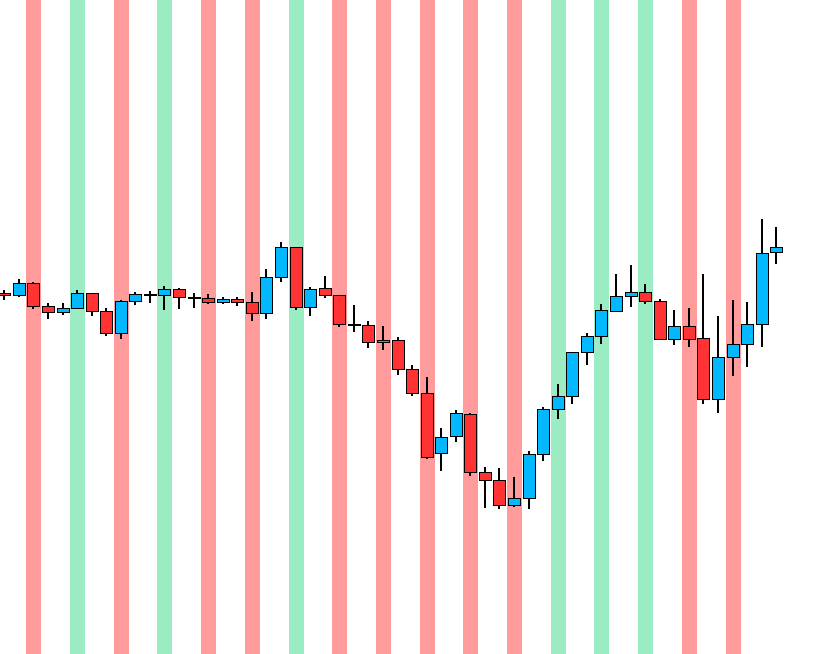
    Je souhaite avoir les données de l’indicateur ci dessous M15 en M5 mais à la clôture de la bougie M15 (et donc les 3 suivantes en M5).

    Cela fonctionne mais l’affichage se mets seulement sur la 1ière bougie 5 Min. Savez comment faire pour que les 3 soient colorées ?

    TIMEFRAME(15 Minute, UPDATEONCLOSE )
    
    a = rsi[14]
     
    up = (a[1] < a)
    down = (a[1] > a)
    
    if (up) THEN
    BACKGROUNDCOLOR(0,204,102,100)
    ELSIF  (down) then
    BACKGROUNDCOLOR(255,0,0,100)
    ENDIF
    
    return


    Merci par avance.

    Sans-titre.png Sans-titre.png
    #247507 quote
    JC_Bywan
    Moderator
    Master

    Bonjour,

    il faut dire au code de faire le backgroundcolor dans la 5mn via l’instruction timeframe(5 minutes), à rajouter ainsi:

    TIMEFRAME(15 Minutes, UPDATEONCLOSE )
    
    a = rsi[14]
    
    up = (a[1] < a)
    down = (a[1] > a)
    
    TIMEFRAME(5 Minutes, UPDATEONCLOSE)
    
    if (up) THEN
    BACKGROUNDCOLOR(0,204,102,100)
    ELSIF (down) then
    BACKGROUNDCOLOR(255,0,0,100)
    ENDIF
    
    return
    Iván González thanked this post
Viewing 2 posts - 1 through 2 (of 2 total)
  • You must be logged in to reply to this topic.

Affichage indicateur UT Inf


ProBuilder : Indicateurs & Outils Personnalisés

New Reply
Author
author-avatar
PRC_2021 @manu35250 Participant
Summary

This topic contains 1 reply,
has 2 voices, and was last updated by JC_Bywan

9 months, 2 weeks ago.

Topic Details
Forum: ProBuilder : Indicateurs & Outils Personnalisés
Language: French
Started: 05/22/2025
Status: Active
Attachments: 1 files
Logo Logo
Loading...