


Add multiple moving averages in one go to a chart?

Viewing 2 posts - 1 through 2 (of 2 total)

  • Author
    Posts
  • #52508 quote
    robdav
    Participant
    Veteran

    Hi,

    I’m trying to write and indicator which will, for example, add 30 moving averages to a chart in sequence from 1 to 30 but I’m not quite how to code this.

    Can someone please help? My attempt below obviously doesn’t like the RETURN statement in the FOR NEXT loop.

    Thanks

    Rob

    FOR i = 1 TO 30 DO
    a = average[i](open)
    RETURN a as "Average"
    NEXT
    #52682 quote
    Nicolas
    Keymaster
    Master

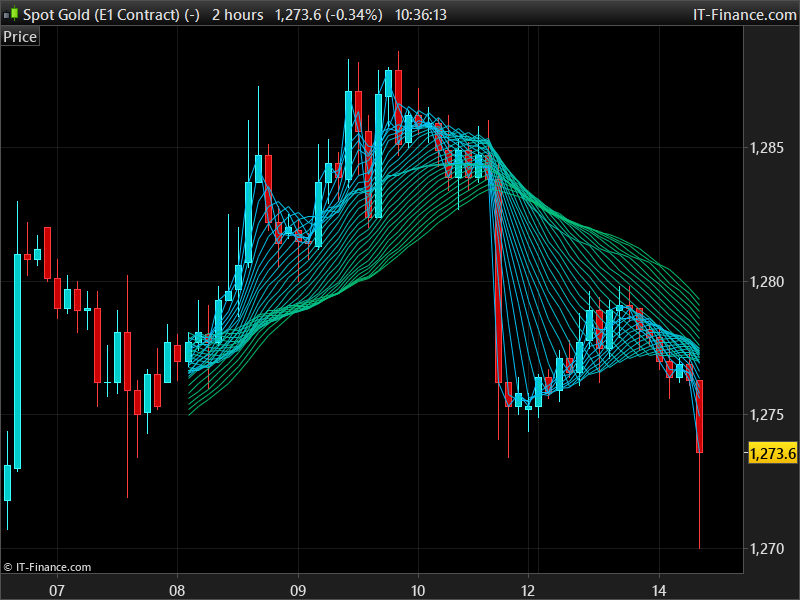
    There are some limitations because of the “infinite loop” error, but this kind of code could make the trick:

    defparam drawonlastbaronly=true
    defparam calculateonlastbars=100
    
    //--- settings
    lookback = 50 //periods to plot
    firstPeriod = 1 //first moving average Period
    lastPeriod = 30 //last moving average Period
    //--- end of settings
    
    b = 1
    for i = max(1,firstPeriod) to max(1,lastPeriod) do
    for a = 0 to lookback do
    drawsegment(barindex[a],average[i][a],barindex[a+1],average[i][a+1]) coloured(0,191,max(1,255-b))
    next
    b = b+5
    next
    
    return

    Because, it is not possible to draw curve in the past, I used segments instead. You can choose the MA’s first period to last period to be plotted. First time I made a Guppy / Fishnet indicator like this 🙂

    robdav and Leo thanked this post
Viewing 2 posts - 1 through 2 (of 2 total)
  • You must be logged in to reply to this topic.

Add multiple moving averages in one go to a chart?


ProBuilder: Indicators & Custom Tools

New Reply
Author
author-avatar
robdav @robdav Participant
Summary

This topic contains 1 reply,
has 2 voices, and was last updated by Nicolas

8 years, 2 months ago.

Topic Details
Forum: ProBuilder: Indicators & Custom Tools
Language: English
Started: 11/13/2017
Status: Active
Attachments: 1 files
Logo Logo
Loading...
