About to give up… is PRT not the code for a simple breakout strategy?

Viewing 15 posts - 1 through 15 (of 19 total)
  • Author
    Posts
  • #243251 quote
    Watanabix
    Participant
    New

    Hi Traders,

    I am feeling I am about to hit a brick wall… for several weeks I have tried to learn and asked for your help regarding a simple breakout strategy:

    1. go long above the high of the 0945-1000 bar
    2. or go short below the low of the same bar
    3. i defined a target profit and a stop loss
    4. i wanted only 1 trade if the first trade was a win, else try a second and final trade for the day
    5. i wanted to trade only during the 0930-1600 NYC session timeframe
    6. i was using YM instrument

    Below is my code (incorporates a lof of tweaks from the PRT community).

    I have never managed to have trades placed in the 1000-1015 bar right after the breakout bar. I repeat: the system never placed an order in that first eligible bar; the earliest would always be the 1015-1030 bar.

    I truly believe my code has mistakes, however thus far, no one was able to solve what I initially thought would be an easy set of instructions. I did make a lot of progress with a few specific brilliant minds here in the PRT community but the code never managed to place orders in the first eligible bar (1000-1015).

    If someone can point me in the right direction, I would be extremely thankful. I am new to PRT but I really like it (and the community as well), however this is becoming a very tough experience for me to believe there is still light at the end of the tunnel…

    Many thanks either way everyone.

    DEFPARAM CUMULATEORDERS = FALSE // to prevent adding to positions
    defparam FLATBEFORE = 094500
    DEFPARAM FLATAFTER = 160000
    
    Once MaxTrades = 2
    //Once BUFFER = 0
    //Once PT = 40
    
    IF IntraDayBarIndex=0 THEN
    TradeCount=0
    TradeOn=1
    HI =0
    LO =0
    ENDIF
    
    If StrategyProfit>StrategyProfit[1] then
    TradeOn=0
    EndIf
    
    If LongTriggered or ShortTriggered then
    TradeCount=TradeCount+1
    EndIf
    
    If OpenTime=094500 then
    HI=High
    LO=Low
    CandleLength=HI-LO
    EndIf
    
    If NOT ONMARKET and TradeOn=1 and TradeCount<MaxTrades THEN
    If High >HI+Buffer  then
    BUY CON  CONTRACTS AT HI+Buffer  limit
    SET STOP PRICE LO-CandleLength *stopadjuster
    SET TARGET pProfit PT
    EndIf
    
    IF Low <LO-Buffer  then
    SELLSHORT CON CONTRACTS AT LO-Buffer  limit
    SET STOP PRICE HI+CandleLength *stopadjuster
    SET TARGET pProfit PT
    EndIf
    EndIf
    
    Graph TradeCount as "TradeCount"
    Graph TradeOn as "TradeOn"
    GraphOnPrice HI as "HI"
    GraphOnPrice LO as "LO"
    
    #243254 quote
    GraHal
    Participant
    Master

    Did you try …

    If High >HI+Buffer  then
    BUY CON  CONTRACTS AT HI+Buffer  Stop //not Limit
    IF Low <LOBuffer  then
    SELLSHORT CON CONTRACTS AT LOBuffer  Stop // not limit
    Watanabix thanked this post
    #243280 quote
    Iván González
    Moderator
    Master

    Hello! In order to enter on the 10:00 candle, everything must be fulfilled on the 9:45 candle. This code is useful for entering on the 10:00 candle on the breakout.

    If NOT ONMARKET and opentime=094500 and TradeOn=1 and TradeCount<MaxTrades THEN
    HI=High
    LO=Low
    CandleLength=HI-LO
    BUY CON  CONTRACTS AT HI+Buffer  stop
    SELLSHORT CON CONTRACTS AT LO-Buffer  stop
    EndIf
    Watanabix thanked this post
    #243294 quote
    Watanabix
    Participant
    New

    Muchas Gracias (many thans) Ivan.

    • the strategy now places trades in the 1000-1015 bar
    • it complies with the maximum of 2 trades per day

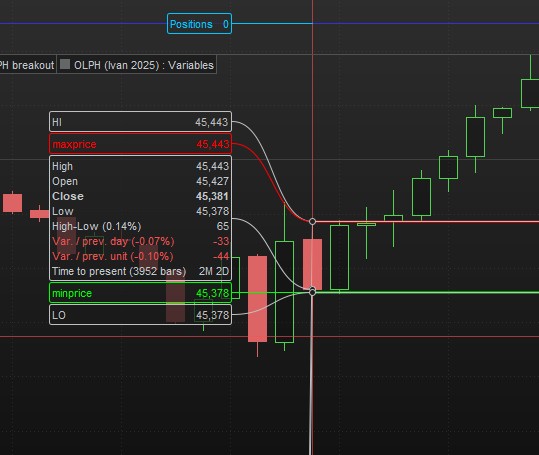
    However, it seems like this fix helped with enabling the strategy to place orders in the 1000-1015 bar but then messed up with incorrectly allowing for:

    • a 2nd trade after the first one being a winner
    • not placing valid trades in bars other than the 100-1015
    • not assuming the profit target when placing a 2nd trade
    • not assuming the correct stoploss level in the first trade

    I am attaching a few pictures in case it helps:

    1. when there is no entry signal in the 1000-1015 bar (i.e. inside bar or high/low don’t cross the HI+buffer/LO-buffer), the strategy does not place any orders for the day even when there are signals in the following bars (picture #1 attached)
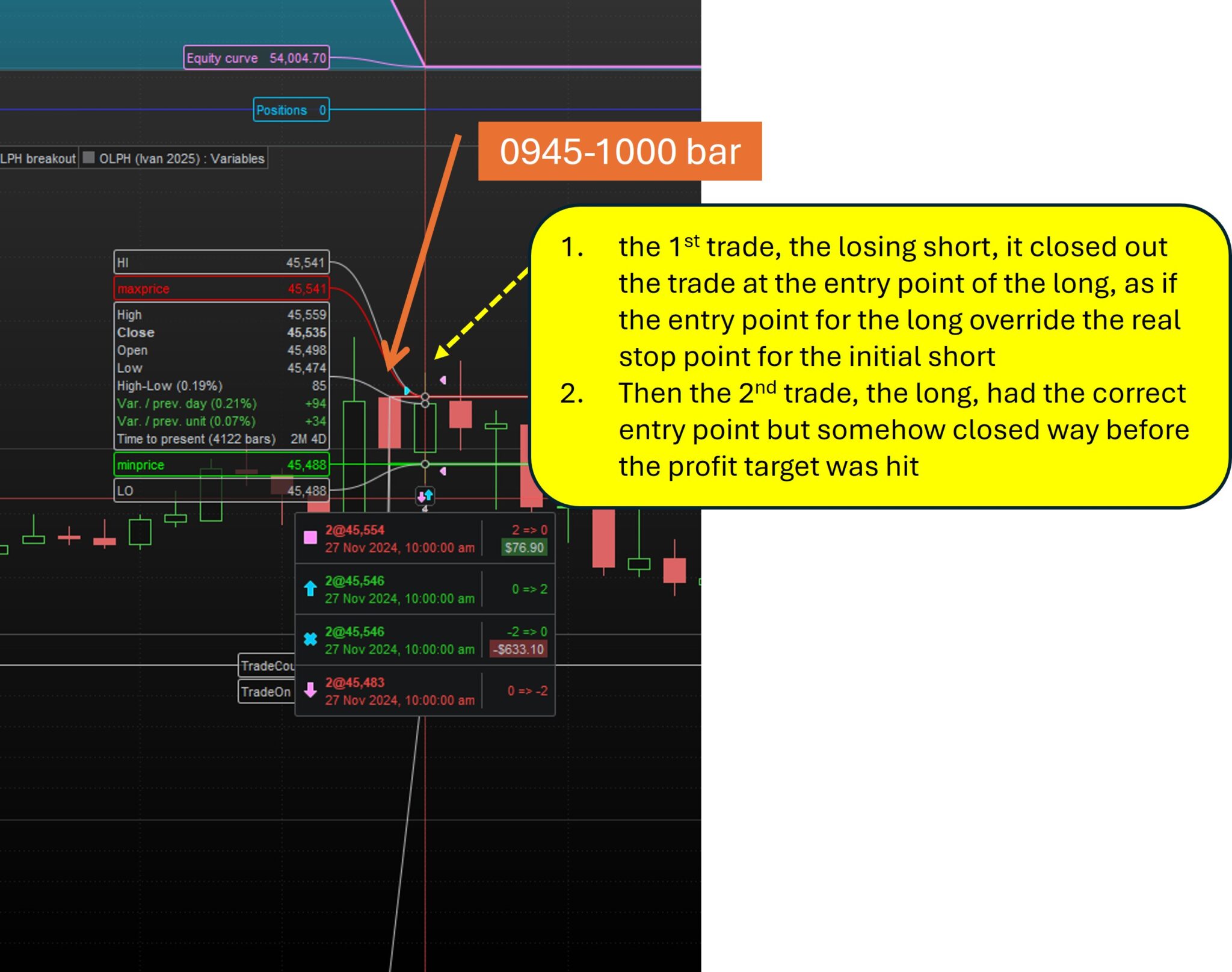
    2. in one instance, the 1st trade, a losing short, was closed out at the entry point of the long instead of at its own stoploss point, which is always above the entry point for the long due to an extra cushion provided by a certain % of the 0945-1000 candle legth (a variable defined as stopadjuster). It looked as if the entry point for the long override the real stop point for the initial short. Then the 2nd trade, the long, had the correct entry point but somehow closed way before the profit target was hit (8 points instead of 40) (picture #2 also attached)
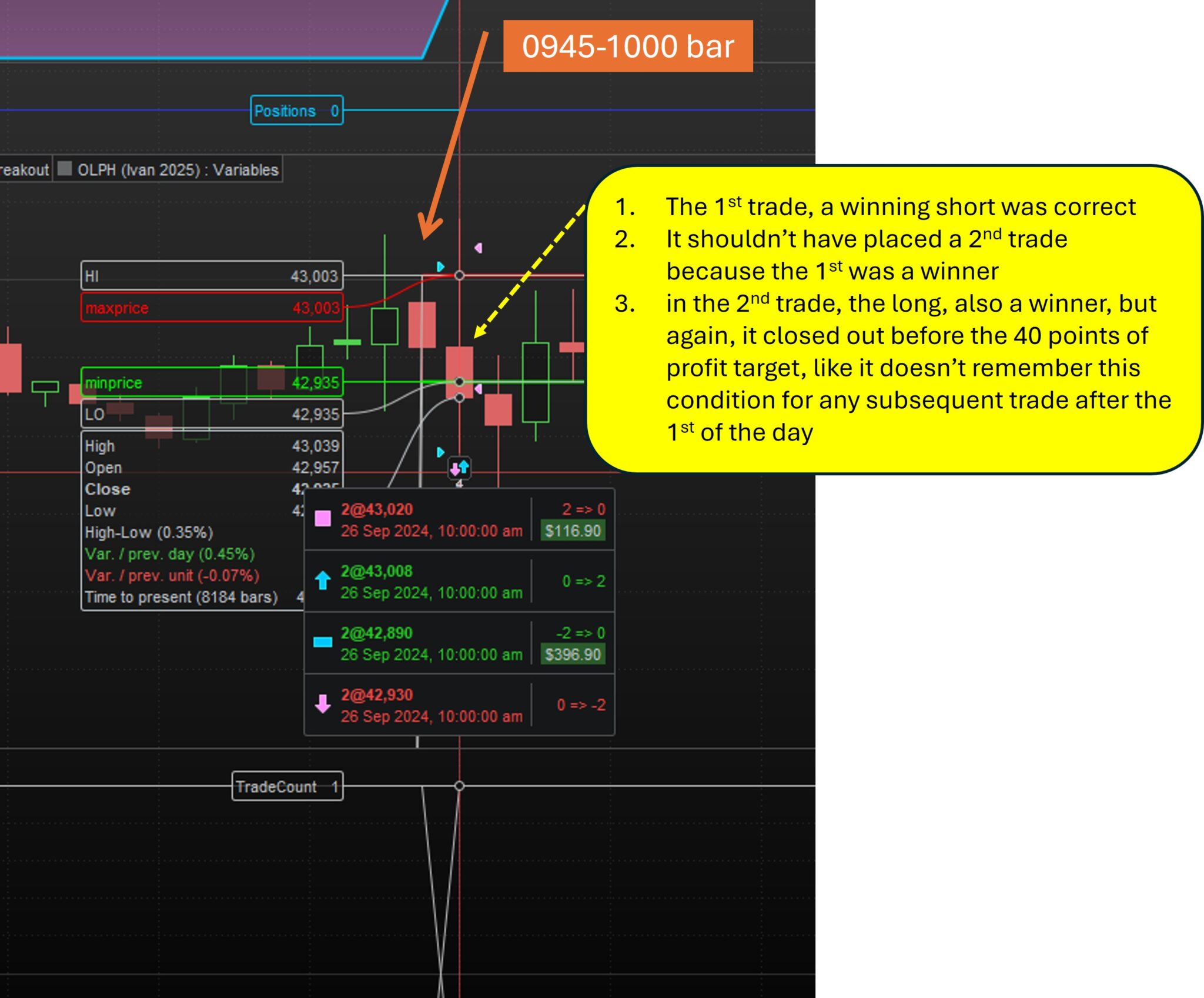
    3. in a few instances, the strategy placed two winning trades in the same day (in the same 1000-1015 bar) when it should have stopped after the first one. In the 2nd trade, also a winner, it closed out again before the 40 points of profit target, like it doesn’t remember this condition for any subsequent trade after the 1st of the day (picture #3 attached)

    I hope this helps…

    Am I being too ambitious with the few conditions I would like to backtest?


    Attaching the code with Ivan’s and Grahal’s inputs

    DEFPARAM CUMULATEORDERS = FALSE // to prevent adding to positions
    defparam FLATBEFORE = 094500
    DEFPARAM FLATAFTER = 160000
    
    Once MaxTrades = 2
    //Once BUFFER = 0
    //Once PT = 40
    
    IF IntraDayBarIndex=0 THEN
    TradeCount=0
    TradeOn=1
    HI =0
    LO =0
    ENDIF
    
    If StrategyProfit>StrategyProfit[1] then
    TradeOn=0
    EndIf
    
    If LongTriggered or ShortTriggered then
    TradeCount=TradeCount+1
    EndIf
    
    If NOT ONMARKET and opentime=094500 and TradeOn=1 and TradeCount<MaxTrades THEN
    HI=High
    LO=Low
    CandleLength=HI-LO
    
    
    BUY CON  CONTRACTS AT HI+Buffer  stop
    SET STOP PRICE LO-CandleLength *stopadjuster
    SET TARGET pProfit PT
    
    SELLSHORT CON CONTRACTS AT LO-Buffer  stop
    SET STOP PRICE HI+CandleLength *stopadjuster
    SET TARGET pProfit PT
    EndIf
    
    
    Graph TradeCount as "TradeCount"
    Graph TradeOn as "TradeOn"
    GraphOnPrice HI as "HI"
    GraphOnPrice LO as "LO"
    
    no-entries-on-1000-1015-bar-meant-no-more-entries-for-the-day.jpg no-entries-on-1000-1015-bar-meant-no-more-entries-for-the-day.jpg short-stop-loss-target-overriden-by-long-entry-point.jpg short-stop-loss-target-overriden-by-long-entry-point.jpg placed-a-2nd-trade-after-a-winner-and-forgot-the-take-profit.jpg placed-a-2nd-trade-after-a-winner-and-forgot-the-take-profit.jpg
    #243299 quote
    Watanabix
    Participant
    New

    Grahal, thank you for your help. Yes, I did try but it started placing orders in the breakout bar 0945-1000, with a bit of a mess in terms of entries… unfortunately

    #243303 quote
    druby
    Participant
    New

    I didn’t realise till now, that if the code block set both BUY and SELLSHORT   STOP orders, then there both active and the first one the price breaks, is the order taken, with cumulateorder = false.

    However, from your 2nd image,  the trigger candle breaks the LO level and enters the short, but it –> EXIT’s <– the trade to get out, and not by a STOP setting.

    That EXIT level is the same level as the long entry, it appears that the Buy stop level was still active and when reached EXIT’ed the short and entered the long.

    The long order then exited  the buy at a  STOP level, which I believe was the stop level for the short.


    I’m not sure, but I think you can only have one active stop level set, and I would think it would be the latter one executed in code, the short one.

    The bar which sets the orders only runs once, so the long stop is overridden with the short stop.

    I bet this is same for the targets, and the active target is for the short.


    If price reverses when in the long, and didn’t hit the short stop level to exit, I wonder if the trade would continue short at a loss till it hit the short target level.


    Though its not noted above, if the stopadjuster  = 1, and buffer = 0,  then all the orders are at different levels, the short hits the buy level before the short stop resulting in the X exit.

    Also, then the long hits the short stop just above, and maybe there was never a long target set.

    If the stopAdjuster = 0, then the entry levels and  stop levels are at HI and LO,  when the short hits the  level of both the short stop and long Buy, the short now STOP’s out, probably by the short stop level.

    The long enters, but is immediately stopped out because of the short stop level I guess is still active.

    Watanabix thanked this post
    #243304 quote
    druby
    Participant
    New

    On the third image, I’m going to guess how that big candle played out.

    The candle broke LO-buffer and entered the short.

    It continued lower and hit the short target, closing the trade.

    The price reversed from its low and broke the HI+buffer and entered long.

    The long got stopped out  when it hit the still active short stop level.

    I don’t think there ever was a long target level set.


    In my earlier comments I may have use HI and LO levels for triggering orders and not mentioned these may be offset but BUFFER.

    #243324 quote
    Aragorna
    Participant
    Junior
    DEFPARAM CUMULATEORDERS = FALSE // to prevent adding to positions
    defparam FLATBEFORE = 094500
    DEFPARAM FLATAFTER = 160000
     
    Once MaxTrades = 2
    //Once BUFFER = 0
    //Once PT = 40
     
    IF IntraDayBarIndex=0 THEN
    TradeCount=0
    TradeOn=1
    HI =0
    LO =0
    ENDIF
     
    If StrategyProfit>StrategyProfit[1] then
    TradeOn=0
    EndIf
     
    If LongTriggered or ShortTriggered then
    TradeCount=TradeCount+1
    EndIf
     
    If NOT ONMARKET and opentime>=094500 and TradeOn=1 and TradeCount<MaxTrades THEN
    
    HI=High
    LO=Low
    CandleLength=HI-LO
     
     
    BUY CON  CONTRACTS AT HI+Buffer  stop
    SELLSHORT CON CONTRACTS AT LO-Buffer  stop
    SET STOP PLOSS CandleLength *stopadjuster
    SET TARGET pProfit PT
    EndIf
     
     
    //Graph TradeCount as "TradeCount"
    //Graph TradeOn as "TradeOn"
    //GraphOnPrice HI as "HI"
    //GraphOnPrice LO as "LO"
    

    For me it doesn’t work because the condition is triggered only at 9.45, so it works only if the next candle break out. I’ve corrected the time condition and the stop loss

    #243329 quote
    LucasBest
    Participant
    Average
    DEFPARAM CUMULATEORDERS = FALSE // to prevent adding to positions
    defparam FLATBEFORE = 094500
    DEFPARAM FLATAFTER = 160000
    
    Once MaxTrades = 2
    //Once BUFFER = 0
    //Once PT = 40
    
    IF IntraDayBarIndex=0 THEN
    TradeCount=0
    TradeOn=1
    HI =0
    LO =0
    ENDIF
    
    If StrategyProfit>StrategyProfit[1] then
    TradeOn=0
    EndIf
    
    If LongTriggered or ShortTriggered then
    TradeCount=TradeCount+1
    EndIf
    
    If opentime=094500 THEN
    HI=High
    LO=Low
    CandleLength=HI-LO
    Endif
    
    If NOT ONMARKET and opentime>=094500 and TradeOn=1 and TradeCount<MaxTrades THEN
    BUY CON  CONTRACTS AT HI+Buffer  stop
    SET STOP PRICE LO-CandleLength *stopadjuster
    SET TARGET pProfit PT
    
    SELLSHORT CON CONTRACTS AT LO-Buffer  stop
    SET STOP PRICE HI+CandleLength *stopadjuster
    SET TARGET pProfit PT
    EndIf
    
    
    Graph TradeCount as "TradeCount"
    Graph TradeOn as "TradeOn"
    GraphOnPrice HI as "HI"
    GraphOnPrice LO as "LO"
    Iván González thanked this post
    #243368 quote
    druby
    Participant
    New

    Noted, Moving the HI;LO; and candleLength update outside the IF NOT ONMARKET block and Adding the > to the  opentime = 0945,  allows further entry’s to be made while between FLATBEFORE/AFTER window.

    However, this allows, if not in market, stop orders to be  set, every bar till a order is triggered or condition fails.


    One addition I have made to the code is with the setting of HI = 0 and LO = 0, in the INTRADAYBARINDEX = 0  IF block.

    When these are set to zero, it affects the y-scale auto zoom, this because the CANDLES and GRAPH keyword, with its variable, are  items that the auto y-scale zoom is triggered by.

    This making the candles un-readable, since the lower level of the y-scale goes to  ZERO instead of the lowest CANDLE low being displayed. (bigger Y-range in same panel height)

    This means manually re-scale the y-axis, which happens a lot when debugging and re-ADDing to chart to update.

    Setting, HI = UNDEFINED and, LO = UNDEFINED, help alleviate this drastic re-scale.

    The HI and LO lines, when set to there operational levels, are closer to the candle levels, so not crushing the displayed objects in the panel.

    Since undefined is not a value like zero, y-scale is not altered, the drawn line appear to stay at there last valid level. Not yet noticed a down side in doing this!


    In reference to my earlier comment, having both BUY and SELLSHORT,  allows a choice of order types depending on price direction breaks, the pre defined levels can be pre set.

    These levels don’t require an additional break level condition, which would delay positioning to next bar, but which STOP and TARGET are used with them.

    Also, in the same bar, if  both are sequentially executed, how they interact, needs a bit more investigation.


    But as in the original code, if conditions are added to test a break, then the order is delayed until next bar.

    Using STOP/LIMIT orders, I think the direction the price crossing the order level matters, a candle testing the break, could close, and end up on the wrong side of the later placed type order level.

    This means the order not being executed, even if the move was correct to the break test, and in a smaller price move, the missed order may execute on the reverse direction part of the move. Getting in too late and in wrong direction.

    There maybe other scenarios which may not be ideal!


    Having both orders in the same bar, allows a quicker response since, condition not related to a price break and the bar delay, but could run into other issue as mentioned above.

    I doubt its possible to check which of the  orders is currently being executed and make change to the stop/target, all within a single bar.

    At this time, reducing the timeframe the orders are executed on, would allow these changes, but I don’t think it would eliminate it 100%, there would always be a  possible short term candle which could trigger both orders in a bar, if big enough, however, this will be more of a remote scenario.

    #243388 quote
    robertogozzi
    Moderator
    Master

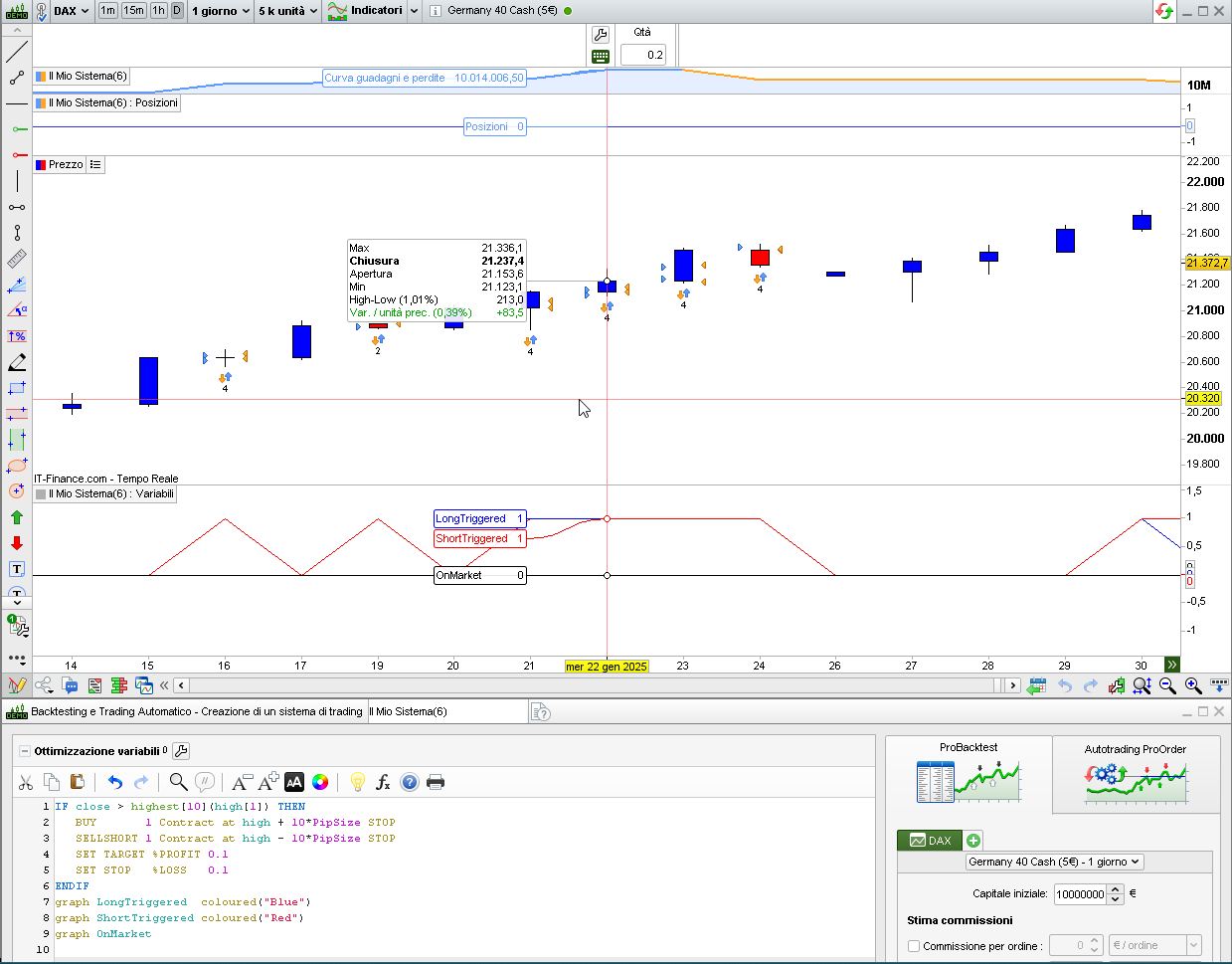
    As you can see in the attached pic, the candle where the mouse is sitting shows that OnMarket is false (for the candle to its left OnMarket is false, as well). To tell if two opposite orders, as in the pic, have been triggered and exited on the same bar, you can use LongTriggered and LongTriggered:

    IF close > highest[10](high[1]) THEN
       BUY       1 Contract at high + 10*PipSize STOP
       SELLSHORT 1 Contract at high - 10*PipSize STOP
       SET TARGET %PROFIT 0.1
       SET STOP   %LOSS   0.1
    ENDIF
    graph LongTriggered  coloured("Blue")
    graph ShortTriggered coloured("Red")
    graph OnMarket

    I tested the code on DAX, Daily TF.

    druby thanked this post
    x.jpg x.jpg
    #243530 quote
    Watanabix
    Participant
    New

    Many thanks Drubby and EVERYONE ELSE for all your help in these recent months. I have tried “everything” and have exhausted my metal capital on this PRT backtesting quest. I have ried running all your codes, fixes, but unfortunately there was no way the entries were not 100% “accurate”…

    And yes, you are absolutely right, the entry of LIMIT/STOP orders will depend upon which direction the price is coming from…

    This is the end of this road for me.

    I truly appreciate everyone’s help. It was amazing to see everyone trying to support me.

    Good luck to everyone in this community with your personal and professional endeavours!

    See you somewhere, some day…

    tiago

    GraHal, druby and robertogozzi thanked this post
    #243603 quote
    druby
    Participant
    New

    Thanks James #Watanabix,

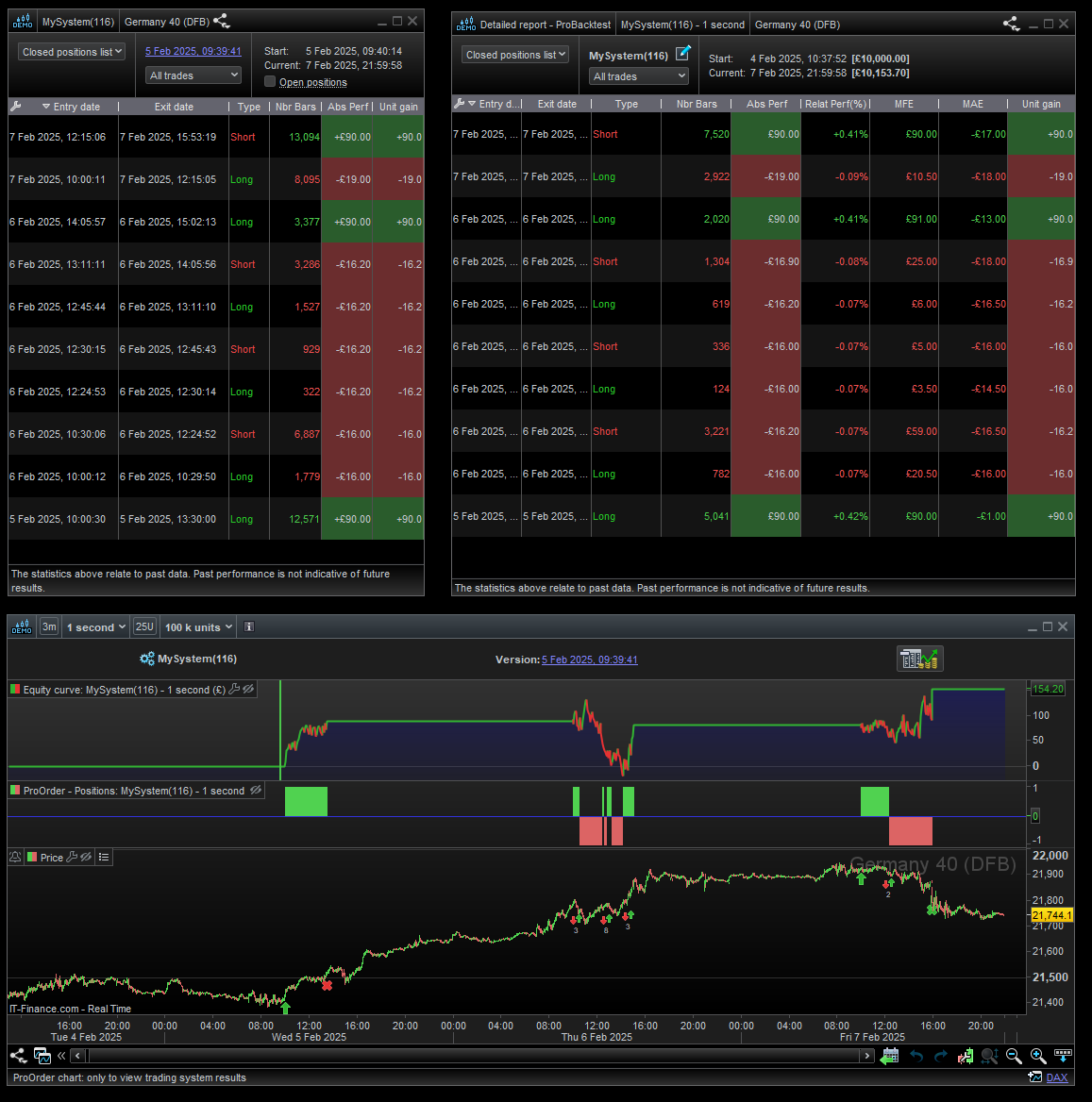
    Based on my early comments, I wrote this code, it doesn’t contain the bells and whistle’s of yours, but I was just trying to get some control over the orders.

    It still uses the 15minute setting of the HI/LO range etc, but runs on the 1 second timeframe to avoid multiple order happening on the same bar.

    Since the candles are a lot smaller at 1 second timeframe, this allowed to fit some conditions in to isolate only a long or short being set, depending on which halve of the range the price is in before a break.

    It seems to work quite well, so I back-tested it over 200,000 units which only is about 3 days, a down side of a smaller timeframe, but it appeared to be profitable over that short time.

    I had optimised the target value , which was 90 points over the 3ish days.

    Commenting out the GRAPH lines, I run it as a strategy in ProBuilder Demo, over next 3 days, and it was still profitable.

    The code  evolution to this point, may contain bits which may not be used or necessary, but may be a good starting point for what you were trying solely at 15minutes.

    The detailed reports, ( left system) (right back-test)       DAX40(DFB)   both seem to track closely with each other,  back-test spread set at 1.4 points.

    Regards

    DEFPARAM PRELOADBARS = 1
    DEFPARAM CUMULATEORDERS = FALSE // to prevent adding to positions
    defparam FLATBEFORE = 094500
    DEFPARAM FLATAFTER  = 160000
    start = 100000
    end = 160000
    window = time >= start and time < end
    PT=90
    cTime = 094500
    once HI = undefined
    once LO = undefined
    once centre = undefined
    
    timeframe(15minute,updateonclose)
    once iHI = undefined
    once iLO = undefined
    
    
    if intradaybarindex = 0 or BARINDEX = 0 then
    iHI = undefined
    iLO = undefined
    endif
    
    if opentime = cTime then
    iHI = high
    iLO = low
    endif
    
    bar15 = barindex
    
    timeframe(default)
    
    
    IF bar15[0] <> bar15[1] THEN
    bar = 1
    HI = iHI
    LO = iLo
    else
    bar = 0
    ENDIF
    
    if high < HI and low > lo then
    valid  = 1
    else
    valid = 0
    endif
    
    IF NOT ONMARKET and valid = 1 then//AND bar = 1 THEN
    
    centre = ((HI-LO)/2)+LO
    
    if high > centre and LOw > centre then
    BUY 1 CONTRACT AT HI stop
    SET STOP PRICE LO
    SET TARGET pProfit PT
    elsif low < centre and high < centre then
    SELLSHORT 1 contract AT LO stop
    SET STOP PRICE HI
    SET TARGET pProfit PT
    ENDIF
    endif
    
    if longtriggered then
    SET STOP PRICE LO
    SET TARGET pProfit PT
    
    elsif shorttriggered then
    SET STOP PRICE HI
    SET TARGET pProfit PT
    endif


    graphonprice HI coloured("red")
    graphonprice centre coloured("yellow")
    graphonprice LO coloured("lime")
    
    graph 0.75 * window + 10
    graph 0.75 * (valid and not onmarket)+9
    graph 0.75 * valid +8
    graph 0.75 * (Not ONMARKET AND bar = 1) +7
    
    graph 0.75 * longTriggered + 5
    graph 0.75 * shortTriggered + 4
    graph 0.75 * ONMARKET + 3
    graph 0.75 * bar + 1
    GraHal, KumoNoJuzza and Watanabix thanked this post
    Screenshot-2025-02-07-230102.png Screenshot-2025-02-07-230102.png
    #243792 quote
    druby
    Participant
    New

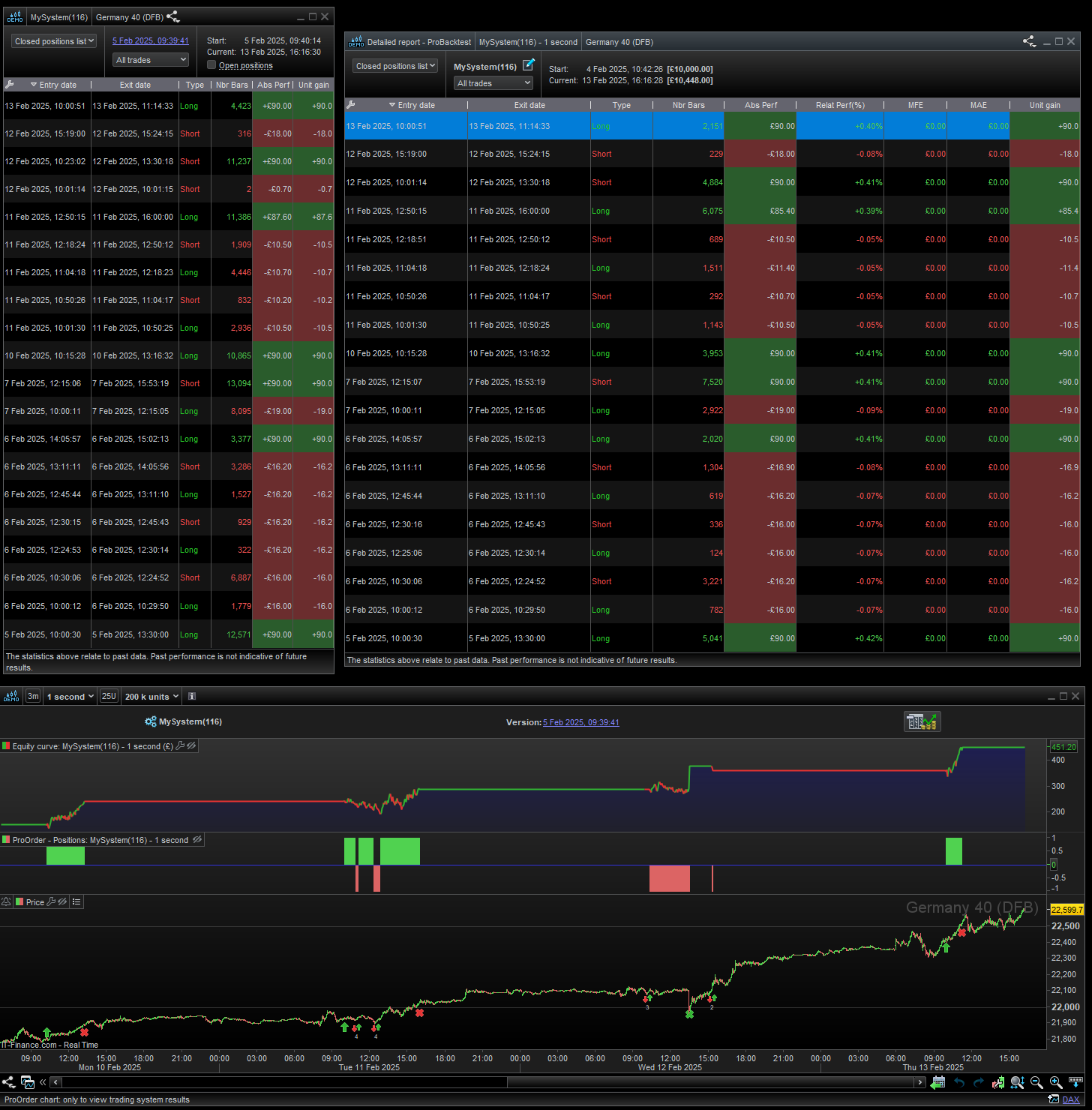
    Update!

    Another few days see an increase.

    Both, back-test and proOrder(demo) detailed reports(closed positions) tracked well until Feb 12th.

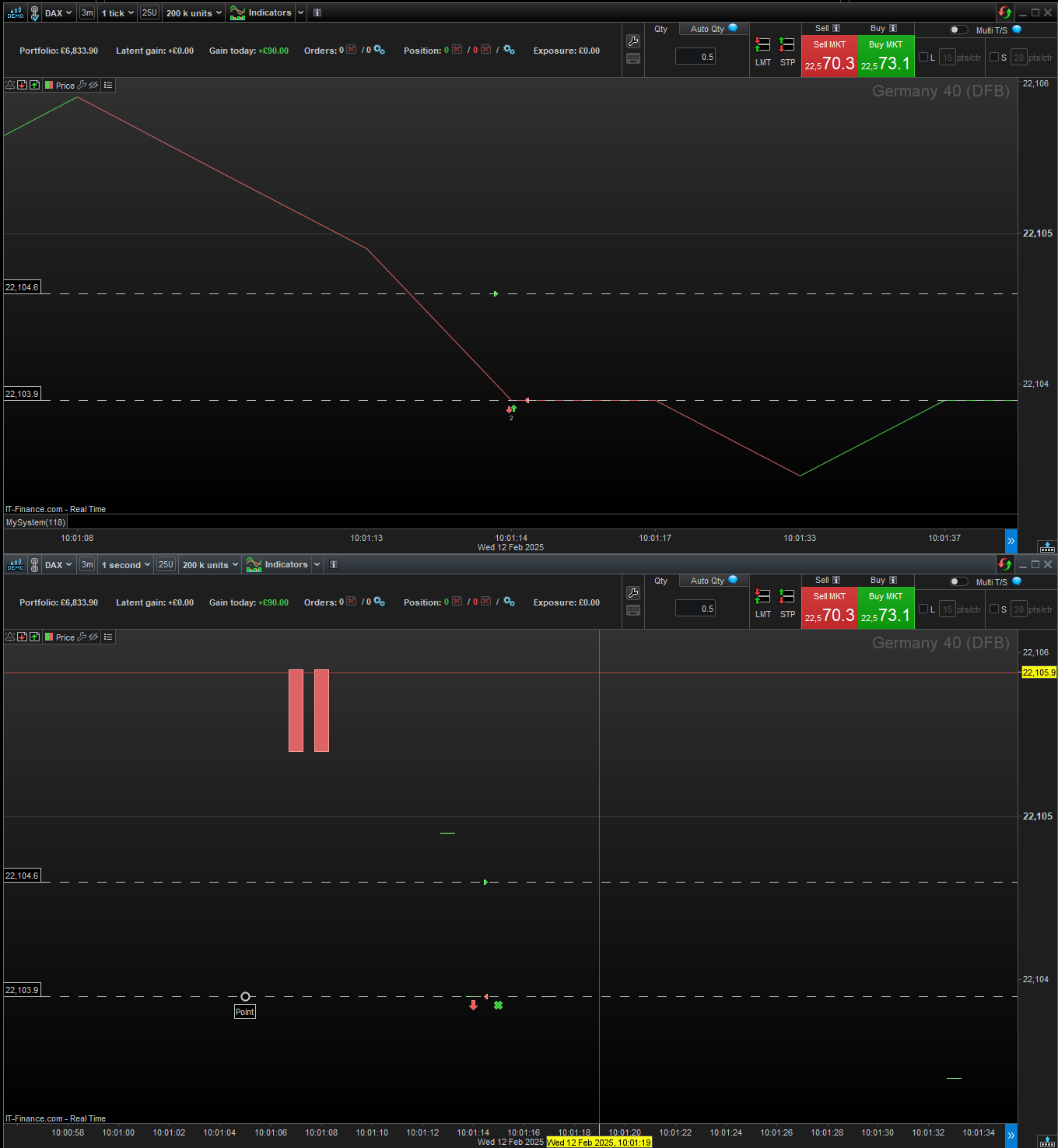
    On the 12th, the proOrder did a entry and then an exit, for reasons unknown as of yet.

    The back-test didn’t do this action.

    I’m still looking into it, my speculations is that its something to do with,

    . The 1 second timeframe, the small or none exist candles on the TF periods

    . The entry being triggered very close to entry threshold, within the spread value.

    . The spread may be involved, because the loss was halve the spread.

    . maybe the order execution, or something.

    What I do no is that back-test did something different t o proOrder(demo)

    Screenshot-2025-02-13-161638.png Screenshot-2025-02-13-161638.png Screenshot-2025-02-13-170042.png Screenshot-2025-02-13-170042.png
    #243806 quote
    GraHal
    Participant
    Master

    the loss was halve the spread.

    You probably know this, but IG spread is taken at half on entry and half on exit.

    I read your good efforts / works druby … I always learn something! 🙂

    druby thanked this post
Viewing 15 posts - 1 through 15 (of 19 total)
  • You must be logged in to reply to this topic.

About to give up… is PRT not the code for a simple breakout strategy?


ProOrder: Automated Strategies & Backtesting

New Reply
Author
author-avatar
Watanabix @watanabix Participant
Summary

This topic contains 18 replies,
has 9 voices, and was last updated by PeterSt

1 year ago.

Topic Details
Forum: ProOrder: Automated Strategies & Backtesting
Language: English
Started: 01/30/2025
Status: Active
Attachments: 8 files
Logo Logo
Loading...