About the missing PRT Code button

Viewing 2 posts - 1 through 2 (of 2 total)

  • Author
    Posts
  • #187581 quote
    PeterSt
    Participant
    Master

    Maybe this is for Roberto :

    I see that some times a user is told not to incorporate HTML in his/her post. I always wondered because no user does that (IMHO) while still it clearly often happens. But I just now noticed this :

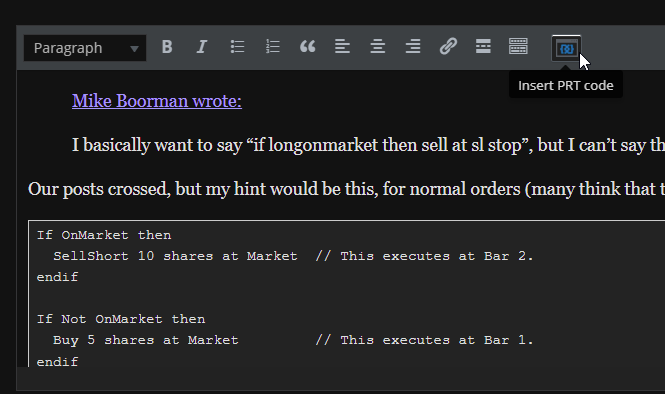
    When one with sometimes much effort made the blue button (see attachment) appear for nicely incorporating some PRT code (can be 20 times (^)F5), you can Edit the post right after, and then the chance exists that the button is again not there. And it is there where the HTML appears in the post (plus no PRT code as such) when the post is saved again.
    I just noticed it by sheer accident, while normally this will go unnoticed (your PRT code is still quite normally visible, only not in the box that should surround it).

    It now becomes quite cumbersome to re-edit the post, in order to let the button re-appear and have the code OK again, also knowing that we don’t have infinite Edit-time …

    image_2022-02-05_114822.png image_2022-02-05_114822.png
    #187585 quote
    robertogozzi
    Moderator
    Master

    I don’t know when that issue will be resolved.

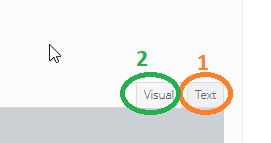
    As to me, I experienced that hitting F5 while you are in text mode (tag 1 in my pic), then switching to Visual mode (tag 2), is the fastest way to have the PRT button back. If I press F5 multiple times in Visual mode it may take several attempts to make it work.

    GraHal thanked this post
    x.jpg x.jpg
Viewing 2 posts - 1 through 2 (of 2 total)
  • You must be logged in to reply to this topic.

About the missing PRT Code button


General Trading: Market Analysis & Manual Trading

New Reply
Author
author-avatar
PeterSt @peterst Participant
Summary

This topic contains 1 reply,
has 2 voices, and was last updated by robertogozzi
4 years ago.

Topic Details
Forum: General Trading: Market Analysis & Manual Trading
Language: English
Started: 02/05/2022
Status: Active
Attachments: 2 files
Logo Logo
Loading...